

Real World Migration Story from BizTalk 2006/2006R2 to BizTalk 2010
Writer:
Srikiran Tadikonda, Microsoft
Banupriya Thirumaran, Microsoft
Reviewed By:
Puneet Gupta, Microsoft
Shridhar Nadgaundi, Microsoft
Scott Zimmerman, Microsoft
Mandi Ohlinger, Microsoft
Contributors:
Gopinath P, Microsoft
Prethish Kumar Puthenparampil, Microsoft
Rachna Srivastava, Microsoft
Rajesh Ramamirtham, Microsoft
Sumant Kumar Pandey, Microsoft
Sneha Aswani, Microsoft
Published: January 2013
Applies to: BizTalk Server
Summary: The BizTalk Server infrastructure used by Microsoft IT (MSIT) included BizTalk Server 2006 R2 and BizTalk Server 2006 environments. Until recently, the platforms that hosted these applications were not Disaster Recovery enabled. Since BizTalk Server 2006 doesn’t support the Applicability Statement 2 (AS2) protocol, AS2 transactions are sent to BizTalk Server 2006 R2. Then, the transactions are routed back to BizTalk Server 2006 for further processing. As a result, there are many cross-server dependencies. With the transactions passed through multiple BizTalk servers, the architecture of these applications was complex. The integration team wanted to remove these cross-server dependencies and simplify the application architecture.
To simplify the architecture, the BizTalk Server 2006 R2/2006 environments are migrated to BizTalk Server 2010. The objectives of the migration are:
-
Enable Disaster Recovery for business critical applications.
-
Reduce the number of servers required to deploy the applications and reduce the support costs for the servers.
-
Minimize the number of pipelines deployed by leveraging the Pipeline Consolidation Framework of BizTalk Server 2010.
-
Enable MSIT to support a broader range of internal applications.
-
Stay current with the technologies: Windows Server 2008 R2, SQL Server 2008 R2, Visual Studio 2010, and the .NET Framework 4.
The migration to BizTalk Server 2010 is a great success, including the following results:
-
Reduced the physical servers for 32 applications from 51 servers to 22 servers
-
Uptime is greater than 99.9% and about 400,000 messages are processed per week
-
Utilize the benefits of Hyper-V
-
Zero major issues post-production
This white paper discusses the steps taken to migrate to BizTalk Server 2010.
Copyright
This document is provided “as-is”. Information and views expressed in this document, including URL and other Internet Web site references, may change without notice. You bear the risk of using it.
Some examples depicted herein are provided for illustration only and are fictitious. No real association or connection is intended or should be inferred.
This document does not provide you with any legal rights to any intellectual property in any Microsoft product. You may copy and use this document for your internal, reference purposes.
© 2013 Microsoft. All rights reserved.
Contents
Introduction to BizTalk Server 2010 5
New Features of BizTalk Server 2010 5
Easier Integration of Enterprise Applications 5
Platform Support for Latest Microsoft Technologies 6
Simplify Solution Manageability for IT Pros 6
Enhanced Enterprise Interoperability 7
Deprecated Features of BizTalk Server 2010 7
Common Reasons for Migrating to BizTalk Server 2010 7
Microsoft IT (MSIT) BizTalk 2010 Migration Story 8
Architecture – Before and After Migration 9
New Features used in Migration 10
Challenges faced in Migration 14
Connect Bug: AS2 encryption and signing issue details 14
Host instance and hosts going down intermittently 14
BizTalk 2010 is stopping when input file is more than 5 MB 15
Volume/ Throughput after migration 16
Weekly Volumes on BizTalk Servers 16
Patches applied to fix issues in BizTalk 2010 17
Introduction
This white paper describes the following:
- Motivations for moving to BizTalk Server 2010
- The process that Microsoft IT went through to migrate 32 mission-critical applications from BizTalk 2006/2006 R2 to BizTalk 2010
- Suggestions for smooth administration of BizTalk Server 2010.
The new BizTalk installation went into production in phases from February 2011 to November 2011. Since then, uptime is greater than 99.9% while processing about 400,000 messages per week. This migration project allowed Microsoft IT to reduce the physical servers for the 32 applications from 51 to 22 servers, which includes eight 4-proc servers running Hyper-V to host BizTalk Server 2010. There have been zero major issues during post-production support. In many respects, the project has been a great success.
Introduction to BizTalk Server 2010
In most organizations today, there is a backlog of requirements to integrate different IT systems. Yet connecting software means more than just exchanging bytes. As organizations continue to move toward a service-oriented world, the real goal—creating effective business processes that unite disparate systems into a coherent whole—is now within reach. Microsoft BizTalk Server 2010 supports this goal.
Microsoft BizTalk Server is an integration server and connectivity solution. It helps organizations meet the challenge of integrating diverse systems. Including over 25 multiplatform adapters and a robust messaging infrastructure, BizTalk Server provides connectivity between core systems inside and outside of your organization. In addition to integration functionality, BizTalk also provides strong durable messaging, a rules engine, EDI connectivity, Enterprise Service Bus, Business Activity Monitoring (BAM), RFID capabilities, industry-standard SWIFT and HL7 support, and IBM Host/Mainframe connectivity.
New Features of BizTalk Server 2010
BizTalk Server 2010 introduces enhancements and new features in four main areas.
Easier Integration of Enterprise Applications
BizTalk 2010 accelerates time to solution with better and more accessible tools:
-
BizTalk Server 2010 includes easy to use tools that integrate Line-of-Business applications with Windows Server AppFabric Workflows. This includes Workflow activities that provide access to the BizTalk Transformation Engine and Mapper, and the BizTalk Line-of-Business adapters.
-
The BizTalk 2010 Mapper has been updated with a new user interface that improves development of large transformations and provides new search and predictive matching functionality. The new mapper also improves productivity by adding cut, copy, paste, move, and undo functions and stronger support for documenting maps and readability.
-
BizTalk Services are now accessible via SharePoint 2010 Business Connectivity Services.
-
BizTalk RFID includes new event handlers and event delivery capabilities. The new event handlers enable removal of duplicate events and filters based on Electronic Product Codes (EPC) and visibility requirements. The new delivery capabilities send events directly to .NET applications, BizTalk Server, and EPC Information Services (EPCIS).
-
Easier access to IBM applications and data sources. BizTalk 2010 Adapter for Host Systems offers efficient development tools and native runtime protocol engines to connect BizTalk 2010 to existing line-of-business programs and data on IBM mainframe systems.
-
Excellent support for industry-standard web services. BizTalk 2010 SOAP adapter enables sending and receiving messages by using SOAP over HTTP, thus enabling it to interact with the universe of web services. BizTalk 2010 also includes seven adapters and easy-to-use “wizards” that enable communicate to and from BizTalk Server and Web services-based applications via the Windows Communication Foundation (WCF).
Platform Support
for Latest Microsoft Technologies
BizTalk Server 2010 supports the Microsoft platform technologies, including Windows Server 2008 R2, SQL Server 2008 R2, Visual Studio 2010, and the .NET Framework 4.
- BizTalk Server 2010 support for Windows Server 2008 R2 offers modular, minimal installation, improved network performance and control. It also includes improved high availability features, enhanced administration, and management with Server Manager, Windows PowerShell command-line, and enhanced virtualization with Hyper-V. By utilizing Windows Server 2008 R2 clustering, BizTalk Server can be deployed in multisite cluster scenarios, where cluster nodes can reside on separate IP subnets and avoid complicated VLANs.
- BizTalk Server 2010 takes advantage of the virtualization improvements included as part of Windows Server 2008 R2 Hyper-V. These improvements lead to reduced costs through lower hardware, energy, and management overhead; plus the creation of a more dynamic IT infrastructure.
- BizTalk Server 2010 support for SQL Server 2008 and SQL Server 2008 R2 offers better manageability and scalability, an optimized virtual SQL Server implementation and improved performance, especially in a 64-bit.
- Support for Visual Studio 2010 and NET Framework (v4) introduces a number of improvements to the underlying Visual Studio-based BizTalk project system. Improvements include debugging support for artifacts and BizTalk maps (XSLT), enhanced BizTalk artifact property pages integrated into Project Designer tabs, the Visual Studio Project Update Wizard, and support for release and debug builds.
Simplify Solution Manageability for IT Pros
With BizTalk Server 2010 it’s now much easier to get things done faster.
- A new settings dashboard consolidates all settings into a single place, providing granular settings at the group, host, or host instance level. The Settings Dashboard supports automated settings deployment with scriptable export/import operations.
- The new System Center Operation Manager Pack includes a new model with separate application and deployment views, new alerts and diagnostics, and improved multimachine monitoring and cluster awareness.
- Enhancements to the setup and upgrade include a new Smart Setup which scans and installs BizTalk upgrades automatically, upgrading from BizTalk Server 2006 R2 and BizTalk Server 2009.
Enhanced Enterprise Interoperability
BizTalk Server 2010 has better options for connecting with business partners and applications.
- Enhanced Trading Partner Management provides easy on-boarding and lifecycle management of trading partners. A new partner management model reflects typical B2B relationships and is easier to manage large-scale TPM deployments. An improved user interface includes agreement templates and business profiles for rapid configuration and a new TPM operator role which provides access to users other than administrators.
- New and enhanced adapters provide higher levels of security, better performance, and support for the latest releases of line-of-business applications.
Deprecated Features of BizTalk Server 2010
The following features and tools are available in previous BizTalk versions and are replaced with new features in BizTalk Server 2010.
- BizTalk Web Services Publishing Wizard: This wizard is replaced with the new BizTalk WCF Publishing Wizard, which provides broader and more flexible support to publish web services from BizTalk.
- BizTalk Adapter Pack 2010 version (BAP 2010): The SAP adapter, Oracle adapter, SQL Server adapter and Siebel adapter in BAP 2010, which comes with BizTalk 2010 replaces the corresponding adapters in BAP 1.0, which comes with BizTalk 2006/2006 R2.
- Add Web Reference: The Consume WCF Service wizard is used to consume web services from BizTalk.
- EDI Pipeline and Context Properties: The new Trading Partner Management feature in BizTalk Server 2010 provides the same capabilities as the EDI Pipeline and Context Properties and replaces these features of older BizTalk Server Versions.
- Web Services Enhancements Adapter: This adapter is replaced with the WCF Adapter using a custom transport.
Common Reasons for Migrating to BizTalk Server 2010
- Stay Current: Being able to use newer communication protocols makes it easy to stay current and take advantage of new software features and technologies, such as improved encryption.
- Support: BizTalk Server 2006/R2, Visual Studio 2005, and SQL Server 2005 are no longer covered by Microsoft’s Mainstream Support Policy. To keep active with support for mission-critical IT assets, it is essential to upgrade to the latest versions.
- Virtualization: BizTalk 2010 takes advantage of the latest virtualization improvements of Windows Server 2008 R2 Hyper-V. The improvements can lead to reduced costs through lower hardware, energy, and management overhead and in the creation of a more dynamic IT infrastructure.
- Clustering: By using Windows Server 2008 R2 clustering, BizTalk Server can now be deployed in multisite cluster scenarios, where cluster nodes can reside on separate IP subnets and avoid complicated VLANs.
Microsoft IT (MSIT) BizTalk 2010 Migration Story
Problem Statement
The Microsoft Board of Directors mandates that Microsoft’s internal business critical applications, like Volume licensing and Order Processing, must have Business Continuity/Disaster Recovery (BC/DR). Until recently, the platforms hosting these applications (that is BizTalk 2006/2006 R2) were not DR enabled. Since BizTalk Server 2006 doesn’t support the AS2 (Applicability Statement 2) protocol, AS2 transactions went to BizTalk Server 2006 R2. Then, the transactions were routed back to 2006 for further processing. This led to many cross-server dependencies. With the transactions being passed through multiple BizTalk servers, the architecture of these applications was complex. The integration team wanted to remove these cross-server dependencies and simplify the application architecture.
Objectives
The objectives of this migration were:
- To enable Disaster Recovery for business critical applications.
- To reduce the number of servers required to deploy the applications and to reduce the support costs for them.
- To minimize the number of pipelines deployed (by leveraging the Pipeline Consolidation Framework of BizTalk 2010).
- To enable MSIT to support a broader range of internal applications.
- To stay current with the technologies: Windows Server 2008 R2, SQL Server 2008 R2, Visual Studio 2010, and the .NET Framework 4.
Migration Process
Development Strategy
The migration process started with estimating the number of maps for the applications, frequency of transactions per LOB (Line of Business), size of the messages and so on; and then setting these values as the production benchmark. Based on the estimation, and the criticality of the applications and the business needs, the integration team divided the entire migration process into four phases.
In each phase, a set of applications were migrated from BizTalk 2006/2006R2 to BizTalk 2010. Once the applications were determined for each phase, the old BizTalk solutions were rebuilt using Visual Studio 2010. BizTalk solutions that contained legacy adapters like SAP and SQL are replaced with WCF-Custom adapters in BizTalk 2010. Due to the growing number of pipeline and pipeline components, an internal framework called Pipeline Consolidation Framework (PCF) was developed. The framework offers flexibility for pipeline configuration, minimizes the number of pipelines and pipeline components, centralizes the storage in the .NET global assembly cache (GAC) and makes the pipelines reusable with more shared functionality. Refer to this (http://blogs.msdn.com/b/srikiran/archive/2012/12/22/pipeline-consolidation-framework-pcf-biztalk-2010.aspx) blog for more information on PCF. Changes to the existing solutions are done in configuring adapters, pipelines, and party settings. In other artifacts like maps, schemas and orchestrations no changes were required.
The final solutions were built and deployed in System Integration Test (SIT), User Acceptance Test (UAT), and Production environments. This entire migration process took about 15 months for 32 applications. This migration process started with less critical applications like HR and Supply Chain applications, then moved to highly critical applications like Finance, and Order to Cash in later phases.
Architecture – Before and After Migration
Previously, there were two versions of BizTalk (BizTalk 2006, 2006R2) in which all applications were deployed (see the following diagram). This architecture was previously supported by 22 Production servers. This architecture led to many problems. See Figure1. For example, when one application was updated, it used to affect the other applications on the same server. Any patches applied to BizTalk 2006/2006R2 affected all the applications. To overcome these major problems, the integration team came up with the new, appropriate architecture. In the new architecture, three BizTalk 2010 LOB Servers are maintained. The applications which are high-critical are deployed on first server, medium-critical on second server and low-critical on third server. When changes are made to low-critical applications, it does not impact the high-, or medium-critical applications on the other BizTalk servers and vice versa. The maintenance of the applications is greatly simplified. The alerts on the host instances are set according to the criticality of the applications, which helps the business owners handle any issues effectively. See Figure2 for each LOB server configuration.
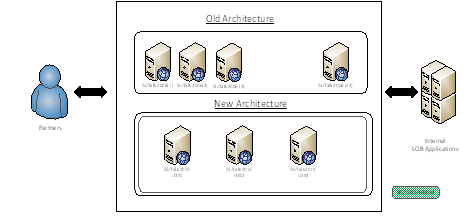
Figure 1. Old and New Architecture
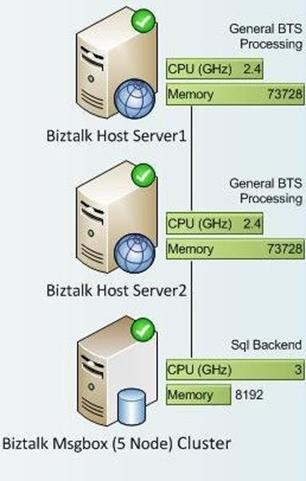
Figure 2. BizTalk 2010 LOB Server Configuration
New Features used in Migration
Several BizTalk 2010 new features are used to help development productivity and solve some of the challenges faced with BizTalk 2006 and BizTalk 2006 R2:
- Using the BizTalk 2006/2006R2 Trading Partner Management (TPM), the application could not use multiple AS2 transaction setups with AS2 (different AS2 Id with single MDN receive endpoint) for the same business partner. In BizTalk 2010, transaction setup is not only at the Party level but also at the Agreement level. So now, there is fine-grained control over Transaction Setup within the Agreement Level.
-
The BizTalk Mapper improvements reduced the time from 16 hours to develop complex maps to 4 hours. The key mapper improvements were:
- Organizing maps in multiple pages
- Ability to search in Schemas
- Predictive Matching
- Cut/Copy/Paste
- Organizing maps in multiple pages
- BAM User Experience Improvements – There were no indexed properties in earlier versions of BAM tracking. BTS2010 has indexed based sorting. The indexed-based sorting resolves a performance issue when returning the most recent tracking records.
-
SQL and SAP Adapters are migrated to WCF adapters to give a uniform experience when configuring the settings, and more importantly, improved performance.
Testing Strategy
Three months of test data was captured from the archives from the production systems. This data was later cleaned up and categorized for testing. The business partners for testing were selected based on criteria, including production volume, encoding, location, and so on. The testing scenarios cover new changes, regression of the as-is functionality, data comparison, and negative testing.
Test is organized into four main phases.
Isolated Environment Testing:
In isolated environment testing, the BizTalk 2010 solution is tested with five or six partners per transaction. Individual BizTalk artifacts were tested including adapters, maps, schemas, receive locations and send ports. And the output for each transaction in BizTalk 2010 is compared with the old environment.
Volume testing was also done and ensured that the outputs between old and new translators were same.
System Integration Testing:
For system integration testing, the BizTalk 2010 system is connected with internal tools and downstream systems. Partner testing is simulated here. For inbound transaction, HTTP posts to the gateway system are simulated. For outbound transactions, transactions are sent to local AS2 sites to verify the correctness of the output.
User Acceptance and Rollback Testing:
For user acceptance and roll-back testing, there is collaboration with the partners at the start of the release so their environments are available during UAT testing.
Test certificates are used and shared with partners during this testing. The UAT test scenarios include positive and negative scenarios agreed with the partners. Scenarios include missing mandatory fields in purchase orders sent by partners, or incorrect EDI qualifiers or delimiters in TPM Agreement settings. Another criteria for successful UAT testing and signoff is that there is a minimum of five files tested with each partner.
Rollback testing happened in UAT. Scenarios were created depending on where the rollback happens. For example, different rollback procedures in gateway applications compared to BizTalk application-level procedures are used. The system was rolled back to the old environment and tested with one file for each transaction to verify that files were flowing through the old environment as expected.
Once the rollback tests were successful, again the automated deployment to switch to the new environment was initiated. This is followed by smoke testing the new applications in BizTalk 2010. This level of rollback testing obviously takes time, but it’s the best way to ensure that the project team is ready to make the switch, without any disruption to the business.
Performance Testing:
For Performance Testing, benchmark statistics are collected from BizTalk 2006 and BizTalk 2006 R2 production systems, covering a period of more than six months. The metrics included number of messages per transaction, size of the messages, peak volume, and frequency of the messages.
Using LoadGen (a simulation tool to measure the impact of clients on server), configuration sets are created for different adapters such as File, HTTP, WCF, and so on. The appropriate performance counters for a BizTalk clustered environment and SQL were selected and started before running LoadGen scenarios. For this project, the PAL (Performance Analysis of Logs) tool is used to analyze the performance counter logs and thresholds. It also documents the system, server, and network issues and presents it in HTML format.
The extreme scalability tests include increasing the message count and the size of the messages to manifold. In some cases, an increase up to 60 times more than the actual volume and 40 times more than the actual size of messages in production are used. See the following Figure 3; which shows the different scenarios. The team was satisfied that the measured CPU rates demonstrated the ability to handle peak load far beyond the requirements. A breakpoint scenario is also tested to ensure the stability and availability of the server even under high CPU utilization. It was seen that the files continued to be processed, even in the breakpoint scenario where there was more than 95% CPU utilization across the servers.
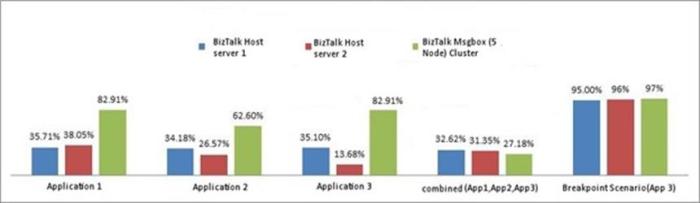
Figure 3. The CPU Utilization of BizTalk 2010 LOB1 during extreme load testing.
Preproduction Validation Testing:
The production deployment scripts, assemblies, and artifacts were validated and smoke tested before the Go-Live event. As the environments were new, there were network and firewall issues when connecting to external customer URLs and internal business systems such as SAP. So, the transactions are smoke tested with local end points and customer UAT URLs to ensure that the firewall issues or connectivity issues were overcome. After installing the BizTalk solutions and before the new receive ports and orchestrations were enabled, Build Validation Tests (BVT) are performed in the production environment. The BVTs verify that all the necessary artifacts are present.
Post Production Support:
Using System Center Operations Manager (SCOM) 2010, we monitored the following events:
- Receive Location and Send port availability
- BizTalk to BizTalk server services
- Suspending Q monitoring
- DB availability
- Any disconnection between Database and processing nodes
Monitoring was automated. Alerts are sent for failed messages and SLAs were created based on the criticality of the applications. The 24/7 support team from Operations and Engineering ensures that any critical issue is resolved based on the SLA.
The post production support for applications is extended for a month from the date of Go-Live. Any suspended messages in BizTalk or any issues raised by customers are attended immediately with the 24/7 support model. There have been no major issues during the post-production support period.
Benefits of Migration
The migration of several applications from BizTalk 2006/2006R2 to BizTalk 2010 achieved many significant benefits for Microsoft.
- The Integration Team successfully deployed 32 unique applications that have 150+ project artifacts (maps) and 300+ partners to production with zero severity-1 bugs or issues.
- It resulted in the retirement of 51 servers, 70% of them being physical servers. This is a large cost savings.
- There was no adverse impact on any business processes, and customers are using new applications without any issues.
- It resulted in a reduction of the pipelines from 108 to 18, which significantly increased the performance of the applications.
- After migration, the applications are able to take advantage of state-of-the-art virtualization technologies with Hyper-V, which leads to reduced costs through lower hardware, less management overhead and more flexible administration.
- The migration has the applications on a newer platform, including Windows Server 2008 R2, SQL Server 2008 R2, and .NET Framework 4.0 which helped to leverage the dynamic features of all these new technologies.
- BizTalk 2010 takes advantage of N-node Active-Active clustering of Windows Server 2008 which improves the availability and utilization of the resources for the applications. BizTalk 2006 R2 uses 2-Node Active-Passive clustering in Windows Server 2003.
Challenges faced in Migration
There were some challenges faced during the migration of applications to BizTalk 2010. The most important of them are listed here.
Connect Bug: AS2 encryption and signing issue details
Issue:
A signed and encrypted message from partner fails to be processed in BizTalk 2010 Beta, and was getting processed in BizTalk 2006 R2. A partner is able to send signed and encrypted message but the AS2 Decoder fails to decrypt the file and returns the following error
:“An error occurred when decrypting an AS2 message.
The sequence number of the suspended message is 1. “
Additional error generated in the event log whenever this error occurs is:
“The AS2 Decoder encountered an exception during processing. Details of the
message and exception are as follows: AS2-From :”<<Some Value>>” AS2-To:”<<
Some Value>>” MessageID:”<< Some Value>>” Message Type: “unknown”
Exception: “An error occurred when decrypting an AS2 message””
The more detailed exception is available here (http://connect.microsoft.com/BizTalk/feedback/details/564504/error-while-decrypting-as2-files-as2-over-file-scenario)
Fix:
This issue was caused by code issue in BizTalk 2010 beta version and fixed in the BizTalk 2010 RTM version.
Host instance and hosts going down intermittently
Issue:
When performing transactions on BizTalk 2010, some of the following errors occurred:
- Error code: 0xC0002A21, an error occurred while attempting to access the SSO database.
- A transport-level error has occurred when receiving results from the server. (Provider: TCP Provider, error: 0 – The semaphore timeout period has expired.) SQL Error code: 0x00000079
Fix:
To fix this problem, follow these steps:
- On the BizTalk servers, update MaxUserPort and TCPTimeWaitDelay registry keys per KB article 319502 (http://support.microsoft.com/?id=319502) and then reboot the servers.
- On the SQL backend servers of BizTalk, set the SynAttackProtect registry key to 0 per KB article 899599 (http://support.microsoft.com/kb/899599), Winsocklistenbacklog to 190 as per KB article 328476 (http://support.microsoft.com/?id=328476) , and reboot the servers.
BizTalk 2010 is stopping when input file is more than 5 MB
Issue:
When you install BizTalk 2010 in Windows 7, Windows 7 Service Pack 1 (SP1), Windows Server 2008 R2 or Windows Server 2008 R2 Service Pack 1 (SP1) and use AS2 decoder to decrypt an encrypted message larger than 5 MB, it fails with an “out of memory error while decrypting files larger than 5MB” exception.
Fix:
To resolve this issue, apply the hotfix described in Microsoft Knowledge Base (KB) article 2480994 (http://support.microsoft.com/kb/2480994)
Best Practices
The following are some of the best practices used to help the migration process go smoothly:
- Ensure consistent monitoring and tracking of messages is present across all applications.
- Avoid overloading individual hosts. Instead, use the appropriate number of BizTalk 2010 Servers and decide how many applications to deploy on each of them in the design phase.
- Validate your message volume per host and modify default settings as appropriate.
- Ensure that the BizTalk SQL Agents Jobs run successfully in SQL Server to release all the resources.
- Ensure that you have a backup and replication strategy in place.
- When possible, avoid large schemas with mostly optional fields.
- Ensure that appropriate permissions exist for SSO, SQL, and BizTalk.
- Modify default retries and timeouts as appropriate.
The optimizations performed by the Integration team to improve the performance of applications in the migration process include:
- Utilized the SQL Server Backup Compression feature in BizTalk Server which eventually reduced the size of BizTalk backups and the time consumed for backing up the Database.
- In BizTalk Server 2010 Management Pack for System Center 2010, set the discovery interval to lower levels which fixed the performance issues related to resource utilization in previous BizTalk versions.
- To achieve higher performance, the Max receive interval is tuned at the host Level in BizTalk 2010. Performance was further improved by tuning the Max polling interval and Orchestration polling interval. Refer to this (http://blogs.msdn.com/b/prethishkumar/archive/2012/02/04/high-performing-biztalk-server-2009-biztalk-server-2010-server-setup.aspx) blog for more information on improving performance.
- Upgraded the hardware (for example, increasing the RAM and disk space) which reduced disk I/O Latency.
Appendix
Volume/ Throughput after migration
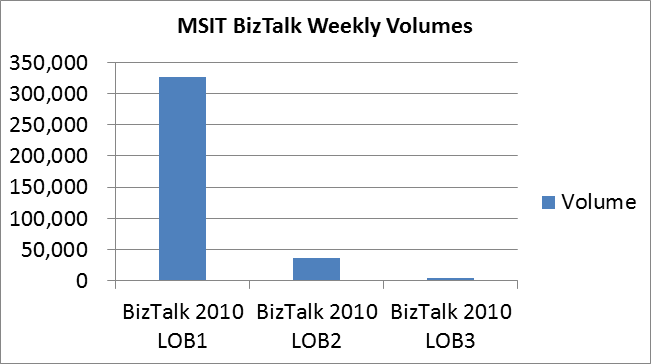
The following table and graph show the typical weekly number of messages that flow through the new BizTalk Servers.
Weekly Volumes on BizTalk Servers
|
BizTalk Server |
Weekly Volume |
|
BizTalk 2010 LOB1 |
326,534 |
|
BizTalk 2010 LOB2 |
36,467 |
|
BizTalk 2010 LOB3 |
4,062 |
Patches applied to fix issues in BizTalk 2010
Certain patches that are applied to BizTalk 2010 to fix issues based on customer feedback received by the Microsoft BizTalk team. In the following table, some of the patches that helped the integration team in migrating the applications from BizTalk 2006/ 2006R2 to BizTalk 2010 are listed.
|
KB |
Description |
|
FIX: “Unable to sign outbound message” error after you upgrade to BizTalk Server 2006 R2 SP1 or to BizTalk Server 2010 (http://support.microsoft.com/kb/2570450) |
|
|
FIX: Host instance of BizTalk Server 2010 does not resume operation after the connection for a BizTalk Management database resumes (http://support.microsoft.com/kb/2587237) |
|
|
FIX: Performance decreases when a server that is running BizTalk Server processes a large batch of messages after you customize the settings of the “Large Message Threshold” option and of the “Large Message Fragment size” option (http://support.microsoft.com/kb/2563979) |
|
|
FIX: AS2 messages remain active after they are processed when the “Track Message Bodies – Request message after port processing” option is enabled on a send port in a BizTalk Server environment (http://support.microsoft.com/kb/2555003) |
|
|
XML Ex operation processes EDI messages in BizTalk Server 2010 if the separator is set to the less than sign (<) or to 0x3C (http://support.microsoft.com/kb/2580202) |
|
|
FIX: A hotfix that improves the performance of the tracking feature in BizTalk Server 2010 is available (http://support.microsoft.com/kb/2627804) |
|
|
FIX: “The formatter threw an exception while trying to deserialize the message” error when the WCF-SAP adapter in BizTalk Adapter Pack executes an RFC or BAPI to an SAP system (http://support.microsoft.com/kb/2563231) |
|
|
FIX: WCF-SAP adapter may incorrectly keep connections open when the adapter sends some RFC requests (http://support.microsoft.com/kb/2552332) |
|
|
A hotfix is available for the WCF-based SAP adapter to let you disable the behavior that trims leading zeros of NUMC values in BizTalk Adapter Pack (http://support.microsoft.com/kb/2539412) |
|
|
FIX: BizTalk Server stops receiving IDOCs from a WCF-based SAP adapter in BizTalk Adapter Pack (http://support.microsoft.com/kb/2539769) |
|
|
FIX: Remote function calls do not work after the WCF-based SAP adapter receives the RFC_FAILURE error code in BizTalk Adapter Pack (http://support.microsoft.com/kb/2556304) |
|
|
FIX: “System.InvalidOperationException: Category does not exist” error if some registry keys for the WCF-based SAP adapter are corrupted in BizTalk Adapter Pack (http://support.microsoft.com/kb/2554806) |
|
|
FIX: Error occurs or NULL values incorrectly inserted by the WCF-based SQL adapter in BizTalk Adapter Pack 2010 if an input message contains empty elements (http://support.microsoft.com/kb/2598894) |
|
|
WCF-SQL Adapter does not return useful errors (http://support.microsoft.com/kb/2478956) |
|
|
WCF-SQL adapter sometimes locks sql spid/table after PDAS stopping all operations against database (http://support.microsoft.com/kb/2481676) |
|
|
Poll Statement is executed even if PolledDataAvailableStatement returns 0 (http://support.microsoft.com/kb/2522459) |
|
|
BAP SAP Keep Context for WCF-SAP (http://support.microsoft.com/kb/2530219) |
|
|
[Port from BAP 2010 CU1 to BAP 2.0 CU2] New WCF based SAP Adapter does not sort the string correctly in the String scenario with multiple grouped IDocs (Collated String option fix) (http://support.microsoft.com/kb/2505757) |
|
|
A BizTalk Server Host instance fails, and a “General Network” error is written to the Application log when the BizTalk Server-based server processes a high volume of documents (http://support.microsoft.com/kb/899599) |
|
|
TCP settings that can impact BizTalk Server (http://support.microsoft.com/kb/970406) |
Conclusion
BizTalk 2010 is implemented by many organizations worldwide today for their mission-critical integration. BizTalk 2010 is for high volume, high availability, and high scalability which are required for business process solutions. Migrating to BizTalk 2010 from BizTalk 2006, BizTalk 2006 R2 gives many benefits to the organization and to the customers.
Acknowledgements
Many thanks for the technical information and input provided by Gopinath P, Prethish Kumar Puthenparampil, Rachna Srivastava, Rajesh Ramamirtham, Sumant Kumar Pandey and Sneha Aswani. We would like to acknowledge the leadership and support provided by Puneet Gupta and Shridhar Nadgaundi. A special thanks to Scott Zimmerman and Mandi Ohlinger for the technical review and valuable insights on this white paper.
For more information:
http://www.microsoft.com/sqlserver/: SQL Server Web site
http://technet.microsoft.com/en-us/sqlserver/: SQL Server TechCenter
http://msdn.microsoft.com/en-us/sqlserver/: SQL Server DevCenter
Did this paper help you? Please give us your feedback. Tell us on a scale of 1 (poor) to 5 (excellent), how would you rate this paper and why have you given it this rating? For example:
- Are you rating it high due to having good examples, excellent screen shots, clear writing, or another reason?
- Are you rating it low due to poor examples, fuzzy screen shots, or unclear writing?
This feedback will help us improve the quality of white papers we release.
Discover more from Escape Business Solutions
Subscribe to get the latest posts sent to your email.