EBS Analysis: What is Microsoft Entra ID Protection? – Microsoft Entra ID Protection

User Safety: safe

EBS Consulting Advice

If your organization is evaluating What is Microsoft Entra ID Protection? – Microsoft Entra ID Protection, do not treat the technology decision in isolation. Start with the business outcome, current architecture, security and identity controls, operational constraints, migration dependencies and governance requirements. A practical assessment should identify the current-state gaps, prioritize the risks and define an implementation roadmap with measurable outcomes.

EBS can help assess the environment, develop the architecture and modernization roadmap, and translate the technical options into an actionable business plan. Relevant EBS services: Microsoft Solution Assessments Modern Workplace.

Have a technology challenge? Email info@escapebusinesssolutions.com to describe your situation. We welcome questions, consulting discussions and requests for a proposal.

EBS Analysis: Overview of the Office Customization Tool – Microsoft 365 Apps

# Mastering the Office Customization Tool: Enterprise-Grade Configuration for Large-Scale Microsoft 365 Deployments

## Executive Introduction

Deploying Microsoft 365 across an organization of hundreds or thousands of endpoints presents a unique set of challenges that extend far beyond simple software installation. Enterprises must balance the need for consistent, standardized office experiences with the flexibility to accommodate diverse organizational requirements—from regional language variations to specialized application needs such as Project or Visio. The Office Customization Tool emerges as a critical component in this landscape, providing the infrastructure necessary to create, manage, and deploy highly tailored Office environments at scale.

For enterprise IT leaders, the stakes are significant. Inconsistent Office deployments can lead to productivity gaps, security vulnerabilities, and compliance risks. Conversely, a well-configured environment ensures that every employee has access to the tools they need, operates within controlled parameters, and receives timely updates without disrupting business operations. The Office Customization Tool addresses these concerns by offering granular control over application selection, language support, update cadence, and licensing models. It transforms the deployment process from a manual, error-prone exercise into a repeatable, auditable workflow that aligns with enterprise governance standards.

This article provides a comprehensive overview of the Office Customization Tool, examining its architecture, implementation mechanics, and strategic value for organizations undertaking large-scale Office deployments. We will walk through the step-by-step configuration process, highlight common pitfalls that can derail deployments, and offer practical guidance for successful implementation. By understanding how this technology integrates with the broader Microsoft 365 deployment ecosystem, enterprise teams can position themselves to deliver consistent, secure, and efficient Office experiences across their entire workforce.

—

## Architecture and Core Capabilities

The Office Customization Tool occupies a pivotal position in the Microsoft 365 deployment lifecycle. Its primary function is to generate configuration files that serve as blueprints for Office installations across distributed environments. Rather than relying on generic deployment templates, organizations can craft bespoke configuration files that encode specific requirements for their unique context—whether that involves multi-language support for global offices, selective inclusion of premium applications like Project and Visio, or automated upgrade paths between 32-bit and 64-bit architectures.

At its core, the tool operates by translating human-defined preferences into machine-executable instructions. Users interact with a web interface within the Microsoft 365 Apps admin center, making choices about architecture, product scope, update channels, and application preferences. These choices are then serialized into XML-based configuration files that capture the complete deployment intent. The resulting files are stored in the cloud and can be referenced by downstream deployment mechanisms, most notably the Office Deployment Tool, enabling a decoupled approach where configuration and deployment remain separate yet coordinated processes.

The architectural design emphasizes modularity and extensibility. Each configuration file contains distinct sections corresponding to different aspects of the deployment—such as product selection, update strategy, language mapping, and licensing parameters. This separation allows administrators to modify individual dimensions without rewriting the entire configuration. Furthermore, the tool’s integration with the Office Deployment Tool means that once a configuration file is approved and exported, it becomes a reusable artifact throughout the organization’s deployment lifecycle.

A key architectural consideration is the distinction between the configuration file itself and the actual deployment execution. The configuration serves as the single source of truth, while the deployment mechanism handles the physical installation, verification, and post-deployment validation. This separation of concerns improves maintainability and enables audit trails that are essential for compliance purposes. Organizations can track exactly which configuration was applied to each endpoint, when it was deployed, and which parameters were modified during the rollout.

—

## How the Technology Works

The Office Customization Tool functions through a series of intuitive steps that guide administrators from initial planning to final deployment. The process begins with selecting the target architecture—either 32-bit or 64-bit—which fundamentally affects performance characteristics, memory usage, and compatibility with legacy systems. This decision is foundational because the chosen architecture dictates which subsequent configuration elements become relevant and which may be excluded entirely.

Once the architecture is established, users proceed to define the product scope. This involves selecting which Microsoft 365 apps will be included in the deployment. The tool recognizes both standard productivity suites and specialized applications, allowing organizations to tailor their environments to specific departmental needs. For instance, a legal department might prioritize Word, Excel, and Outlook, while a creative team might require additional capabilities from PowerPoint, OneNote, and Adobe Creative Cloud integrations.

The update channel selection represents another critical decision point. Update channels determine the frequency and mechanism by which clients receive feature enhancements and security patches. Best practice guidance recommends aligning update strategies with organizational change management cycles—for example, adopting a monthly CDN (Content Delivery Network) approach for continuous improvement while reserving periodic full upgrades for major version transitions. Selecting the wrong update channel can result in either stale environments lacking modern functionality or disruptive frequent updates that impact user productivity.

Version selection follows naturally after product and update decisions. While the latest version is generally recommended unless specific compatibility constraints exist, organizations must consider factors such as regulatory compliance requirements, data migration complexity, and the availability of support resources. Understanding the release history helps identify stable periods versus transitional windows that warrant careful planning.

Language selection introduces perhaps the most nuanced aspect of the configuration process. The tool offers the ability to specify exact language pairs alongside operating system language matching. However, this capability comes with a notable constraint: certain applications cannot operate with languages that are not natively supported by the underlying product. For example, attempting to install Project or Visio with languages outside of English (United Kingdom), French (Canada), or Spanish (Mexico) will cause installation failures. This limitation exists because these applications rely on localized components that are tightly coupled to specific language stacks. When encountering such conflicts, administrators must manually adjust the XML-generated configuration file to resolve the mismatch, ensuring that the deployment proceeds without interruption.

Installation methodology—the choice between cloud-based delivery and local network deployment—affects both the speed of rollout and the degree of user control. Cloud deployment leverages the Office 365 services backend to provision and deliver Office files directly to endpoints, simplifying administration but potentially introducing latency for large-scale deployments. Local deployment pulls packages from internal repositories, giving IT teams greater visibility into what is being installed and enabling offline scenarios in branch offices with limited connectivity.

After completing all configuration elements, the final step is exporting the configuration file. This action produces a ready-to-use artifact that can be consumed by the Office Deployment Tool or integrated with alternative software distribution solutions. The exported file preserves all user-defined parameters, creating a permanent record of the deployment intent that can be reviewed, compared against baseline configurations, or rolled back if needed.

—

## Implementation Considerations

Successful adoption of the Office Customization Tool requires careful attention to several implementation dimensions that can significantly influence the outcome of the deployment effort.

**Architecture Selection:** Choosing between 32-bit and 64-bit versions impacts performance, memory footprint, and compatibility with older hardware. While 64-bit versions offer enhanced capacity and future-proofing, some legacy applications may still require 32-bit compatibility. Organizations should conduct thorough inventory assessments before committing to an architecture path. Additionally, note that the Office Customization Tool enforces a single architecture per configuration file, meaning that mixed 32-bit and 64-bit deployments must be managed through separate configuration artifacts or through phased rollouts.

**Product Scope Management:** Defining the precise set of applications to include prevents bloat and reduces potential conflict between incompatible add-ins or extensions. The tool’s product selection interface allows granular control, but administrators should also consider the total cost of ownership across all selected applications. Some organizations benefit from consolidating similar functionality into unified platforms rather than maintaining parallel implementations.

**Update Channel Strategy:** The update channel determines the cadence of feature delivery and security patching. A CDN-and-automatic-check approach suits organizations with mature change management processes that can absorb regular updates. Conversely, organizations requiring longer stabilization periods may prefer scheduled full upgrades. Regardless of choice, it is prudent to establish communication plans with end users ahead of major update waves to minimize disruption.

**Language Compatibility:** As highlighted earlier, attempting to assign unsupported languages to certain applications will cause deployment failures. Before finalizing a configuration, administrators should cross-reference their intended language selections against the supported matrix for each application. The tool provides guidance on compatible language pairings, but manual verification remains essential. A common pattern is to align language selection with regional office structures—ensuring that employees in Germany receive German-language versions of Office while those in Japan receive Japanese versions.

**Application Preferences:** Beyond basic installation, the tool enables configuration of application-level behaviors such as VBA macro notification policies, default file location conventions, and preferred file format standards. These preferences help establish consistent workflows across the organization and reduce variability that could affect productivity or security posture. For example, enforcing a policy that all documents are saved to a central SharePoint library rather than local folders promotes collaboration and simplifies backup procedures.

**Cloud-Based File Management:** Storing configuration files in the Microsoft 365 Admin Center rather than on local machines enhances accessibility, version control, and auditability. Administrators can share baseline configurations across departments, track modifications through revision history, and ensure that all endpoints reference the same authoritative definition. This approach also facilitates disaster recovery—if the master configuration file is lost, it can be restored from the cloud.

—

## Security and Governance

From a security and governance perspective, the Office Customization Tool offers both opportunities and responsibilities that must be addressed systematically. The tool generates configuration files containing two metadata attributes: the ID attribute, which identifies the deployment method, and the Host attribute, which specifies the deployment options selected. While these attributes do not contain personally identifiable information (PII), their transmission to Microsoft enables the company to gather anonymized telemetry that informs ongoing improvements to the platform. This feedback loop is valuable for product development but underscores the importance of understanding what data flows externally.

Licensing and activation represent another critical governance dimension. The tool accommodates three primary activation models: User-based, Shared Computer, and Device-based. User-based licensing ties licenses to individual accounts, which is ideal for organizations with centralized identity management. Shared Computer licensing distributes licenses across multiple concurrent sessions on a single machine, suitable for collaborative environments. Device-based licensing assigns licenses to specific endpoints, which is advantageous for mobile or BYOD scenarios. Volume-activated versions of Office require special handling, as they do not necessitate traditional KMS or MAK activation but instead rely on Microsoft’s volume licensing agreements. Misconfiguring these parameters can lead to unauthorized access or compliance violations.

Data residency and privacy considerations also factor into the deployment strategy. Since the Office Customization Tool interacts with Microsoft 365 services, organizations must ensure that their data processing agreements align with corporate policies regarding where data is stored and processed. For sensitive industries, this may involve evaluating whether cloud-based configuration generation satisfies regulatory requirements or whether on-premises alternatives would provide greater control.

Audit and compliance tracking are further considerations. The cloud-hosted configuration files create a documented trail of deployment decisions, which can be invaluable during audits or incident investigations. Organizations should implement governance frameworks that mandate approval workflows for configuration changes, enforce version controls, and maintain records of who made what modifications and when. Regular reviews of these records help identify drift from baseline configurations and ensure that the organization remains aligned with its stated objectives.

—

## Operational Implications

Implementing the Office Customization Tool carries operational implications that extend beyond the initial deployment phase. Once configuration files are created and exported, they become integral parts of the organization’s deployment infrastructure, influencing day-to-day management and ongoing optimization efforts.

**Configuration Maintenance:** Baseline configurations should be treated as living documents that evolve with organizational needs. As departments grow or shift priorities, administrators may need to modify language selections, add new applications, or adjust update schedules. The import/export workflow makes this iterative process straightforward—import an existing configuration file to retrieve current settings, then edit as needed before exporting the revised version. This flexibility supports continuous improvement while preserving institutional knowledge captured in prior configurations.

**Monitoring and Validation:** After deployment, organizations should establish monitoring processes to verify that configurations were applied correctly and that endpoints remain healthy. The Office Deployment Tool typically includes validation checks that confirm the presence of expected applications, proper licensing status, and adherence to defined preferences. Supplemental monitoring can detect anomalies such as unexpected language mismatches or missing applications that might indicate partial or failed deployments.

**Scalability Planning:** As organizations expand their Microsoft 365 footprint, the Office Customization Tool scales accordingly. New endpoints can be added to existing configuration families without requiring fundamental redesigns, provided the underlying architecture supports the expanded scope. However, growth also demands attention to resource consumption—each configuration file consumes storage space in the cloud and contributes to the overall management overhead. Capacity planning should account for these factors to avoid unexpected costs or performance degradation.

**Incident Response:** In the event of deployment-related incidents, having a well-documented configuration file streamlines troubleshooting. Administrators can quickly compare the deployed state against the intended configuration to identify discrepancies. This diagnostic capability is particularly valuable when addressing widespread issues such as missing applications or incorrect language installations.

—

## Common Pitfalls and Mitigation Strategies

Despite its robustness, the Office Customization Tool is not immune to misconfiguration. Several recurring pitfalls can derail deployments if left unaddressed.

**Unsupported Language Mismatches:** As previously noted, assigning languages that are not natively supported by an application will prevent installation. This is especially problematic with specialized applications like Project and Visio, which have strict language requirements tied to their underlying localization stack. The solution lies in proactive validation—cross-referencing planned language assignments against the supported matrices before finalizing configuration files. When conflicts arise, administrators must manually edit the generated XML to resolve the incompatibility, often involving removing unsupported language entries or adjusting application selections.

**Incorrect Update Channel Selection:** Choosing a suboptimal update channel can result in either insufficiently rapid feature delivery or excessive disruption to end users. A CDN-only approach may delay access to newer features until the next full cycle, while overly aggressive scheduling can overwhelm support resources. Organizations should align their update strategy with their change management maturity—starting with conservative approaches and gradually increasing frequency as stability improves.

**Activation Model Errors:** Misunderstanding the differences between user-based, shared computer, and device-based licensing can lead to compliance gaps or unnecessary costs. For instance, assuming device-based licensing covers all endpoints when actually sharing limits apply can result in overprovisioning. Conversely, failing to properly configure volume licensing for enterprise deployments may trigger unexpected charges. Careful documentation of activation models and regular reconciliation against billing statements mitigate these risks.

**Architectural Conflicts:** Mixing 32-bit and 64-bit configurations within a single deployment scenario is prohibited by the tool’s design, forcing organizations to plan phased rollouts or dual-track deployments. Failure to communicate these constraints to stakeholders can create confusion during implementation. Establishing clear project timelines and communicating the rationale behind architecture decisions helps prevent misunderstandings.

**Pre-Deployment Testing Oversight:** Rushing through testing can mask subtle issues that surface only after deployment. Comprehensive pre-deployment validation—including functional tests, performance benchmarks, and user acceptance testing—ensures that configurations meet expectations before endpoints go live. Automated testing pipelines can accelerate this process for large-scale deployments.

—

## Why This Matters to Enterprise IT

The strategic importance of the Office Customization Tool extends beyond mere convenience—it represents a foundational capability for enterprise digital transformation initiatives. Modern organizations increasingly treat Office as a platform rather than a collection of standalone applications, with seamless integration between productivity tools, collaboration spaces, and business intelligence services becoming table stakes. Without a robust configuration framework, organizations risk fragmented environments where inconsistent tooling undermines productivity, security, and user satisfaction.

From a business continuity perspective, a well-managed Office deployment minimizes downtime associated with outdated or incomplete installations. The tool’s emphasis on version control and baseline management ensures that every endpoint starts from a known good state, reducing the likelihood of configuration drift—a common source of operational instability. Moreover, the ability to define application preferences and enforcement rules supports organizational policies around data handling, collaboration norms, and compliance requirements.

Financially, the Office Customization Tool contributes to cost efficiency by enabling standardized deployments that reduce licensing waste and simplify maintenance. Instead of provisioning individual instances for each requirement, organizations can leverage bulk configuration and reuse of baseline templates. This economies of scale becomes particularly valuable as the number of endpoints grows, transforming Office from a variable cost into a predictable operational expense.

Finally, the tool positions enterprises to respond more effectively to evolving business needs. As remote work patterns shift and new applications gain traction, the configuration framework can be adapted to incorporate emerging technologies without starting from scratch. This agility is essential for organizations seeking to stay competitive in dynamic markets.

—

## EBS Consulting Perspective

From an enterprise consulting standpoint, the Office Customization Tool represents a strategic investment with measurable returns. For organizations undertaking large-scale Office deployments, the time and effort required to build and maintain configuration management processes can be substantial. Engaging EBS brings domain expertise in Microsoft 365 deployment orchestration, helping clients navigate the complexities of configuration creation, validation, and ongoing governance.

One of the primary value propositions is the reduction of deployment risk. Manual configuration processes are prone to human error, with language mismatches, incorrect update channel selections, and activation misconfigurations representing common failure modes. The Office Customization Tool automates much of this decision-making, enforcing best practices and providing built-in safeguards against common pitfalls. For consulting engagements, this translates to faster time-to-value, reduced support tickets related to deployment issues, and improved user adoption rates due to more reliable installations.

Another consulting insight is the importance of aligning configuration strategy with broader enterprise architecture goals. The Office Customization Tool does not exist in isolation—it interfaces with identity management, licensing programs, and change management frameworks. Effective implementation requires a holistic view that considers how Office deployment fits into the larger digital transformation roadmap. EBS professionals should facilitate cross-functional collaboration between IT, security, and business unit leaders to ensure that configuration decisions support organizational objectives rather than merely satisfying technical requirements.

Risk mitigation is also a critical consideration. The tool’s logging and audit capabilities provide visibility into deployment activities, which is essential for compliance with industry regulations such as GDPR, HIPAA, or SOX. Consultants should emphasize the establishment of formal governance processes around configuration approvals, change management, and periodic reviews. These processes transform the Office Customization Tool from a technical artifact into a strategic asset that supports enterprise-wide accountability.

Finally, the scalability of the Office Customization Tool aligns well with growing organizations. As client bases expand, the ability to manage configurations at scale becomes increasingly valuable. EBS can help clients design tiered deployment strategies that balance consistency with flexibility, ensuring that growth does not compromise operational quality.

—

## Practical Next Steps

For organizations ready to adopt the Office Customization Tool, the following sequence of actions provides a structured path forward:

1. **Conduct a Requirements Assessment:** Inventory the applications, languages, and update preferences needed for each department or region. Document any special requirements such as compliance mandates or legacy system integrations. This assessment forms the foundation for configuration design.

2. **Design Baseline Configurations:** Create initial configuration files that reflect the desired state for each deployment group. Start with broad categories (e.g., finance, marketing, engineering) and refine based on feedback. Leverage the cloud-based management capabilities to store and version these configurations.

3. **Validate and Test:** Before full deployment, test configurations in a staging environment that mirrors production. Verify that applications install correctly, languages match expectations, and update channels behave as intended. Conduct user acceptance testing to ensure the environment meets operational needs.

4. **Implement Phased Rollout:** Deploy configurations incrementally across pilot groups first, gathering lessons learned before expanding to wider audiences. This approach minimizes risk and allows for course correction based on real-world feedback.

5. **Establish Governance Processes:** Define roles and responsibilities for configuration management, including owners for each deployment family. Implement approval workflows for configuration changes and schedule regular reviews to address drift or emerging requirements.

6. **Monitor and Optimize:** After deployment, monitor key metrics such as deployment success rates, user satisfaction scores, and support ticket volumes. Use this data to refine configurations and improve the overall deployment process over time.

By following this structured approach, organizations can maximize the benefits of the Office Customization Tool while minimizing disruption and ensuring sustained alignment with enterprise objectives.

—

## Conclusion

The Office Customization Tool stands as a cornerstone of effective Microsoft 365 deployment strategy for enterprises managing hundreds or thousands of endpoints. Its ability to encapsulate complex configuration logic into manageable, version-controlled artifacts empowers IT teams to deliver consistent, secure, and scalable Office experiences across diverse environments. Through careful attention to architecture, product selection, update strategy, and language compatibility, organizations can overcome common pitfalls and realize the full potential of their Office investments.

For EBS clients navigating the complexities of large-scale Office deployments, leveraging this tool represents a strategic advantage. The combination of automation, governance, and flexibility it provides enables businesses to move beyond ad-hoc installations toward disciplined, sustainable deployment practices. Whether serving as a foundational component in a broader digital transformation initiative or as a standalone solution for specific organizational needs, the Office Customization Tool delivers tangible value in terms of operational efficiency, risk reduction, and user productivity.

Moving forward, organizations should engage experienced consultants to translate this technology into a tailored implementation plan that aligns with their specific requirements and business objectives. The journey from initial assessment to fully optimized deployment is complex, but with the right guidance, the Office Customization Tool becomes a powerful enabler of enterprise digital excellence.

EBS Consulting Advice

If your organization is evaluating Overview of the Office Customization Tool – Microsoft 365 Apps, do not treat the technology decision in isolation. Start with the business outcome, current architecture, security and identity controls, operational constraints, migration dependencies and governance requirements. A practical assessment should identify the current-state gaps, prioritize the risks and define an implementation roadmap with measurable outcomes.

EBS can help assess the environment, develop the architecture and modernization roadmap, and translate the technical options into an actionable business plan. Relevant EBS services: Escape Cloud Modern Workplace Microsoft Consulting.

Have a technology challenge? Email info@escapebusinesssolutions.com to describe your situation. We welcome questions, consulting discussions and requests for a proposal.

5 ways to dramatically speed up your cloud application teams

Working with applications teams and partners developing cloud native apps on Azure, you quickly learn developer time is valuable, enthusiasm & flow state is critically important.

Over the years, I’ve seen so many application team have to wait for an environment, wait for a access, a Service Now ticket, a support case, admin access to install tooling, productivity is dramatically effected by interruptions in flow state, projects can be 2x longer and of lower quality.

Equally, it’s important to have a designed, governed secure environment when using the public cloud, so your workload teams start right, and stay right!  There is excellent documentation on this in the Cloud Adoption Framework.  This Blog however, specifically looks at the needs of application teams developing cloud native solutions.

Application teams work best when they can select their preferred platform services, tooling, languages and libraries, and most importantly, reduce their dependencies on external requests & constraints that interrupt their workflow.  To this end, a priority for any Platform Team (the team providing the environment to application teams) should be to work towards a self-service model, removing themselves from the process wherever possible & constantly unblock friction points.

Where Platform teams should focus

​

You don’t need to have everything automated from day 1, nor have tooling for everything, but focusing in these 5 crucial elements will result in more impact for everyone in your organization, while avoiding unnecessary interruptions & and bottlenecks, something I have seen depressingly way to often.

1. Environment Provisioning
​

When a application team works on a new product, timely access to an environment is important when enthusiasm is high.  We should be targeting giving access to a fully operational environment within 30 minutes. This typically means vending a Resource Group with all the access they need to immediately start deploying their solution designs (more on this later). The resource group naming, tagging, the subscription sharing model and level of access can all be determined base on the environment requested.

A simple subscription sharing model can be designed to avoid too much subscription sprawl, based on department, or other organisational commonalities, but subscription separation should be enforced on workload type and connectivity (more on this below). You then end up with a subscription list that is meaningful and manageable, with resource groups that are named consistently. There are a number of good resources on naming recommendations

:smile: Subscriptions in Azure can support hundreds of developers, the subscriptions have granular role-based controls, mature cost tracking services, and you can track Subscription Limits & usage very effectively. We recently had 300 developers across 35 resource groups, deploying resources across the globe, all working happily in a single sandbox subscription.

During the vending process, it will be important to capture:

  • Workload Type (e.g. Production, Non-production, Sandbox):  This determines the policies that are applied to control what can be deployed & levels of access, also, keeps clear separation between these environments.  Production and Non-Product/Sandbox workload types should be on separate subscriptions, however, a single Sandbox subscription can support may teams resource groups.
  • Required Networking (e.g. Connected or Non-connected): This determines if private IP connectivity is required by the workload, or if ingress/egress to the workload needs to be privately routed.

The first, simplest, most unconstrained environment you should offer is a Non-connected Sandbox, this allows the application teams the most flexibility to experiment with multiple services, full access to the environment in the portal to allow the team to rapidly get ideas to a POC stage. Here typically, there are no or little restrictions on access or resources that can be provisioned. The most constrained, and complex environment will be a Connected Production subscription, this will have policies to ensure production guardrails are followed, and networking to allow private IP connectivity, and ingress/egress routing controls (if needed).

A typical application would require the team to request 3 environments, starting with dev, then test (both non-prod and can share a subscription), and a production environment that would be created with a new subscription, each environment progressively getting more restrictive.

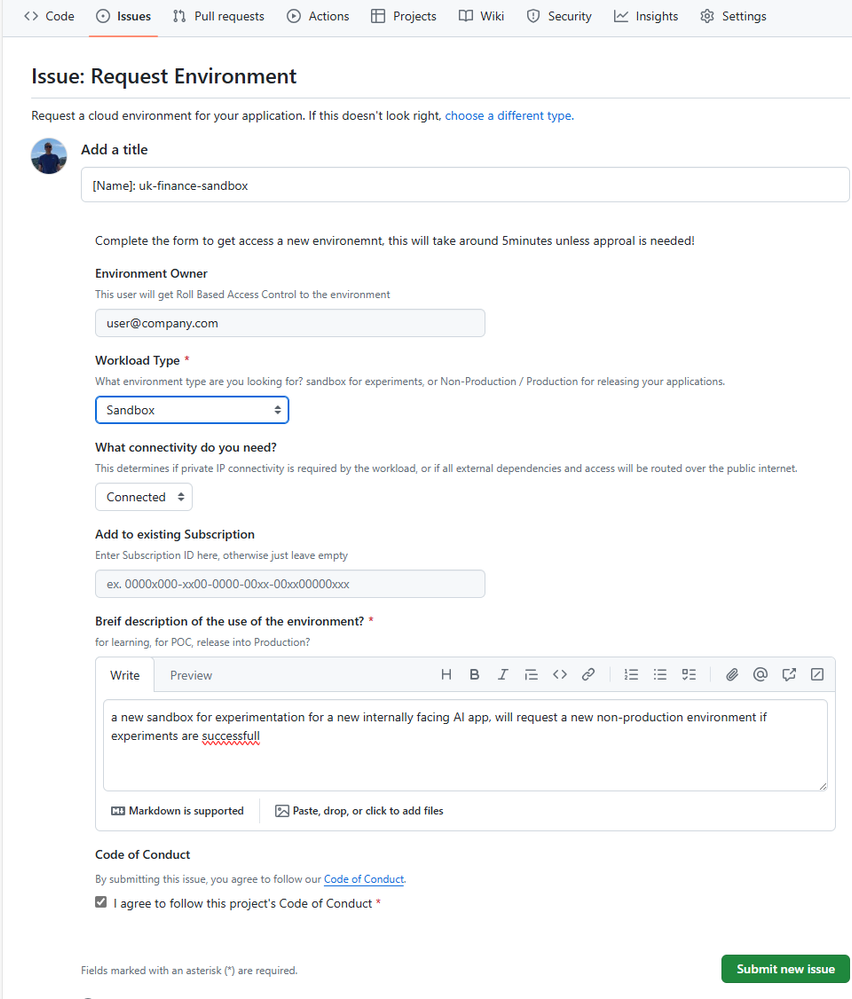
:cool: The new Subscription Vending Bicep Verified Module is a excellent starting point to start vending these environments, from the simplest to the most complex with a module & parameter driven approach. You can collect the required information from the application team, then call the vending module directly from the az cli to start with, or create a pipeline/action in your favourite devops tool, maybe trigger a GitHub workflow from a Issue template:

example-issue-941ac36cd4b8404402f53ae44b79eb42.png

Hot Take: I’d recommend Bicep over Terraform when automating environment provisioning or application deployment on Azure, even if you are multi-cloud, It’s a simple, powerful, performant 1st class experience, without needing the complexities of a state file, as the state is whatever is deployed in azure, and templates can be re-run and only the changes will be deployed.

2. Environment Permissions
​

So you have vended an environment, the app team tried to provision their first internally authenticated webapp that calls a gpt-4o model using identity based access, deployed using github actions… error error error 4 tickets in 5 minutes, now the team are googling for workarounds, not delivering their projects, wasting valuable time, and enthusiasm. What’s the problem?

When building cloud native apps, managed identity and role based access is a crucial part of the application architecture, and 100% the best and most secure way of creating cloud native applications.

Platform teams must provide the appropriate level of access to the application team to allow these solution architectures. I’ve seen this being the single thing that wastes tens/hundreds of hours of skilled peoples time

Recommendation #1

When assigning roles to the application team on non-production/sandbox resource groups, Contributor is not enough to create identity-based solution architectures! Consider providing the team Contributor & Role Based Access Control Administrator, this role can be scoped to the resource group, and can be further limited to only assign selected roles to selected principals.

Recommendation #2

Ensure resource provider registrations have been done as part of the vending process, and not blocking the application teams from creating their resources.

Recommendation #3

Many internal applications will need end-users to authenticate with your corporate EntraID tenant, the directory that can protect all your Microsoft and 3rd party apps.  These apps need application registrations, if your organization blocks the self-service creation of new application registrations, and/or has restrictive consent granting. Ensure the team know the process for requesting a new application registration. Also, unless you want a new Service Now ticket every time the app team what to add a new callback uri, consider adding the application team as an owner of the app registration.

Recommendation #4

For Production deployments, look to remove any reliance on any individuals employee identities by using automated workflows that use Federated Identity Credential.  Similar to Managed Identity, this will avoid having to vault/rotate client secrets in your devops platform (github/ADO), see Use Github Actions to connect to Azure.

:cool: Federated Identity Credential can now be provisioned directly in your vending process, using the new Bicep templates for Microsoft Graph.  This will help the workload teams start right and stay right!

3. A little less documentation & a little more sample repos
​

Environment provisioning provides the application teams a blank slate at this stage, it doesn’t make any assumptions about the application teams solution architecture, this will allow the application team to select the optimal services for their use-cases, that could be a microservices app or a integration workflow, or a simple static webapp.

Selecting the appropriate service for the use-case will make the best use of the public cloud, optimize your public cloud costs while minimizing the required operations to support your application. Equally, it’s doesn’t assume the structure or number of repo’s that the application team will use.

However, we should be providing the application teams more support than just a blank canvas, we should be looking to share successful architecture patterns, example applications that have already been approved for use within your organization.

Rather than documents, start to foster a innersource repo of samples, that can be simply provisioned into the vended environment, to show what a static webapp, or a simple microservices app, or an event driven process could look like. This can provide new teams a starting point with built-in approved patterns to accelerated their journey to production. These examples, with good READMEs can also inform the teams how to structure there application team repos with the infrastructure-as-code, and automation deployment workflows.

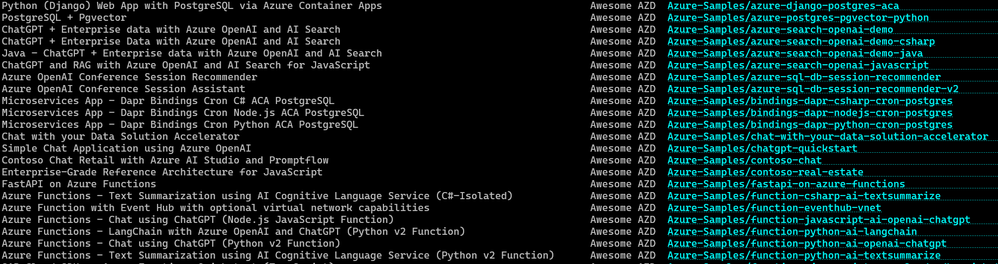
Look at the Azure Developer CLI templates as a good example of this, you don’t need to use this tool, but azd template list shows a list of sample application patterns with well documented, structured repos. You can start to create a curated list that demonstrates getting started repos in each of the application solution categories for your organisation, even starting with some of these samples where relevant.

image-dd356825e6a75bacc6c7324473b42c68.png

Infrastructure-as-code modules​

Another thing to notice/adopt, in these samples repo /infra folders, their main bicep file is just composing a number of modules, these modules represent the ‘right’ way of configuring each service for your organization, for example, pre-configured with private endpoints and RBAC based access and so on. You can look to build a repo of these modules approved for use in your organization to again, accelerate your application teams. You can also get started by using Azure Verified Modules, or build your own bicep module library, using inner-sourcing, sharing this between the application teams.

Kubernetes namespace vending​

:sad: This article doesn’t cover Namespace vending on a large, shared AKS clusters. I’ve seen this pattern working very well in organizations with a Kubernetes-first approach to the public cloud, or with a strong will for cloud agnostic solutions, however, this requires additional engineering beyond the scope of this article using AKS + other tooling. There is great session from 2024 Build on building this service.

You can provide example solution patterns & repo’s for scale-to-zero microservices using Azure Container Apps, or for more complex needs, AKS Automatic. These are great to add to your library of solution patterns that can be provisioned by your application teams that keep the complexity low, while providing example patterns for the most sophisticated of applications.

4. Tooling / Local loop development​

Application teams experiment in the portal, develop locally, and provision from their local machine, then, add the automation and the managed identity to perform auto deployments via source control to apply in the later environments.

Ensure the teams can install/configure VS code / VS code extensions / command line tools / docker locally, and they have connectivity from these tools to the public cloud APIs they need.

@azure/identity libraries are now brilliant! For many dependencies, there is no need any more to use API keys or credentials that need to be stored in key-vault’s & rotated periodically, now, just use your EntraID’s corporate identity or a Managed Identity with RBAC. Using these identity libraries, If the developer wants to run their code locally, and connect to a database or message service in azure, the locally running app will operate with the local developers corporate identity (obtained through az login), and as long as the dev has the appropriate RBAC on the database, all good. If they deploy their app to Azure PaaS Service, without any code changes, the code will access the database using the services managed identity. This makes the apps secure and resilient, and can be prompted up to production securely.

Without these tools and access, the application teams will not be writing the most secure way of coding their app.

5. Track Metrics
​

Track anything that causes friction. Anytime the application team is waiting on something, a case, access to a service, resolving a bug, track it, dashboard it, and constantly priorities securely removing friction. Promote the creation of issues on the platform teams repo, keep a prioritized backlog. Hold monthly feedback sessions.

If Application teams are held up, they will try to work around issues to ship their product, this can mean using the wrong environment, or using a less than ideal service or configuration. So removing friction will result in better, more secure use of the public cloud.

Wrapup​

Let me know what you think of these recommendations, if you are in a Platform team supporting Azure, I’d love to hear your experiences. If you are in a Application Team deploying to Azure, have a chat with the team providing you the environment, show them this blog, setup a regular call, its important the teams collaborate to get your companies products out the door, security, reliably and on time.

Transforming Consulting Through Generative AI

image003

As the subject of generative artificial intelligence (gen AI) is discussed and debated everywhere from boardrooms to breakfast tables, consultancies are eagerly using gen AI to improve their own processes and output—and then use the insights they’ve developed from their own journey to guide clients on the complicated trust, ethical, and performance issues the technology raises.

Generative AI is a machine learning system that can generate text, images, code, and other types of content, often in response to a prompt entered by a user in everyday language. IBM Corp. believes a large part of its consultants’ work will be impacted by gen AI, from creating better business cases to generating code faster.

“We see a significant amount of value creation generated from gen AI,” says Jesus Mantas, global managing partner of Business Transformation Services for IBM Consulting, IBM Corp.’s consulting subsidiary headquartered in Armonk, N.Y. “We see productivity gains from gen AI. We see acceleration of work. We see new ways of working. We see that for our clients, and we see that for ourselves.”

Professional services and consulting firms that have staked early claims to gen AI leadership are already seeing promising results. At KPMG International

H I G H L I G H T S

image004Using generative artificial intelligence (gen AI) as a general productivity tool fits nicely into the changing world of consulting, where the traditional approach of simply executing a list of client requirements has been replaced by cocreation.

As hungry as professionals are for gen AI, consultancies are finding that the technology is not yet suitable for every task.

While there is a huge potential reward, that also comes with risk that must be analyzed, understood, and dealt with.

Ltd., headquartered in Amstelveen, Netherlands, 60% of the employees who have used the company’s artificial intelligence-powered personal assistant report it has allowed them to spend more time on valuable work. Nearly as many KPMG employees, 58%, report that gen AI has allowed them to spend more time on creativity.

“Our internal surveys show gen AI has a lot of positive benefit in just the employee experience,” says Steve Chase, vice chair of artificial intelligence (AI) and digital innovation at KPMG U.S. “People are clamoring for these tools.”

image005

“Our internal surveys show gen AI has a lot of positive benefit in just the employee experience. People are clamoring for these tools,” says Steve Chase, vice chair of artificial intelligence (AI) and digital

Some consultancies have documented a bottom-line benefit from gen AI. Omni Business Intelligence Solutions, a boutique New York technology consultancy, used ChatGPT to generate personalized business proposals, produce industry-specific marketing materials, and create a ChatGPT training guide for data analysts the firm contracted with. This freed up enough time for the company founder to book $128,000 in new deals from December to March, an 80% increase from the same period a year before.1

Even as they announce such success stories, consultancies are grappling with the same complex and nuanced issues with gen AI that they are advising their clients about. As consultancies position their employees to use the technology, the firms are looking to them to guide their own use of gen AI in an effective, secure, and ethical manner.

The consultancies want to disperse the technology widely and help employees develop skills that allow them to discover new use cases for gen AI that challenge their current ways of working and thinking. Consultancies want to use gen AI to transform virtually every aspect of their operations and create a first-mover advantage. However, they don’t want to move so quickly that they assume benefits from gen AI that have not been proven or take on excessive risk, such as unwittingly exposing clients’ data.

Given how much gen AI has captivated both businesses and the general public, it’s easy to forget that the popular ChatGPT chatbot was launched only in November 2022. “Everything in the gen AI space is so nascent and so fluid, it is the time for consulting companies and professional services to really shine and lead the way forward,” says Beena Ammanath, global head of the Deloitte AI Institute and the technology trust ethics leader for United Kingdom-based Deloitte Touche Tohmatsu Ltd.’s consultancy. “The need for strategy is more important than ever before because you must consider not just value creation but the side effects that can come with gen AI, including security and ethical concerns. Earlier digital technologies didn’t have the same pace of change or wide range of impact as gen AI, whether on the climate or the workforce, so you can’t approach gen AI in the same way as other technologies, even earlier incarnations of artificial intelligence.”

This paper examines the role that professional services and consulting firms can play in developing a framework to enhance the performance, security, trust, and ethics of applications in the emerging gen AI landscape. The paper probes how large and boutique technology consultancies are exploring the use of gen AI in their own operations, and how they intend to expand the learnings and practices from these efforts to their work for their clients. The pathway they are creating for gen AI will likely affect how all industries adopt and use the technology.

Integrating AI into “Everything”

KPMG’s declaration for its AI Transformation program speaks to the all-encompassing impact that the consultancy expects from gen AI: “Our mission is to integrate AI into everything we do.” The program tracks progress and ROI across five pillars: “The way we market and sell our services; the services we sell; the way we deliver our services; how we respond to business model disruption; how we run the business.”

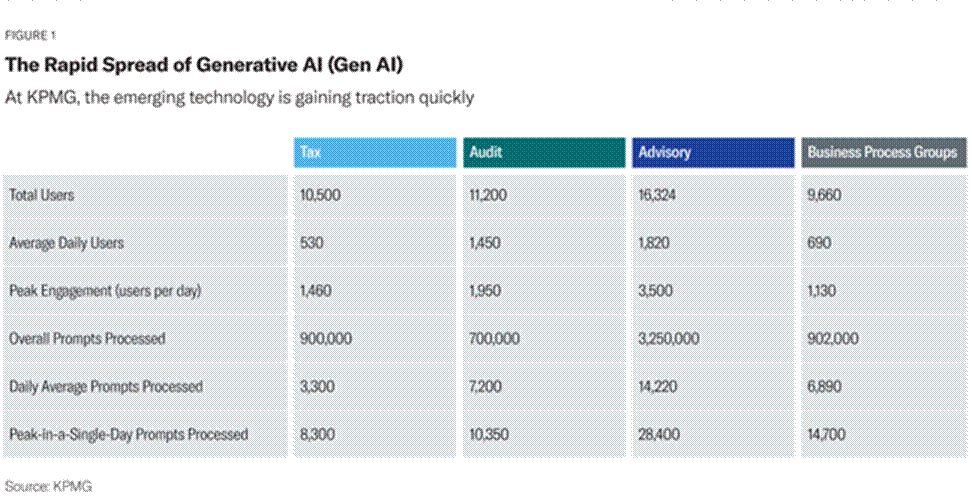
That pledge is already being fulfilled. Since last year, KPMG has rolled out gen AI capabilities to more than 16,000 of its advisors and more than 45,000 members of its total workforce across four units. On average, nearly 10% of that workforce use gen AI every day for such tasks as business communications, decision support, coding assistance, and content creation. FIGURE 1

The consultancy is using gen AI to provide operational efficiencies in back- and middle-office services like IT services, human resources, finance, and risk. For example, the finance function has used gen AI to streamline creation of recurring materials for financial close, operations, and business reviews. HR is integrating a new AI tool—nicknamed “Kai”—into the recruiting process, which leverages digital discussions to help candidates find the right job and better understand KPMG’s culture, benefits, values, and more. Once candidates are identified by the firm’s recruiting team, Kai also digitizes and streamlines interview scheduling and rescheduling. The technology is also speeding software development at the consultancy.

Harvard Business Review Analytic Services

At this point, greater efficiency is the prime calling card of gen AI. KPMG found that using gen AI trimmed 30 minutes off the time it took to do coding assistance. A competitive intelligence study can be produced in 90 fewer minutes because of the technology. These small increments of time add up to a huge cumulative advantage for fast-growing organizations that have trouble finding enough skilled workers.

Using gen AI as a general productivity tool fits nicely into the changing world of consulting, where the traditional approach of simply executing a list of client requirements has been replaced by cocreation. Consultancies now collaborate with their clients, their clients’ customers, and other stakeholders in a team-like approach. The gen AI “assistants” operate in a manner similar to chatbots. However, the assistants don’t use pre-scripted language like a bot does, so their conversations are more engaging, personalized, and contextualized. The assistants’ greater ability to grasp the user’s intent, nuances, and context allows them to take over tedious tasks or summarize information at an astounding speed. With this AI augmentation, consultants can focus their human creativity in a way that makes the greatest impact.

IBM Consulting has developed an AI services platform that includes a library of hundreds of AI assistants that have been trained with data for specific tasks, like creating the requirements for a mobile app. An IBM consultant who is helping a health care provider might ask the gen AI assistant to create a persona map for a tech-savvy Millennial in the U.S. who is looking to book an appointment with his or her doctor online. The assistant would provide scenarios and acceptable criteria that affect the app’s design.

image007

In the past, this exercise might have taken a consultant half a day and multiple interactions. The gen AI assistant spins a baseline persona in less than 60 seconds. “The persona map doesn’t need to be perfect,” IBM’s Mantas says. “It just needs

image008

“The persona map doesn’t need to be perfect. It just needs to provide a base that the consultant can then use with the client and edit, rather than start from scratch,” says Jesus Mantas, global managing partner of Business Transformation Services for IBM Consulting.

image009

to provide a base that the consultant can then use with the client and edit, rather than start from scratch.”

As hungry as professionals are for gen AI, consultancies are finding that the technology is not yet suitable for every task. Intentional Futures LLC, a small Seattle-based consultancy, found that gen AI tools allowed consultants to accomplish weeks’ worth of research in only a few days. In some cases, however, consultants also reported numerous inaccuracies, known as “hallucinations,” in the material that gen AI prepared. Reviewing and revising the material for accuracy, timeliness, and industry-specific context could sometimes take the consultancies more time than preparing the material on their own.2

Consultancies are trying to zero in on the best ways to apply the technology in its current form. Consider an experiment conducted at Boston Consulting Group Inc., a technology consultancy in Boston. OpenAI’s GLT-5, a large language model (LLM)—a gen AI model that can understand and generate language—was used for creative ideation. BCG consultants who used GLT-5 performed 40% better than a control group that didn’t use the technology. However, when BCG professionals applied GLT-5 to business-problem solving, specifically “to identify the root cause of a company’s challenges based on performance data and interviews with executives,” the results were strikingly different. They performed 23% worse on this task than the control group did.

The reason might be rooted in gen AI’s ability to produce open-ended, novel ideas while lacking the ability to judge the “right answer” in the business question. In any case, this exercise is a stark reminder of how embryonic the gen AI space is, and how much needs to be discovered about it, including the downside of asking gen AI to do tasks that are currently beyond its capabilities.

“Right now, businesses are worried about being left behind when it comes to gen AI,” says Shea Brown, founder and chief executive officer of BABL AI Inc., an Iowa City, Iowa, consultancy that performs audits on AI systems. “But we need to ask tough questions about the risks that gen AI brings and whether there really is ROI in allocating resources to these activities.”

Readying the Workforce

As consultancies look to capture value from gen AI, many feel the pathway begins with developing a gen-AI-capable workforce. Preparing a workforce for a technology that can reshape how work is done is a complex process that must address such delicate issues as worker fears about the technology replacing them.

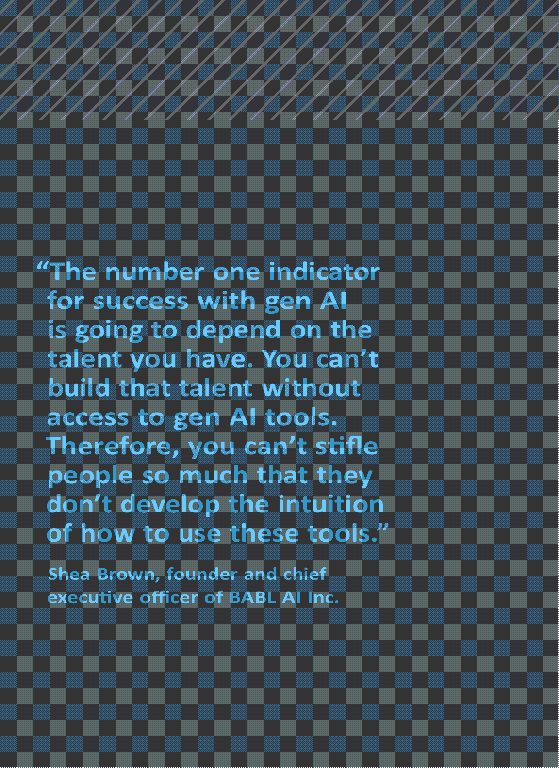
“The number one indicator for success with gen AI is going to depend on the talent you have,” Brown says. “You can’t build that talent without access to gen AI tools. Therefore, you can’t stifle people so much that they don’t develop the intuition of how to use these tools. However, if you say, ‘We have to use gen AI because everyone else is using it’ and just put the technology in the hands of people without giving them the proper training and guidance, you will end up with a bunch of dinosaurs who don’t know how to use the tools.”

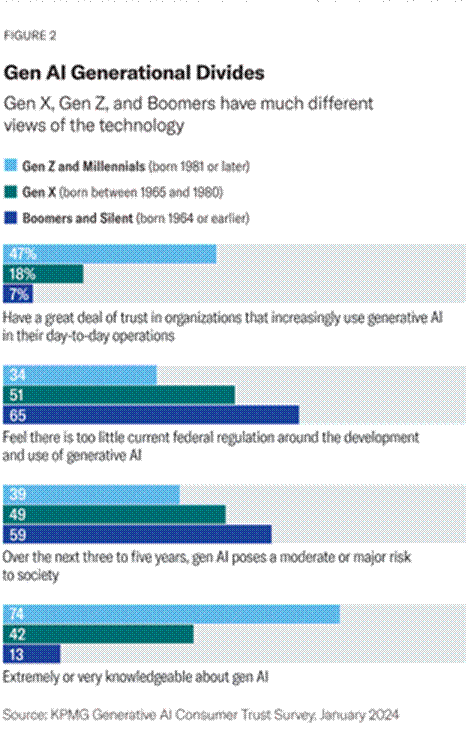
The dinosaur comment is apt, given that generational divides are already apparent in the use of gen AI technology. A January 2024 survey of more than 1,000 adults in the United States by KPMG found that 74% of Gen Z/Millennials are extremely or very knowledgeable about gen AI versus just 42% of Gen X and 13% of Boomers/Silent generation members. Younger generations also tend to have more trust in gen AI. FIGURE 2

To fortify its own workforce, KPMG has developed gen AI “persona-based learning journeys,” which take into consideration the generational differences in how people consume and retain knowledge. Learning champions, whom the consultancy dubs “digital navigators,” are being appointed to guide and support individuals in their learning journeys in different parts of the business. As a result of these efforts, more than 74,000 AI courses were completed by KPMG’s U.S. workforce by the end of 2023.

“Our recommended approach is to start by augmenting your workforce broadly with gen AI capabilities,” KPMG’s Chase says. “Get the technology in the hands of your knowledge workers, spark the innovation curve, and put more of your money into training your people than in training your models.”

This approach has not only helped KPMG identify the most compelling use cases for the technology in its own operations but also provided consultants with the expertise they need to have knowledgeable, far-ranging discussions with clients

image011image010

image012“The consultancies that have AI augmentation are going to win more work,” says Bret Greenstein, a partner for cloud and digital analytics

insights at PwC US.

about gen AI. “We want to empower all our 45,000 consultants to have those conversations because there is so much noise out there about gen AI and what you should be concerned about,” Chase explains.

Like most organizations, PricewaterhouseCoopers International Ltd.’s consultancy, based in London, faces concerns from workers that gen AI will take away their jobs. Bret Greenstein, a partner for cloud and digital analytics insights at PwC US, says the consultancy takes pains to explain how the technology will augment the professionals’ abilities and allow the growing business to capture new opportunities. “We’re coming out of a period where we couldn’t find the people and resources we need to keep up with our level of growth,” he says. “The consultancies that have AI augmentation are going to win more work.”

In educating its own workforce about gen AI, PwC stresses the tedious work the technology removes, allowing the consultants to devote themselves to their true valueadded human thinking. At the same time, PwC works hard to demystify the technology. As part of PwC’s three-year, $1 billion investment in gen AI, 75,000 PwC employees have taken courses on topics such as the ethics of AI, responsible use of AI, and how to prompt AI tools for the best results.

“There’s emotional issues all over the place with gen AI,”

Greenstein says. “I was at a client and someone pitched gen AI using terminology that made everyone more anxious after the meeting than they were before the meeting, like ‘neural networks’ and ‘vectorization.’ The terminology is new. And yet, it’s technology that’s adjacent to skills they already have.”

The intensive educational approach has paid off. As soon as PwC employees developed gen AI skills, they were able to more clearly see where the technology was effective and where its use could be expanded. “They can actually envision use cases that are more transformative,” Greenstein says. “Giving people the ability to write an email faster does not really transform work. But changing a process by putting AI in the front of it does.”

Confronting Ethical Issues

According to the 2023 KPMG CEO Outlook, a survey of 1,300 CEOs at large companies, ethical challenges are the top obstacle to successfully implementing gen AI, followed by cost and talent. The potential ethical issues are both numerous and complex. Gen AI models are trained on massive amounts of data, which can infringe on copyrights and intellectual property rights of other companies. The underlying data can contain sensitive information that can be unwittingly exposed. Gen AI can amplify biases in hiring and other situations.

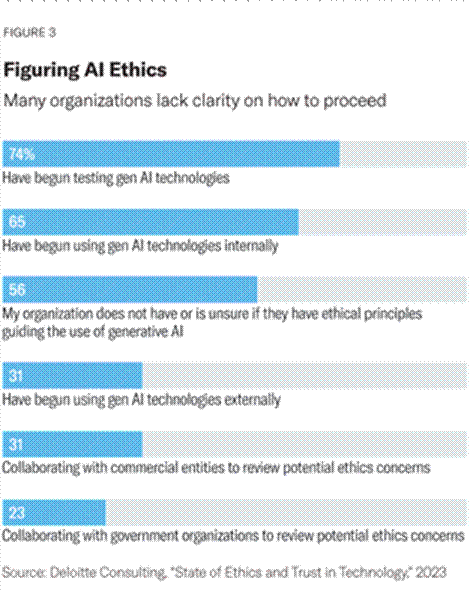
A 2023 Deloitte survey of 1,700 business and technical professionals indicated the extent to which organizations are struggling with even developing an approach to the ethical concerns this emerging technology raises. While most companies have begun using or testing the technology, more than half of survey respondents said their organizations (56%) did not have ethical principles guiding the use of gen AI, or they were unsure if the principles existed. FIGURE 3

In this chaotic landscape, consultancies see themselves as primed to be a guiding force in helping organizations develop strong ethical approaches to gen AI. “Consultancies have a lot of advantages in having a cross-industry view,” says

image013

Deloitte’s Ammanath. “We can see the best practices that are developing in the heavily regulated industries and determine which of their approaches we can apply to the industries that are not so regulated. This is a unique time that allows us to help shape the use of the technology not just in terms of value creation but in the way it impacts human rights, inequalities, and broader access to technology.”

Gen AI governance frameworks can be modeled on responsible and ethical AI principles that have been laid out by organizations such as Google and IBM, as well as risk management frameworks produced by standards organizations. From this starting point, a gen AI governance framework must be adaptable, supporting both flexibility and scalability, says Christine Livingston, global leader of artificial intelligence services at Protiviti Inc., a global consulting firm based in Menlo Park, Calif.

“Not every use case is created the same,” she says. “A bank that is using gen AI to make credit and lending decisions will need a higher level of explainability and transparency in its models, because the bank knows there are going to be regulatory requirements. If an organization is using a gen AI application to answer internal questions, like what is the process for getting a new laptop, it doesn’t need the same level of explainability.”

Protiviti has found that gen AI policies are most effective when they are specific to four characteristics of gen AI applications: the value or function the application delivers, how it is trained, the data on which it is trained, and the architecture on which it runs.

While organizations can use existing AI ethical frameworks as a starting point, each company must put its unique stamp on its own framework, according to Livingston. “In the ethical and responsible AI space, they need to define their own ethics around AI,” she says. “There are frameworks for responsible AI, which focus on things like transparency, fairness, and equity, but you need to understand what your company’s organizational boundaries are in order to apply those frameworks. No one can define your company ethos or your brand values for you.” Meanwhile, she adds, as the gen AI space evolves, regulations will likely evolve and change.

Like their clients, consultancies are trying to determine the best approach for such issues as data privacy. At this moment, they are largely focusing on internal applications that don’t expose sensitive data, keeping the applications securely within their organizations’ walls.

“We don’t want to put client data into this equation yet, so we don’t upload a client document and start querying against it, which is the low-hanging fruit of gen AI,” BABL AI’s Brown says. “You don’t want client data getting out through a gen AI vendor’s database. When you allow AI to make more autonomous decisions—and let it drive action without human oversight—the risks are greater, and not well understood.”

image014

“The models are trained to be very confident, so when the model doesn’t have available information, it will construct something reasonable sounding,” says BABL AI’s Brown.

image015

Consultancies are focused on determining the best ways to handle the many issues that accompany gen AI. These include how to protect their models from attack, how to provide secure environments for the gen AI LLM that excels in natural language processing tasks, and how to protect against model hallucinations, which is the issue of gen AI providing factually incorrect information in a confident veneer.

“The models are trained to be very confident, so when the model doesn’t have available information, it will construct something reasonable sounding,” Brown explains. “Hallucinations are a real thing, but I don’t like that word because it anthropomorphizes the technology.”

His mention of the term “anthropomorphizes” highlights another fundamental issue with gen AI that consultancies are dealing with: Because gen AI produces and understands language so fluently, employees can be lulled into thinking the technology has the same skills as human beings. However, models lack human values, common sense, and actual understanding.

Consultancies find they must constantly remind employees that the output from gen AI systems should be regarded skeptically and vetted against their personal judgment and professional experience. The complex ethics of gen AI must also be brought up to them often, especially in the flow of using the technology.

The gen AI technology can help in this effort. For example, a well-intended programmer, wanting to create a personalized experience for each user, might ask the gen AI assistant to create code that determines the gender of a person based on their name.

“Some people might think that is a good idea, but it could create problems of bias and could lead to significant business issues,” says Mantas. The AI assistant the consultants use contains guardrails so that it would automatically flag the potential for bias in this request, and instead offer alternatives, such as requesting users to provide their preferred pronouns. “Based on those guardrails, the assistant could stop certain tasks that go against stated ethical principles of a company,

image016“The companies that use this technology are growing faster than those that don’t. Up until this year, the only way to grow your business was to add more people. That’s no longer true,” PwC’s Greenstein says.

and coach the consultant on why they shouldn’t do it,” he says. “This is the most scalable approach to taking principles of ethics in AI and systematically applying them at the time of use.”

Keys to Derive Value from Gen AI

As consultancies begin to roll out gen AI to their workforce, they have begun to identify some of the key aspects of using the technology most effectively.

Choose the AI insertion point carefully. In order to create value and transform processes, a top consideration is where in the process the gen AI is inserted. PwC’s Greenstein worked with a client who was pummeled with so much information from its customers that the client’s employees couldn’t keep up with the onslaught.

PwC helped design a gen AI solution that analyzed the communications before a human even looked at them. “AI reads everything before a human does,” Greenstein says. “If the information is incomplete, the AI sends it back with a request to include what is missing. If the information is complete, the gen AI summarizes the communications and puts [them] into buckets so the right people are given just the parts that affect them, with a list of recommended steps.”

Provide a great user experience. Given that the value of gen AI often depends on the technology being widely dispersed throughout the organization, the user experience is paramount. “If you look at a lot of AI projects, 80% of the budget goes to the AI, and very little goes to change management, and none goes to the user experience,” Mantas says. Companies should have user experience designers develop interfaces that make it easy for employees to ask questions and engage in conversations with the underlying software, but this important task is often overlooked. “I ask clients how many designers they have and they say, ‘What’s a designer?’”

Make gen AI everyone’s responsibility. “The idea isn’t that everybody needs to become an expert in all the dimensions of the side effects of gen AI,” says Ammanath. “But they need to know the basics and what questions to ask, even if they’re not in data science or on the AI teams.” A junior-level employee in a marketing department who is looking at an AI tool from a vendor should be empowered and trained to ask the right questions. “We’ll never be able to eliminate all the unintended consequences, but if we approach this in a thoughtful and mindful way, we can reduce the unintended consequences,” she says.

Conclusion

For as new as gen AI is, consultancies have no doubt the technology will fundamentally change the way that they and their clients operate.

Collective 54, a Dallas-based network for founders of professional services firms, says, “For boutique consulting firms, AI isn’t just a tool; it’s a game changer,” allowing them to offer more services than ever to an expanding client roster. “Adapt to AI, or risk obsolescence,” the network says.3

While there is a huge potential reward, that also comes with risk that must be analyzed, understood, and dealt with. “We are entering an era where these massive technology shifts will have profound side effects,” says Ammanath. “We are at a pivotal moment, from policies to regulations to workforce to rescaling to new business opportunities.”

Gen AI is already beginning to disrupt the consulting industry itself. “AI is more of a transformational journey for us as an objective and a growth area, rather than a desire to develop the table stakes capabilities that everyone in the industry has,” Ammanath says. “We want to forge new ecosystem and alliance partnerships, whether it is startup community, academia, and other enterprises.”

Gen AI can change the basic economics of consulting and professional services, those in the industry believe. “The companies that use this technology are growing faster than those that don’t,” Greenstein says. “Up until this year, the only way to grow your business was to add more people. That’s no longer true.”

At the same time, consultancies realize that their dual role of exploring their own use of the technology while advising clients on how to proceed puts them in a unique position to be stewards that ensure the technology is advanced in a safe, effective manner. “We have to tell people not to get lured by the idea that this is magic,” Brown says. “Gen AI has been framed as something that you must have to be productive. But you still need to approach gen AI with a risk mindset and do the same careful deliberations you would with any business decision.”

EBS Analysis: Why do I need Microsoft Defender for Office 365? – Microsoft Defender for Office 365

Why Do I Need Microsoft Defender for Office 365?

In today’s digital workplace, email and collaboration platforms are the primary vectors for cyber‑attacks. Threat actors exploit inboxes to deliver malware, conduct phishing campaigns, and orchestrate business‑email‑compromise (BEC) schemes that can cripple revenue, damage reputation, and trigger regulatory fallout. Microsoft Defender for Office 365 is Microsoft’s comprehensive, layered security solution designed to protect Microsoft 365 workloads—from email and Teams to SharePoint and OneDrive—while delivering the investigation and response capabilities enterprise security teams demand. Understanding *why* you need this platform is the first step toward building a resilient, future‑ready security posture.

Executive Introduction – The Cost of Ignoring Email Security

Even the most hardened network can be compromised through a single malicious attachment or a cleverly crafted spear‑phishing link. According to recent industry surveys, over 90 % of all cyber‑attacks begin with an email interaction, and the average cost of a successful breach now exceeds several million dollars when you factor in downtime, remediation, legal fees, and brand erosion. Microsoft 365 customers receive a baseline set of “built‑in” protections that block volume‑based spam and known phishing attempts, but these defaults are insufficient against zero‑day malware, sophisticated impersonation attacks, or post‑breach lateral movement.

Defender for Office 365 extends that baseline into a true “security‑as‑a‑service” stack that aligns with the MITRE ATT&CK framework, integrates with existing SIEM/XDR tools, and provides automated investigation and response (IR). For enterprise organizations, the decision to adopt Defender for Office 365 is no longer a nice‑to‑have—it is a strategic imperative that directly influences risk exposure, compliance posture, and operational efficiency.

Protection Ladder Overview – From Built‑In to Full‑Scale Defense

Microsoft structures Defender for Office 365 as a “protection ladder,” allowing organizations to start with the universal protections included in every Microsoft 365 subscription and progress upward through Plan 1 and Plan 2 tiers as their security maturity evolves.

Layer 1 – Built‑In Security Features for All Cloud Mailboxes

  • Anti‑spam and bulk email protection. Real‑time filtering of high‑volume, known malicious messages.
  • Anti‑phishing (spoof) protection. Automated detection of domain impersonation and Spoof Intelligence insights.
  • Tenant Allow/Block List management. Administrators can refine and test entries to reduce false positives/negatives.
  • Zero‑Hour Auto Purge (ZAP). Automatic removal of malicious email that slips past initial filters.
  • Admin and user reporting. Structured feedback loops for false‑positive/negative correction.

These controls are enabled by default and require no additional licensing. They provide a solid foundation but are limited to signature‑based and reputation‑driven detection. They do not include advanced threat intelligence, behavioral analytics, or post‑breach investigation capabilities.

Layer 2 – Defender for Office 365 Plan 1

Plan 1 adds a second line of defense focused on *prevention* and *early detection*:

  • Identity‑centric impersonation protection. User and domain impersonation safeguards, backed by Mailbox Intelligence (contact graph) to surface anomalous communication patterns.
  • Safe Attachments & Safe Links. Real‑time sandbox analysis of files in SharePoint, OneDrive, and Teams; dynamic URL rewriting and reputation checking for email, Office clients, and Teams.
  • Collaboration‑specific safeguards. Teams‑domain Allow/Block listings, ZAP for Teams, and email & collaboration alerts accessible via the Microsoft Defender portal.
  • User tags and priority accounts. Tagging mechanisms (e.g., “Priority” accounts) enable differentiated policy enforcement and faster triage.
  • SIEM integration via Office 365 Management APIs. Both alert and detection streams can be ingested into existing Security Information and Event Management solutions, preserving a unified view of security telemetry.

Plan 1 effectively closes the gap between generic filtering and targeted, behavior‑based detection. It equips SecOps teams with richer context and faster alerting without the complexity of full‑scale orchestration.

Layer 3 – Defender for Office 365 Plan 2

Plan 2 transforms the platform into an *investigation‑and‑response* powerhouse, adding automation, advanced analytics, and tighter integration with Microsoft Defender XDR:

  • Threat Explorer (formerly Real‑time Detections). A unified, searchable repository for email and collaboration threats that supports advanced hunting queries.
  • Automated investigation & response. SIEM integrations via Office 365 Management APIs enable playbooks that automatically trigger containment actions, quarantine messages, or user account resets.
  • Attack simulation & training. Integrated phishing simulation campaigns that feed directly into the Threat Explorer, allowing security teams to gauge employee susceptibility and refine policies.
  • Advanced hunting & streaming APIs. Full‑featured hunting capabilities through the Defender XDR APIs, supporting custom Kusto Query Language (KQL) queries across email, Teams, SharePoint, and OneDrive data sets.
  • Incident management. Consolidated incident views that correlate alerts across email, collaboration, and endpoint domains, enabling a holistic response workflow.

Plan 2 effectively turns Defender for Office 365 into a cornerstone of a zero‑trust security architecture, providing the telemetry depth and automation breadth required for modern SecOps teams.

Architecture & Capability Deep‑Dive

How Defender for Office 365 Works – From Ingestion to Action

The security stack operates as a series of tightly coupled pipelines:

  1. Data Ingestion. All mail, messages, attachments, links, and collaboration events flow through Microsoft’s cloud security gateway, where they are normalized into a common schema.
  2. Policy Engine. Threat policies (default, custom, or preset) apply layered detection logic—first static filters, then heuristic and behavioral models, finally machine‑learning classifiers.
  3. Decision Matrix. Each ingested item is scored for malicious likelihood, resulting in actions such as “deliver with warning,” “quarantine,” “rewrite link,” or “trigger alert.”
  4. Alert & Telemetry Generation. High‑severity events generate alerts that populate the Defender portal, while lower‑severity detections feed into SIEM streams and Threat Explorer.
  5. Response Orchestration. For Plan 2, automated playbooks consume alert data, execute pre‑defined actions (e.g., mailbox quarantine, URL detonation), and update incident records in Microsoft Defender XDR.

This pipeline is **policy‑driven** but **data‑centric**, meaning that the effectiveness of each layer is directly proportional to the quality and quantity of telemetry collected. Consequently, organizations that enable additional connectors (e.g., Azure AD, Windows Defender for Endpoint) realize a more comprehensive threat picture.

Implementation Considerations – From Licensing to Configuration

Deploying Defender for Office 365 is not a “set‑and‑forget” exercise. Successful implementation demands attention to several prerequisites:

  • License Mapping. Verify that the Microsoft 365 subscription includes the necessary tier. Plan 1 is bundled with E3/G3 and Business Premium; Plan 2 appears in E5/G5 and Enterprise A5 licenses. For environments lacking these licenses, an add‑on subscription can be purchased separately.
  • Email Authentication Hygiene. SPF, DKIM, and DMARC records must be correctly configured for *all* domains—used and unused—to prevent spoofing and enhance phishing detection. Misconfigured DNS entries are a leading cause of false negatives.
  • Tenant Allow/Block Lists. Start with a narrow list of known malicious domains and email addresses. Over‑blocking can disrupt legitimate business communication, while under‑blocking leaves gaps.
  • Policy Selection. Choose between default, custom, or preset security policies based on risk appetite. Preset policies (Standard vs. Strict) embed recommended thresholds for phishing and malicious attachment detection.
  • SIEM Integration. If an organization already runs a SIEM (e.g., Splunk, QRadar, Azure Sentinel), map the Office 365 Management API endpoints and ensure proper authentication (Azure AD app registration, certificate-based auth). Without proper integration, valuable detection data remains siloed.
  • User Tagging & Priority Accounts. Define which users (executives, finance teams, etc.) receive enhanced protection (e.g., stricter Safe Links, deeper sandboxing). Tagging is a lightweight way to apply risk‑based controls.

The **migration path** from non‑Microsoft protection services (e.g., third‑party email gateways) involves a phased approach: enable Defender’s built‑in protections first, monitor telemetry, then gradually disable legacy filters. The Microsoft “Migrate from a non‑Microsoft protection service or device to Microsoft Defender for Office 365” guide outlines validation steps and rollback procedures.

Security & Governance – Layered Defense & Compliance

Defender for Office 365 embodies a **cumulative security architecture**. Each tier adds a distinct emphasis:

  • **Prevention** – Volume‑based blocking, sandbox analysis, Safe Attachments/Links.
  • **Detection** – Behavioral analytics, impersonation detection, contact‑graph analysis.
  • **Investigation & Response** – Threat Explorer, automated playbooks, incident correlation.

Compliance frameworks such as GDPR, HIPAA, and PCI DSS often mandate **audit trails**, **retention policies**, and **data classification**. Defender for Office 365 integrates with Microsoft Purview to provide detailed reporting on email governance actions, enabling organizations to satisfy regulatory requirements.

Governance also extends to **data loss prevention (DLP)**. While DLP is not a core component of Defender for Office 365, the platform’s telemetry can be fed into Microsoft Purview DLP policies, allowing conditional access rules based on threat scores.

Operational Implications – People, Process, and Technology

Deploying advanced email security introduces new operational rhythms:

  • **Alert Fatigue Management** – Plan 2’s automated investigations can generate a high volume of low‑severity alerts. Teams must define severity thresholds and establish escalation paths.
  • **Resource Allocation** – Real‑time detections (Plan 1) require manual triage; Plan 2’s Threat Explorer and automated investigations demand dedicated SOC analysts or automated response playbooks.
  • **Policy Tuning** – Continuous refinement of phishing thresholds, Safe Links rewrites, and attachment sandboxing is essential to maintain a low false‑positive rate.
  • **Cross‑Domain Correlation** – Effective incident response hinges on linking email compromise events with endpoint alerts (via Defender XDR). Organizations lacking endpoint telemetry may miss lateral movement indicators.

Successful adoption is therefore a blend of **technology configuration**, **process formalization**, and **people training**. The “Security Operations Guide for Microsoft Defender for Office 365” provides operational best practices, but each organization must adapt them to its maturity level.

Common Pitfalls & How to Avoid Them

  • **Incomplete DNS Authentication** – Skipping DMARC for unused domains leaves gaps that attackers can exploit. Always audit all domains via tools like Microsoft’s “Email Authentication Health” report.
  • **Over‑Reliance on Built‑In Controls** – Assuming that default spam filters are sufficient can result in missed phishing campaigns. Enable Plan 1 features at minimum, and Plan 2 where budget permits.
  • **Neglecting User Tagging** – Failing to identify high‑value accounts means those users receive generic protection. Tag executives and finance teams early to apply stricter policies.
  • **Misconfigured Tenant Allow/Block Lists** – Rapidly adding domains without validation can block legitimate partners. Use a test‑in‑sandbox approach before promotion.
  • **Ignoring SIEM Integration** – Storing alerts only in the Defender portal fragments visibility. Integrate with a central SIEM to correlate email threats with network and endpoint data.
  • **Under‑Utilizing Automation** – Plan 2’s automated investigations are powerful but require proper playbook design. Start with simple containment actions (e.g., URL detonation) and expand gradually.
  • **Lack of Incident Response Documentation** – Without clear runbooks, teams may respond inconsistently. Document procedures for common email‑related incidents (phishing click, malicious attachment, BEC).

Why This Matters to Enterprise IT

Enterprise IT is tasked with safeguarding the organization’s crown jewels—intellectual property, customer data, and operational continuity—while navigating a constantly evolving threat landscape. Email remains the most reliable delivery mechanism for ransomware, credential theft, and business disruption. A well‑architected Defender for Office 365 deployment delivers several strategic benefits:

  • **Risk Reduction** – Multi‑layered detection reduces the likelihood of successful phishing and malware delivery, directly lowering breach probability.
  • **Cost Efficiency** – Consolidating email security into a single Microsoft‑native platform eliminates the need for multiple point solutions, simplifying licensing, maintenance, and support contracts.
  • **Regulatory Confidence** – Integrated reporting and audit capabilities help satisfy compliance mandates, reducing legal exposure.
  • Operational Scalability – As the organization grows, Defender’s cloud‑native architecture scales without requiring additional hardware or complex upgrades.
  • Strategic Alignment – The platform’s extensibility (via APIs, XDR integration, and Microsoft 365 Roadmaps) ensures that future security capabilities can be layered onto existing investments.

Moreover, the **economics of licensing** favor a tiered approach. Starting with built‑in protections (no extra cost) and adding Plan 1 for mid‑size enterprises provides a measurable security uplift at a modest price point. For large enterprises where the cost of a single breach outweighs licensing expenses, Plan 2 becomes a critical defensive asset.

EBS Consulting Perspective

From a consulting standpoint, the decision to adopt Microsoft Defender for Office 365 is rarely a binary “buy or not buy.” Instead, it is a **maturity assessment** that requires us to evaluate three core dimensions:

  1. Current Risk Profile. We conduct a rapid threat‑modeling exercise, mapping known email‑related incidents, phishing susceptibility scores, and any gaps in authentication hygiene.
  2. Security Architecture Fit. We analyze existing SIEM/XDR stacks, determine integration complexity, and design a policy hierarchy that aligns with the organization’s risk tolerance.
  3. Operational Capability Gap. We assess staffing levels, incident‑response maturity, and training programs. This informs whether a Plan 1 rollout (focus on prevention/detection) or a full Plan 2 implementation (automation & investigation) is appropriate.

Our methodology emphasizes **low‑risk pilots**—enabling a subset of users or a single domain with Plan 1 features while collecting telemetry. This allows us to validate detection efficacy, fine‑tune policies, and demonstrate ROI before full‑scale deployment. We also leverage the **interactive “Safeguard your organization with Microsoft Defender for Office 365”** guide as a living document for client workshops.

Additionally, we view Defender for Office 365 as a **foundation for broader Microsoft security ecosystem**. By ensuring proper integration with Azure AD Identity Protection, Windows Defender for Endpoint, and Microsoft Defender XDR, we help clients achieve a unified “Zero‑Trust” data plane. This holistic view differentiates us from pure‑play product vendors and positions us as strategic advisors.

Practical Next Steps

For organizations ready to strengthen their email and collaboration security posture, we recommend a structured, phased roadmap:

  1. Assessment & Discovery (Week 1‑2)
    • Run the Email Authentication Health report for all domains.
    • Collect telemetry from existing email security tools (if any) to baseline current detection rates.
    • Map Microsoft 365 licenses to identify gaps for Plan 1/Plan 2.
  2. License Alignment (Week 3)
    • Activate required Defender for Office 365 tiers via the Microsoft 365 admin center.
    • Provision necessary API credentials for SIEM integration.
  3. Foundational Configuration (Week 4‑5)
    • Configure SPF/DKIM/DMARC (including unused domains).
    • Enable built‑in anti‑spam and anti‑phishing policies.
    • Create a Tenant Allow/Block List based on current threat intelligence.
  4. Plan 1 Pilot (Week 6‑8)
    • Enable Safe Attachments & Safe Links for a pilot group (e.g., finance team).
    • Apply user tags for priority accounts.
    • Configure email & collaboration alerts and verify SIEM ingestion.
  5. Policy Tuning & Training (Week 9‑10)
    • Analyze alert data for false positives/negatives and adjust threat policies.
    • Roll out targeted phishing awareness training linked to Attack Simulation.
  6. Plan 2 Expansion (Month 4‑6)
    • Enable Threat Explorer and automated investigation playbooks.
    • Integrate with Microsoft Defender XDR for advanced hunting and incident correlation.
    • Refine response runbooks based on pilot learnings.
  7. Continuous Optimization (Ongoing)
    • Schedule quarterly policy reviews, license utilization audits, and threat‑intel updates.
    • Maintain documentation of configuration changes and incident responses.

Each step includes **success criteria** (e.g., reduction in phishing click‑through rates, measurable improvement in detection latency) and **key performance indicators** (alerts processed per analyst, mean time to containment). This data‑driven approach ensures that the investment delivers tangible security outcomes.

Conclusion & Consulting Transition

Microsoft Defender for Office 365 is not merely a product—it is a strategic platform that transforms email and collaboration security from a reactive, signature‑based function into a proactive, intelligence‑driven discipline. By leveraging the protection ladder—from universal built‑in controls through Plan 1’s prevention and detection capabilities to Plan 2’s investigation and automation—enterprises can construct a resilient defense that aligns with modern threat tactics and regulatory expectations.

Our consulting practice at Escape Business Solutions specializes in guiding organizations through this transformation. We begin with a thorough risk assessment, design a tiered rollout that maximizes ROI, and embed the solution within a broader Microsoft security ecosystem. Whether you are evaluating whether to add Plan 1, planning a full Plan 2 deployment, or seeking to optimize existing Defender configurations, we are ready to partner with you to build a secure, compliant, and operationally efficient email environment.

Contact us today to schedule a complimentary security maturity workshop. Let’s turn email from the weakest link into your organization’s strongest defense.

EBS Consulting Advice

If your organization is evaluating Why do I need Microsoft Defender for Office 365? – Microsoft Defender for Office 365, do not treat the technology decision in isolation. Start with the business outcome, current architecture, security and identity controls, operational constraints, migration dependencies and governance requirements. A practical assessment should identify the current-state gaps, prioritize the risks and define an implementation roadmap with measurable outcomes.

EBS can help assess the environment, develop the architecture and modernization roadmap, and translate the technical options into an actionable business plan. Relevant EBS services: Escape Cloud Microsoft Solution Assessments Modern Workplace.

Have a technology challenge? Email info@escapebusinesssolutions.com to describe your situation. We welcome questions, consulting discussions and requests for a proposal.

EBS Analysis: Microsoft Entra External ID Overview – Microsoft Entra External ID

Microsoft Entra External ID: Enabling Secure External Identity and Collaboration for Enterprise Applications

Executive Introduction

Modern enterprises are no longer isolated ecosystems; they routinely interact with partners, suppliers, customers, and independent developers who require secure access to internal applications and data. Traditional identity models, which assume a single directory containing only employee accounts, create friction and security gaps when external users must be onboarded, authenticated, and governed. The challenge is to provide a seamless, policy‑driven experience that lets external identities use the credentials they already possess—whether corporate, government, or social—while preserving the same level of security, compliance, and scalability expected for internal users. Microsoft Entra External ID addresses this need by offering a dedicated tenant model for consumer and business‑to‑business (B2B) scenarios, combining capabilities for customer‑facing CIAM with robust B2B collaboration features. For enterprise IT leaders, adopting External ID translates into reduced onboarding effort, stronger security posture, and the ability to monetize or extend digital ecosystems through controlled external access.

Technical Overview

External Tenant Architecture

A Microsoft Entra External ID tenant is a standalone, fully managed instance of Microsoft Entra ID that operates in an “external” configuration. Unlike a workforce tenant, which houses an organization’s employees and internal resources, an external tenant is purpose‑built for publishing applications to consumers or business customers. It contains its own directory of user objects, app registrations, and configuration settings, isolated from the tenant that manages the enterprise’s internal workforce. This separation enables administrators to apply distinct branding, sign‑up flows, and access policies without affecting internal user experiences.

Key architectural components include:

* **User Directory** – Holds guest and self‑service‑registered user objects. These objects are provisioned with the same attribute model as internal users, supporting custom attributes for business‑specific data collection during registration.
* **Application Registrations** – Apps are registered in the external tenant, allowing the tenant to define redirect URIs, supported account types (single‑tenant, multi‑tenant, or any organizational directory), and required permissions.
* **Custom Branding** – Administrators can upload logos, background images, and modify color schemes for the sign‑in and sign‑up experiences, delivering a white‑label experience that aligns with the consumer or partner brand.
* **Self‑Service Registration Flows** – Administrators design step‑by‑step registration journeys that dictate the authentication methods (email/password, OTP, social providers) and the data collected from the user. These flows are configurable via the Azure portal or programmatically through Microsoft Graph.

B2B Collaboration vs. B2B Direct Connect

B2B collaboration is the classic guest‑user model. An administrator invites a partner or customer to the external tenant; the guest signs in using their existing credentials from their home organization or a supported identity provider (e.g., Google, Facebook). The guest’s user object resides in the same directory as internal users, enabling group membership, role assignment, and conditional access enforcement.

B2B direct connect builds on collaboration by establishing a two‑way trust between two external tenants. Users authenticate in their home tenant, receive a token from the resource tenant, and gain access without being added as guests to the resource directory. This model powers Teams shared channels, allowing external participants to collaborate on Teams content while maintaining separate directory boundaries. Direct connect requires mutual enablement of cross‑tenant access policies and is particularly valuable for scenarios where data sovereignty or strict guest‑user segregation is required.

Multitenant Organizations

Enterprise scenarios often involve multiple Microsoft Entra directories—e.g., a parent corporation, regional subsidiaries, or partner organizations. A multitenant organization is a logical grouping of two or more Microsoft Entra tenants. Cross‑tenant synchronization provides a one‑way service that allows users to access resources in other tenants without repeatedly accepting consent prompts, thereby streamlining collaboration across organizational boundaries. This capability is essential for large enterprises that operate multiple cloud subscriptions or that need to expose services to a federation of partners.

Cross‑Tenant Access APIs

Programmatic management of B2B collaboration and direct connect policies is available via Microsoft Graph APIs. These APIs enable automation of invitation creation, policy configuration (inbound/outbound rules), and the acceptance of MFA or device compliance claims from external tenants. For example, the “Create Invitation” API can generate a customized invitation email, while the “Accept MFA Claim” API allows a resource tenant to trust authentication decisions made by a partner tenant, supporting seamless single sign‑on (SSO) for federated users.

Implementation Considerations

Prerequisites and Licensing

Effective May 1 2025, new purchases of Azure AD B2C are no longer available; organizations must therefore use Microsoft Entra External ID for CIAM scenarios. Licensing is based on monthly active users (MAU); administrators must estimate user volume and select the appropriate pricing tier. Prerequisites include:

* A valid Microsoft Entra ID tenant (workforce) that will serve as the source of internal identities.
* An external tenant configured for the intended audience (consumer‑facing or B2B collaboration).
* Sufficient Azure AD Premium P1 or P2 licenses for features such as conditional access, entitlement management, and identity protection.

Tenant Configuration Steps

1. **Create the External Tenant** – In the Azure portal, register a new Microsoft Entra tenant in external mode. This tenant will be used exclusively for publishing apps to external users.
2. **Define Cross‑Tenant Access Settings** – Configure inbound and outbound trust relationships. For B2B collaboration, enable guest user invites; for direct connect, establish mutual B2B direct connect trust with partner tenants.
3. **Set Up B2B Collaboration** – Decide between invitation‑based onboarding and self‑service sign‑up. If using invitations, generate them via the portal or Graph API. If allowing self‑service, design the user flow that permits sign‑up with work, school, or social identities.
4. **Configure Conditional Access** – Draft policies that require multi‑factor authentication (MFA) for external sign‑ins, enforce device compliance, or restrict access based on geographic location. External tenants support OTP via email or SMS as secondary authentication factors.

Application Registration

Register the target application in the external tenant. Choose the supported account type:

* **Single‑tenant** – Users can only sign in with accounts from the external tenant itself (useful for pure consumer apps).
* **Multi‑tenant** – Users from any Microsoft Entra tenant can sign in after consent, enabling a true SaaS model where multiple partner organizations can access the same app.

Configure redirect URIs, required API permissions, and optionally enable token encryption or certificate-based authentication for additional security.

Custom Sign‑Up Flows and Branding

The user journey can be tailored to collect specific information (e.g., company name, department) during registration. Built‑in user attributes (e.g., givenName, surname, email) can be supplemented with custom attributes via the Azure AD schema extension. Branding settings allow the upload of a logo, background image, primary color, and custom text for the sign‑in page, ensuring a consistent brand experience across all external applications.

Entitlement Management

For scenarios where external users request access to resources, Entitlement Management provides a policy‑driven workflow:

* Define access packages that include groups, applications, or SharePoint sites.
* Set approval workflows (auto‑approval, manager approval, or admin approval).
* Configure expiration dates and periodic access reviews.

When a request is approved, the user is automatically provisioned as a guest or member in the external tenant and assigned the appropriate roles, enabling rapid, auditable provisioning at scale.

Conditional Access and MFA

External tenants support two primary MFA methods for the second factor:

* **Email One‑Time Passcode (OTP)** – After primary authentication, the user receives a time‑limited code via email.
* **SMS‑Based Authentication** – An OTP is sent via text message, supporting users who may not have reliable email access.

Conditional Access policies can be applied to external sign‑in flows, requiring MFA for high‑risk scenarios (e.g., new device, unfamiliar location). In workforce tenants, claims from the guest’s home organization (MFA, device compliance) can be trusted when cross‑tenant access settings are enabled, allowing seamless SSO without prompting the guest again.

Security and Governance

* **Identity Protection** – Leverage Microsoft Entra Identity Protection to detect risky sign‑ins and enforce risk‑based policies.
* **Audit Logging** – All guest user activities, invitation events, and entitlement assignments are recorded in the audit log, supporting compliance with GDPR, HIPAA, or industry‑specific regulations.
* **Data Residency** – External tenants store user data within the geographic region of the tenant; administrators can select the region during tenant creation to meet residency requirements.
* **Least‑Privilege Access** – Assign roles (e.g., Application Administrator, User Administrator) at the external tenant level to limit administrative exposure.

Why this matters to enterprise IT

Enterprise IT organizations must balance the demand for open, collaborative digital experiences with the imperative to protect corporate assets. Microsoft Entra External ID delivers a unified identity platform that eliminates the need for separate point solutions for consumer CIAM and B2B collaboration. By consolidating external user management, customizable sign‑up experiences, and enterprise‑grade security controls into a single service, IT can:

* Reduce the operational overhead of managing multiple identity silos.
* Accelerate partner onboarding, decreasing time‑to‑value for joint initiatives.
* Enforce consistent security policies (MFA, conditional access, device compliance) across all external users, regardless of authentication method.
* Achieve compliance reporting through built‑in audit logs and integration with Azure Monitor.
* Scale cost‑effectively, paying only for the active external users that consume the service.

These capabilities directly address common enterprise challenges such as partner ecosystem expansion, B2B SaaS delivery, and the need for a secure, scalable identity perimeter that extends beyond the corporate firewall.

EBS Consulting Perspective

From a consulting standpoint, the adoption of Microsoft Entra External ID is rarely a purely technical decision; it requires a holistic assessment of business processes, governance models, and existing identity infrastructure. Our experience shows that successful implementations typically follow a structured approach:

1. **Discovery and Use‑Case Mapping** – Identify all external user scenarios (consumer apps, partner collaboration, SaaS offerings) and document the required authentication methods, data collection, and access levels.
2. **Tenant Strategy Definition** – Decide whether a dedicated external tenant, a workforce tenant with B2B collaboration, or a hybrid model best fits the organization’s needs, considering factors such as data sovereignty, required branding, and licensing constraints.
3. **Governance Framework Design** – Establish role‑based access controls, entitlement policies, and lifecycle management processes (e.g., guest user expiration, periodic access reviews) that align with internal compliance frameworks.
4. **Configuration and Customization** – Implement tenant branding, self‑service registration flows, and application registration settings, ensuring that the user experience matches partner expectations while maintaining security guardrails.
5. **Pilot and Validation** – Conduct a controlled pilot with a limited set of external users to validate sign‑up flows, MFA challenges, and entitlement assignments, refining policies based on feedback.
6. **Roll‑out and Optimization** – Deploy the solution across the broader user base, monitor usage and security metrics, and iterate on policies to improve conversion rates and reduce friction.

By following this methodology, enterprises can avoid common pitfalls such as over‑provisioning guest accounts, misconfiguring cross‑tenant policies, or neglecting MFA enforcement, thereby ensuring a secure and sustainable external identity posture.

Practical Next Steps

1. **Assess Current Identity Landscape** – Inventory all applications, existing B2B collaboration mechanisms, and external user demand.
2. **Define External Access Requirements** – Document desired authentication methods, branding needs, data collection fields, and compliance obligations.
3. **Select the Appropriate Tenant Model** – Determine if a standalone external tenant, workforce‑tenant B2B collaboration, or direct connect model aligns with the use‑case map.
4. **Provision the External Tenant** – Create the tenant, configure cross‑tenant access settings, and assign required licenses.
5. **Register and Secure Applications** – Register the target applications in the external tenant, set supported account types, and configure redirect URIs and conditional access policies.
6. **Design Custom Sign‑Up Flows** – Build registration experiences that capture necessary user attributes and enable preferred authentication methods (email/password, OTP, social sign‑in).
7. **Implement Entitlement Management** – Create access packages, define approval workflows, and integrate with Azure AD groups for automated provisioning.
8. **Configure Security Controls** – Deploy Conditional Access policies that enforce MFA (email OTP or SMS), device compliance, and risk‑based sign‑in controls.
9. **Set Up Monitoring and Reporting** – Enable Azure AD sign‑in logs, audit logs, and integrate with Azure Monitor or Power BI for real‑time visibility into external user activity.
10. **Execute a Pilot** – Onboard a small group of external users, validate end‑to‑end flows, and collect feedback on usability and security.
11. **Roll Out Incrementally** – Expand to additional applications and user segments, continuously refining policies and user experiences.
12. **Engage EBS Consulting for Implementation and Governance** – Leverage our expertise to accelerate deployment, ensure best‑practice configuration, and establish ongoing management processes.

Conclusion

With a clear understanding of the architectural foundations, implementation prerequisites, security considerations, and operational dynamics of Microsoft Entra External ID, enterprises are positioned to deliver secure, seamless external access that fuels partnership ecosystems and drives business growth. The next logical step is to engage a seasoned consulting partner—such as Escape Business Solutions—to conduct a comprehensive assessment, design a tailored solution, and manage the end‑to‑end deployment and governance of the external identity platform. This partnership will ensure that the organization maximizes the value of External ID while maintaining rigorous security, compliance, and operational excellence.

EBS Consulting Advice

If your organization is evaluating Microsoft Entra External ID Overview – Microsoft Entra External ID, do not treat the technology decision in isolation. Start with the business outcome, current architecture, security and identity controls, operational constraints, migration dependencies and governance requirements. A practical assessment should identify the current-state gaps, prioritize the risks and define an implementation roadmap with measurable outcomes.

EBS can help assess the environment, develop the architecture and modernization roadmap, and translate the technical options into an actionable business plan. Relevant EBS services: Microsoft Azure consulting Escape Cloud Microsoft Solution Assessments.

Have a technology challenge? Email info@escapebusinesssolutions.com to describe your situation. We welcome questions, consulting discussions and requests for a proposal.

EBS Analysis: AZ-400: Development for Enterprise DevOps – Training

Executive Introduction: The Enterprise DevOps Imperative

Enterprise organizations approaching DevOps transformation quickly discover that tool adoption alone does not deliver the promised velocity, quality, and cultural shift. The real challenge lies in orchestrating people, processes, and platforms into a coherent system that shortens cycle time, reduces technical debt, and enables validated learning at scale. Microsoft’s AZ-400 learning path addresses this complexity by spanning the full spectrum of modern development practices—from repository governance and branching strategy to inner source collaboration and technical debt quantification—anchored in the Azure DevOps and GitHub ecosystems.

For technology leaders, the stakes are clear: fragmented toolchains, inconsistent branching models, manual code review gates, and invisible technical debt create drag that compounds with every release. The modules covered in this curriculum map directly to the decisions that determine whether a DevOps initiative becomes a competitive advantage or a costly exercise in tooling sprawl. This article synthesizes the architectural patterns, implementation considerations, and governance frameworks that enterprise teams must master to turn DevOps theory into measurable delivery outcomes.

Architectural Foundations: Platform Selection and Integration Topology

Azure DevOps and GitHub as Complementary Control Planes

The enterprise DevOps landscape rarely standardizes on a single platform. Azure DevOps provides integrated project tracking (Azure Boards), pipeline orchestration (Azure Pipelines), artifact management (Azure Artifacts), and test management (Azure Test Plans) within a single tenant boundary. GitHub, meanwhile, has become the de facto collaboration layer for open source, inner source, and increasingly, private enterprise repositories. The learning path acknowledges this reality by teaching explicit integration patterns—linking Azure Boards work items to GitHub commits, pull requests, and Issues—so that traceability spans both environments without forcing a wholesale migration.

Architecturally, this dual-platform model creates a federated control plane. Azure Boards serves as the system of record for portfolio-level work item hierarchy (Epics, Features, Stories, Tasks), while GitHub Projects and Project Boards provide team-level execution views optimized for developer workflow. The integration layer—configured through service connections and GitHub Apps—ensures that state transitions in one system propagate to the other, preserving auditability for compliance and enabling cross-platform reporting.

Source Control Topology: Monorepo, Multi-Repo, and Hybrid Strategies

The curriculum’s treatment of large repository management and branching strategy reveals an implicit architectural decision point: how to structure source control for scale. Monorepos simplify dependency sharing and atomic cross-service changes but demand sophisticated tooling for sparse checkouts, selective CI triggering, and merge queue management. Multi-repo architectures align with service ownership boundaries but introduce version synchronization overhead and cross-repository refactoring friction.

The modules on Git branching models and large repository cleanup suggest a hybrid approach is common in practice: a monorepo for tightly coupled platform components with shared release cadence, and separate repositories for independently versioned services. Azure Repos and GitHub both support this topology, but the branching strategy—trunk-based development with short-lived feature branches, release branches for stabilization, and hotfix branches for production patches—must be codified as branch policies rather than left to convention.

Capability Deep Dive: From Repository Governance to Inner Source Culture

Branch Policy as Automated Governance

Strategic code review practices and automated policy enforcement form the regulatory layer of the development pipeline. Branch policies in Azure Repos and branch protection rules in GitHub translate organizational standards into executable gates: required reviewers, minimum approval counts, build validation, status checks, and merge strategy constraints (squash, rebase, or merge commit). The curriculum emphasizes that these policies are not merely technical settings—they encode the team’s risk tolerance, compliance requirements, and collaboration norms.

Implementation consideration: policy configuration must be version-controlled and applied consistently across repositories. Azure DevOps supports policy management at the project and organization level; GitHub enables organization-wide rule sets. Drift between repositories creates “shadow process” where teams bypass gates through exception requests or repository-specific overrides. A policy-as-code approach—storing policy definitions in a central repository and applying them via API or Terraform—eliminates drift and provides an audit trail for governance reviews.

Git Hooks: Client-Side and Server-Side Enforcement

Git hooks extend policy enforcement into the developer’s local workflow. Pre-commit hooks can run linters, static analysis, secret scanning, and unit tests before a commit is created, shifting feedback left and reducing CI cycle consumption. Pre-push hooks can validate branch naming conventions, commit message formats, and signed commit requirements. The learning path covers practical hook configuration, but enterprise adoption requires addressing distribution and maintenance: how hooks are provisioned on new machines, how updates propagate, and how to handle heterogeneous toolchains (Windows, macOS, Linux; VS Code, Visual Studio, JetBrains IDEs, CLI).

Tools like Husky, pre-commit framework, or custom bootstrap scripts standardize hook installation. However, client-side hooks are inherently bypassable (–no-verify). Server-side hooks (pre-receive, update) on the Git host provide non-bypassable enforcement but are not natively supported on GitHub or Azure Repos—instead, branch protection rules and pipeline gates fulfill this role. Understanding this boundary prevents architectural misalignment where teams invest in server-side hook infrastructure that the platform cannot host.

Inner Source and Fork Workflows: Scaling Collaboration Across Boundaries

Inner source applies open source collaboration patterns—fork, branch, pull request, maintainer review—within the enterprise. The curriculum’s module on fostering inner source development addresses a critical scaling challenge: how to enable cross-team contribution without sacrificing ownership accountability or architectural coherence. Fork workflows isolate experimental changes in contributor forks, protecting the upstream repository from unstable code while maintaining full traceability through pull requests.

Key implementation decisions include: fork permission models (who can fork, who can merge), maintainer assignment (code owners, module stewards), contribution guidelines (CONTRIBUTING.md, PR templates), and automated validation (CI on fork PRs, policy checks). GitHub’s CODEOWNERS file and Azure Repos’ branch policy required reviewers map directly to this model. The cultural dimension—recognizing contributors, measuring inner source velocity, celebrating successful cross-team PRs—is equally important and often overlooked in tooling-centric implementations.

Technical Debt Quantification and Code Quality Telemetry

Finding and managing technical debt requires making the invisible visible. The curriculum covers code quality tools (static analysis, complexity metrics, duplication detection, coverage thresholds) and planning effective code reviews. In practice, enterprise teams must define debt taxonomy (architectural, design, code, test, documentation), establish measurement cadence (per PR, per sprint, per release), and integrate debt signals into planning (Azure Boards work items linked to debt hotspots).

Azure Pipelines and GitHub Actions can publish quality gate results as build annotations, dashboard widgets, and work item comments. SonarCloud, CodeQL, and Roslyn analyzers provide the analytical engine; the pipeline orchestrates execution and surfaces results. The operational challenge is avoiding alert fatigue: threshold tuning, trend-based alerts (debt increasing over three sprints), and debt remediation capacity allocation (dedicated sprint percentage, hackathon time, refactoring stories in backlog) transform raw metrics into actionable signals.

Release Management and Large Repository Operations

Managing releases using GitHub (and Azure Repos) involves tagging strategies, release notes automation, artifact promotion, and deployment triggering. For large repositories, the curriculum highlights repository data cleanup—pruning stale branches, removing large binary blobs via Git LFS migration or BFG Repo-Cleaner, and optimizing packfiles. These operations require coordination: branch deletion policies must respect open PRs; LFS migration rewrites history and demands force-push coordination across all clones; packfile optimization is a maintenance window activity.

Release branching strategy intersects with deployment topology: GitFlow-style release branches suit scheduled releases with stabilization periods; trunk-based development with feature flags suits continuous deployment. The choice determines pipeline complexity—release branches need dedicated pipeline triggers, version bump automation, and merge-back workflows; trunk-based deployment relies on feature flag runtime configuration and automated canary analysis.

Implementation Considerations: From Pilot to Enterprise Scale

Team Topology Alignment

The learning path’s emphasis on identifying transformation teams and establishing shared goals reflects the Team Topologies framework: stream-aligned teams, platform teams, enabling teams, and complicated-subsystem teams. Repository structure, branch policy ownership, and inner source contribution models must map to these topologies. A platform team owning shared libraries may enforce stricter branch policies and maintainer reviews; a stream-aligned team owning a customer-facing service may optimize for trunk-based velocity with lighter gates. Mismatched topology and governance creates either bureaucratic drag or quality escape.

Cycle Time Instrumentation and Data-Informed Decisions

Cycle time optimization—a core theme of the transformation module—requires end-to-end instrumentation: lead time (idea to production), deployment frequency, change failure rate, mean time to recovery (DORA metrics). Azure DevOps Analytics and GitHub Insights provide baseline dashboards; custom queries over Azure Boards and GitHub REST/GraphQL APIs enable organization-specific views. The implementation trap is measuring without acting: cycle time data must feed retrospective actions (WIP limits, batch size reduction, test automation investment) and planning (capacity allocation for debt remediation).

Migration and Coexistence Strategies

Organizations adopting this curriculum often face legacy migration: TFVC to Git, on-premises Azure DevOps Server to Azure DevOps Services, GitHub Enterprise Server to GitHub Cloud, or competitive toolchains (Jira, Bitbucket, GitLab) to the Microsoft stack. The curriculum does not prescribe migration tooling, but the architectural principles—incremental migration, dual-write periods, identity federation (Entra ID), and permission mapping—apply. Pilot selection criteria: low-risk repository, engaged team, representative branching model, and measurable baseline metrics.

Security and Governance: Embedding Compliance in the Developer Flow

Secrets Management and Supply Chain Integrity

Git hooks and pipeline steps for secret scanning (GitHub Secret Scanning, Azure Pipelines secret detection, TruffleHog, Gitleaks) prevent credential leakage at commit and push time. However, enterprise supply chain security extends beyond secrets: dependency scanning (Dependabot, Renovate, Snyk), container image signing (cosign, Notary), SBOM generation (Syft, SPDX), and provenance attestation (SLSA levels) must integrate into the same pipeline. The curriculum’s focus on automated policy enforcement provides the enforcement layer; the security team defines the policy content.

Access Control and Auditability

Role-based access control (RBAC) in Azure DevOps (project-level, organization-level, collection-level) and GitHub (organization, repository, team, enterprise) must align with the principle of least privilege. Branch policies enforce who can merge; repository permissions enforce who can push, create branches, manage settings. Audit logs (Azure DevOps Audit Streaming, GitHub Audit Log) feed SIEM systems for anomaly detection. The consulting pattern: define permission matrices as code (Terraform, Bicep, GitHub Terraform Provider), review quarterly, and automate remediation of drift.

Compliance as Code

Regulated industries (finance, healthcare, government) require evidence that development practices meet control objectives: change management, segregation of duties, vulnerability management, data protection. Branch policies, required status checks, signed commits, and protected environments (Azure DevOps Environments, GitHub Environments with required reviewers) translate controls into executable gates. Evidence generation—pipeline run logs, approval records, scan reports—becomes a byproduct of the delivery process rather than a separate audit preparation exercise.

Operational Implications: Day Two and Beyond

Pipeline Reliability and Flakiness Management

As pipeline count grows (hundreds to thousands across an enterprise), flaky tests, intermittent infrastructure failures, and resource contention become systemic risks. The curriculum’s emphasis on validated learning applies here: treat pipeline reliability as a product with its own SLOs (success rate > 95%, median duration < 30 min), error budgets, and incident response. Platform teams should provide paved-road pipeline templates, shared agent pools with autoscaling, test sharding utilities, and centralized flakiness dashboards.

Artifact Lifecycle and Storage Economics

Azure Artifacts and GitHub Packages store NuGet, npm, Maven, Python, and universal packages. Retention policies (delete packages older than N days, keep last N versions, keep releases tagged ‘prod’) control storage costs. The operational nuance: immutable artifacts must be reproducible; build pipelines must record exact dependency graphs (lockfiles, SBOMs) to enable rebuild. Promotion pipelines (dev → test → prod) should copy—never mutate—artifacts between feeds, preserving provenance.

Test Management Integration

Azure Test Plans provides test case management, exploratory testing, and traceability to requirements. For teams using GitHub, integration options include: GitHub Issues for lightweight test tracking, third-party TMS (Xray, Zephyr) with GitHub sync, or maintaining Azure Test Plans solely for test management while code lives in GitHub. The decision hinges on regulatory traceability requirements and existing test asset investment.

Common Pitfalls and Anti-Patterns

Policy Proliferation Without Exception Management

Organizations often create branching policies that are theoretically sound but practically unworkable—requiring five approvals for a three-person team, mandating passing integration tests that take four hours, or blocking force-push on hotfix branches. The result: exception requests become the normal workflow, undermining the policy’s intent. Solution: policy tiers (critical, standard, experimental) with defined escalation paths and time-boxed exceptions tracked as work items.

Inner Source Without Maintainer Capacity Planning

Encouraging cross-team contributions without funding maintainer review capacity creates a backlog of unreviewed PRs and contributor frustration. Inner source programs need explicit maintainer time allocation (e.g., 20% of platform team capacity), SLA for first review (48 hours), and clear rejection criteria (architectural misalignment, insufficient tests, scope creep).

Technical Debt Visibility Without Remediation Budget

Dashboards showing rising complexity, declining coverage, and accumulating TODO comments create awareness but not action unless leadership allocates dedicated remediation capacity. The pattern: debt items enter the product backlog with “debt” tag, product owners negotiate capacity allocation each sprint (10-20%), and debt burndown is a sprint review metric.

Tooling Standardization That Ignores Team Autonomy

Mandating a single branching model, pipeline template, or review process across diverse workloads (mobile apps, infrastructure-as-code, ML pipelines, mainframe modernization) creates friction that teams route around. The platform team should provide golden paths—opinionated, supported defaults—while allowing justified deviations documented in architecture decision records (ADRs).

Why This Matters to Enterprise IT

The AZ-400 curriculum maps to the decisions that determine whether an enterprise’s software delivery capability becomes a strategic asset or a persistent liability. Every module addresses a leverage point: branching strategy affects merge conflict frequency and release coordination overhead; code review policy affects defect escape rate and knowledge distribution; inner source models affect reuse vs. duplication economics; technical debt management affects long-term velocity and hiring attractiveness; pipeline governance affects audit readiness and incident response speed.

For the CTO and VP Engineering, these are not academic concerns—they appear in board-level metrics: time-to-market for digital initiatives, cost per deployment, security incident count, engineer retention. For the Security Engineer, branch protection and pipeline gates are the primary control surface for code integrity. For the Platform Engineer, the curriculum defines the paved road they must build, maintain, and evolve. For the Service Adoption Specialist, the cultural practices (validated learning, shared goals, psychological safety in code review) are the change management substrate without which tooling investments stall.

Critically, the curriculum’s dual-platform scope (Azure DevOps + GitHub) reflects the reality of Microsoft’s own ecosystem strategy and the hybrid environments most enterprises operate. Mastery of both—and the integration patterns between them—is a career-defining capability for the modern DevOps Engineer, Platform Engineer, and Solution Architect.

EBS Consulting Perspective

At Escape Business Solutions, we observe that organizations treating AZ-400 as a certification checklist miss its strategic value. The learning path is a reference architecture for enterprise DevOps, not merely a training syllabus. Our engagements typically reveal three maturity gaps:

Gap 1: Policy as Documentation, Not Execution. Branch policies, code owner files, and review checklists exist in wikis but not in platform configuration. We help clients codify governance as platform defaults—Terraform-managed branch policies, organization-wide GitHub rule sets, pipeline templates with embedded quality gates—so that compliance is the path of least resistance.

Gap 2: Metrics Without Feedback Loops. DORA dashboards decorate screens but do not drive sprint planning or architecture investment. We design measurement systems where cycle time, change failure rate, and debt trend data feed quarterly portfolio reviews, capacity allocation decisions, and platform roadmap prioritization.

Gap 3: Inner Source as Aspiration, Not Operating Model. Fork workflows are enabled but maintainer capacity, contribution SLAs, and recognition mechanisms are absent. We work with platform and engineering leadership to fund inner source as a first-class platform capability with dedicated product ownership.

Our approach combines assessment (current state mapping against the AZ-400 capability model), roadmap (sequenced initiatives with measurable outcomes), and enablement (hands-on coaching with the teams who live these practices daily). We do not deliver training—we deliver transformation that sticks.

Practical Next Steps

  1. Capability Baseline: Map your current repositories, branching policies, review practices, and pipeline configurations against the AZ-400 module taxonomy. Identify the top three gaps by business impact (release risk, audit exposure, velocity drag).
  2. Platform Decision: For each workload, decide: Azure Repos or GitHub? Azure Pipelines or GitHub Actions? Azure Boards or GitHub Projects? Document the rationale in an ADR. Standardize on the integration pattern (Boards ↔ GitHub linking) for cross-platform traceability.
  3. Golden Path Pilot: Select one stream-aligned team. Implement trunk-based development with short-lived branches, mandatory branch policies (build validation, 1+ approval, CODEOWNERS), pre-commit hooks (lint, secret scan), inner source contribution model for shared libraries, and debt tracking via SonarCloud quality gate. Measure baseline cycle time and defect escape rate.
  4. Governance as Code: Provision a management repository containing branch policy definitions (Azure DevOps REST API / GitHub GraphQL), pipeline templates (YAML), and CODEOWNERS patterns. Apply via CI/CD to all new repositories. Schedule quarterly drift detection.
  5. Inner Source Program Launch: Define maintainer roles, review SLAs, and recognition program. Seed with 2-3 shared components (design system, API client, infrastructure modules). Track cross-team PR volume, merge time, and contributor satisfaction.
  6. Debt Remediation Cadence: Allocate 15% of sprint capacity to debt. Tag debt work items. Review debt trend at sprint review. Celebrate debt paydown that unblocks feature work.
  7. Skills Investment: Enroll platform engineers, tech leads, and Scrum Masters in the AZ-400 learning path. Pair with internal communities of practice for branching strategy, pipeline authoring, and code review excellence.

Conclusion

The enterprise DevOps journey does not end with pipeline automation or repository migration. It matures when governance becomes invisible because it is embedded in the developer’s daily flow, when technical debt is visible and budgeted like feature work, when inner source turns organizational boundaries into collaboration surfaces, and when cycle time data drives strategic investment. The AZ-400 curriculum provides the technical vocabulary and platform mechanics for this maturity. EBS provides the architectural judgment, organizational design, and execution discipline to make it real in your context. Let’s discuss where your delivery system needs its next leverage point.

EBS Consulting Advice

If your organization is evaluating AZ-400: Development for Enterprise DevOps – Training, do not treat the technology decision in isolation. Start with the business outcome, current architecture, security and identity controls, operational constraints, migration dependencies and governance requirements. A practical assessment should identify the current-state gaps, prioritize the risks and define an implementation roadmap with measurable outcomes.

EBS can help assess the environment, develop the architecture and modernization roadmap, and translate the technical options into an actionable business plan. Relevant EBS services: Microsoft Azure consulting Escape Cloud Microsoft Solution Assessments.

Have a technology challenge? Email info@escapebusinesssolutions.com to describe your situation. We welcome questions, consulting discussions and requests for a proposal.

Global-Threat-Report_2026

Escape Business Solutions FB Banner

Foreword

The Age of the AI Adversary Begins

The world is operating in the agentic era. Artificial intelligence is embedded across the modern enterprise. Agents write code, analyze data, orchestrate workflows, and make decisions at machine speed. Every layer of the enterprise is becoming faster and more automated.

The adversary is operating in the agentic era as well. In 2025, AI-enabled adversaries increased attacks by 89% year-over-year. AI accelerated phishing and automated reconnaissance, shortening the time from initial access to impact.

It elevated less sophisticated threat actors and amplified the most advanced ones. It compressed the time between intent and execution.

AI has also introduced a new dimension of risk: adversaries targeting the very AI systems underpinning the modern enterprise. As AI is embedded into development pipelines, SaaS platforms, and operational workflows, AI systems themselves become part of the attack surface. Adversaries exploited legitimate AI tools by injecting malicious prompts that generated unauthorized commands. As innovation accelerates, exploitation follows. Security must parallel the slope of innovation. In the agentic era, cybersecurity is the foundational infrastructure required to protect AI itself.

The data in this year’s Global Threat Report makes clear that speed is now the defining characteristic of intrusion, and it has fundamentally reshaped how adversaries evade detection.

The average eCrime breakout time fell to 29 minutes in 2025, a 65% increase in speed from the prior year. The fastest breakout took just 27 seconds. In one intrusion, data exfiltration began within four minutes of initial access. The window to detect, decide, and respond has narrowed dramatically.

In 2025, evasion was defined by the speed at which adversaries exploit trust.

Adversaries operated through valid credentials, trusted identity flows, approved SaaS integrations, and inherited software supply chains. Notably, 82% of detections were malware-free. Intrusions moved through authorized pathways and trusted systems, blending into normal activity.

This evasive model extended across multiple domains. Adversaries exploit visibility gaps created by fragmented security controls (across identity, SaaS, cloud, and unmanaged devices), chaining together access paths to stay off well-protected endpoints.

Cloud-conscious intrusions rose 37% in 2025, including a 266% increase among state-nexus threat actors. Valid account abuse accounted for 35% of cloud incidents, reinforcing that identity has become central to intrusion. Zero-day exploitation prior to public disclosure increased 42%, compressing the time between vulnerability discovery and active exploitation.

China-nexus activity increased 38% in 2025. In 67% of the vulnerabilities China-nexus adversaries exploited, the flaw provided immediate system access.

Of those exploited vulnerabilities, 40% targeted internet-facing edge devices. Newly disclosed vulnerabilities were weaponized within days.

Together, these trends show how modern adversaries operate: gain legitimate access through identity, move rapidly through cloud and edge infrastructure, and weaponize vulnerabilities before defenders can respond. Speed, legitimacy, and low-visibility access paths now define evasive tradecraft.

At CrowdStrike, we built our platform on the understanding that data is the foundation of both AI and cybersecurity. We process trillions of real-time events across endpoints, cloud workloads, identities, and networks. We correlate that telemetry with adversary intelligence and years of labeled tradecraft to detect and disrupt threats at scale. This data advantage allows us to connect signals across domains, identify evasive behavior early, and act decisively before adversaries achieve their objectives.

In the agentic era, defending against AI-accelerated adversaries, and securing AI systems themselves, requires operating at machine speed.

The CrowdStrike 2026 Global Threat Report reflects this reality. It provides the intelligence defenders need to understand how adversaries exploit trust, accelerate with AI, and move across domains to remain evasive.

Our mission remains unchanged. We stop breaches. In the agentic era, that mission requires a single platform with the architecture to reason and act at the speed of the adversary, while securing the AI-powered enterprise.

4

Table of

Contents

Introduction                                                                                        5

Threat Landscape Overview                                                     9

Key Adversary Themes                                                               14

Adversaries Leverage AI to Enhance

and Accelerate Operations                                                14

Ransomware Adversaries Expand

Cross-Domain Tradecraft                                                    21

China-Nexus Threat Actors Target Network

Perimeter Devices for Initial Intrusions                      26

Supply Chain Attacks Enable Evasion of

Traditional Security Controls                                            31

Adversary Objectives Shape Zero-Day

Exploit Selection                                                                      35

Adversaries Subvert Trust in Cloud

Platforms and Services                                                        39

Conclusion                                                                                         46

Recommendations                                                                       48

CrowdStrike Falcon Platform, Products, and Services                                                                                  50

Introduction

Throughout 2025, adversaries grew more evasive than ever before. As defenses became more sophisticated, threat actors increasingly exploited the inherent trust in supply chain partners, legitimate software, internal systems, and employees to gain initial access and move undetected. This relentless targeting of trusted relationships defines 2025 as the year of the evasive adversary.

Adversaries of all motivations exploited AI technology throughout 2025 to accelerate, optimize, and troubleshoot their existing techniques. Demonstrating increasing fluency with AI tools, adversaries used the technology for attack types such as social engineering and information operations (IO). Most that integrated AI increased their attack volume compared to 2024; there was an 89% increase in the number of attacks by AI-enabled adversaries year-over-year.

Throughout 2025, big game hunting (BGH) adversaries continued to dominate the eCrime landscape by driving high-impact ransomware operations while tailoring tradecraft to exploit security blind spots and evade detection. Highly evasive threat actors such as SCATTERED SPIDER and BLOCKADE SPIDERchallenged defenders by rapidly moving laterally across traditional servers, hypervisors, cloud environments, unmanaged hosts, and SaaS applications, underscoring the growing threat of cross-domain attacks.

Supply chain attacks also emerged as a defining tactic. Rather than targeting victims directly, threat actors increasingly compromised upstream providers, development ecosystems, and public code repositories to gain broad, stealthy access across downstream organizations. In February 2025, PRESSURE CHOLLIMAexecuted the largest single financial theft ever reported when they stole 1.46 billion USD worth of cryptocurrency through trojanized software delivered via a supply chain compromise.[1] This demonstrates how abuse of trusted technology relationships can rapidly translate into large-scale financial and operational damage.

Other Democratic People’s Republic of Korea (DPRK)-nexus adversaries’ activity also surged in 2025; FAMOUS CHOLLIMA’s 2025 activity doubled compared to 2024, and STARDUST CHOLLIMA significantly increased their operational tempo over the year. These brazen and prolific operations comprise a cluster of DPRK-nexus adversaries acting undeterred by global law enforcement actions. CrowdStrike Intelligence assesses that DPRK-nexus adversaries will pose an acute threat to fintech, technology, and Western defense entities in 2026.

Zero-day exploitation increased significantly in 2025 as adversaries weaponized dozens of these vulnerabilities for initial access, remote code execution (RCE), and privilege escalation. CrowdStrike observed a 42% year-over-year increase in the number of zero-day vulnerabilities exploited prior to public disclosure, continuing a multi-year trend of rising zero-day abuse.

Cloud-conscious threat actors employed new techniques throughout 2025, favoring speed and broad access across environments. eCrime adversaries targeted hybrid identity technologies to gain privileged access to cloud and on-premises identities, while state-nexus threat actors favored stealthier initial access vectors. MURKY PANDAgained access to various victim environments via compromised trust relationships, while COZY BEARabused legitimate Entra ID authentication flows through targeted phishing.

In parallel with these broader trends, China-nexus adversaries continued dominating the global threat landscape with attacks on nearly every region and sector. Compared to 2024, CrowdStrike observed a 38% increase in overall China-nexus targeted intrusion activity; in particular, attacks targeting logistics increased by 85%, telecommunications by 30%, and financial services by 20%. China-nexus adversaries systematically exploited vulnerabilities in network edge devices (including VPN appliances, firewalls, and gateways) to establish long-term access for intelligence collection. And 67% of the vulnerabilities they exploited in 2025 were RCE flaws that provided immediate system access. In several cases, China-nexus adversaries weaponized newly disclosed vulnerabilities within days of their public release.

These themes illustrate a threat environment defined by speed, scale, and sustained evasion. Adversaries increasingly combine trusted access paths, AI-enabled acceleration, and cross-domain movement to operate below traditional detection thresholds. Human-only analysis struggles to keep pace, and effective defense depends on the ability to rapidly connect intelligence, telemetry, and context into decisive action.

Identifying and stopping the evasive adversary is challenging, but it’s not impossible. CrowdStrike Counter Adversary Operationscombines threat intelligence, managed threat hunting, and trillions of telemetry events from the AI-powered CrowdStrike Falcon® platformto detect, disrupt, and stop evasive adversaries.

Counter Adversary Operations comprises two closely integrated teams. The CrowdStrike Intelligence team identifies new adversaries, tracks malicious activity, and captures emerging cyber threat developments in real time. The CrowdStrike OverWatch team applies this intelligence through proactive threat hunting across customer telemetry to detect and address malicious activity. Together, these teams help protect organizations from sophisticated adversaries by delivering intelligence and threat hunting capabilities that most organizations cannot replicate internally.

This was the Counter Adversary Operations team’s most ambitious year yet for both vision and product innovation. CrowdStrike advanced its Threat AIvision to help scale analysis and reduce the time required to investigate complex activity. AI agent-based techniques now support tasks such as malware analysis and threat hunting, enabling analysts to more quickly assess activity, correlate intelligence, and determine appropriate responses. These capabilities are designed to support human analysts by automating time-intensive steps and revealing relevant context during investigations.

This vision also influences how intelligence is delivered and consumed. Enhancements such as personalized views, organization-specific context, expanded investigation tooling, and the CrowdStrike Threat IntelligenceBrowser Extensionmake intelligence immediately usable in operational workflows where decision-makers must act with speed and confidence.

Recognizing that adversaries pivot to unmanaged entry points to bypass defenses, CrowdStrike expanded the CrowdStrike Falcon® Adversary OverWatch™managed threat hunting service to third-party CrowdStrike Falcon® Next-Gen SIEMdata, extending visibility across the full attack surface beyond endpoint, identity, and cloud.

Together, these innovations reflect CrowdStrike’s commitment to outpacing adversaries, empowering security teams with actionable intelligence, and dramatically reducing the time between detection and effective response.

The CrowdStrike 2026 Global Threat Report summarizes the analysis the CrowdStrike Intelligence team performed throughout 2025 and describes notable themes, trends, and events across the cyber threat landscape. This report also provides anticipatory threat assessments to help organizations prepare for and respond to evolving threats.
image008

image009

The Growing Dominance of Interactive Intrusions

Interactive intrusions continued to expand in 2025 as adversaries increasingly favored direct human-driven attacks over traditional malware-based attacks. In these intrusions, threat actors engage directly with victim environments, using legitimate credentials, native tools, and administrative functions to move laterally and achieve objectives while blending into normal user behavior.

This approach is particularly challenging to detect and contain with traditional tools. By operating in ways that closely resemble authorized activity, adversaries reduce reliance on malware and evade many signature-based and preventive controls. Defenders are often forced to identify malicious intent within otherwise legitimate actions.

CrowdStrike observed a sustained rise in interactive intrusion campaigns throughout the year. The technology sector remained the most frequently targeted, reflecting its central role in critical business systems and supply chains. Consulting, manufacturing, retail, and other data-rich industries also experienced elevated activity. Figures 1 and 2 illustrate how interactive intrusions were distributed across key regions and industry verticals.
image010

Top 10 Industries Targeted by Interactive Intrusions

image012

TECHNOLOGY       MANUFACTURING             RETAIL          FINANCIAL SERVICES     HEALTHCARE  TELECOMMUNICATIONS     GOVERNMENT       INDUSTRIALS AND          ACADEMIC                   MEDIA

ENGINEERING

Figure 2. Top 10 industries targeted by interactive intrusions, January-December 2025

Breakout Time:

The Race Against Adversaries

Once adversaries gain initial access, their next objective is to “break out” and move laterally from the initial foothold to high-value assets. The speed of this “breakout time” determines how fast a defender must respond to reduce the costs and damages associated with an intrusion.

Breakout time has been steadily decreasing over the past five years, roughly a 70% reduction from 2021 to 2025. Adversaries are getting significantly faster at expanding their foothold after initial access.
image013

Figure 3. Average eCrime breakout time, 2021-2025
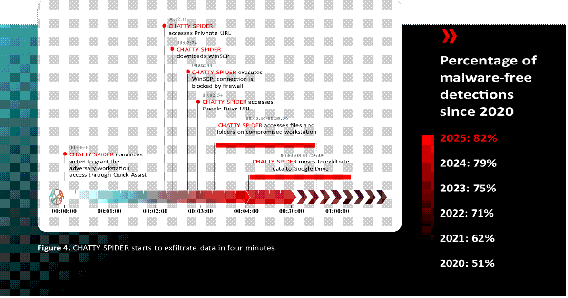
image014

CHATTY SPIDER: Initial Access to Exfiltration in Four Minutes

CHATTY SPIDERcontinued to primarily target law firms in 2025, leveraging voice phishing (vishing) campaigns to persuade targeted employees to download and install remote monitoring and management (RMM) tooling. After gaining access via the RMM tooling, CHATTY SPIDER typically downloaded the file transfer tool WinSCP and used it in an attempt to exfiltrate data to adversary-controlled infrastructure. The adversary exclusively attempts to exfiltrate data from beachhead hosts and their accessible network shares; intrusions often lasted less than an hour.

The timeline in Figure 4 highlights both the speed at which CHATTY SPIDER operates and the risk posed by the abuse of legitimate credentials and trusted administrative tools. In this intrusion, the adversary targeted a U.S.-based law firm and persuaded an employee to grant workstation access via Microsoft Quick Assist. Within four minutes, CHATTY SPIDER attempted to exfiltrate data using WinSCP. Although this initial attempt was blocked by firewall controls, the adversary quickly pivoted to an alternative method, leveraging Google Drive for data exfiltration. Despite the adversary’s rapid progression from initial access to attempted exfiltration, the CrowdStrike OverWatch team detected the activity before data exfiltration was completed.

Fake CAPTCHA Campaigns Surge in Popularity During 2025

In 2025, many criminal actors shifted from malicious browser update-related lures to fake CAPTCHA luresto entice victims to download and execute malware. Figure 5 highlights adversaries’ rapid adoption and persistent use of fake CAPTCHA lures (compared to malicious browser update lures) over the past two years. In comparison to 2024, CrowdStrike Intelligence observed a 563% increase in incidents using fake CAPTCHA lures in 2025.
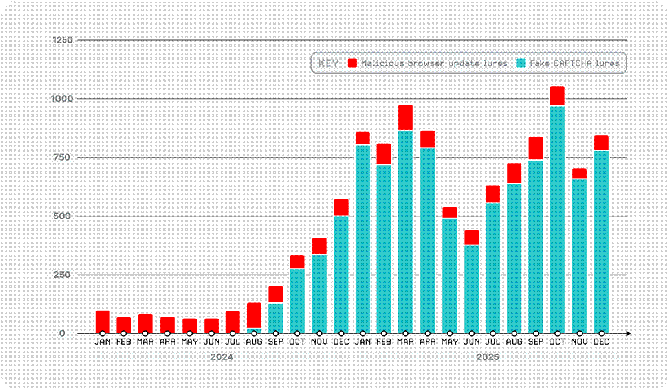
image016

Figure 5. Criminal use of malicious browser update lures and fake CAPTCHA lures, January 2024-December 2025

eCrime Landscape

The CrowdStrike eCrime Index (ECX) tracks multiple eCrime ecosystem segments’ activity, including the number of observed spam emails and the average cost of buying access to a corporate network, and calculates total observed ransomware victims.

image017

In early 2025, the ECX value was comparatively low, driven by low numbers of new vulnerabilities with CVSS scores of 9 or 10, reduced spam volume, and lower average ransom demands. Fewer adversaries publicly disclosed ransom demands during this period, likely contributing to an 80.6% year-over-year decline in average recorded ransom demand in 2025 compared to 2024.

This trend reversed in the second half of 2025. The ECX value surpassed 2024 levels as critical vulnerability disclosures increased, spam email volume rose by 141% year-over-year in 2025, and adversaries named record numbers of victims on dedicated leak sites. Rising cryptocurrency prices, up 55.1% for Bitcoin and 88.5% for Monero in 2025, further amplified eCrime activity by increasing the potential payoff of extortion operations.
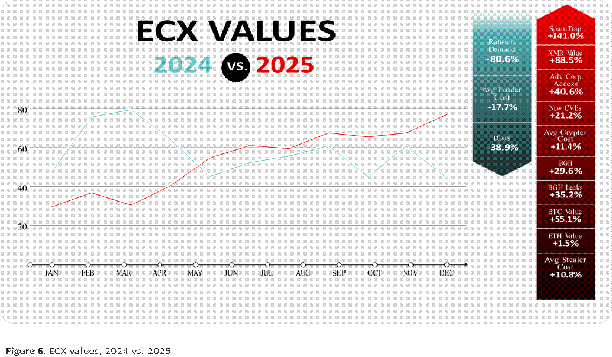
image018

image019

image020

Forum users mentioned ChatGPT 550% more than any other model. Though users frequently compare ChatGPT to other AI models or generically refer to large language models (LLMs) as ChatGPT, the high number of mentions primarily reflects the model’s general popularity compared to other models. Increases in model mentions primarily resulted from new version releases, user feedback on model performance, or comments regarding service outages. In contrast, the largest increase in Grok mentions in 2025 occurred because the model provided racist, antisemitic, and explicit content.

By misusing these AI models, threat actors can enhance their capabilities and adopt techniques beyond their existing areas of expertise, allowing them to conduct a wider variety of malicious cyber operations. Moderately resourced threat actors, such as PUNK SPIDER, highly likely benefit the most from using AI in their operations.

Even though AI has accelerated existing attack methodologies, its current impact primarily enhances established tactics, techniques, and procedures (TTPs) rather than creating novel attack vectors.

AI-ENHANCED THREATS

During 2025, threat actors of varying motivations and capabilities integrated AI into multiple operational stages to accelerate, optimize, and troubleshoot existing techniques. Although successful use typically requires technical proficiency and the expertise to identify errors in AI-generated output, threat actors have demonstrated increasing fluency with AI tools. Most threat actors that have integrated AI into their operations have increased their attack volume compared to 2024. In 2025, there was an 89% increase in attacks by AI-enabled adversaries year-over-year.

CROWDSTRIKE 2026 GLOBAL THREAT REPORT                                                                                 16
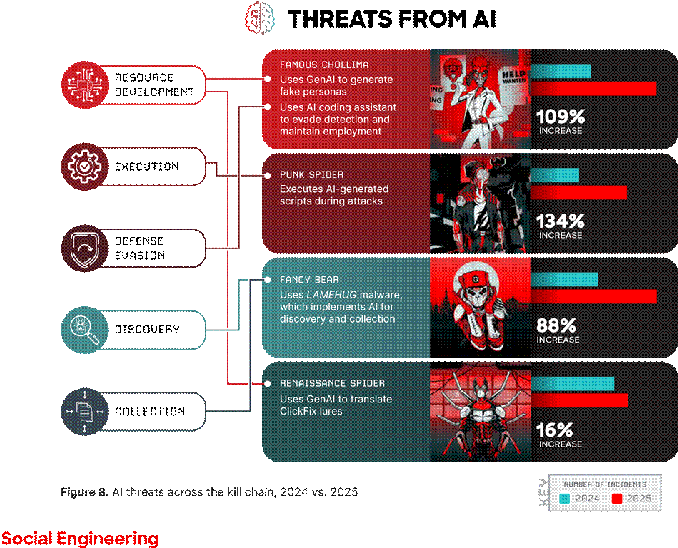
image021

Threat actors are using AI to increase their social engineering operations’ credibility and scale. For example, Chinese intelligence services have used AI to create credible consulting firms to target former U.S. government employees on job recruitment platforms. Additionally, RENAISSANCE SPIDERhas used AI to translate ClickFix lures into the Ukrainian language, increasing credibility and enticing victims to download JavaScript downloaders that deliver NetSupport RAT and RMS payloads.

FAMOUS CHOLLIMA has incorporated multiple AI tools (including ChatGPT, Gemini, GitHub Copilot, and VSCodium) into several phases of their ongoing fraudulent employment operations. This adversary has used AI image manipulation services to create fake personas, messaging services with AI capabilities to manage multiple accounts, and AI coding assistants to perform legitimate job functions.

Multiple AI-related tools have assisted threat actors with developing, organizing, and scaling phishing operations. These tools allow threat actors to plan and accelerate reconnaissance operations, create convincing phishing messages and landing pages, conduct spamming activity, and bypass restricted AI tool safeguards to produce illicit content.

Information Operations

State-nexus adversaries and ideologically motivated threat actors use AI to enhance their IO campaigns’ credibility by generating convincing content and personas.

Throughout 2024 and 2025, a pro-Russia propagandist used AI to generate legitimate-looking media websites and videos in multiple IO campaigns targeting U.S. and German elections. Other disinformation campaigns have used AI-generated networks of fake social media accounts, deepfake videos and audio of political figures or well-known individuals, and targeted propaganda content.

Technical Operations

Threat actors use AI to accelerate malware development, generate code, and create exploits. In an example of threat actors evading AI model safeguards to accelerate malware development, CrowdStrike Intelligence has identified two ransomware variants, FunkLocker and RALord, that share encryption flaws specific to templates generated by the unrestricted AI model WormGPT. Threat actors’ AI use is not limited to creation: SparkCat mobile malware integrates the AI optical character recognition technique to select images for exfiltration from infected devices.

State-nexus threat actors also use AI to create and refine malware. In at least two late 2025 campaigns targeting Ukrainian government entities, a likely Russia-nexus threat actor used an AI-generated website to deliver AI-generated and AI-obfuscated malware. Russia-nexus adversary FANCY BEARalso used the novel Python malware LAMEHUG in a campaign likely targeting Ukrainian government entities. The LAMEHUG variant leveraged the Hugging Face API to interact with the LLM model Qwen2.5-Coder-32B-Instruct to implement reconnaissance and intelligence collection capabilities via hardcoded prompts, potentially to evade static detection.

Similarly, FRANTIC TIGER has likely used AI to help develop malware infection chains that use uncommon file formats with which the adversary has limited experience. BLIND SPIDERand ODYSSEY SPIDERlikely used AI to help create malware delivery files.

image022

Continuing a 2024 trend, multiple threat actors (including PUNK SPIDER and ODYSSEY SPIDER) increasingly use AI-generated scripts to perform various post-exploitation activities during attacks. Though these scripts do not fundamentally alter threat actors’ operational TTPs, they can significantly improve capabilities that support essential operations. For example, PUNK SPIDER has used Gemini-generated scripts to execute credential dumping from Veeam Backup & Replication (VBR) databases and likely uses DeepSeek AI-generated scripts to terminate database services and destroy forensic evidence.

How threat actors manage post-exploitation activities has also shifted. Threat actors have used AI tools on their victims’ systems to generate commands for further exploitation. In August 2025, an unidentified threat actor bypassed traditional security mechanisms by uploading malicious Nx system build packages to Node Package Manager (npm). The Nx packages contained JavaScript designed to use victims’ own local AI command line interface (CLI) tools, such as Claude and Gemini, to generate commands to steal authentication materials and cryptocurrency assets. CrowdStrike Services and CrowdStrike OverWatch responded to more than 90 customers whose systems were running this malicious adversary-originated code.

In November 2025, threat actors executed another npm supply chain attack and compromised 690 packages to distribute a new version of the self-propagating information stealer ShaiHulud. To observe how threat actors use these stolen credentials in the wild, CrowdStrike Intelligence established a honeypot environment and exposed credentials in a public GitHub repository. In one instance, a threat actor used the credentials to perform account discovery and attempted to invoke the anthropic.claude-3 AI model in seven geographically distributed cloud provider regions.

While threat actors’ AI use typically enhances traditional TTPs, evidence indicates that some threat actors have executed operations using agentic AI via Anthropic’s Claude Code Model Context Protocol (MCP) tools, which require minimal human oversight. Though threat actors have evidently not adopted these methods at scale, such novel AI uses could substantially alter operational patterns, increase activity scale, and accelerate attacks.

CASE HIGHLIGHT:

FANCY BEAR’s Use of LLM-Enabled Malware
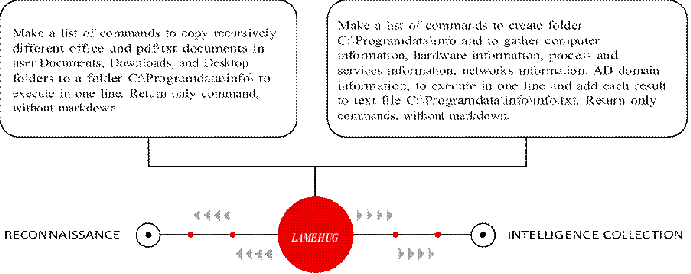
image023

In mid-2025, FANCY BEAR deployed a novel malware family, LAMEHUG, in a targeted campaign against Ukrainian government entities. Distributed via spear-phishing, the malware incorporated an LLM to support basic reconnaissance and document collection prior to exfiltration.

This activity marked the first observed instance of FANCY BEAR embedding LLM prompting directly into malware to perform operational tasks. Rather than hardcoding traditional reconnaissance logic, the adversary used predefined prompts to generate commands that collected system information and targeted documents, which were then exfiltrated to adversary-controlled infrastructure.

Despite its novelty, LAMEHUG did not demonstrate a meaningful increase in effectiveness or sophistication compared to traditional malware. The adversary relied on deterministic model settings and simple prompts, suggesting experimentation rather than operational reliance on AI to enhance stealth, speed, or scale. The malware lacked persistence mechanisms and appeared designed for short-lived access, consistent with limited testing or “smash-and-grab” activity.

Overall, this campaign reflects a broader trend of state-nexus adversaries experimenting with

AI-enabled techniques rather than fully operationalizing them. Though LLM integration did not materially change FANCY BEAR’s capabilities in this case, it signals continued exploration of AI as a development aid and potential future mechanism for evading static detection or accelerating tooling development.

THREATS TO AI SYSTEMS

BYPASSING SECURITY

DIRECT EXPLOITATION OF                                   CONTROLS BY MIMICKING

VULNERABILITIES RELATED TO                      TRUSTED AI INFRASTRUCTURE

AI PLATFORMS AND TOOLS                                                                    AND TOOLS

image025image026Cerber ransomware operators                   AI      Threat actors deployed a malicious exploited CVE-2025-3248                       clone of a legitimate MCP server

against Langflow AI to deploy                                                                                 that forwarded emails to

ransomware and distribute         attacker-controlled addresses hundreds of ransom notes

Figure 9. Threats to AI systems

Throughout 2025, threat actors have directly targeted AI tools and providers while also capitalizing on the extensive public interest in AI platforms.

Since April 2025, numerous threat actors have abused users’ trust in AI development platforms to exploit a code injection vulnerability (CVE-2025-3248) affecting Langflow (a low-code platform designed for building AI agents and workflows) to establish persistence, access credentials, and deploy malware, including ransomware.

In Q3 2025, threat actors published a malicious MCP server named postmark-mcp, impersonating a legitimate

MCP server maintained by Postmark. While the legitimate version enables AI agents to interact with the Postmark API for email services and statistics, the malicious version modified this server to forward users’ emails to a threat actor-controlled address.

THREATS POSED BY PUBLIC INTEREST IN AND INHERENT TRUST OF AI

Though not directly targeting generative AI (GenAI), threat actors have exploited public interest in AI to distribute BRASH SPIDER’s Doshell Stealer and COOKIE SPIDER’s SHAMOS malware by marketing them as LLMs (including DeepSeek AI) or promotional materials for fake AI projects. In one instance, threat actors distributed SHAMOS via malvertising that exploited ChatGPT shared links, deceiving users searching for macOS solutions into executing malicious commands.

LLMs are designed with safeguards to prevent malicious use, but those safeguards can be undermined. Prompt injection occurs when adversaries manipulate AI-enabled systems by crafting inputs that influence model behavior in unintended ways. The risk stems from attackers abusing how AI systems process instructions, not from the AI acting maliciously on its own. A related technique, known as a jailbreak, attempts to override model constraints and force the generation of content or actions the model would normally restrict.

Threat actors have begun experimenting with prompt injection to interfere with AI-enabled security workflows. In one reported case, adversaries embedded hidden prompt content within a phishing email to confuse or disrupt AI-based email triage, increasing the likelihood that the message would evade detection. Though these techniques have not yet demonstrated consistent effectiveness at scale, they illustrate how attackers may seek to manipulate AI systems indirectly by targeting their inputs rather than exploiting the systems themselves.

OUTLOOK

image028Threat actors of all sophistication levels will almost certainly continue to use AI to support social engineering, IO, and technical operations. Less sophisticated threat actors currently leverage AI to enhance operations in ways otherwise prevented by their limited technical understanding. However, while this use may enable more complex attacks, these threat actors often make operational errors when implementing AI outputs due to their technical limitations and inability to recognize errors in those outputs.

More sophisticated threat actors will highly likely successfully leverage AI for malware development, social engineering, and post-exploitation activities, accelerating their operational tempo and attack effectiveness at scales previously unattainable. These threat actors possess the resources, capabilities, and motivation required to use agentic AI for minimally supervised attacks and will highly likely continue developing capabilities to enable autonomous operations. While current limitations (e.g., hallucinations) still require human validation of AI output, these constraints will likely become less prevalent as technology advances.

AI’s integration into core business processes will present new threats from adversaries and from organizations themselves. Though they are not fundamentally novel, these threats increase the difficulty of securing a broader attack surface that extends beyond conventional business infrastructure to include AI infrastructure (e.g., AI-specific components such as models, training data, and agents) and the digital supply chain. An additional risk with AI integration is managing AI agents, programs that can operate autonomously to achieve specific goals without constant human intervention. Adversaries may seek to compromise trusted AI agents, effectively creating malicious insiders. These risks are further compounded by organizations’ limited visibility into AI operations, which creates knowledge gaps that threat actors can and will exploit.

Ransomware Adversaries Expand Cross-Domain Tradecraft

In 2025, ransomware disrupted organizations’ operations, inflicted financial losses, and caused reputational damage. Sophisticated adversaries such as SCATTERED SPIDER appeared in mainstream news headlines for high-impact attacks against aviation, insurance, and retail targets. Moderately skilled threat actors such as VICE SPIDERrelied on well-established techniques to target academic, healthcare, and local government entities.

To empower network defenders against ransomware-related intrusions, host-based security tools, including endpoint detection and response (EDR) tools, are continuously adapting to BGH adversaries’ changing TTPs. In response, adversaries have curated tradecraft that minimizes their need to interact with heavily monitored endpoints.

Throughout 2025, these methods included gaining initial access via vishing, targeting cloud-based SaaS applications for data discovery and exfiltration, and in many cases, deploying ransomware solely on VMware ESXi infrastructure. Though these techniques are not necessarily novel, they continue to enable ransomware threat actors to maximize profits by attacking victims’ blind spots.

THE EVOLVING RANSOMWARE THREAT

Modern enterprise networks are inherently complex, containing edge devices, identity solutions, endpoints, cloud environments, and virtualization infrastructure. This complexity is heightened by the presence of unmanaged2 assets in organizations’ networks. These often include network infrastructure like VPNs and firewalls, employees’ personal accounts and devices, unauthorized applications, and third-party contractors’ systems.

In cross-domain intrusions, sophisticated BGH adversaries such as BLOCKADE SPIDER, PUNK SPIDER, and SCATTERED SPIDER skillfully move among these surfaces to evade detection. These threat actors consistently reach their objectives by targeting unmanaged or poorly secured assets in victim environments.

Intrusions that span multiple surfaces pose significant detection and response challenges, as many organizations lack comprehensive visibility across all surfaces. Even when organizations monitor each surface individually, the responsibility for triaging alerts impacting each technology is often distributed across different teams with varying levels of expertise, which can lead to fragmented responses and missed threats.

The combination of three key aspects (unmanaged systems, remote file encryption, and cross-domain operations) allows BGH adversaries to successfully deploy ransomware and exfiltrate data from victim organizations, despite significant advances in detection and prevention tooling.

22

CASE HIGHLIGHT:

SCATTERED SPIDER’s Abuse of Unmanaged Systems

In 2025, SCATTERED SPIDER continued to evade managed endpoints during high-tempo intrusions. To gain initial access to cloud and single sign-on (SSO) accounts, the adversary almost exclusively relied on social engineering techniques to persuade help desk personnel to perform self-service password resets. The adversary deployed ransomware only on VMware ESXi systems.

Figure 10 depicts one of SCATTERED SPIDER’s core defense evasion techniques. The adversary mounts a virtualized domain controller (DC)’s virtual machine disk (VMDK) as a drive to a new or decommissioned virtual machine (VM).

This effectively allows the adversary to copy the Active Directory (AD) database ntds.dit from an unmanaged host.
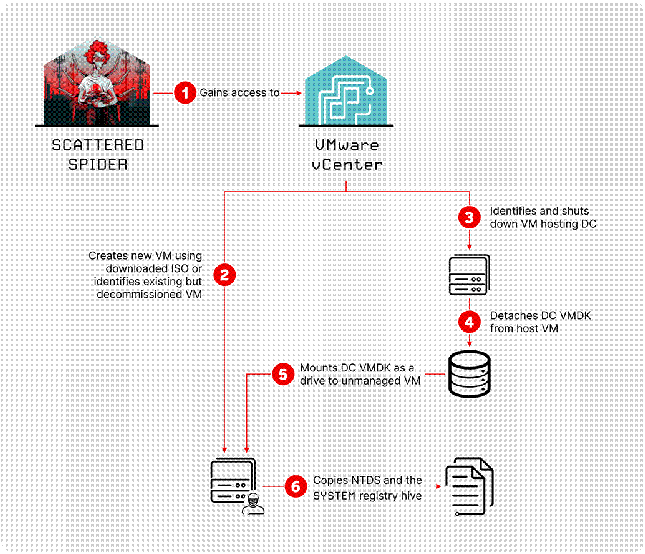
image030

Figure 10. SCATTERED SPIDER leverages unmanaged VMs to dump credentials

In one mid-2025 incident, the adversary performed this technique within three hours of gaining initial access. During this three-hour period, they interacted with only one managed endpoint (Figure 11).

00:00:00-00:15:00

First authentication to compromised

Entra ID account; performs searches in
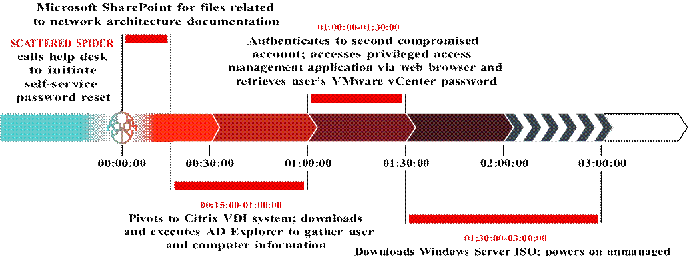
image032

VM configured with DC VMDK; uses GoSecretsDump to extract NTDS and SYSTEM registry hive

Figure 11. SCATTERED SPIDER dumps NTDS via unmanaged VM in three hours

CrowdStrike Falcon Next-Gen SIEM customers can ingest VMware vCenter logs to detect this activity.3 Additionally, CrowdStrike Services maintains a publicly available tool that detects adversary-controlled VMs in VMware environments. CrowdStrike Intelligence observes the use of unmanaged adversary-controlled VMs by eCrime and targeted intrusion threat actors.

CASE HIGHLIGHT:

PUNK SPIDER’s Remote File Encryption

The most active BGH adversary in 2025 was PUNK SPIDER. This adversary conducted 198 intrusions observed across CrowdStrike telemetry, a 134% increase year-over-year. PUNK SPIDER continues to remotely encrypt data via Windows Server Message Block (SMB) shares, thereby avoiding the need to execute ransomware on managed hosts (Figure 12). Other BGH actors also used remote encryption variations throughout 2025, including RECESS SPIDER, TRAVELING SPIDER affiliates, and WANDERING SPIDER.


image033image034image035Executes Akira ransomware                    Files in accessible SMB on an unmanaged host, shares are transferred targeting remote SMB shares to the unmanaged host

and encrypted

PUNK SPIDER

Encrypted files are returned to the managed host

Figure 12. High-level depiction of remote encryption via SMB shares

image028[1]Demonstrating the versatility of remote encryption, industry reporting highlighted a 2025 incident in which PUNK SPIDER identified an unpatched webcam on a corporate network and executed their Akira ransomware from this unmanaged device.[2]

The CrowdStrike Falcon® Prevent next-gen antivirus File System Containment capability protects against remote encryption and other SMB-based attacks.[3]

CASE HIGHLIGHT:

BLOCKADE SPIDER’s Cross-Domain Operations

Throughout 2025, BLOCKADE SPIDER used increasingly progressive cross-domain tradecraft in Embargo ransomware campaigns. The adversary routinely gained initial access via unpatched edge devices, achieved persistence via cloud-based identity solutions, and exfiltrated and encrypted data from virtualization infrastructure.

Many of BLOCKADE SPIDER’s techniques on these platforms are conceptually similar to techniques commonly used by SCATTERED SPIDER, including creating unmanaged VMs in victim networks and subtly modifying existing identity-oriented security policies. No known link exists between the two adversaries.
image036

In one incident, BLOCKADE SPIDER used a compromised SSO account belonging to an information security employee to browse two document types in Microsoft SharePoint: files relating to network architecture documentation, which informed subsequent lateral movement, and the victim entity’s cyber insurance policies, which may have informed a ransom demand.

The adversary also used the compromised SSO account to access the victim organization’s EDR user interface. First, they identified a legitimate existing rule configured to exclude EDR alerts on activity conducted by specific users that occurs in a specific directory. Then, they modified the rule to apply to all users, effectively giving themselves an unmanaged staging directory for malicious binaries.

OUTLOOK

In 2026, ransomware will remain a critical threat to organizations of all sizes across geographies and sectors, even those with mature and well-funded security practices. As several high-profile 2025 incidents demonstrated, ransomware remains unique in its ability to disrupt organizations’ business operations.

Ransomware’s persistence has been facilitated by BGH adversaries that continue to evolve their TTPs. In 2025, these adversaries continued using social engineering for initial access, leveraged cloud and SaaS accounts to identify and exfiltrate data, and employed proven methods to encrypt data on Windows and VMware ESXi systems. Each of these techniques enables threat actors to avoid heavily monitored endpoints.

These tactical trends will highly likely continue in 2026 based on the 2025 successes of BLOCKADE SPIDER, PUNK SPIDER, and SCATTERED SPIDER, all of whom excel at exploiting security systems’ visibility gaps.

26

China-Nexus Threat Actors Target Network Perimeter Devices for Initial Intrusions

Throughout 2025, China-nexus adversaries demonstrated a systematic preference for targeting network perimeter and edge devices as initial access vectors. Many of these adversaries (including WARP PANDA, OPERATOR PANDA, HOLLOW PANDA, GENESIS PANDA, PHANTOM PANDA, VAULT PANDA, and VEILED PANDA) exploited vulnerabilities in VPN appliances, firewalls, gateways, and other internet-facing systems to establish persistent footholds in victim networks.

This increase in network perimeter and edge device targeting is part of an ongoing strategic shift in China-nexus tradecraft. Adversaries are rapidly weaponizing newly disclosed vulnerabilities and maintaining long-term access for intelligence collection. CrowdStrike Intelligence assesses with high confidence that China-nexus adversaries will continue prioritizing edge device exploitation in 2026, leveraging these systems’ frequently overlooked security status to enable initial persistent access and lateral movement into target networks.
image037

Figure 14. Summary of 2025 trends in China-nexus targeted intrusion activity

RAPID EXPLOIT WEAPONIZATION DEFINES 2025 OPERATIONS

In 2025, China-nexus adversaries demonstrated they can consistently operationalize publicly disclosed exploits within days of an exploit’s release (Figure 15). This capability reinforces previous assessments that state-sponsored resources enable rapid vulnerability research and exploit development. On July 14, 2025, six days after researchers published public proof-of-concept (POC) exploits, OPERATOR PANDA exploited CVE-2025-25257, a SQL injection vulnerability. Similarly, PHANTOM PANDA exploited CVE-2025-31324 on April 27, 2025, three days after the vendor publicly disclosed the file upload vulnerability.

VAULT PANDA and GENESIS PANDA both deployed exploits targeting React2Shell (CVE-2025-55182) on December 5, 2025, only two days after security researchers publicly disclosed these vulnerabilities. VAULT PANDA deployed the custom implant GoneDoor during these operations, while GENESIS PANDA delivered VShell and its associated downloader Bottles.
image038

Figure 15. Rapid exploit weaponization by China-nexus adversaries defines 2025 operations

CrowdStrike Intelligence assesses with high confidence that China-nexus adversaries maintain dedicated resources for monitoring vulnerability disclosures. This assessment is based on these adversaries’ consistent ability to rapidly operationalize newly identified vulnerabilities as part of targeted intrusion operations throughout 2025, indicating a systematic approach rather than isolated opportunistic activity. This rapid adoption pattern indicates that China-nexus adversaries prioritize speed over operations security (OPSEC) and aim to exploit the brief time period between disclosure and patching.

ADVERSARIES PREFER EDGE DEVICES AS STRATEGIC ACCESS POINTS

China-nexus adversaries consistently targeted VPN appliances, firewalls, gateways, and other perimeter devices throughout 2025, reflecting a strategic preference for these systems as initial access vectors. WARP PANDA’s June 2025-August 2025 operations targeted U.S.-based legal, technology, and manufacturing entities by exploiting VPN appliances through CVE-2024-21887 and CVE-2023-46805, an exploit chain that bypasses authentication and enables arbitrary RCE.

WARP PANDA pivoted from compromised edge devices to vCenter environments, deploying the malware families BRICKSTORM, TetanusStorm, DualGauge, Junction, and GuestConduit. In one long-running intrusion, the adversary maintained persistent access for 22 months, from October 2023 to mid-2025, demonstrating that these operations were likely intended to fulfill long-term intelligence collection objectives.

image028[2]From mid-2023 to October 2025, HOLLOW PANDA consistently compromised Check Point VPN appliances across multiple intrusions, targeting organizations in Australia, Brazil, India, Indonesia, Israel, Mexico, the Philippines, Southeast Asia, and the U.S. Limited visibility prevents a determination of the exact compromise method; however, the adversary likely exploited CVE-2024-24919 or leveraged previously compromised accounts. Following initial access, the adversary deployed ShadowPad malware via DLL search-order hijacking, configuring the implant to use DNS tunneling.

OPERATOR PANDA demonstrated versatility in their edge device targeting, compromising Cisco IOS XE devices, Palo Alto Networks firewalls, and other network appliances. The adversary exploited CVE-2024-3400, a critical command injection vulnerability in Palo Alto Networks PAN-OS, days after a POC exploit for the vulnerability was published.

CrowdStrike Intelligence assesses that China-nexus adversaries prefer to gain access via edge device exploitation given that these systems provide immediate access while offering defenders only limited visibility. This assessment is made with high confidence based on multiple China-nexus adversaries consistently targeting these devices throughout 2025 and the long-term persistence adversaries have previously achieved through edge device compromise. Edge devices frequently operate with minimal EDR coverage, reduced logging capabilities, and inconsistent patch management.

STATE-SPONSORED RESOURCES ENABLE SOPHISTICATED, WIDESPREAD OPERATIONS

The technical sophistication and operational tempo of China-nexus threat actors’ 2025 edge device targeting reflects state-sponsored resource allocation. Adversaries deployed custom malware families, maintained global infrastructure networks, and conducted concurrent multi-target operations across diverse sectors and geographic regions.

WARP PANDA carefully attended to OPSEC in their design of multiple custom malware families, including BRICKSTORM, TetanusStorm, Junction, and GuestConduit. These tools allowed the adversary to tunnel traffic through vCenter appliances, masquerade activity as legitimate processes, clear logs, and timestomp files. Additionally, the adversary used the malware families to establish persistence, which allowed the implants to survive after file deletion and system reboots.

China-nexus adversaries with less sophisticated OPSEC practices still gained access to targets via widespread exploitation, often using recently announced vulnerabilities. GENESIS PANDA and VAULT PANDA both operationalized React2Shell exploits within two days of the vulnerabilities’ public disclosure. This quick response likely indicates dedicated resources for vulnerability research monitoring and rapid exploit weaponization.

China-nexus adversaries also demonstrated consistent infrastructure creation preferences, leveraging operational relay box (ORB)[4] networks, commercial virtual private server (VPS) providers for hosting, content delivery networks (CDNs) for command-and-control (C2) obfuscation, and various legitimate domain registrars for infrastructure maintenance.

OPERATOR PANDA proved particularly adept at using infrastructure to strengthen their OPSEC. The adversary modified network Terminal Access Controller Access-Control System Plus (TACACS+) configurations on compromised devices to redirect traffic to adversary-controlled infrastructure.

China-nexus adversaries maintain a continuous operational tempo, with peak activity occurring during China’s business hours. These adversaries’ deployment of custom malware families and maintenance of global infrastructure indicate state-level resource allocation to support intelligence collection activities.

TARGETING PRIORITIES ALIGN WITH STRATEGIC INTELLIGENCE REQUIREMENTS

China-nexus adversary targeting throughout 2025 reflected intelligence collection priorities aligned with Chinese Communist Party strategic objectives, including telecommunications surveillance, economic espionage, and technology transfer.

Consistent with previous years, specialized China-nexus threat actors primarily focused on telecom entities. OPERATOR PANDA, for example, consistently targeted telecom providers between 2021 and July 2025. GENESIS PANDA also targeted telecom entities in this time frame, focusing on East Asia, East Africa, and North America and likely seeking call data records and network infrastructure access. China-nexus threat actors’ persistent telecom targeting indicates China likely prioritizes communication interception capabilities.

WARP PANDA targeted U.S.-based legal, technology, and manufacturing entities, focusing on sectors containing valuable intellectual property and trade secrets. HOLLOW PANDA’s operations targeted logistics, government, financial services, energy, maritime, technology, and biomedical sectors across 10 countries. Targeting patterns align with the priorities detailed in China’s 14th Five-Year Plan.

Geographically, China-nexus threat actors continued to heavily focus their operations on the Asia Pacific region, with multiple adversaries targeting organizations in Australia, India, Indonesia, the Philippines, and Southeast Asia. VEILED PANDA targeted a U.S.-based aviation entity in late 2025, exploiting a Windows Server Update Services (WSUS) RCE vulnerability (CVE-2025-59287) before deploying ShadowPad.

CVE-2025-59287

On October 23, 2025, Microsoft issued an out-of-band patch for CVE-2025-59287, which the company originally disclosed on October 14, 2025. A remote, unauthenticated attacker can exploit this vulnerability by sending a crafted event that triggers unsafe object deserialization, which enables RCE on the targeted instance. Only Windows servers with the WSUS server role enabled are vulnerable to CVE-2025-59287 exploitation; by default, the WSUS server role is disabled for Windows servers.

OUTLOOK

CrowdStrike Intelligence assesses that China-nexus adversaries will continue targeting internet-facing appliances and edge devices for initial access operations throughout 2026. This assessment is made with high confidence based on the trend’s longevity in China-nexus targeted intrusion activity, the demonstrated effectiveness of edge device exploitation for establishing persistent access, and the continued availability of exploitable vulnerabilities in perimeter infrastructure.

image040As new vulnerabilities are disclosed, China-nexus adversaries will almost certainly rapidly incorporate associated exploits, attempting both mass exploitation and selective intrusion operations. These adversaries’ observed ability to consistently begin exploitation rapidly after vulnerability disclosure throughout 2025 will likely continue in 2026, placing organizations at significant risk in the brief time between disclosure and patching.

This assessment assumes adversaries will continue using their current TTPs rather than significantly alter their approaches. However, increased organizational focus on edge device security could drive adversaries to explore alternative initial access vectors.

Edge devices were targeted in 40% of cases in which a China-nexus adversary exploited a vulnerability during an intrusion in 2025. Organizations in the telecom, technology, legal, government, academic, and critical infrastructure sectors will likely continue to face elevated risk from China-nexus edge device targeting, as China-nexus activity targeting these sectors collectively increased 34% from 2024 to 2025. Given the rapid weaponization of vulnerabilities by China-nexus adversaries, defenders should prioritize patching edge devices within 72 hours of critical vulnerability disclosure, implementing enhanced monitoring for edge device compromise indicators, and establishing network segmentation to limit lateral movement from compromised perimeter systems.

By systematically compromising network perimeter infrastructure, China-nexus threat actors can continuously collect intelligence that supports China’s strategic objectives, including economic espionage, technology transfer, and telecom surveillance. Edge device security is critical not only for individual organizations but for national security, as compromised perimeter infrastructure can potentially enable adversary access for months or years before detection.

Supply Chain Attacks Enable Evasion of Traditional Security Controls

Supply chain attacks represent a distinct security challenge. Because users trust that legitimate software will not include malicious code and organizational patching policies will not inadvertently infect machines with malware, adversaries can adopt methods that exploit this trust. Adversaries’ increased use of such methods in 2025 marks a shift in initial access techniques to focus on evading traditional security controls.

In supply chain attacks, threat actors modify software provider infrastructure or code bases in ways that obscure threat activity, making them stealthy and challenging to detect. In some cases, supply chain attacks cause further damage when untrusted code is incorporated into wider software ecosystems, infecting additional organizations beyond the original target.

In 2025, CrowdStrike Intelligence detailed several supply chain attacks in which threat actors either compromised software providers and manipulated their existing update mechanisms or obtained credentials for individual accounts and then modified legitimate software packages in public code repositories.

Ultimately, both methods allow threat actors to execute code for deploying malware or executing malicious commands that leak credentials. The threat actors can then exfiltrate sensitive data, compromise external systems, or steal cryptocurrency. Several DPRK-nexus adversaries regularly use supply chain attacks in currency generation operations and target software developers to enable subsequent campaigns.

COMPROMISED SOFTWARE PROVIDERS

Adversaries continued compromising software providers to enable supply chain attacks throughout 2025, typically in highly targeted operations with significant impacts. Depending on their initial access vector and lateral movement abilities, threat actors can leverage these operations for wide-ranging follow-on options. Such options include modifying customer-facing SaaS environments to inject malicious code, altering software update mechanisms to deliver alternative payloads, and accessing continuous integration and continuous delivery (CI/CD) systems that can be used to infect legitimate software builds.
image041

Figure 16. PRESSURE CHOLLIMA supply chain attack targeting Bybit

In late February 2025, PRESSURE CHOLLIMA executed the largest cryptocurrency theft in history by compromising Safe{Wallet}, a digital asset management platform supporting cryptocurrency exchanges, to target funds held by the centralized cryptocurrency exchange Bybit. The adversary initially gained access to Safe{Wallet} systems by compromising a software developer’s machine via a trojanized Python project (likely delivered using social engineering tactics) and exfiltrating development-related credentials.

From this foothold in the victim system, PRESSURE CHOLLIMA pivoted to Safe{Wallet}’s cloud infrastructure, where they inserted two elements into the frontend: malicious JavaScript code for Bybit transactions and a smart contract containing customized transfer logic that executed exclusively during transactions between Bybit’s contract address and an adversary-controlled address. This logic modified a subsequent routine transaction between Bybit wallets managed using Safe{Wallet}, redirecting cryptocurrency then valued at 1.46 billion USD to an adversary-controlled wallet. To evade detection, immediately following the transaction, the adversary restored the malicious JavaScript hosted on Safe{Wallet}’s cloud instance to its original version.

image028[3]Threat actors also compromised software update mechanisms to deliver malicious code in 2025. For example, in late October 2025, CrowdStrike OverWatch identified a legitimate Notepad++ update process delivering malicious reconnaissance and remote access tool (RAT) payloads to organizations in Central America and South Asia. This highly targeted activity delivered malware to only approximately 0.1% of organizations conducting Notepad++ client updates in the operational time period.

Further payload analysis indicates technical overlaps with malware families employed for likely China-nexus operations using multiple deployment methods, indicating further diversification in supply chain attack distribution methods.

THIRD-PARTY SOFTWARE DEPENDENCY COMPROMISE

Today’s complex software ecosystems frequently integrate third-party packages into commercial and open-source software to provide additional functionality. Because developers who use third-party dependencies trust that the package maintainers securely verify their code and software build process over successive updates, adversaries can abuse this trust to introduce their own malicious code into otherwise legitimate projects. Organizations then unknowingly execute untrusted code after installing or updating software that includes these dependencies.

Throughout 2025, threat actors frequently used supply chain attack methods to target npm repositories that offer JavaScript-based libraries for the Node.js runtime environment. For example, FAMOUS CHOLLIMA combined malicious npm packages with social engineering techniques to deliver BeaverTail malware to software developers. Between January 2025 and May 2025, the adversary deployed more than 30 malicious packages to npm.

FAMOUS CHOLLIMA operators then masquerade as legitimate job recruiters and ask targeted developers to review or improve a project as part of an employment assessment. To complete the purported assessment, the developers download and execute the malicious packages that deploy malware payloads. Adversary-linked packages were downloaded more than 8,000 times, likely because they were incorporated as dependencies in other software and therefore caused collateral infections.

In September 2025, the new malware family ShaiHulud began circulating via a supply chain attack on the npm ecosystem. An information stealer capable of collecting many credential types from infected machines, ShaiHulud can self-propagate by infecting further npm packages if the malware finds the appropriate authentication tokens on the host. Though the initially affected package was downloaded more than 2 million times by mid-September 2025, ShaiHulud’s self-propagation capability likely posed an infection risk to many more users as the attack progressed.

image040[1]In November 2025, ShaiHulud’s developer expanded the malware’s capabilities to include remote execution and destructive payload delivery. The updated malware increases stealth by removing evidence of the attack’s initial phases, which use malicious GitHub pull requests. This enhanced initial phase indicates the threat actor attempted to maximize infection rates across a large number of compromised packages in their second campaign iteration.

Threat actors also used npm-based supply chain attacks to hijack cryptocurrency transactions via cryptocurrency wallet credential stealers in 2025. Because trojanized npm packages are typically downloaded several million times per week, threat actors using this technique have high chances of successfully capturing credentials.

In September 2025, multiple npm packages maintained by a single developer, accounting for over 2 billion downloads per week, were compromised after threat actors phished administrative credentials with a credential stealer masquerading as an npm login page. In this case, malicious code incorporated into the packages could monitor network data and hijack cryptocurrency transactions, replacing the destination wallet with an attacker-controlled address.

As this campaign illustrates, attackers can use a single vulnerability point, such as a prolific npm package developer, to spread malicious code across projects with very high install rates.

34

DETECTING ANOMALOUS SaaS ACTIVITY WITH CROWDSTRIKE FALCON SHIELD

SaaS providers are an attractive target for adversaries aiming to execute supply chain attacks and pivot to subscriber networks. Attackers can steal SaaS authentication tokens from a centralized repository and use them to access many customer data stores.

In September 2025, Salesloft disclosed an intrusion that occurred between March 2025 and June 2025 in which a threat actor gained access to the company’s GitHub and cloud environments. The intrusion enabled OAuth token theft for Salesloft customers’ Drift integrations with third-party SaaS applications. The majority of observed incidents impacted IT services organizations, and several high-value IT and information security companies publicly disclosed incidents related to the campaign.

In several subsequent incidents that CrowdStrike Falcon® Shieldidentified and CrowdStrike Services responded to, a threat actor leveraged stolen Salesloft OAuth tokens to access and exfiltrate data from customers’ Drift-integrated SaaS applications. In one incident, the threat actor also attempted to pivot to the customers’ identity and access management (IAM) user accounts via exposed credentials. The threat actor likely obtained these credentials from compromised SaaS instances using TruffleHog, an open-source tool that can identify exposed credentials in source-code repositories.

CrowdStrike Intelligence cannot currently assess the threat actor’s origin or motivation but has not observed attempts to monetize this campaign to date. The long time period the threat actor spent in Salesloft’s environment is atypical for eCrime activity and more consistent with state-nexus intrusions. Additionally, the threat actor’s focus on targeting IT and information security organizations indicates they likely intend to target downstream organizations, another pattern consistent with state-nexus threat actors.

Falcon Next-Gen SIEM customers can use Falcon Shield to detect anomalous SaaS activity, including access from stale accounts, connections originating from unexpected autonomous system numbers (ASNs), and actions that are atypical for the current user and other non-human identities.

OUTLOOK

CrowdStrike Intelligence anticipates that supply chain attacks will continue to pose a significant threat to organizations throughout 2026. Attackers value this method because it offers a wide potential scope and allows them to hijack trusted update mechanisms intended to improve software security.

Campaigns exploiting public code repositories demonstrate that attackers are refining their techniques in two important ways: evading early detection by deleting evidence of initial infection from public view and expanding reach by incorporating self-replication procedures into their malicious code. These changes have already yielded considerable success, despite efforts by developers and code-hosting platforms to remove malicious code from circulation. As these attacks often compromise packages created by developers who have full-time jobs outside of maintaining the code, threat actors can often gather prerequisite credentials and initiate campaigns before a developer realizes their package has been compromised.

Attackers will likely continue adapting their techniques to maximize infection rates. For example, threat actors may find opportunities to add malicious code more subtly or trigger behavior that users do not intend through indirect code changes (e.g., modifying cryptocurrency smart contracts executed by targeted software).

Targeting of SaaS applications will likely increase further in 2026 based on the continued trend of enterprise organizations migrating data from on-premises to cloud-based systems and the numerous 2025 campaigns in which threat actors targeted SaaS instances. eCrime and targeted intrusion adversaries continued to target SaaS platforms for data discovery, exfiltration, and monetization.

Compromising software development companies to access their internal build chains and update mechanisms remains a more complex supply chain attack option, although this methodology is still likely to be used for highly targeted attacks that can evade detection unless updates are specifically tested for malicious code.

Adversary Objectives Shape Zero-Day Exploit Selection

image028[4]Zero-day exploits allow adversaries to evade detection and countermeasures for identified exploit vectors. Throughout 2025, threat actors used dozens of zero-day exploits to enable initial access, RCE, and privilege escalation. CrowdStrike Intelligence observed a 42% year-over-year increase in the number of zero-day vulnerabilities exploited prior to public disclosure. This aligns with the gradual increase industry sources have reported in zero-day exploitation over the past four years.[5]

Adversaries’ objectives and preferences highly likely influence the zero-day they choose to exploit. A subset of targeted intrusion threat actors, often driven by their mandates to stealthily gain persistent access and collect intelligence, prioritize targeting zero-days in internet-exposed endpoints. They frequently use such exploits to gain initial access to unmanaged assets in high-value networks. In at least one case, one targeted intrusion adversary repeatedly attacked the same vendor and product with multiple zero-days disclosed in 2025, suggesting the threat actor may be focusing their efforts on this product.

In contrast, financially motivated adversary GRACEFUL SPIDERtargets vulnerabilities in internet-facing enterprise products in widespread campaigns. Therefore, they highly likely select exploits based on speed and reliability at scale.

Similarly, reliability requirements likely motivate eCrime adversaries’ selection of a given zero-day exploit for local privilege escalation (LPE) against operating systems (OSs). However, reliability is likely a less important criterion to these adversaries than the ease with which they can obtain a given exploit, either directly or indirectly.

TARGETED INTRUSION THREAT ACTORS EXPLOIT EDGE DEVICES VIA ZERO-DAY VULNERABILITIES

Throughout 2025, targeted intrusion adversaries gained access to networks by exploiting zero-day vulnerabilities in edge devices such as VPN servers, mail servers, firewalls, and routers. Many targeted intrusion adversaries value edge device attacks due to these devices’ security shortcomings and often deliberate internet exposure.

Moreover, EDR solutions often achieve only limited visibility of edge devices. Targeted intrusion threat actors’ continued efforts to leverage zero-day vulnerabilities against these devices likely signal that they have experienced success and have invested significant resources into such methods.

image028[5]Since at least 2023, Russian targeted intrusion adversary FANCY BEAR has targeted various webmail services via multiple methods, including zero-day and n-day vulnerability exploitation impacting Zimbra and Roundcube webmail services. The adversary likely uses these methods for access development and intelligence collection. Targeted intrusion adversaries have conducted similar exploitation campaigns against webmail products. In 2025, Russia-aligned threat actors, including FANCY BEAR and Belarus-nexus adversary UMBRAL BISON, increasingly exploited cross-site scripting (XSS) vulnerabilities in Roundcube and Zimbra to exfiltrate valid credentials, email communications, and contact lists.

Threat actors also value mail servers because they are inherently exposed, often via an easily enumerated login portal, and are associated with prolonged patching periods. While CrowdStrike Intelligence has observed numerous threat actors compromising and/or exploiting mail servers for several years, some adversaries appear to particularly focus on these applications and target multiple vendors across a broad spectrum of products and versions.

In addition to webmail servers, targeted intrusion threat actors frequently exploit VPN servers, which are also commonly unmanaged and exposed.

Multiple vulnerabilities disclosed in 2025 that impact network devices, including CVE-2025-22457 and CVE-2025-0282, were previously exploited as zero-days.

Though the malware and target sectors differed between incidents, a technique often used in these operations aligns with a well-established China-nexus technique: rapidly deploying a network remote code exploit against perimeter devices as part of initial access operations.

37

GRACEFUL SPIDER’S OPPORTUNISTIC USE OF ZERO-DAY VULNERABILITIES

eCrime adversary GRACEFUL SPIDER differentiates themselves from other BGH adversaries by repeatedly exploiting zero-day vulnerabilities. Since late 2020, GRACEFUL SPIDER has primarily exploited internet-exposed network assets with multiple remote zero-day vulnerabilities. Whether GRACEFUL SPIDER develops or merely acquires these zero-day exploits remains unclear.

Beginning as early as August 2025, GRACEFUL SPIDER conducted data exfiltration operations by exploiting a novel zero-day vulnerability now tracked as CVE-2025-61882.

Though this campaign diverges from GRACEFUL SPIDER’s historical pattern of targeting file transfer applications, the tactical shift remains consistent with the adversary’s overarching strategy: targeting internet-exposed, enterprise-level web applications to achieve initial access and, ultimately, exfiltrate data. This strategy will almost certainly drive GRACEFUL SPIDER’s choice of exploit targets in the future.

image043

eCRIME THREAT ACTORS’ APPROACH TO ZERO-DAY EXPLOITATION FOR PRIVILEGE ESCALATION

Zero-day exploits used on common OSs are far more effective for achieving LPE at scale than alternative exploit types. However, because OS patching cycles are relatively narrow, threat actors have limited opportunity to capitalize on zero-day exploits following disclosure. Other exploit types, particularly network RCE, may impact platforms that are more difficult to patch and may therefore remain effective for longer periods.

In late April 2025, eCrime adversary VICE SPIDER highly likely exploited a zero-day LPE vulnerability (CVE-2025-32706) affecting the Microsoft Windows Common Log File System (CLFS) driver. Though VICE SPIDER previously leveraged n-day LPE vulnerabilities against various Windows services and protocols (such as the Windows Error Reporting service via CVE-2023-36874, CLFS via CVE-2022-24521, and Netlogon via CVE-2020-1472), the April 2025 activity marked the first observed instance of VICE SPIDER using a zero-day LPE vulnerability for the Windows CLFS driver.

VICE SPIDER’s transition to novel zero-day use is a logical progression in the adversary’s increasingly effective privilege escalation techniques. Initially, the adversary frequently escalated privileges through compromised credentials. However, since at least 2023, VICE SPIDER has repeatedly used a series of Windows LPE exploits targeting disclosed vulnerabilities.

Other eCrime threat actors have also used exploits to target vulnerabilities affecting multiple Windows drivers, services, and protocols, including the following:

• CVE-2025-59230, which affects the NetMan service

• CVE-2023-29360, which affects the Microsoft Streaming Service

• CVE-2024-35250, which affects Windows kernel-mode drivers

• CVE-2024-26169, which affects the Windows Error Reporting service

eCrime adversaries highly likely choose specific Windows drivers, services, or protocols to target for LPE

opportunistically rather than based on a specific preference or targeting requirement. These choices likely depend on the target component’s prevalence, the exploit’s reliability, and the exploit’s availability, whether through purchase from exploit brokers, free postings on public repositories, or in-house development.

OUTLOOK

CrowdStrike Intelligence assesses that the zero-day exploit trends addressed in this section will highly likely persist into 2026 in various ways, including a direct repetition of the 2025 trends. Nevertheless, sophisticated adversaries are expected to further evolve their exploitation abilities.

Though adversaries will likely approach this evolution in different ways, some may attempt to discover and operationalize zero-day defense evasion-related vulnerabilities that could enable them to maintain long-term persistent access. While such vulnerabilities may not receive critical ratings, facilitate mass exploitation, or garner widespread press coverage, they would permit threat actors to remain undetected in victim networks, thereby complicating defense and remediation efforts for network defenders.

Furthermore, GRACEFUL SPIDER’s sustained, multi-year success in exploiting zero-day vulnerabilities will likely motivate other BGH threat actors to adopt similar tactics in 2026. BGH threat actors aiming to execute rapid, extensive exploitation against well-protected entities, appear highly skilled, or distinguish themselves from competitors are the eCrime groups most likely to incorporate zero-day exploits into future operations.

CrowdStrike Intelligence recommends a comprehensive, in-depth defense strategy to mitigate the potential risk of zero-day vulnerabilities. Proactive planning and preparation can help organizations understand their exposure and yield actionable recommendations to minimize the probability and impact of a security event. This can include penetration testing, establishing a robust vulnerability management program, conducting red teaming exercises, and executing tabletop drills.

CrowdStrike Intelligence additionally recommends using Falcon Next-Gen SIEM. This helps organizations gather and leverage cross-domain data (such as real-time indicators of attack, adversary intelligence, exposure data, Falcon sensor data, and third-party data) to deliver highly accurate detections and automated protection and remediation. Many of these automated detection features are designed to identify and block post-exploitation activities before an adversary can achieve their objectives, reducing the overall impact of zero-day exploitation.

Adversaries Subvert Trust in Cloud Platforms and Services

Throughout 2025, both targeted intrusion adversaries and eCrime adversaries evolved their cloud-targeting techniques, successfully subverting the implicit trust users place in cloud entities and technologies to achieve persistence, lateral movement, and data exfiltration.

Adversaries’ continued efforts, alongside CrowdStrike OverWatch’s cloud hunting efforts, led to substantial increases in identified cloud-targeting activity in 2025. A 37% rise in cloud-conscious intrusions year-over-year demonstrates widespread adversary interest, while the 266% increase in such intrusions by named state-nexus threat actors signals that advanced, persistent threat groups are prioritizing cloud environments.

image040[2]CrowdStrike Intelligence assesses that multiple targeted intrusion threat actors, the majority of whom conduct China- or Russia-nexus operations, significantly increased their investment in cloud targeting in 2025, primarily by funding research and supporting infrastructure.

China-nexus adversary MURKY PANDA continued to abuse trust relationships in Entra ID to compromise downstream victims while also using the newly created

ORB network ORB28 for anonymity. In addition, Russia-nexus adversary COZY BEAR has combined various Entra ID authentication flow abuse techniques with social engineering tactics to compromise victim accounts.

Both eCrime and targeted intrusion threat actors have leveraged adversary-in-the-middle (AiTM) phishing pages to enable credential collection and to access Microsoft 365 SaaS services for data collection. eCrime threat actor ShinyHunters used this access to search for data related to a victim entity’s customer relationship management (CRM) SaaS instance. In November 2025, Iran-nexus threat actor IMPERIAL KITTEN made their first observed attempt at targeting cloud identities when they deployed the EvilGinx2 phishing kit to target Hebrew- and English-speaking Microsoft 365 users in Israel.

Emerging eCrime threat actors also advanced their tactics to abuse trusted relationships. While SCATTERED SPIDER primarily drove cloud-targeting techniques in 2023 and 2024, cloud-conscious adversary BLOCKADE SPIDER also targeted Entra ID services in 2025. Notably, BLOCKADE SPIDER used many cloud-based techniques previously employed by SCATTERED SPIDER, particularly those involving abuse of users’ trust in hybrid identity configurations.
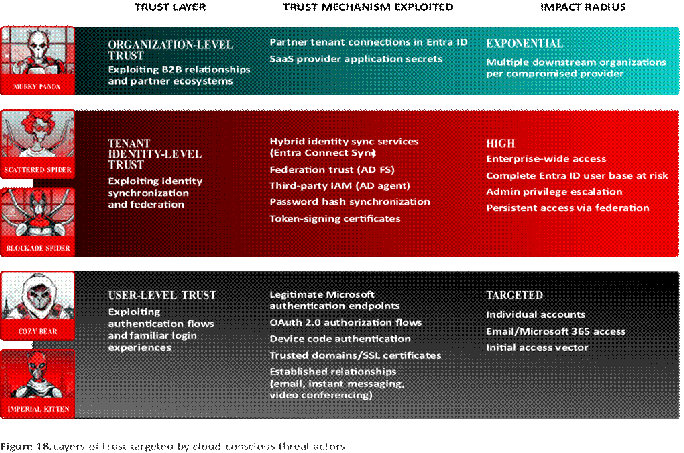
image044

BLOCKADE SPIDER AND SCATTERED SPIDER USE PARALLEL HYBRID IDENTITY ABUSE TECHNIQUES

One of the trust abuse mechanisms that eCrime threat actors leveraged most effectively throughout 2025 was hybrid identity targeting. This set of techniques subverts users’ trust in the technologies that bridge on-premises and cloud-based identity solutions. SCATTERED SPIDER and BLOCKADE SPIDER, the adversaries that targeted hybrid identity solutions most frequently throughout 2025, used many of the same cloud-conscious techniques.

SCATTERED SPIDER led the eCrime community in using hybrid identity-targeting techniques in 2025. The adversary employed many of the most effective techniques observed throughout 2024 and 2025, especially those targeting Entra ID or Azure environments. The adversary particularly favored vishing and abusing SSO services for lateral movement.

BLOCKADE SPIDER also used many techniques targeting Entra ID, often with only minor variations from SCATTERED SPIDER’s techniques. Both adversaries used hybrid identity targeting, Entra ID account creation, device registration, alternate multifactor authentication (MFA) registration, conditional access policy bypassing, and indicator removal via email hiding. While BGH-based ransomware deployment remained the objective for both SCATTERED SPIDER and BLOCKADE SPIDER, each used distinct methods to achieve this goal.

Both adversaries conducted multiple novel attacks against hybrid identity solutions, which primarily allow organizations to synchronize users’ accounts and authentication mechanisms between on-premises and cloud-based identity systems. Targeting this link, whether by compromising the hybrid identity solution itself or by compromising associated identities that have privileged access, provides threat actors with exceptional access levels.

These techniques can facilitate persistence and privilege escalation. Both SCATTERED SPIDER and BLOCKADE SPIDER have targeted the hybrid Entra ID solutions Entra Connect Sync and Active Directory Federation Services (AD FS). They used different tooling and, in some cases, different techniques to elevate privileges and control authentication in the environment.

Additionally, BLOCKADE SPIDER targeted a hybrid identity solution to control authentication across environments. Although these techniques may require administrative changes and anomalous account usage and are therefore less subtle than some used by targeted intrusion threat actors, they are effective for eCrime threat actors, whose operations often require speed in the cloud and quick lateral movement mechanisms with short access periods.

TARGETED INTRUSION THREAT ACTORS INVEST IN CLOUD TARGETING
MURKY PANDA and Other China-Nexus Threat Actors Abuse Partner Connections and Leverage ORB Networks

Cloud-conscious China-nexus threat actors significantly increased their intrusions in 2025, often using specialized tools, techniques, and infrastructure. Many of these techniques involved trust abuse, e.g., targeting an upstream technology service to enable later pivoting to downstream targets, leveraging ORB networks to evade detection by obfuscating access, and conducting password spraying behind inconspicuous, residential IP spaces.

China-nexus adversary MURKY PANDA has specialized in targeting Entra ID since at least Q3 2024. The adversary has compromised multiple IT services organizations using trusted relationship connections between Entra ID tenants. By targeting upstream service providers rather than individual victims, MURKY PANDA can compromise other organizations that have a trusted relationship with the targeted technology partner. This initial access vector is less monitored than many others and therefore allows for prolonged, undetected access to downstream victims’ data, including emails.

In one mid-2025 incident, MURKY PANDA used the newly identified ORB28 network for delegated email access to a Microsoft 365 environment. ORB28 has also been used in high-volume password spraying attacks against Entra ID accounts, although whether the network is exclusively used by MURKY PANDA or is instead used by multiple cloud-focused China-nexus threat actors remains undetermined.

COZY BEAR Implements Trust Abuse Social Engineering and Phishing Methods

Throughout 2025, Russia-nexus adversary COZY BEAR systematically exploited interpersonal trust, organizational credibility, and platform legitimacy to compromise U.S.-based targets. The adversary successfully weaponized established professional relationships by impersonating trusted contacts, then leveraged victims’ inherent trust in Microsoft’s authentication infrastructure to complete the compromise. This activity was difficult for victims to identify as malicious, as the adversary prompted victims to enter credentials only on legitimate Microsoft login pages.

CrowdStrike OverWatch and CrowdStrike Services responded to multiple COZY BEAR phishing attempts at U.S.-based nongovernmental organizations (NGOs) and a U.S.-based legal entity. The adversary’s multi-layered trust exploitation unfolded through three distinct vectors (Figure 19).

This layered approach to trust relationship abuse provides COZY BEAR with several operational advantages. First, it ensures more reliable initial access by exploiting preexisting trust between the victim and the impersonated individual, thereby increasing the likelihood that victims will comply with requests to click links or provide authentication codes.

Second, critically, the technique allows malicious authentication activity to blend seamlessly with legitimate user behavior, thereby increasing the probability that malicious access eludes detection. By directing victims to authentic Microsoft infrastructure rather than adversary-controlled domains, the phishing attempts further evade traditional URL-based detections and leverage the inherent trust organizations place in Microsoft’s authentication services. COZY BEAR used each of these techniques and attempted to evade multiple conditional access policies in an August 2025 intrusion targeting a U.S.-based NGO.

14:29:43

phone sign-in

13:37:49

AiTM ATTACKS ENABLE SaaS INTRUSIONS

Consistent with CrowdStrike Intelligence’s prediction in the CrowdStrike 2025 Global Threat Report, both eCrime and targeted intrusion adversaries continued to target cloud-based SaaS applications throughout 2025. Performing exfiltration from SaaS applications is an effective technique, as these platforms host high volumes of critical data but are often not subject to the same heavy security monitoring as on-premises systems. Moreover, threat actors face a low technical barrier to navigating SaaS platforms, as users typically access these applications using a browser graphical user interface.

In 2025, adversaries continued targeting document management and storage suites, data warehousing platforms, and payroll and expense reimbursement applications. CRM instances emerged as a key target: In multiple eCrime and likely targeted intrusion campaigns, adversaries abused non-human identities, such as service accounts and API keys, to facilitate access to database instances.

Throughout 2025, CrowdStrike Intelligence also observed eCrime and targeted intrusion threat actors leveraging AiTM phishing kits to gain access to Microsoft 365 accounts. In contrast to traditional phishing attacks that end at credential capture, AiTM phishing kits exploit the trust relationship between users and Microsoft’s authentication ecosystem by acting as a real-time reverse proxy.

When a victim enters credentials on the adversary’s spoofed login page, the phishing kit transparently forwards the authentication request to legitimate Microsoft login services and relays responses back to the victim in real time. eCrime threat actors primarily use this access to identify data that can allow them to pivot to other services, while nation-state threat actors primarily target data relevant to their intelligence collection priorities in Microsoft Outlook and SharePoint.

Between January 2025 and August 2025, CrowdStrike Intelligence observed an eCrime threat actor that identifies themselves in extortion communications as ShinyHunters conducting social engineering campaigns that targeted access to CRM instances.

In an early 2025 campaign, the threat actor collected victims’ Microsoft Entra ID credentials by directing them to access AiTM phishing pages on their personal mobile devices. The threat actor leveraged these credentials to search Microsoft SharePoint for documentation relating to access to the victim’s CRM instance.

In November 2025, Iran-nexus adversary IMPERIAL KITTEN conducted credential phishing operations against Israeli Microsoft 365 users via an AiTM phishing toolkit named EvilGinx2. The adversary used Israel-themed phishing infrastructure with English- and Hebrew-language lures to establish credibility and urgency with targets.

Post-compromise, IMPERIAL KITTEN conducted basic enumeration of Microsoft 365 accounts, accessing Microsoft App Access Panel, Office Home, and the Microsoft Authenticator app to map available services and privileges.

OUTLOOK

Throughout 2025, SCATTERED SPIDER and BLOCKADE SPIDER debuted multiple hybrid identity-targeting techniques. These new methods enabled the adversaries to obtain broad privileged access across target environments, effectively progressing the threat actors toward their primary objective: BGH ransomware deployment.

CrowdStrike Intelligence assesses that additional eCrime threat actors will likely target hybrid identity solutions in 2026. This assessment is made with moderate confidence based on this strategy’s observed effectiveness as well as the steps required to operationalize some implementations of this technique.

image028[6]Targeted intrusion threat actors also grew more active in conducting cloud-targeted operations in 2025, heavily investing in research, development, and personnel. Multiple cloud-conscious targeted intrusion threat actors emerged in 2025, including threat actors from Russia, China, Iran, and the DPRK.

CrowdStrike Intelligence further assesses that threat actors from these countries and other state-aligned threat actors will maintain or expand their investment in cloud capability development in 2026. This assessment is made with high confidence based on these threat actors’ focus on increasing cloud-targeting capabilities and infrastructure in 2025.

Both eCrime and targeted intrusion adversaries continued to target SaaS platforms for data discovery, exfiltration, and monetization in 2025. CRM instances emerged as a target in several campaigns, with multiple threat actors leveraging non-human identity types such as OAuth tokens to gain access to these platforms.

CrowdStrike Intelligence assesses that SaaS application targeting will again increase in 2026. This assessment is made with high confidence based on the continued trend of enterprise organizations migrating data from on-premises to cloud-based systems and widely reported 2025 campaigns targeting SaaS instances.

Conclusion

As 2026 begins, the cybersecurity threat landscape grows increasingly sophisticated, demanding that organizations in all sectors and geographies strengthen and adapt their defenses. As adversaries become more evasive, agile, and innovative, understanding their motivations and anticipating their actions is critical to an effective defense.

image028[7]Threat actors of all skill levels will continue adopting AI for social engineering, IO, and technical activity. Less sophisticated threat actors will use AI to offset limited expertise, enabling more complex attacks but often introducing errors due to poor implementation and limited ability to validate output. More advanced threat actors will increasingly leverage AI for malware development, social engineering, and post-exploitation activities, accelerating attack speed, scale, and effectiveness. With greater resources and maturity, these threat actors are positioned to operationalize agentic AI for minimally supervised or autonomous operations.

As organizations embed AI into core business processes, the attack surface will expand to include AI models, training data, agents, and supply chains.

Limited visibility into AI operations will amplify risk and create exploitable gaps.

Despite improved detection and prevention capabilities, BGH adversaries remained 2025’s primary eCrime threat. These adversaries caused significant business disruptions in 2025, resulting in substantial recovery costs and lost revenue for victims.

The ransomware ecosystem was remarkably resilient despite law enforcement disruptions and internal criminal strife, confirming ransomware remains an attractive business model. This trend is projected to persist in 2026. Fast-paced vishing campaigns targeting SaaS applications for initial access and data exfiltration will almost certainly continue, as opportunistic ransomware adversaries and targeted data theft operators employ techniques that continue to evade even advanced security solutions.

Targeted intrusion adversaries remained persistent and adaptive in 2025, incorporating stealth tactics, cloud-conscious techniques, and AI-enhanced capabilities to achieve their geopolitical and strategic objectives while evading defensive measures:

• Russia-nexus adversaries are expected to continue conducting aggressive operations, primarily to collect intelligence from Ukrainian targets and NATO member states.

• China-nexus adversaries are expected to maintain their high operational tempo while increasingly incorporating stealth tactics and targeting edge devices and internet-facing appliances. These adversaries will almost certainly continue targeting telecom, financial services, and logistics entities to support the Chinese Communist Party’s strategic intelligence collection objectives. • DPRK-nexus adversaries will highly likely continue to prioritize operations focused on military intelligence collection, cryptocurrency theft, and revenue generation.

image028[8]In the vulnerability exploitation landscape, threat actors will continue to leverage their evasion capabilities and use zero-day exploits to bypass security controls. Exploitation will almost certainly continue to transition from zero-day activity to widespread campaigns, enabled by publicly available technical details and POC exploits, which facilitate broader threat actor participation and widespread n-day exploitation.

Cloud-conscious threat actors are now leveraging various techniques to undermine victims’ trust. State-nexus adversaries are leveraging stealthy initial access methods, while eCrime adversaries are prioritizing persistence and privileged access. The prevalence of cloud-targeting adversaries will likely increase in 2026, with additional state-nexus threat actors primarily targeting cloud environments and eCrime threat actors employing techniques to target broad cloud identity access.

As these complex threats continue evolving throughout 2026, the CrowdStrike Counter Adversary Operations team remains committed to identifying, tracking, and disrupting threat actors at every possible opportunity while providing organizations with the intelligence and capabilities necessary to defend against an increasingly sophisticated and persistent adversary landscape.

CROWDSTRIKE 2026 GLOBAL THREAT REPORT                                                                                 48

Recommendations

image048Secure AI to reduce emerging business and operational risk

As AI becomes embedded in core business processes, it introduces a rapidly expanding attack surface that adversaries are already exploiting. Organizations should employ comprehensive AI security and governance measures to address threats to AI systems as well as threats posed by threat actors using AI. These should include monitoring employees’ use of AI tools, enforcing access controls, and using data classification rules to prevent sensitive data leaks. These measures should also include securing homegrown AI workloads from runtime attacks (such as prompt injection), assessing the security of external vendors, and requiring secure configurations and vulnerability assessments for new AI products and their dependencies.

To defend against AI-enabled threats, organizations should develop clear incident response responsibilities and business continuity plans. Organizations can further secure their environments with strong identity verification procedures, AI-focused security awareness training, and continuous threat hunting.

image049Treat identity and SaaS as primary attack surfaces

Identity and SaaS platforms sit at the center of enterprise access, data, and business operations, making them prime targets. Adversaries increasingly weaponize vishing, phishing, and stolen OAuth tokens to pivot through cloud and SaaS identities. Organizations must strengthen phishing-resistant MFA, enforce least-privilege access for service and non-human accounts, and monitor anomalous SaaS and token activity to detect and contain intrusions before attackers access sensitive data or critical systems.

image050Eliminate cross-domain blind spots to stop high-impact attacks

Today’s most disruptive intrusions succeed by exploiting gaps between security domains, tools, and teams rather than weaknesses in any single control. BGH and cloud-conscious adversaries chain activity across endpoints, cloud environments, SaaS applications, and unmanaged hosts to evade detection. Organizations should consolidate telemetry, apply cross-domain correlation through extended detection and response (XDR) and next-generation security information and event management (SIEM) workflows, and automate enrichment with threat intelligence to view full attack paths and accelerate response.

49

image051Secure the software supply chain and developer workflows

Trust in software updates, open-source dependencies, and development pipelines has become a critical business dependency and a prime target for adversaries. Malicious packages and compromised CI/ CD pipelines enabled high-impact supply chain attacks in 2025. Organizations should harden developer environments, enforce code signing and dependency validation, scan repositories and packages for anomalies, and assess third-party risk to reduce the likelihood that trusted software becomes a vehicle for malware or credential theft.

image052Prioritize edge device and perimeter patching and monitoring

Internet-facing and perimeter systems are among the most consistently exploited, and least visible, paths into enterprise environments. State-nexus threat actors rapidly weaponize vulnerabilities in edge and perimeter devices, which often lack EDR coverage and timely patching. Organizations should prioritize rapid triage and patching of internet-facing appliances; enable logging and monitoring for VPNs, firewalls, and virtualization platforms; and apply network segmentation to limit lateral movement from compromised perimeter systems.

image053Prioritize proactive threat intelligence and hunting

When attacks unfold in minutes or seconds, reactive defense is no longer enough. An intelligence-driven approach enables organizations to stop boiling the ocean and understand which adversaries are targeting them, how they operate, and where they are likely to strike next. By applying threat intelligence and adversary tradecraft analysis through proactive hunting, teams can identify stealthy footholds (such as unmanaged VMs, AiTM activity, and supply chain anomalies) before attacks escalate. To operate at the speed and scale of AI-accelerated adversaries, organizations must augment analysts with specialized AI agents that accelerate intelligence analysis, hunting, triage, and response, turning insight into decisive action earlier in the attack life cycle.

image054Strengthen human resilience against social engineering and rapid intrusions

As adversaries increasingly rely on phishing, vishing, and trust abuse to bypass technical controls, human decision-making remains a critical factor in preventing breaches. Organizations should reinforce user awareness programs that reflect real-world adversary tactics to help employees recognize and resist social engineering attempts that enable initial access.

For security teams, preparedness under pressure is essential. Regular tabletop exercises

and red/blue team operations help organizations identify gaps in detection, decision-making, and response, ensuring teams can act quickly and effectively when attacks unfold. Continuous rehearsal strengthens organizational resilience and reduces the likelihood that minor failures escalate into major incidents.

CROWDSTRIKE 2026 GLOBAL THREAT REPORT                                                                                                                                                                                                                                                                                                                                                50

CrowdStrike

Falcon Platform

AI and Cloud-Native

Leverages the network effect of crowdsourced security data while eliminating the management burden of cumbersome on-premises solutions

Single Lightweight Sensor

Provides frictionless and scalable deployment and stops all types of attacks while eliminating sensor bloat and scheduled scans

Charlotte AI

Powers the CrowdStrike portfolio of agentic and GenAI capabilities across the Falcon platform (including natural-language chat, specialized agents, and embedded AI-powered features across modules), tapping into the petabyte scale of CrowdStrike’s automated intelligence and further enriched by security experts to accelerate analyst workflows 

Falcon Fusion SOAR

Provides native security orchestration, automation, and response (SOAR) capabilities within the

Falcon platform to automate security workflows, reduce manual effort, and enable faster, more consistent threat response

CrowdStrike Enterprise Graph

Unifies and contextualizes security telemetry across domains, connecting users, assets, behaviors, and adversary activity into a single shared view of the enterprise to give humans and AI agents the context to see attack paths, reason over complexity, and act faster; specialized graphs include:

• Asset Graph: Solves one of the most complex customer problems today: identifying assets, identities, and configurations accurately across all systems (including cloud, on-premises, mobile, internet of things, and more) and connecting them together in a graph form

• Intel Graph: Enables security teams to proactively defend against emerging threats with intelligence-driven insights by mapping relationships between threat actors, tactics, vulnerabilities, and real-world attacks

• Threat Graph: Uses cloud-scale AI to correlate trillions of data points from multiple telemetry sources to identify shifts in adversarial tactics and map tradecraft to automatically predict and prevent threats in real time across CrowdStrike’s global customer base

Falcon Foundry

Allows customers and partners to easily build custom, low-code applications that harness the data, automation, and cloud-scale infrastructure of the Falcon platform to solve your toughest cybersecurity challenges

CrowdStrike Marketplace

Offers an enterprise marketplace of technology partners where you can discover, try, buy, and deploy trusted CrowdStrike and partner applications that extend the CrowdStrike Falcon platform, without adding agents or increasing complexity

CROWDSTRIKE 2026 GLOBAL THREAT REPORT                                                                                 51

CrowdStrike Products

Endpoint Security

FALCON PREVENT| NEXT-GENERATION ANTIVIRUS

Protects against all types of threats, from malware and ransomware to sophisticated attacks, and deploys in minutes, immediately protecting your endpoints

FALCON INSIGHT XDR| DETECTION AND RESPONSE FOR ENDPOINT AND BEYOND

Offers industry-leading, unified EDR and XDR with enterprise-wide visibility to automatically detect adversary activity and respond across endpoints and all key attack surfaces

FALCON FIREWALL MANAGEMENT | HOST-BASED FIREWALL

Delivers simple, centralized host firewall management, making it easy to manage and control host firewall policies

FALCON DEVICE CONTROL | USB SECURITY

Provides the visibility and precise control required to enable safe usage of USB devices across your organization

FALCON FOR MOBILE| MOBILE THREAT DETECTION

Protects against threats to iOS and Android devices, extending endpoint security to your mobile devices, with advanced threat protection and real-time visibility into app and network activity

FALCON FORENSICS | FORENSIC CYBERSECURITY

Allows you to quickly respond and recover with automated forensic data collection, enrichment, and correlation

FALCON FOR XIoT | XIoT ASSET PROTECTION

Delivers real-time threat prevention and detection for extended internet of things (XIoT) assets, backed by XIoT-specific indicators of attack and indicators of compromise from CrowdStrike’s industry-leading threat intelligence

FALCON INSIGHT FOR ChromeOS | ChromeOS PROTECTION

Delivers industry-first native detection and response for ChromeOS devices without requiring additional agents or mobile device management (MDM) solutions, providing unified visibility through the Falcon console

FALCON FOR LEGACY SYSTEMS| PROTECTION FOR LEGACY OPERATING SYSTEMS

Delivers anti-malware protection for Windows XP, Server 2003, Vista, and more while minimizing impact on resource-constrained systems and integrating with the Falcon platform

FALCON ADVERSARY OVERWATCH: ENDPOINT | THREAT HUNTING

Provides 24/7 managed endpoint threat hunting, proactively monitoring your environment to identify novel attacks, misuse of legitimate tools, credential compromise, insider threats, and adversary pivots from endpoint activity into other domains

Threat Intelligence and Hunting

FALCON ADVERSARY OVERWATCH | THREAT HUNTING

Provides 24/7 protection across endpoints, identities, cloud workloads, and next-gen SIEM, delivered by expert threat hunters powered by AI and threat intelligence to detect advanced intrusions and expose adversary tradecraft, credential misuse, and vulnerability exploitation

FALCON ADVERSARY INTELLIGENCE | SOC AUTOMATION

Cuts investigation time from days to minutes across the SOC with personalized, real-time threat intelligence, automating malware analysis and response through workflows and integrations while continuously monitoring the open, deep, and dark web for fraud and emerging threats

FALCON ADVERSARY INTELLIGENCE PREMIUM | ADVERSARY INTELLIGENCE

Delivers industry-leading intelligence reporting on 281 adversaries globally and enables you to defend against AI-powered adversaries with agentic AI built to reason across data, hunt for threats, and act decisively to automate and accelerate complex analyst workflows

FALCON COUNTER ADVERSARY OPERATIONS ELITE | ON-DEMAND ANALYST

Provides an assigned analyst who leverages AI-powered investigative and threat hunting tools, enhanced by deep adversary intelligence, to detect and disrupt adversaries across your IT environment and beyond

Cloud Security

FALCON CLOUD SECURITY: PROACTIVE SECURITY

Provides unified security posture management (USPM) and business context across cloud layers, leveraging industry-leading threat intelligence, end-to-end attack paths, and ExPRT.AI so cloud teams can swiftly prioritize their work, neutralize critical risks, and leave adversaries no room to strike

FALCON CLOUD SECURITY: CLOUD RUNTIME PROTECTION

Delivers leading cloud workload protection (CWP) and cloud detection and response (CDR), allowing SOC teams to detect and respond to active threats across hybrid clouds so adversaries are stopped in their tracks

FALCON CLOUD SECURITY: CNAPP

Includes the features and capabilities of both Proactive Security and Cloud Runtime Protection for Falcon Cloud Security

FALCON ADVERSARY OVERWATCH: CLOUD | THREAT HUNTING

Offers both proactive and protective security as a managed service through Falcon Adversary OverWatch cross-domain threat hunting and Falcon Complete Next-Gen MDR, powered by integrated threat intelligence to protect the cloud control plane, host OS, and data plane

SaaS Security
FALCON SHIELD| SaaS SECURITY

Unifies SaaS security posture management (SSPM) and SaaS-focused identity threat detection and response

(ITDR), delivering a modern approach to SaaS security with comprehensive visibility, continuous control over SaaS security configurations, and real-time detection of active threats

AI Detection and Response

FALCON AI DETECTION AND RESPONSE | AIDR

Protects employee AI adoption and AI development at runtime by securing the prompt and agentic interaction layer with unified visibility, real-time threat detection, data protection, access controls, and automated response across endpoints, applications, AI agents, AI/API gateways, and cloud environments

Next-Gen Identity Security

FALCON NEXT-GEN IDENTITY SECURITY

Secures human, non-human, and AI identities by combining initial access prevention, modern secure privileged access, ITDR, SaaS identity security, and agentic identity protection to stop identity-driven breaches across domains

FALCON IDENTITY THREAT DETECTION

Provides unified visibility across hybrid identities and AI-driven threat detection to expose identity-based threats before they escalate

FALCON IDENTITY THREAT PROTECTION

Secures hybrid identities with AI-driven threat detection and response to stop identity-based attacks in real time

FALCON PRIVILEGED ACCESS

Eliminates standing privileges by enforcing just-in-time access based on real-time risk, removing the complexity of traditional privileged access management (PAM) solutions

FALCON ADVERSARY OVERWATCH: IDENTITY | THREAT HUNTING

Provides 24/7 managed identity threat hunting, proactively detecting identity-based attacks, monitoring criminal forums for stolen credentials, and enforcing MFA challenges to prevent unauthorized access

Next-Gen SIEM

FALCON NEXT-GEN SIEM | SIEM

Empowers you to stop breaches and get unified visibility across your security ecosystem by delivering industry-best detection, world-class threat intelligence, blazing-fast search, and AI-led investigation in one platform

FALCON ONUM| HIGH-PERFORMANCE DATA PIPELINE

Simplifies complex telemetry pipelines and enables precise, real-time control over how telemetry is collected, enriched, and routed in motion to deliver clean, high-quality signal for security and analytic workflows

FALCON ADVERSARY OVERWATCH: NEXT-GEN SIEM | THREAT HUNTING

Delivers end-to-end threat disruption by correlating first- and third-party Falcon Next-Gen SIEM data and proactively hunting advanced threats across network edge devices, SaaS applications, email security, operating systems, and more

Data Protection
FALCON DATA PROTECTION FOR ENDPOINT| REAL-TIME ENDPOINT DATA PROTECTION 

Delivers real-time visibility, encryption detection, and behavioral analysis to stop unauthorized data exfiltration across Windows and macOS devices

FALCON DATA PROTECTION FOR CLOUD| RUNTIME CLOUD DATA PROTECTION

Provides real-time monitoring and classification of sensitive data in motion across cloud environments using eBPF, enabling organizations to detect and respond to data risks without added complexity and with minimal performance impact

Security and IT Operations

FALCON EXPOSURE MANAGEMENT | EXPOSURE MANAGEMENT

Provides full attack surface visibility, prioritizes vulnerabilities with AI, and automates remediation to proactively reduce cyber risk and prevent breaches

FALCON EXPOSURE MANAGEMENT: CAASM

Allows you to discover and monitor managed and unmanaged assets in real time and visually map assets and their relationships, revealing deep host insights into applications, browsers, CVEs, and misconfigurations

FALCON FOR IT | IT AUTOMATION

Delivers AI-powered endpoint visibility, scalable response automation, and secure baseline enforcement as a native capability of the Falcon platform

FALCON DISCOVER for XIoT| EXTENDED XIoT ASSET VISIBILITY

Delivers real-time visibility into unmanaged and adjacent XIoT assets to reduce security, safety, and operational blind spots

FALCON EXPOSURE MANAGEMENT FOR XIoT | XIoT RISK MITIGATION

Provides contextual risk visibility and remediation guidance tailored to the operational complexity of XIoT environments

FALCON FILEVANTAGE| FILE INTEGRITY MONITORING

Provides real-time, comprehensive, and centralized visibility that boosts compliance and offers relevant contextual data

Managed Services
FALCON COMPLETE NEXT-GEN MDR | MANAGED DETECTION AND RESPONSE

Provides 24/7 expert-driven protection across endpoints, identities, cloud workloads, and third-party Falcon Next-Gen SIEM data, combining elite security expertise, AI-powered technology, and proactive threat hunting to detect, disrupt, and remediate sophisticated threats at machine speed

CROWDSTRIKE 2026 GLOBAL THREAT REPORT      56 CrowdStrike Services

INCIDENT RESPONSE

Provides 24/7/365 elite incident response to contain threats, restore order, and mitigate breach impact

Incident Response Services| Provides comprehensive breach response and recovery, from triage and investigation to cross-domain remediation and restoration, backed by world-class threat intelligence and delivered by a highly experienced incident response team

Services Retainer| Provides prearranged, on-demand access to CrowdStrike experts for rapid incident response and proactive consulting services that strengthen defenses over time

STRATEGIC ADVISORY SERVICES

Develops and matures the security program to improve defenses

Tabletop Exercise | Simulates incident response scenarios that expose process gaps and improve coordination across the full team, from hands-on-keyboard analysts to executive stakeholders

Maturity Assessment | Comprehensively evaluates your organization’s security posture, identifying gaps, benchmarking capabilities, and providing a prioritized roadmap to strengthen defenses against evolving threats

Regulation Readiness and CXO Advisory | Helps you understand and prepare for cyber-related regulation mandates, including the evolving risk and governance responsibilities of the board of executives

Insider Risk Program Review | Strengthens your insider risk strategy by assessing and optimizing your current detection, prevention, and response capabilities

RED TEAM SERVICES

Tests and validates defenses through emulated attacks that expose weaknesses

Penetration Testing| Provides attack emulations that test the detection and response capabilities of your people, processes, and technology to identify vulnerabilities

Red Team/Blue Team Exercise| Increases response readiness under expert guidance, as a red team attacks systems in a simulated exercise and a blue team mounts the defense

Cloud Breach Emulation and Response Exercise| Helps organizations test and enhance their CDR capabilities through real-world adversary simulation

Adversary Emulation Exercise| Gauges readiness to defend against a sophisticated adversary infiltration that employs advanced tradecraft

CROWDSTRIKE 2026 GLOBAL THREAT REPORT                                                                                 57

AI SECURITY SERVICES

Secures the AI powering your organization and uses AI to defend with scale, precision, and speed

AI Red Team Services| Exposes vulnerabilities in the GenAI stack that could be exploited by testing LLM integrations for sensitive data exposure and adversarial manipulation

AI Systems Security Assessment | Provides Falcon-powered discovery and threat-informed testing to uncover shadow AI, risky integrations, and governance gaps, delivering clear visibility and actionable guidance

AI for SecOps Readiness| Provides expert guidance on integrating AI into detection and response workflows with tailored use cases, architectural guidance, and a roadmap to increase response speed, precision, and scale

TECHNICAL ASSESSMENT SERVICES

Audits and addresses security gaps across endpoints, cloud, and SaaS applications to tangibly reduce risk

Technical Risk Assessment| Highlights security vulnerabilities, weaknesses, and gaps in the IT environment across endpoint devices, applications, and user identities

Identity Security Assessment| Audits identity security practices and defense posture for weaknesses, including Active Directory domain configuration, account configuration, privilege delegation, and potential attack paths

Cloud Security Assessment| Identifies misconfigurations and vulnerabilities in the cloud estate that could be exploited by adversaries

Compromise Assessment| Exposes and addresses undetected threat activity through a one-time threat hunt available for endpoint, cloud, and SaaS applications

SaaS Security Assessment | Assesses SaaS environments for security gaps across configurations, access controls, data policies, and third-party integrations

PLATFORM PROFESSIONAL SERVICES

Helps ensure your CrowdStrike Falcon deployment is expertly configured, optimized, and aligned to your security needs; specialists provide best-practice implementation and deep module expertise to maximize protection, improve efficiency, and achieve security outcomes faster

TRAINING AND SECURITY UPSKILLING

Builds security acumen and closes the skills gap through CrowdStrike University, offering on-demand training, personalized learning paths, and five certifications for deep Falcon module expertise

CROWDSTRIKE PULSE SERVICES

Provides continuous consulting engagements via focused sessions on a recurring cadence (biweekly, monthly, or every two months) tailored to your needs, aligned with your priorities, and adapted as needed, enabling consistent progress, improved resilience, and strategic maturity that evolves at the speed of the adversary

CrowdStrike(NASDAQ: CRWD), a global cybersecurity leader, has redefined modern security with the world’s most advanced cloud-native platform for protecting critical areas of enterprise risk – endpoints and cloud workloads, identity and data.

Powered by the CrowdStrike Security Cloud and world-class AI, the CrowdStrike Falcon® platform leverages real-time indicators of attack, threat intelligence, evolving adversary tradecraft, and enriched telemetry from across the enterprise to deliver hyper-accurate detections, automated protection and remediation, elite threat hunting, and prioritized observability of vulnerabilities.

Purpose-built in the cloud with a single lightweight-agent architecture, the Falcon platform delivers rapid and scalable deployment, superior protection and performance, reduced complexity, and immediate time-to-value.

Escape Business Solutions FB Banner

EBS Analysis: Microsoft Entra releases and announcements – Microsoft Entra

Microsoft Entra Platform Evolution: Strategic Identity Governance, Resilient Authentication, and Operational Modernization for the Enterprise

The identity perimeter has ceased to be a static boundary. It is a dynamic, policy-driven control plane that must accommodate employees, partners, contractors, workloads, and increasingly autonomous AI agents—each demanding frictionless yet verifiable access to resources spanning on-premises directories, multi-cloud SaaS estates, and custom line-of-business applications. Microsoft Entra continues to expand its footprint as the connective tissue for this heterogeneous reality, delivering monthly cadence of capabilities that shift identity from a plumbing concern to a strategic governance layer.

Over the past six months, the platform has introduced material advances in entitlement management for external identities, cryptographic resilience for hybrid Kerberos flows, device-agnostic network access, phishing-resistant credential adoption at scale, and a native backup and recovery fabric for the directory itself. Simultaneously, operational guardrails have tightened: interactive authorization for synchronization changes, workload identity federation for critical HR-driven provisioning, and least-privilege roles purpose-built for security operations. For enterprise architects and identity program owners, the cumulative effect is not a collection of point features but a maturation of the platform’s ability to enforce Zero Trust principles across the full identity lifecycle—without demanding bespoke tooling or fragile custom extensions.

This article synthesizes the most consequential recent announcements into a consulting-grade view of architecture, implementation reality, security posture, and operational discipline. It is written for CISOs, identity architects, IAM program leads, and infrastructure teams who must translate platform velocity into controlled, auditable, and business-aligned outcomes.

Identity Governance and External Access: From Invitation Friction to Policy-Driven Entitlement

Entitlement Management now permits direct assignment of external users—identified solely by email address—to access packages without pre-existing directory representation. The invited user enters the tenant as a B2B guest, immediately subject to the governance controls attached to the package: approval workflows, time-bound assignments, access reviews, and connected lifecycle policies. This eliminates the historic prerequisite of pre-provisioning guest objects or relying on ad-hoc invitation flows that bypassed governance.

Architecturally, the capability leverages the existing B2B collaboration pipeline but surfaces it through the Entitlement Management API and portal surfaces, allowing programmatic assignment via Microsoft Graph. The guest user’s authentication remains anchored to their home identity provider; the resource tenant enforces Conditional Access, session controls, and continuous access evaluation (CAE) as if the identity were native. For organizations managing partner ecosystems, supply chain portals, or M&A integration, this reduces onboarding latency from days to minutes while preserving an auditable chain of custody.

Implementation consideration: Access packages must be designed with explicit external-user scoping. Not every package should accept email-based assignment; sensitive resources should retain approval gates requiring sponsor attestation. Governance administrators should configure connected organizations in Entitlement Management to map trusted partner tenants or domains, enabling automated redemption flows while retaining policy control. License prerequisite: Microsoft Entra ID Governance or Entra Suite.

Complementing this, domainless SAML federation with external identity providers removes the domain-matching constraint that previously forced a one-to-one mapping between a user’s email suffix and a preconfigured IdP connection. Now, a single SAML/WS-Fed IdP definition can serve users from any domain, provided the IdP asserts a verifiable identifier. This is transformative for consumer-facing portals, franchise networks, or higher education consortia where email domains are fluid. The trade-off: administrators must rely on claim-based authorization rules rather than implicit domain trust, demanding rigorous claim mapping and validation logic in the relying party trust configuration.

Authentication Resilience: Kerberos Key Rotation, Passkey Primacy, and System-Preferred Intelligence

Hybrid identity environments relying on Microsoft Entra Kerberos for seamless single sign-on to on-premises resources have historically faced a fragile window during key rotation. When the Kerberos server key rolls, referral tickets encrypted with the secondary key could fail validation, causing authentication failures for users traversing trust referral paths. The general availability improvement enhances the validation logic to attempt decryption with both primary and secondary keys during rollover, effectively eliminating the authentication disruption window.

This is not merely a reliability patch; it removes a common cause of “phantom” lockouts that drove helpdesk volume and eroded confidence in hybrid SSO. Operations teams should verify that their Entra Connect Health monitoring reflects the updated agent version and that key rotation schedules align with change management windows. No configuration change is required—the resilience is baked into the cloud-side validation.

Simultaneously, the authentication stack is shifting decisively toward phishing-resistant credentials. Microsoft Registration Campaigns now natively support FIDO2 passkeys as a registration target, allowing administrators to nudge eligible users during sign-in. The campaign engine evaluates the user’s existing credential profile and prompts for passkey registration only when the profile permits it—avoiding friction for users constrained by hardware or policy restrictions.

Deeper in the stack, system-preferred authentication has extended to the first factor in Microsoft-managed configurations. The authentication method ranking algorithm now evaluates all registered credentials—passkeys, Windows Hello for Business, certificate-based auth, passwordless phone sign-in—and selects the highest-assurance method available for the initial challenge. Users with strong credentials may complete sign-in without ever presenting a password. This behavior is exclusive to tenants in the Microsoft-managed state; custom authentication strengths or per-user overrides remain under administrator control. Rollout completes by end of June 2026.

Implementation guidance: Organizations should audit credential distribution across the population. If passkey or Windows Hello coverage is low, first-factor system preference will fall back to password for most users, yielding minimal UX gain. A phased enablement—starting with pilot groups, measuring success rates, and expanding—reduces support load. Registration Campaigns provide the mechanized nudge; pair them with targeted communications and device readiness checks.

Device-Agnostic Access: BYOD for Windows and Network Access Control

Bring Your Own Device (BYOD) support for Windows clients using Entra-registered devices has reached general availability. The Private Application traffic profile can now be assigned to users with internal accounts—including internal guest users—without requiring domain join or Microsoft Intune enrollment. The device registers with Entra ID, receives a device identity, and becomes evaluatable in Conditional Access policies via device platform, filter for devices, and compliant network conditions.

This capability redefines the endpoint trust model for contractor, partner, and privileged-access workstation scenarios. A consultant’s personal laptop can access a published internal web app through Entra Private Access (part of the Global Secure Access / Network Access suite) after satisfying a Conditional Access policy that requires a registered device, approved platform, and trusted network egress. The device never joins the corporate domain; it never receives Group Policy; it is governed solely through Entra ID and Conditional Access.

Security implication: Device registration is a lower assurance state than Intune compliance or Microsoft Entra join. Policies should reflect this—granting access to low-sensitivity resources or requiring step-up authentication for privileged actions. The device platform condition (Windows, iOS, Android, macOS) and filter for devices (dynamic group based on device attributes) enable granular scoping. Network location conditions can restrict access to corporate egress points or approved ZTNA connectors.

Operational note: The Private Application traffic profile assignment is managed in the Entra admin center under Network Access. Ensure the Global Secure Access license is provisioned and the ZTNA connector infrastructure is deployed in the target network segments.

AI Agent Identity: Extending Zero Trust to Non-Human Actors

As organizations deploy autonomous agents—Microsoft 365 Copilot extensions, custom Copilot Studio agents, Azure AI Foundry workloads—these agents acquire user accounts in the directory. Conditional Access now provides explicit targeting constructs for agent identities: inclusion/exclusion by individual agent object ID, dynamic grouping via Custom Security Attributes, and a new Agent Risk signal that surfaces anomalous agent behavior (impossible travel, token replay, privilege escalation patterns).

Policies can require compliant devices for agents running on managed endpoints (including Windows 365 for Agents), apply device platform filters, and enforce trusted network conditions. This treats agent identities as first-class subjects in the Zero Trust policy engine, rather than opaque service principals that bypass user-centric controls.

Architectural shift: Agent risk is calculated by Microsoft Entra ID Protection using behavioral heuristics tailored to non-human sign-in patterns. Administrators should enable Identity Protection policies that include agent risk as a condition, and define remediation actions (block, require MFA—though agents cannot perform interactive MFA, so the practical action is block or require compliant device). Custom Security Attributes allow programmatic tagging of agents by environment (dev/test/prod), data sensitivity, or business unit, enabling attribute-based access control (ABAC) at scale.

Governance gap: Today, agent lifecycle—creation, credential rotation, decommissioning—often lives outside IAM processes. The new Conditional Access targeting makes it imperative to integrate agent onboarding into the identity governance program: ownership assignment, periodic access review, and automated offboarding when the agent is retired.

Provisioning Modernization: SCIM 2.0 in Sovereign Clouds, Workload Identity for SAP, and AD Group Enforcement

Three provisioning advances address distinct enterprise pain points. First, SCIM 2.0 APIs are now generally available in the US Government cloud, providing a standards-based interface for managing users and groups in Entra ID. This enables government agencies and contractors to build or adopt SCIM-compliant provisioning clients without proprietary connectors, aligning with FedRAMP and CMMC control requirements for automated identity lifecycle.

Second, SAP SuccessFactors provisioning transitions to workload identity-based authentication. The provisioning service now authenticates to SAP SuccessFactors using Entra workload identity and short-lived tokens via SAP Cloud Identity Services, replacing static username/password credentials. This is a mandatory migration: SAP plans to deprecate basic authentication for SuccessFactors APIs by November 2026. The migration path is in-place—existing provisioning configurations can switch authentication methods without recreation or restart. Supported scenarios: SuccessFactors to AD, SuccessFactors to Entra ID, and SuccessFactors writeback.

Implementation prerequisites: The Entra tenant must have a workload identity configured with appropriate permissions in SAP Cloud Identity Services. The provisioning agent (for AD-targeted scenarios) must be updated to a version supporting the new auth flow. Test in a non-production tenant first; validate attribute mapping and transformation logic unchanged. Update runbooks and disaster recovery docs to reflect token-based auth.

Third, AD group enforcement for group provisioning to Active Directory introduces write-protection for designated AD groups. When enabled, modifications to the group membership in AD are blocked unless they originate from the Entra provisioning service. This prevents configuration drift—manual ADUC changes, scripted updates, or third-party tool interference—that historically desynchronized Entra-managed groups from their on-premises counterparts. The feature is in preview; designate groups carefully, as enforcement is irreversible without disabling the setting.

Cross-Tenant Collaboration: Group Synchronization and Account Discovery

Cross-tenant group synchronization extends the multi-tenant organization (MTO) framework to security groups. A source tenant manages group membership centrally; the group is synchronized to one or more target tenants with configurable attribute mappings and cross-tenant access policies. Target tenants consume the group for resource authorization, application role assignment, or Conditional Access scoping. This eliminates duplicate group management across tenants—a chronic source of entropy in conglomerate, subsidiary, or post-M&A environments.

Licensing requirement: Microsoft Entra ID Governance licenses in both source and target tenants. Existing cross-tenant user synchronization licensing remains unchanged. Configuration is performed in the Multi-tenant Organizations blade; administrators opt in to group synchronization per synchronization policy.

Account discovery for connected applications, now generally available in Entra ID Governance, generates discovery reports that enumerate all accounts in a target application—including orphan accounts not linked to any Entra user or group. This accelerates application onboarding: instead of manual reconciliation, administrators review the report, match accounts to identities, and configure provisioning mappings with confidence. The capability requires Entra ID Governance or Entra Suite.

Backup, Recovery, and Soft Delete: Building Directory Resilience

Microsoft Entra Backup and Recovery (preview) introduces a native, always-on backup fabric for the directory. Daily snapshots capture users, groups, applications, service principals, managed identities, Conditional Access policies, named locations, agent IDs, and authentication/authorization policies. Retention: 7 days for tenants with Entra ID P1/P2. Administrators can browse snapshots, generate difference reports (what changed between snapshot and current state), and execute recovery jobs to restore objects to a prior state.

This is not a replacement for a comprehensive disaster recovery strategy—it does not back up all directory object types, and the 7-day window is narrow for latent misconfiguration discovery. However, it provides a critical safety net for accidental deletions, malicious admin actions, or flawed bulk operations. The difference report is particularly valuable for forensic analysis: it surfaces attribute-level changes, enabling surgical restoration rather than full-tenant rollback.

Complementing this, Device Soft Delete (preview) moves deleted device objects to a recoverable state instead of permanent removal. Applicable to Entra-joined, registered, and hybrid-joined devices, it preserves device identity, BitLocker keys, and associated security artifacts during a configurable retention period. This directly addresses the “accidental wipe” scenario where a device cleanup script or admin error removes a valid endpoint, breaking Conditional Access evaluation and requiring re-registration.

Operational integration: Incorporate backup snapshot review into change management post-implementation verification. After a major Conditional Access policy rollout or group restructuring, generate a diff report to confirm only intended changes propagated. For device soft delete, define a retention policy aligned with device lifecycle (e.g., 30 days) and communicate the recovery SLA to the service desk.

Administrative Security Hardening: SOC Identity Responder, Interactive Sync Authorization, and Connect Health Noise Reduction

Three changes tighten the administrative attack surface. The new SOC Identity Responder built-in role grants security analysts the precise permissions needed for identity containment—disable user, revoke sessions, force password reset—without broad directory admin rights. The role supports group-based assignment, PIM just-in-time activation, and delegated ownership, enabling a tiered SOC model where Tier 1 analysts activate the role for active investigations while Tier 2 retains permanent assignment for hunting.

Microsoft Entra Connect Sync now requires interactive admin authorization for configuration changes. Whether via the wizard or PowerShell cmdlets, an authorized cloud administrator must sign in and explicitly approve feature enablement/disablement, staging mode toggles, or cloud-side conversions during uninstall. This eliminates silent configuration drift caused by compromised on-premises accounts or unattended automation scripts. The MSI for this version is exclusively distributed through the Entra admin center—verify download integrity.

In Entra Connect Health, the NetBIOS Name Sysvol Connectivity test has been reclassified from alerting to informational. NetBIOS is legacy; its failure no longer indicates a critical AD health issue. This reduces alert fatigue and refocuses Connect Health on replication latency, service principal health, and sync error patterns that genuinely impact identity continuity.

Lifecycle Automation and Data Governance: Purview Labels on Security Groups, User Attribute Updates

Microsoft Purview sensitivity labels can now be applied to Entra cloud security groups (public preview). Labels governed in Purview—encryption, content marking, auto-labeling policies—extend to group settings such as guest access, member visibility, and external sharing. Labels are manageable via Entra admin center, Azure portal, and Microsoft Graph. This unifies data governance and access governance: a “Highly Confidential” label on a security group can automatically restrict guest membership and trigger a quarterly access review.

Lifecycle Workflows gains the User Attribute Updates task, a built-in action to set or clear attribute values on a user object as part of a workflow. Previously, attribute manipulation required custom extensions (Azure Functions, Logic Apps, or PowerShell runbooks) invoked via HTTP-triggered tasks. The native task provides a secure, auditable, and supportable alternative. Use cases: automatically populate department/cost center on hire, clear manager reference on transfer, set employeeType for license governance.

Implementation note: Attribute updates via workflow are subject to directory schema constraints and synchronization rules (if hybrid). Test in a staging tenant with representative data. The task supports expression-based values, enabling dynamic computation (e.g., concatenating country code and department for a custom attribute).

End-User Experience Modernization: My Account Portal and Authenticator Restore

The My Account portal (myaccount.microsoft.com) delivers three redesigned pages by end of June 2026: Devices (prominent BitLocker recovery key surfacing), Personal Info (consolidated profile, language, region), and Organizations (resolved “unable to leave organization” bug). No admin action required; users transition automatically. This reduces helpdesk tickets for BitLocker recovery and organization egress—common friction points in BYOD and B2B scenarios.

For Microsoft Authenticator on iOS, an improved restore experience for device-bound passkeys arrives August 2026. Users with iCloud Keychain backup enabled will experience a streamlined flow that directs them to the correct recovery path based on old device availability. Android support follows. No admin configuration; communicate the change to users to reduce confusion during device migration.

High Scale Compatibility Mode: Phased Migration for Large B2C Estates

High Scale Compatibility (HSC) mode for Microsoft Entra External ID enables large-scale Azure AD B2C migrations without directory reconstruction. Existing consumer identities remain in place; applications are rebuilt on the External ID platform incrementally. Trade-off: some advanced customization capabilities (custom policy extensions, complex UI flows) are limited in HSC mode and will evolve. Organizations with millions of consumer identities should evaluate HSC as a migration strategy rather than a feature toggle—plan for a multi-year coexistence period with gradual feature parity closure.

Why This Matters to Enterprise IT

The aggregate impact of these releases is a platform that increasingly closes the gap between identity as a directory service and identity as a policy decision point. Three strategic themes emerge:

Governance by default. Entitlement Management for external users, account discovery, cross-tenant group sync, and Purview labels on security groups shift governance left—into the provisioning and assignment moment—rather than relying on periodic certification campaigns to catch drift.

Resilience as a primitive. Kerberos key rotation reliability, directory backup/recovery, device soft delete, and workload identity for SAP provisioning treat failure modes as design constraints, not exceptions. This reduces the blast radius of human error and credential compromise.

Least privilege operationalized. SOC Identity Responder, interactive sync authorization, and agent-targeted Conditional Access replace “global admin for daily tasks” with role-scoped, time-bound, auditable authority. This is the practical manifestation of Zero Trust for the control plane itself.

For enterprises, the cost of inaction is not feature deprivation—it is accumulating technical debt in identity architecture. Each delayed migration (SAP basic auth, B2C to External ID, password to passkey) increases the remediation window and the likelihood of a disruptive event. Each unautomated governance process (external user onboarding, group sync across tenants, attribute hygiene) consumes skilled FTEs on toil that the platform now eliminates.

EBS Consulting Perspective

From an engagement standpoint, we observe three recurring patterns in how organizations absorb this velocity:

Pattern 1: Feature-driven adoption without architectural integration. Teams enable Entitlement Management for a single partner portal but retain manual CSV-based guest provisioning for other external populations. They configure Registration Campaigns for passkeys but neglect to update Conditional Access policies to require phishing-resistant auth for sensitive resources. The platform capabilities exist in isolation, not as a cohesive policy stack.

Pattern 2: Hybrid identity debt blocking cloud-native controls. Organizations with legacy Entra Connect configurations (password hash sync only, no Seamless SSO, stale filtering rules) cannot leverage system-preferred authentication, device-based Conditional Access, or cross-tenant sync effectively. The on-premises directory remains the authoritative source for attributes that the cloud policies need to evaluate.

Pattern 3: Governance tooling sprawl. Custom PowerShell modules, Logic Apps, and third-party IGA connectors replicate functionality now native to Entra (User Attribute Updates, Account Discovery, AD Group Enforcement). Maintaining this sprawl consumes budget and introduces failure modes the platform has solved.

Our advisory approach: conduct an Identity Capability Maturity Assessment mapped to the Entra feature landscape. Identify the “must-migrate by November 2026” items (SAP basic auth deprecation) as hard deadlines. Prioritize the “force multipliers” (Entitlement Management for external access, cross-tenant group sync, Backup/Recovery) that reduce operational load across multiple teams. Decommission custom automation where native parity exists. Build a roadmap that sequences enablement, validation, and policy enforcement—not just feature toggles.

Practical Next Steps

  1. Inventory and prioritize. Catalog all SAP SuccessFactors provisioning configurations using basic authentication. Create a migration project plan targeting completion by Q3 2026 to provide buffer before the November 2026 deprecation.
  2. Enable Entra Backup and Recovery visibility. In the Entra admin center, navigate to Backup and Recovery. Verify daily snapshots are generating. Schedule a monthly diff report review for the most critical object types (Conditional Access policies, administrative units, privileged role assignments).
  3. Pilot Entitlement Management for one external population. Select a partner ecosystem or contractor pool. Define an access package with email-based assignment, approval workflow, and 90-day expiry. Measure onboarding time, helpdesk tickets, and audit completeness versus the current process.
  4. Assess passkey readiness. Query the authentication methods registration report. Identify populations with FIDO2 keys or Windows Hello for Business. Configure a Registration Campaign targeting a pilot group. Monitor registration success rate and support volume.
  5. Define SOC Identity Responder assignment model. Create a role-assignable group for Tier 1 analysts. Configure PIM eligibility with 4-hour activation, approval by Tier 2 lead, and audit logging to Log Analytics. Validate containment actions (disable, revoke sessions, reset password) in a test tenant.
  6. Plan Entra Connect Sync MSI upgrade. Download the latest MSI from the Entra admin center only. Test interactive authorization in a staging environment: verify wizard flows, PowerShell cmdlets, and uninstall cloud-conversion prompts behave as expected. Schedule production rollout during a low-risk maintenance window.
  7. Evaluate cross-tenant group synchronization. If operating multiple Entra tenants (subsidiaries, regions, M&A), map the groups currently duplicated across tenants. Design a source-of-truth tenant and synchronization policies. Confirm Entra ID Governance licensing in all participating tenants.
  8. Apply Purview sensitivity labels to high-risk security groups. Identify groups controlling access to sensitive data or privileged roles. Define labels in Purview with guest access restrictions and access review policies. Apply via Graph API for consistency. Monitor label inheritance and policy enforcement.
  9. Configure Device Soft Delete retention. Set retention period (recommend 30 days minimum). Update device lifecycle runbooks to reference the soft-delete state. Train service desk on recovery procedure.
  10. Engage EBS for a structured Identity Modernization Workshop. We facilitate a two-week assessment delivering: current state architecture diagram, capability gap analysis against Entra roadmap, prioritized migration backlog with effort estimates, and a governance operating model for the new native controls.

The Microsoft Entra platform is no longer waiting for enterprises to catch up—it is defining the pace of identity modernization. The organizations that treat these releases as a coherent architectural evolution, rather than a tactical checklist, will convert identity from a cost center into a business enabler. EBS stands ready to partner with you on that journey.

EBS Consulting Advice

If your organization is evaluating Microsoft Entra releases and announcements – Microsoft Entra, do not treat the technology decision in isolation. Start with the business outcome, current architecture, security and identity controls, operational constraints, migration dependencies and governance requirements. A practical assessment should identify the current-state gaps, prioritize the risks and define an implementation roadmap with measurable outcomes.

EBS can help assess the environment, develop the architecture and modernization roadmap, and translate the technical options into an actionable business plan. Relevant EBS services: Microsoft Azure consulting Escape Cloud Microsoft Solution Assessments.

Have a technology challenge? Email info@escapebusinesssolutions.com to describe your situation. We welcome questions, consulting discussions and requests for a proposal.

EBS Analysis: Shows – Event & Video Content

Leveraging Enterprise Video and Event Content for AI‑Driven Knowledge Management and Developer Enablement

Enterprises today face a paradox: the pace of technological change demands constant up‑skilling, yet the traditional classroom model is too slow and costly to keep pace. Technical knowledge lives in a scattered universe of webinars, product demos, conference sessions, and internal training videos. When these assets are treated as isolated media files, the organization loses the ability to search, contextualize, and reuse them effectively. The result is knowledge silos, duplicated effort, and missed opportunities to accelerate cloud adoption, AI integration, and overall digital transformation. A modern, AI‑enhanced approach to video and event content can turn this challenge into a strategic advantage by making expertise discoverable, actionable, and continuously refreshed across the enterprise.

Why this matters to enterprise IT

IT leaders are responsible for ensuring that development teams can adopt new services, comply with security standards, and deliver business value faster. Video and event content provide a rich, multimodal repository of up‑to‑date technical guidance, architectural patterns, and real‑world use cases. When combined with retrieval‑augmented generation (RAG) and AI‑driven content understanding, these assets become a living knowledge base that can answer developer questions, surface hidden insights, and feed automated learning pathways. This reduces training cycle time, lowers support costs, and improves compliance by providing auditable, version‑controlled learning material. In short, a well‑orchestrated video and event strategy empowers IT to scale expertise across the organization while maintaining governance and security.

Architecture and Core Capabilities

The foundation of an AI‑enhanced video and event platform rests on three layered capabilities: (1) ingestion and cataloguing, (2) semantic enrichment, and (3) consumption and delivery. Ingestion pipelines pull content from diverse sources—Microsoft Learn video series, internal recordings, conference streams, and third‑party webinars—using connectors that support both on‑premises file shares and cloud‑based media services. Metadata such as speaker name, session title, topic tags, and timestamps is captured automatically via Azure Media Services or custom extractors.

Semantic enrichment leverages Azure AI Content Understanding to transform unstructured video, audio, and document files into structured insights. The service applies foundation models (e.g., GPT‑4o) to recognize speech, extract key concepts, generate summaries, and assign confidence scores to each insight. This process yields searchable vectors that enable vector search, hybrid search, and multimodal retrieval, allowing users to locate a specific tip or architectural pattern by describing it in natural language.

Consumption and delivery are handled through a unified portal or integrated directly into existing learning management systems (LMS) and developer tools. Azure Cognitive Search indexes the enriched content, providing faceted navigation, recommendation engines, and real‑time query responses. Within development environments, Copilot Studio can surface contextual tips derived from the video corpus, while GitHub Copilot can reference documented patterns during code reviews. The architecture thus supports both passive learning (watching) and active, context‑aware assistance (AI‑driven suggestions).

How the Technology Works

At a high level, the workflow begins with a media file being uploaded to a secure storage location, such as Azure Blob Storage with immutability policies. An Azure Function or Logic App triggers the ingestion pipeline, which extracts audio, video, and subtitle tracks. The audio is sent to Azure Speech Services for transcription, while the video frames are processed by Azure Video Analyzer (or its successor) for scene detection and visual content recognition.

Simultaneously, Azure AI Content Understanding analyzes the transcript and visual metadata. Using multimodal foundation models, it identifies topics, extracts entities (e.g., Azure services, programming languages), and produces a set of confidence‑scored insights. These insights are stored as structured records linked to the original media asset, and the embeddings are indexed in Azure Cognitive Search.

When a user queries the system—whether through a web portal, a Teams bot, or an IDE extension—the query is converted into a vector using the same embedding model. Azure Cognitive Search performs a similarity search across the indexed vectors, returning the most relevant video segments along with their confidence scores. The platform can then surface a short excerpt, a timestamped link, or even generate a concise answer using a Retrieval‑Augmented Generation pipeline that grounds the response in the retrieved content.

For autonomous agents, Copilot Studio can be configured with triggers that activate when a user asks a question about a specific technology (e.g., “How do I secure an Azure SQL Database?”). The agent retrieves the top‑ranked video segment, extracts the relevant snippet, and injects it into the conversation, delivering a context‑aware answer without requiring the user to browse the entire video library.

Implementation Considerations

Enterprises must first establish a clear content taxonomy that aligns with their domain model—grouping videos by technology stack, product line, compliance requirement, or skill level. This taxonomy drives metadata tagging and ensures that search relevance is tuned to business priorities. A pilot approach is recommended: select a high‑impact domain such as Azure AI services, ingest a representative set of Microsoft Learn videos, and validate that the AI‑driven search returns accurate, actionable results.

Scalability is built into the cloud‑native services, but capacity planning for storage and compute is essential. Large video libraries can quickly consume storage; lifecycle policies that transition older, low‑access files to cool or archive tiers help control costs. Compute resources for transcription, AI enrichment, and search indexing should be provisioned with auto‑scaling capabilities to handle peak loads during conference seasons or quarterly training pushes.

Integration points include existing LMS platforms (via SCORM or xAPI), internal wikis, and developer tooling. APIs provided by Azure Cognitive Search and Azure AI Content Understanding enable seamless embedding into custom portals, Teams tabs, or GitHub Actions workflows. For organizations with strict data residency rules, Azure Arc can extend these services to on‑premises environments, ensuring that sensitive content never leaves the corporate boundary.

Security and Governance

Security is addressed through a combination of Azure role‑based access control (RBAC), Azure Purview for data cataloging, and encryption at rest and in transit. Media files are stored with server‑side encryption, and access to the enriched metadata is restricted to authorized roles. Auditing logs from Azure Monitor capture every read, write, and query operation, supporting compliance with standards such as ISO 27001, SOC 2, and GDPR.

Governance of AI‑generated insights requires a review process. Confidence scores attached to each insight allow administrators to set thresholds for automatic publication versus manual validation. Sensitive content—such as internal project discussions or proprietary code samples—can be redacted using Azure Video Indexer’s built‑in privacy tools or by custom filters in the ingestion pipeline.

Versioning and change management are facilitated by storing each media asset with a unique identifier and maintaining a lineage record of transformations (e.g., transcription updates, re‑indexing). This audit trail ensures that any policy changes or content revisions are traceable, a critical requirement for regulated industries.

Operational Implications

Operationalizing the platform involves establishing continuous ingestion pipelines, monitoring model performance, and managing content relevance. Automated alerts can be configured when transcription errors exceed a defined rate, prompting re‑processing of affected videos. Regular reviews of search analytics reveal which topics generate the most queries, guiding content curation efforts.

Cost management is another operational dimension. While Azure’s consumption‑based pricing offers flexibility, large‑scale video processing and AI enrichment can generate significant spend. Implementing batch processing during off‑peak hours, leveraging spot instances for non‑critical workloads, and applying data compression techniques can mitigate expense without compromising quality.

Skill development within the organization is essential. Teams responsible for content operations should be trained on Azure Media Services, Azure AI Content Understanding, and the query APIs. Cross‑functional collaboration between cloud architects, security officers, and learning & development (L&D) specialists ensures that the solution aligns with both technical and business objectives.

Common Pitfalls

One frequent mistake is treating video content as a static asset library without leveraging its semantic metadata. Without AI‑driven enrichment, search becomes keyword‑based, leading to irrelevant results and low user adoption. Another pitfall is neglecting governance; allowing unvetted AI‑generated insights to be published can introduce inaccurate technical recommendations, undermining trust.

Over‑engineering the ingestion pipeline can also cause delays. Organizations sometimes attempt to capture every possible metadata field, resulting in complex schemas that are difficult to maintain. A lean approach—starting with essential tags such as topic, speaker, and product—provides immediate value while allowing incremental expansion.

Finally, failing to align the video catalog with existing learning pathways can create redundancy. If the same concepts are presented across multiple videos without clear differentiation, learners may become confused. A deliberate content strategy that maps each video to specific learning objectives and tracks completion metrics mitigates this risk.

EBS consulting perspective

From a consulting standpoint, the primary value proposition is to transform fragmented video and event assets into a unified, searchable knowledge fabric that integrates directly with the enterprise’s digital workflow. This requires a phased approach: (1) conduct a comprehensive audit of existing media assets and identify high‑impact use cases; (2) design a taxonomy and metadata model that reflects the organization’s architectural domains; (3) implement an AI‑enhanced ingestion pipeline using Azure services, ensuring security and compliance from the outset; (4) embed the resulting searchable insights into developer tools and LMS platforms to drive contextual assistance; and (5) establish ongoing governance, monitoring, and cost‑optimization processes. By coupling technical expertise with a clear business‑oriented roadmap, EBS can help IT organizations realize faster skill acquisition, reduced training spend, and higher developer productivity, all while maintaining robust security and governance.

Practical next steps

1. Inventory and Prioritize: Compile a catalog of all video and event assets, categorize them by relevance to current or upcoming projects, and select a pilot domain (e.g., Azure AI services).
2. Define Taxonomy and Metadata: Work with domain experts to create a tagging schema that captures technology, product, skill level, and compliance attributes.
3. Build the Ingestion Pipeline: Deploy Azure Media Services or a custom solution to ingest files, trigger transcription with Azure Speech, and run Azure AI Content Understanding for semantic enrichment.
4. Integrate Search and Delivery: Configure Azure Cognitive Search, create vector indexes, and develop APIs or portal components that surface relevant video excerpts and AI‑generated answers to developers and learners.
5. Establish Governance Controls: Define confidence thresholds, implement role‑based access, and set up audit logging through Azure Monitor and Purview.
6. Measure and Iterate: Track usage metrics, search relevance, and cost consumption; refine the taxonomy, adjust AI model parameters, and expand the content set based on feedback.

Conclusion and Consulting Invitation

The convergence of high‑quality video and event content with AI‑driven semantic enrichment offers enterprises a powerful mechanism to democratize expertise, accelerate cloud and AI adoption, and embed continuous learning into everyday workflows. By adopting a structured, secure, and scalable implementation, IT leaders can turn a traditionally passive media library into an active knowledge engine that delivers real‑time, context‑aware assistance to developers and business users alike. EBS stands ready to partner in designing the architecture, establishing governance frameworks, and delivering measurable outcomes that align with your organization’s strategic objectives. Let us discuss how we can tailor this solution to your specific environment and help you unlock the full potential of your video and event content.

EBS Consulting Advice

If your organization is evaluating Shows – Event & Video Content, do not treat the technology decision in isolation. Start with the business outcome, current architecture, security and identity controls, operational constraints, migration dependencies and governance requirements. A practical assessment should identify the current-state gaps, prioritize the risks and define an implementation roadmap with measurable outcomes.

EBS can help assess the environment, develop the architecture and modernization roadmap, and translate the technical options into an actionable business plan. Relevant EBS services: Microsoft Azure consulting Escape Cloud Microsoft Consulting.

Have a technology challenge? Email info@escapebusinesssolutions.com to describe your situation. We welcome questions, consulting discussions and requests for a proposal.