On Windows clients, Internet Explorer 11 should be installed and enabled but doesn’t necessarily need to be the default browser. For more information: Requirements for running Office Add-ins.
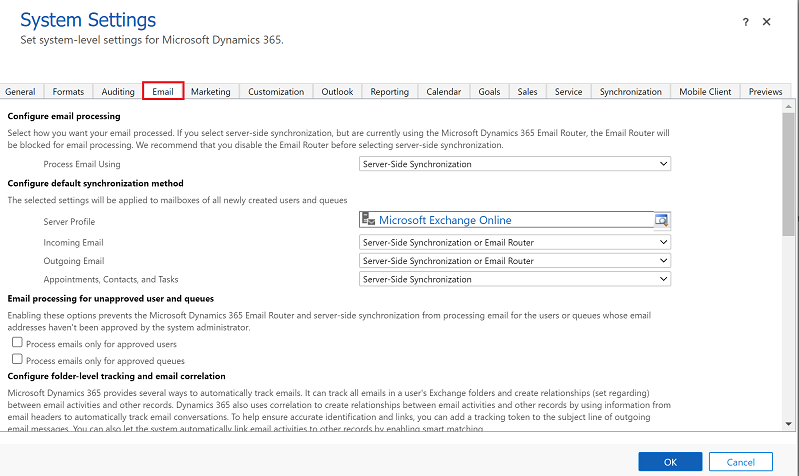
To use Dynamics 365 App for Outlook, you need to set server-side synchronization for your email processing. For more information on email synchronization, see Set incoming and outgoing email synchronization
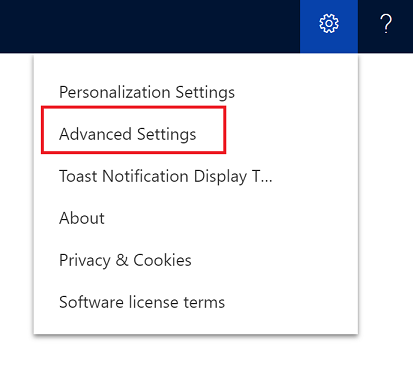
From your app, go to Settings > Advanced Settings.
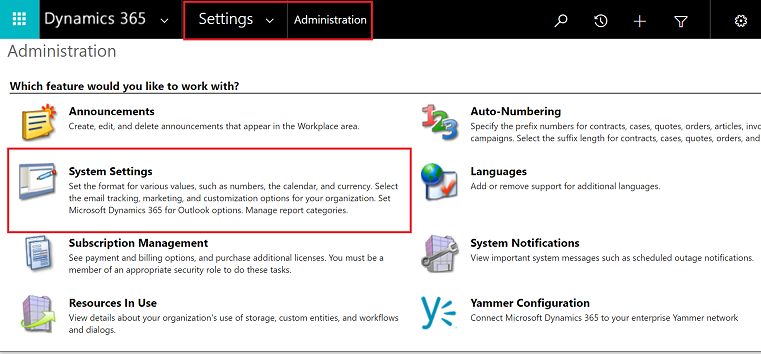
Go Settings > Administration and then select System Settings.
Select the Email tab, and set Process Email Using to Server-Side Synchronization.
Step 2: Test email configuration and enable mailboxes
Enable and test your user mailboxes so they can use Dynamics 365 App for Outlook.
From your app, go to Settings > Advanced Settings.
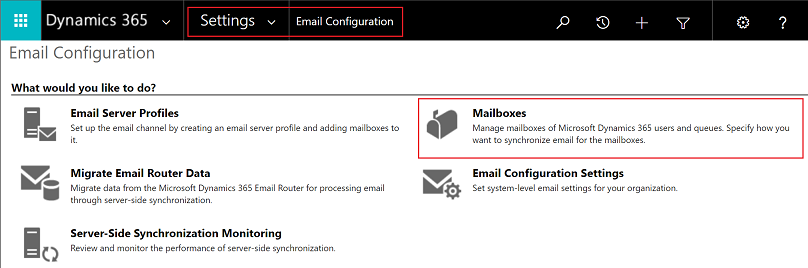
Go Settings > Email Configuration and then select Mailboxes.
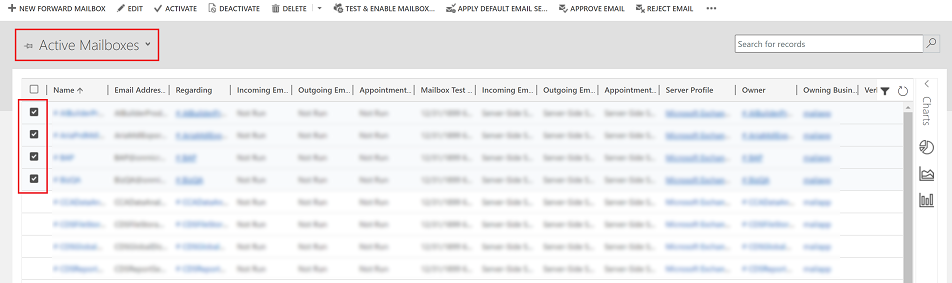
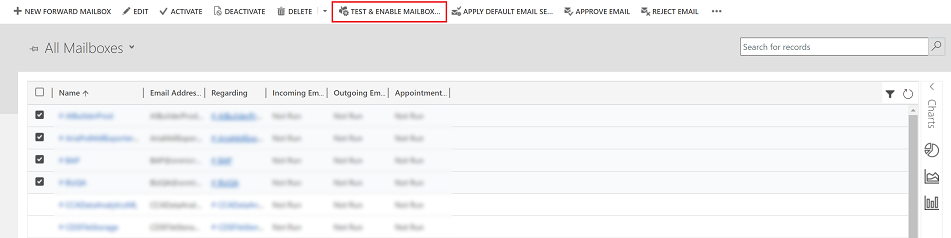
Select the Active Mailboxes view, and then select the mailboxes that you want to test and enable.
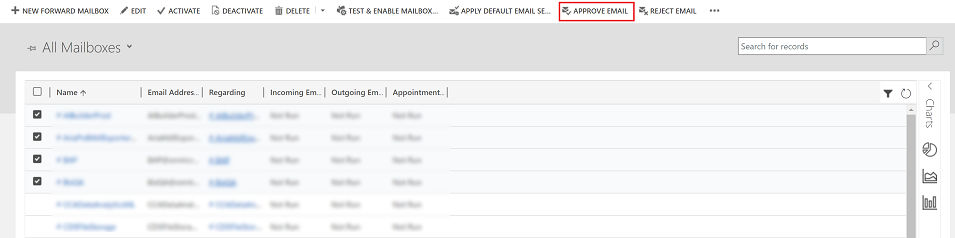
On the command bar, select APPROVE EMAIL and then select OK.
Once approved, select TEST & ENABLE MAILBOX.
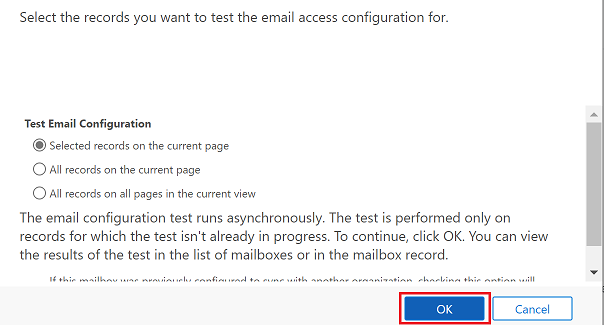
On the confirmation dialog box, select OK.
You may need to wait for the system to process the updates. The more mailboxes you enable, the longer it may take.
Step 2.1: Verify configuration
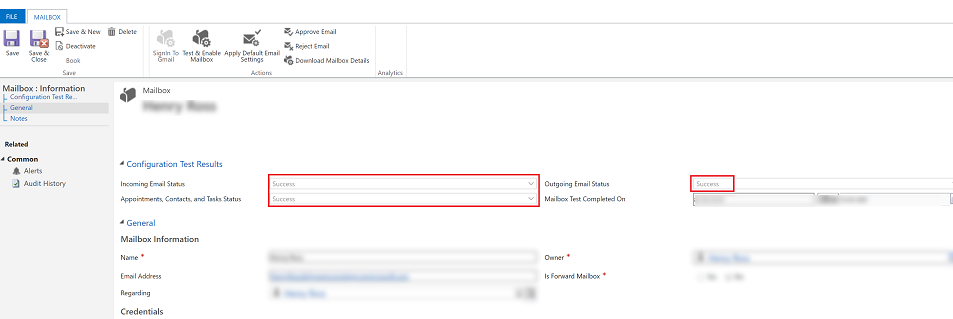
To verify mailbox is set up correctly, open the mailbox that you tested in the previous step.
If the set up is successful, the configuration Test Results section will change from Not Run to Success.
Step 3: Provide security role access
The security role Dynamics 365 App for Outlook User is available from build 9.1.0.4206 or later. If a user doesn’t have this security role or its underlying privileges, they’ll receive the following error: You haven’t been authorized to use this app. Check with your system administrator to update your settings. You must add users to this role so they can use Dynamics 365 App for Outlook. This will ensure that the users have the basic privileges needed to access App for Outlook.
Other security privileges on top of the basic privileges, related to the user’s role, will light up more features. For example, if a user has create privilege on Lead table, in addition to Dynamics 365 App for Outlook User security role, they would see an email resolve to a Lead table where applicable.
App for Outlook also requires server-side synchronization to be properly configured with the minimum security roles required by the service. These roles are outlined in the table below.Expand table
Privilege name
Table
Location (tab) within security role
prvReadEmailServerProfile
EmailServerProfile
Business Management
prvWriteMailbox
Mailbox
Business Management
prvReadMailbox
Mailbox
Business Management
prvReadOrganization
Organization
Business Management
prvSyncToOutlook (exchangesyncidmapping
Outlook
Business Management > Privacy-related privileges
prvReadActionCard
ActionCard
Core Records
prvDeleteActivity
Activity
Core Records
prvAppendActivity
Activity
Core Records
prvWriteActivity
Activity
Core Records
prvCreateActivity
Activity
Core Records
prvReadActivity
Activity
Core Records
prvAppendToActivity
Activity
Core Records
prvReadConnection
Connection
Core Records
prvAssignContact
Contact
Core Records
prvReadContact
Contact
Core Records
prvWriteContact
Contact
Core Records
prvCreateContact
Contact
Core Records
prvDeleteContact
Contact
Core Records
prvReadUserQuery
Saved View
Core Records
prvReadQueue
Queue
Core Records
prvReadQuery
View
Customization
prvReadIncident
Case
Service
prvSearchAvailability
Service Management > Miscellaneous Privileges
prvOverrideCreatedOnCreatedBy
Business Management > Miscellaneous Privileges
Note
If you create a team and add the team to the Dynamics 365 App for Outlook User security role, this doesn’t automatically propogate the privileges to the users within that team. This applies to custom roles with the Use Dynamics 365 Appf for Outlook privilege, as well.
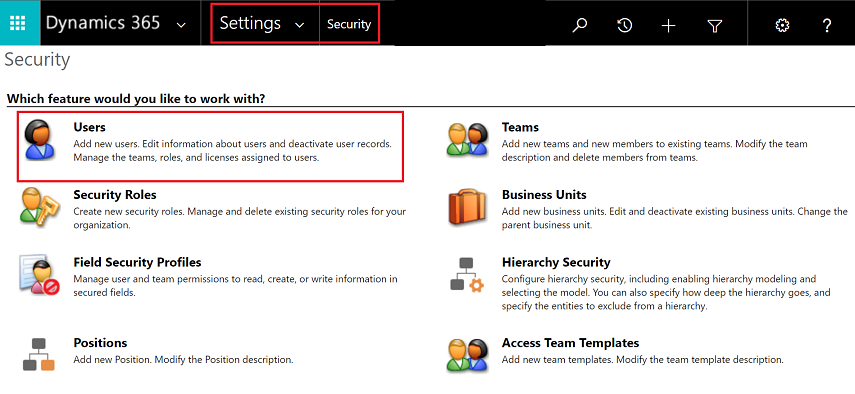
To add users to the App for Outlook security role, from your app, go to Settings > Advanced Settings.
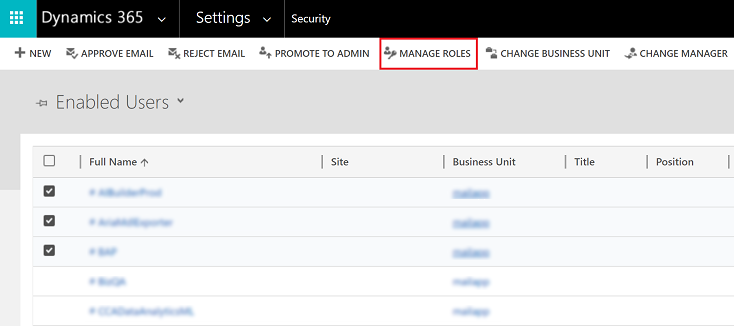
Go Settings > Security and then select Users.
Select the users from the list and then select Manage Roles.
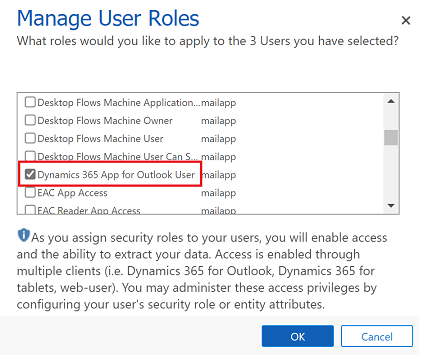
In the Manage User Roles dialog, select the Dynamics 365 App for Outlook User security role to the users and then select OK.
Step 4: Install App for Outlook
Follow these steps to push Dynamics 365 App for Outlook to selected users, all users, or have users install it themselves as needed.
Important
For environments in Microsoft Dataverse an administrator can get the App for Outlook solution from Microsoft AppSource. After signing in to AppSource, choose the the environment that you want to install App for Outlook. For more information, see Microsoft Dynamics 365 App for Outlook.
Your Dataverse organization must have a Dataverse store for the AppSource install to succeed.
To push the app to your users, from your app, go to Settings > Advanced Settings.
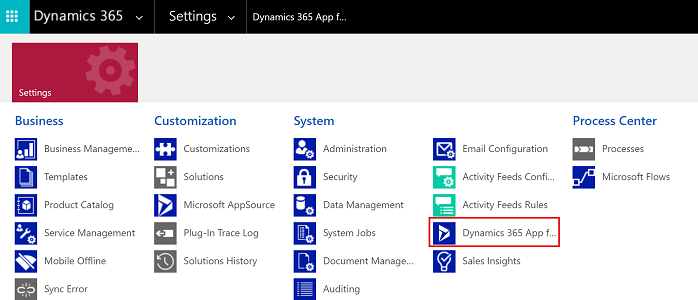
Go Settings > Dynamics 365 App for Outlook.
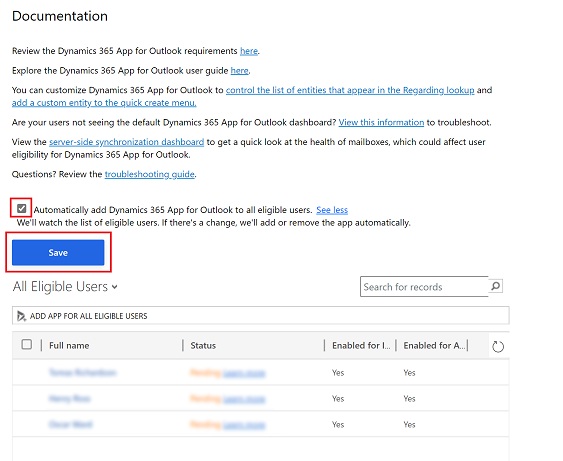
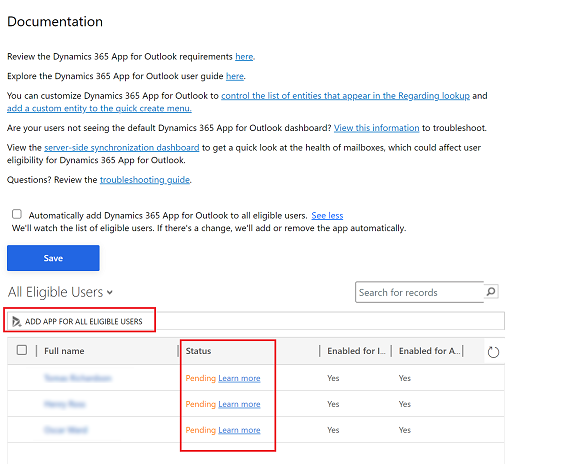
The Getting Started with Microsoft Dynamics 365 App for Outlook page lists all eligible users that can use App for Outlook. You have several different options on how you can deploy the app to your users:
Option 1: Select the checkbox to automatically add App for Outlook to all eligible users. If a user’s email is synchronized through server-side synchronization, you won’t have to do anything more to push the app to them.
Option 2: Select ADD APP FOR EIGIBILE USERS to deploy the app to all users that are set up correctly. The Status will change to Pending.
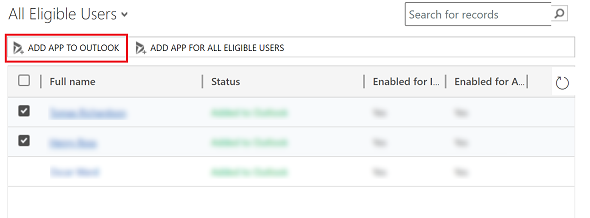
Option 3: Push the app to certain users, select those users in the list, and then select Add App to Outlook.
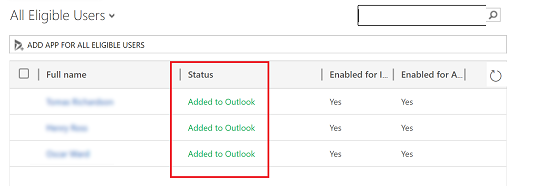
The status will change to Added to Outlook and the app will be available for your users.
The app will appear in the Outlook ribbon for the added users.
Have users install App for Outlook themselves
From your app, go to Settings > Advanced Settings.
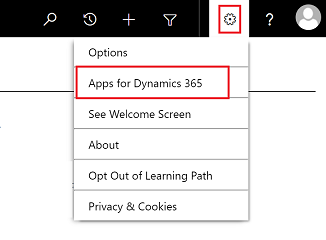
Select the Settings button , again and then select Apps for Dynamics 365 apps.
In the Apps for Dynamics 365 apps screen, under Dynamics 365 App for Outlook, users select Add app to Outlook.
To deploy to Dynamics 365 apps (on-premises) users
Follow these steps if you’re using Dynamics 365 apps (on-premises).
If you don’t see Dynamics 365 App for Outlook when you click the Settings button , check that you’ve enabled the feature.
If you or your users have trouble installing Dynamics 365 App for Outlook, it may be because their Exchange mailbox is currently linked to another Microsoft Dataverse environment or Customer Engagement (on-premises) organization. An Exchange mailbox (email address) can only synchronize appointments, contacts, and tasks with one organization, and a user that belongs to that organization can only synchronize appointments, contacts, and tasks with one Exchange mailbox. You can overwrite the setting stored in Exchange if you want to change the primary synchronizing organization. For more information, see this KB article.
Small and medium businesses (SMBs) are the backbone of the US economy, driving growth and employing millions of workers.
When SMBs use powerful technology, they can achieve more than ever before. From cutting-edge AI capabilities to seamless payment solutions, Microsoft is investing in SMBs like yours, helping you thrive in the digital era.
As a Microsoft-certified partner, we can help you focus on your core business while we handle the complexities of managing your Microsoft cloud services, ensuring reliability, scalability, and cost optimization. Don’t hesitate to contact us.
The significant shift in workforce dynamics driven by the pandemic will continue to reverberate for many years. Executive leaders can optimize talent outcomes by harnessing the pandemic-driven digital acceleration trends that are shaping the future of work.
Overview
Opportunities and Challenges
The single greatest factor that will drive organizational success through the decade will be the ability to pair continuing technological advances with talent strategies. Every significant business initiative will have a digital underpinning.
Historically, the digital employee experience has been the responsibility of the IT organization. Executive leaders now must closely oversee the talent implications of technology investments to ensure organizational success.
While once-complex technologies such as coding, analytics, web design and automation are now accessible to non-IT workers, few organizations have a programmatic approach to ensure that more employees exploit these services, leading to competitive disadvantage.
What You Need to Know
The 2022 Gartner View From the Board of Directors survey shows that digital technology initiatives and a focus on the workforce are the top business priorities for 2022 to 2023.1 The intersection of the two — talent and technology — is what we call workforce digital dexterity.
Ensuring that employees are able to exploit changes in the technology landscape is a team effort requiring coordination between team managers, HR, facilities management, and IT and business unit executives.
Offering a multitude of technology-centric career development and advancement opportunities is essential to employee retention and attraction strategies, and to the expansion of digital capabilities. Helping non-IT employees develop business technologists skills must be part of the executive leader remit.
Insight From the Experts
All Major Future of Work Trends Have a Significant Digital Component
The sweeping changes in work models driven by the pandemic will have a significant impact on the employer-employee relationship. As our Future of Work Reinvented Resource Center highlights,2 granting workers more flexibility in where, when and how much they work drives greater effort, promotes engagement, and helps retain and attract talent. This pandemic-driven shift in work models was unexpected and sudden, and will have a permanent effect on work strategies going forward.
The pandemic has also accelerated the shift to digital processes since most in-person and analog operations failed and were replaced with digital constructs. In this body of research, we focus on the continued trajectory of this significant shift in the evolution of work — namely the impact of technology on every facet of the work experience. Figure 1 calls out the trends that will have the biggest impact on how work gets done throughout the decade. Each of the trends has a corresponding report on its significance and what executive leaders can do about it now .
Taken together, these trends lead us to a series of inescapable conclusions:
Workforce digital dexterity — the ambition and ability to use technology for improving business outcomes — along with an agile and open mindset — are perhaps the most critical elements in driving organizational success over the next decade.
Current ways of promoting digital skills have underperformed, and a human-centric approach to digital enablement — supported by executive leadership — is needed to drive success.
All executive leaders need to be increasingly alert about technology advances and participate in the continuous improvement of the digital employee experience
We hope you enjoy this exploration of these future work trends.
Kind regards,
Matt Cain and Chris Howard
Executive Overview
Definition
This collection of research identifies the top digitally mediated trends that will have the greatest impact on how work gets done through the end of the decade.
The underlying theme of this research is that the most desirable work skills will increasingly require digital dexterity — along with an open mindset and agile behavior (see Building Employees’ Digital Dexterity: A Key Capability for Future Business Success). The pandemic — and the lack of preparation for it — highlighted the importance of focusing on future scenarios. Given the importance of technology on the future of work, executive leaders must develop a sophisticated understanding of the interplay of technology and talent strategies.
There are no black swans among the top trends — all the trends are underway, though some are more advanced than others (see Figure 1). This is a critical point: because the trends are in flight means that a broad spectrum of executives are in a position to understand, influence and drive the trends that will make a significant contribution to individual, team and organizational goals.
The pandemic — and the ensuing war for talent —has highlighted the importance of the employee experience in helping drive performance and retain talent. This body of research underscores the criticality of the digital employee experience, which, in a world where most work processes are digital, increasingly constitutes the largest part of the broader employee experience.
Figure 1: Future of Work Trends: Faster, Smarter, Informed
Over the past 40 years we have suffered through — and been delighted by — multiple eras of computing. This began with the IBM PC in 1980 and progressed through the internet era (information and communications for all), to the smartphone era (everywhere computing) to the SaaS/cloud era (rapid technology upgrades). Now, in 2021, we are entering the artificial intelligence (AI) and Internet of Things (IoT) era (intelligence everywhere).
These eras, of course, are cumulative, and a person entering the workforce today is expected to master the technology of the current era and all that preceded it. The pandemic rapidly moved us to a greater digital foundation as most interactions went virtual, paper-based and analog work processes failed, and it was sink-or-swim time for workers forced to learn to perform all duties while working remotely. The momentum of the pandemic and digital changes will extend for years, resulting in faster technology advances leading to continuous change in the way work is structured and employees experience it.
We have broken our future of work trends into four categories — the first three — work is faster, smarter and informed — are the digitally mediated trends that we believe will have the biggest impact on how work gets done through 2030. The last category — future of work scenarios — highlights peripheral areas that impact and incubate the evolution of work— the development of smart cities, skills acquisition, frontline workers and customers.
Research Highlights
Work Is Faster
The relentless push for speed — in product development, in customer service, in virtually every business operation — has been with us since the invention of the wheel. So from that perspective, it’s not surprising that the drive for speed is accelerating. In this Work is Faster research collection, we examine the new paths that are being built to accelerate all aspects of the business cycle. Executive leaders should be investing in new team organizational and operational structures such as talent marketplaces, agile and fusion teams to drive business outcomes, and should be exploring new hybrid business model constructs.
Our trend work is more distributed — refers to an environment where hybrid work is already embraced, and where there are significant degrees of flexibility in areas such as what skills are applied to which activities. Other distributed work factors include who is doing the work, more agile distribution of work across teams, breaking down functional silos, and cross-functional teams becoming common, especially as they relate to digital initiatives and digital product management. With distributed work, digital channels and a collection of everchanging cloud-sourced, personal and team productivity applications — what we call “the new work hub” enables distributed work. Internal talent marketplaces become the key enablers for connecting talent to work activities. In cases where more routine work occurs, workforce optimization tools dynamically distribute work activities.
Team dynamics are also featured in our next trend — teams become agile. The idea here is that a workstyle that was created to accelerate software delivery has proven so successful that it is moving outside of the IT organization into mainstream business operations. An interdisciplinary team that includes a variety of skills not often found in permanent team structures can be essential to the success of agile-centric initiatives. These teams can use agile principles to navigate the uncertainties associated with digital business activities, as well as business processes in general, far better than traditional approaches. Agile operations plus interdisciplinary teams are the core building blocks of business model acceleration.
Hyperautomation fuels growth describes howhyperautomation — the disciplined approach to rapidly identifying, vetting and automating as many business and IT processes as possible — makes work faster. Hyperautomation activities are accelerated through the use of fusion teams. A fusion team is a multidisciplinary team that blends technology or analytics and business domain expertise, and shares accountability for business and technology outcomes. Instead of organizing work by functions or technologies, fusion teams are typically organized by the cross-cutting business capabilities, business outcomes or customer outcomes they support.
The last trend in this section, everything goes hybrid is a business practice riff on the pivot to hybrid work models. Prior to the pandemic, many workers went to the office. During the pandemic, those employees worked from home. Postpandemic, a third way emerges where workers split their time between home and office, based on the work to be performed. Many business practices are following the same trajectory. A traditional delivery model is forced to become virtual due to the pandemic, and then postpandemic, a third way emerges. This third way is a hybrid model, which, in most cases, represents an acceleration of business practices that have a profound impact on how work gets done.
Work Is Smarter
Similar to the relentless drive to improve the speed of business, the continuing effort to build more intelligence into work processes is the subject of the Work is Smarter research collection. That drive will be increasingly orchestrated by two factors: the continuous improvement of AI capabilities, and the ease with which they can be written into business activities. Executive leaders should be assembling resources to ensure that they are able to exploit the tremendous potential driven by the dropping cost of advanced computing services such as natural language processing, machine vision and IoT services.
The basic premise of our simple things become smarter trend is that the vast economies of scale driving down the cost of computing — in areas such as sensors, networks, AI and cloud-based storage — increasingly enable continuous improvement in the intelligence of just about anything.
At the same time, these technologies are being packaged in ways that make them far easier to be consumed by organizations. Applications, highways, meters and speakers — to name a few — can sense things around them, collect data, respond to queries and execute commands. Executive leaders need to be aware of the competitive advantage to be gained by making simple things of all varieties smarter.
With increasing business operation complexity and a rapidly rising tide of data, employees need more assistance to deliver better business results. Our AI joins the team trend discusses how
business systems are starting to not just automate tasks, but independently act and collaborate on their human collaborators’ behalf. The increased integration of AI techniques throughout various systems and their increased capability to behave autonomously are transforming AI from tools to teammates.
Ourcomputers get conversational trendexplores the consequences of natural language technologies enabling individuals to interact with computers via a conversation. Natural language query, chatbots and virtual assistants increasingly allow the workforce to ask for information, perform transactions and initiate workflows by simply asking the computer to do these tasks. While not without risk from poor implementations, these technologies, if done well, are incredibly empowering because employees can get tasks done without having to learn the custom commands and navigation idiosyncrasies of a burgeoning set of applications.
Work Is Informed
Data is the lifeblood of business operations, and the efficiencies driven by new ways to create, target and optimize the data and information life cycle are the subjects of our Work Is Informed research collection. Work will be transformed over the next decade by data fueling a variety of AI constructs, which, in turn, will transform how we detect patterns, consume content and restructure processes. Data and content analysis will lead to proactive delivery of information based on explicit and tacit factors, and generate computer-driven nudges. The tools used to orchestrate data and content will become increasingly easier to use. Executive leaders need to ensure that data literacy and providing employees with the agency to drive change are institutional values.
Tinkers become mechanics describes how rising digital skills, coupled with easier-to-use technology, allow employees to create technical solutions to business problems without relying on IT. There are three factors driving this trend. The first factor — complex technologies for analytics, application development, website design and workflow design — is becoming far easier to be used by digitally dexterous workers outside of IT (the tinkerers). They use the technology to boost their skills — becoming mechanics in the process. These business technologists (our official term for this role) are necessary because the IT group cannot meet the incessant demand for custom technology solutions (the second factor). Empowering employees — to eliminate work friction or develop a business opportunity — is what will ultimately lead to sustained digital transformation (the third factor).
The ability of AI services to extract meaning out of content such as videos, transcripts and meetings, coupled with services that understand what type of information is most helpful to us are the subjects of our information finds you trend. And conversely, these AI-driven services also help organizations understand what information is not helpful, and therefore, suppress delivery. This trend examines the emerging tools that will help employees cope with an increasing flood of notifications, alerts and communications, and to extract value from a rising tide of content. That AI-driven content capture and analysis will be coupled with best practice “nudge engines,” which will be applied to an infinite number of use cases including manager best practices, employee wellness, application navigation and time management.
A similar dynamic is occurring in the world of data, where information capture is the subject of our everything gets measured and tracked trend. This is accomplished through sensors embedded in inanimate and organic objects (IoT) or cloud-based systems that can capture and extract meaning out of every keystroke, and AI systems that analyze emotions and attention states. This convergence of the physical and digital worlds means every microbehavior of people (voice and image sentiment), machines and even livestock gets analyzed. Executive leaders will need to make use of this data to optimize jobs, teams and processes as an essential driver of competitive advantage and organizational resilience while respecting privacy.
Future of Work Scenarios
When we were assembling these future work trends, a couple topics kept popping up that were not exactly about work skills, but were deeply related to the future of work. These topics include learning, cities, customers and frontline workers — so we decided to include them in this Future of Work Scenario collection. Executive leaders should take a broad view of future of work trends, and increasingly connect those trends with adjacent future trends about frontline workers, urban areas, learning practices and customers.
Many organizations in verticals like retail, healthcare, manufacturing and logistics have significantly more frontline workers than desk-based workers. Our five trends shaping the future of frontline workers research examines how they are subject to the same high-level trends affecting the future of work as desk-based workers These include hyperautomation, increased sensorization and more advanced analytics, including image and video analytics. To be successful, organizations need to deploy human-centric design and engage frontline workers in ideation, design and delivery of these solutions.
Because digital skills are increasingly marbled through all future-of-work trends, including hyperautomation, business intelligence and AI-driven applications, skills will shift with technology change. Ourfuture of work demands agile learning trend explores how executive leaders must create a culture of continuous learning that increases organizational resilience. Employees must become continuous learners to keep their skills up-to-date for success in their current role, and they must reskill periodically to advance their career or to jump into a new high-demand role.
The development of smart cities and intelligent urban areas — the topic of our future of work-life integration in smart cities research — is closely linked to the economic, environmental and demographic opportunities of society. Cities are aligning support functions to the individual needs of citizens to create a dynamic service experience and entrepreneurship of citizens and communities. This is especially true when cities increasingly compete on issues regarding the quality of their industrial and citizen ecosystem, workforce and digital skills, industrial and open data availability, and an ambient and sustainable environment with increasing touchless interactions (a pandemic-accelerated phenomenon).
These top 3 customer experience trends describe how organizations must shape their future by planning for a flexible response to customer demand and improved value propositions. This will require continuous improvement in work outcomes and talent management strategies. Organizations who are setting customer experience goals must align their ambition with the strategies for the workplace, digital enablement, and for attracting and managing talent.
In today’s shifting macroeconomic climate, Microsoft is focused on helping organizations in every industry use technology to overcome challenges and emerge stronger. From enabling hybrid work to bringing business processes into the flow of work, Microsoft 365 helps organizations deliver on their digital imperative so they can do more with less.
This month in Microsoft 365, we’re introducing new sharing experiences in OneDrive, enabling creation and collaboration in Microsoft Office, and connecting employees to organizational goals with Microsoft Viva Goals. And our new How to Hybrid: The WorkLab Guides offer practical guidance to help leaders make hybrid work work.
Let’s dive in.
Streamline file sharing and communication in the flow of work
OneDrive is the core system for powering all file-sharing experiences across Microsoft 365. We’re excited to preview new capabilities to help you access everything you need, whether you’re working alone on a project, collaborating with your team, or organizing important documents or files.
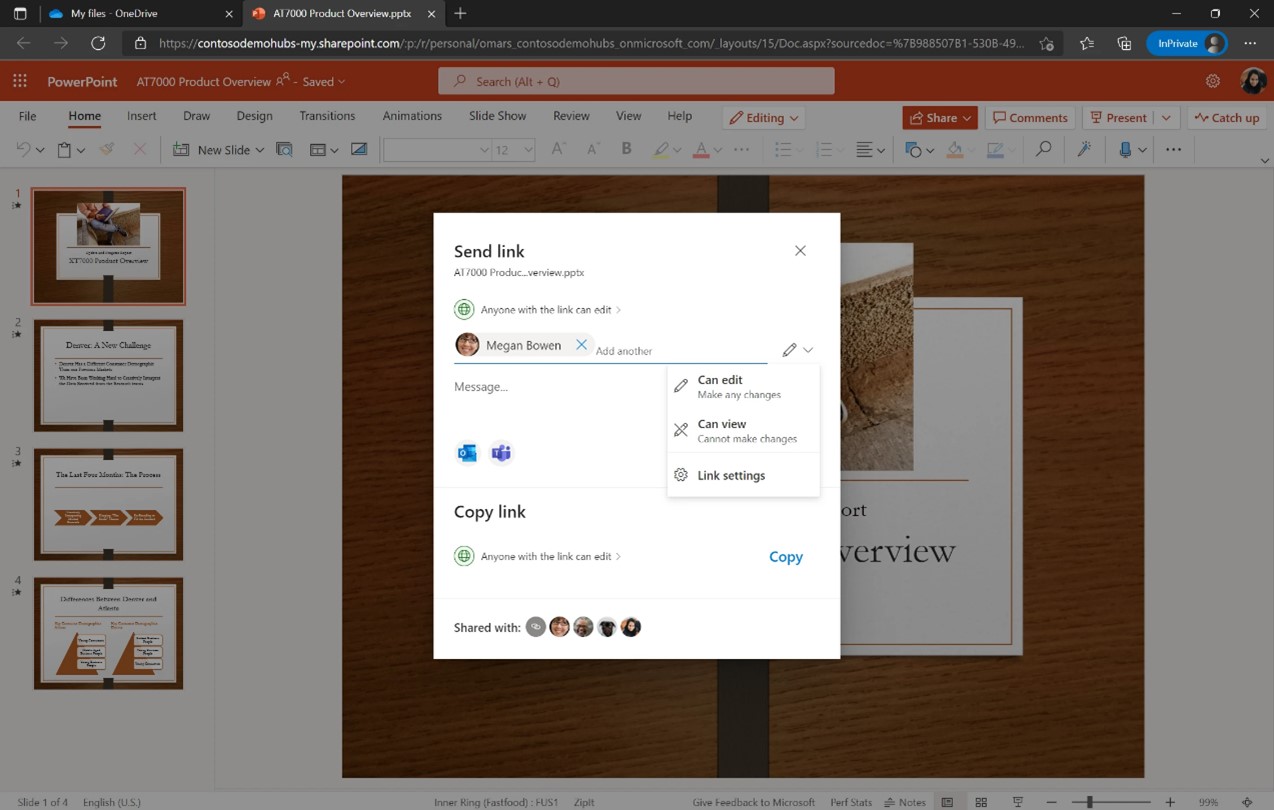
We’re creating a more intuitive sharing experience across OneDrive, SharePoint, and Microsoft Teams that provides a quick, robust way to locate and share files and manage access settings across individuals and groups.
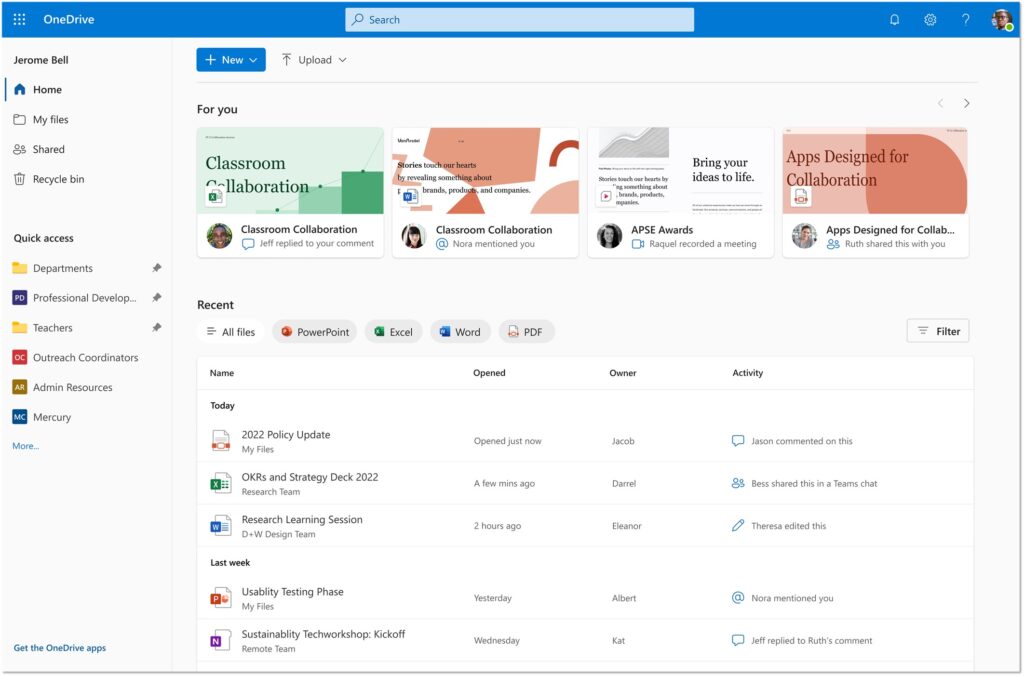
The redesigned OneDrive Home experience surfaces your most recent files along with any activity updates, so you can see everything at a glance and quickly prioritize where to start working. You can also filter by file type (.docx, .pptx, .xlsx, and .pdf) using the buttons at the top of the Recent file list.
Finally, to easily find and access the places where you continually work, you can pin document libraries to the Quick access section in the left navigation bar of OneDrive Home. Learn more about the latest OneDrive capabilities.
Microsoft Teams Phone is the market leader in cloud calling across VoIP and PSTN with more than 12 million PSTN users. We are introducing a new Teams Phone Pay-As-You-Go calling plan option to give customers even more flexibility to choose the plan that best meets their organization’s needs. Each Pay-As-You-Go license includes a phone number and unlimited inbound calling, while outbound calls accrue per-minute charges. The Pay-As-You-Go calling plan is now available in select markets.
Enable creation and collaboration with Microsoft 365
Microsoft 365 lets you create, share, and collaborate all in one place with your favorite apps. New capabilities in Microsoft Officemake it easier to access, create, and organize ideas on the web or on your mobile device.
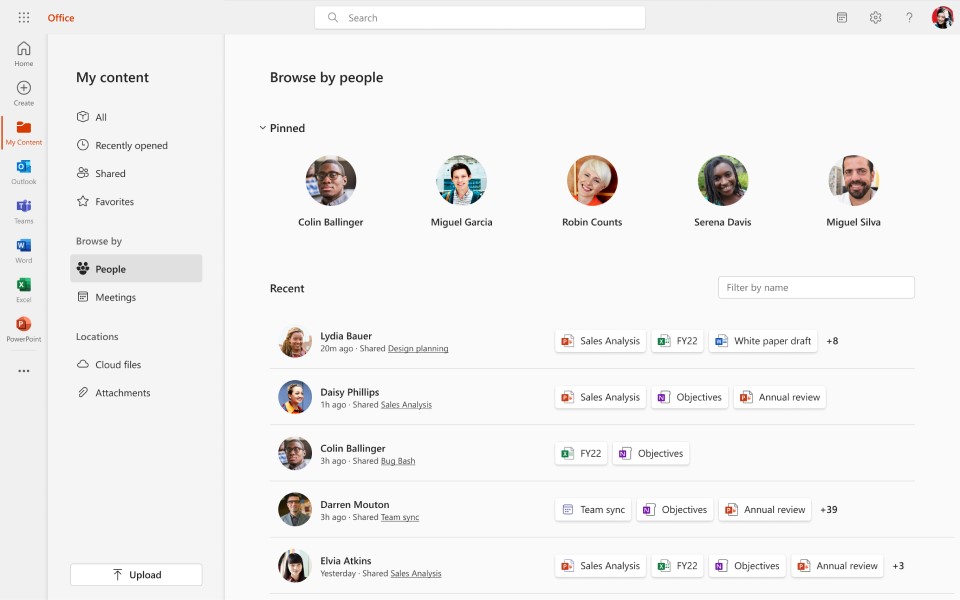
On the web, People Pinning under My content enables you to create a more personalized experience by pinning your top collaborators so that you can easily get back to the content from your most important contacts.
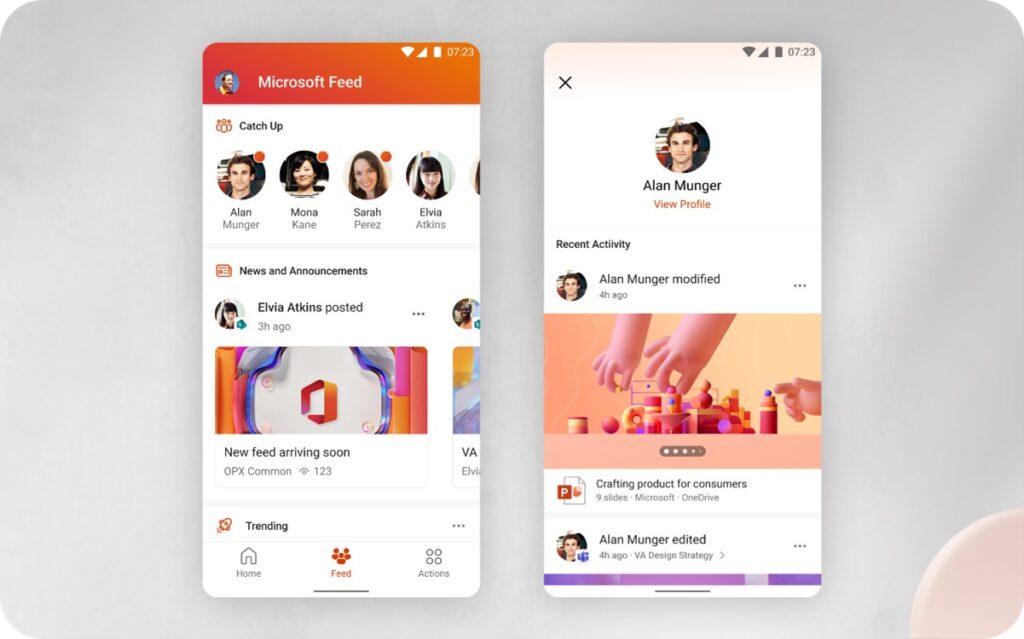
On the mobile app, Microsoft Feed lets commercial users discover interesting and relevant content, activity, and insights all drawn from their Microsoft 365 network.
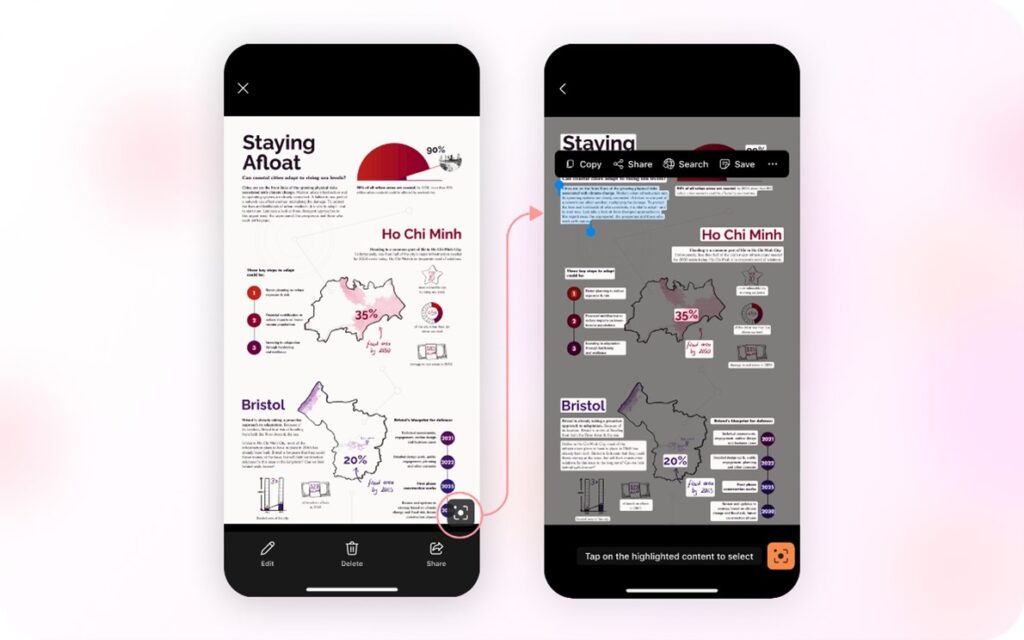
And Microsoft Lens in the app uses interactive text to help you reuse information from existing photos, screenshots, or camera views to quickly capture notes, copy and paste across platforms, save to your device, or share with others.
Reconnect and engage a dispersed workforce
Organizations increasingly recognize that employee experience and wellbeing are essential to productivity—it’s why 25 percent of the Fortune 500 already use Microsoft Viva. We’re adding new capabilities in Viva and Teams to help keep employees connected to each other, their team, and to the organization’s mission, culture, and business goals.
Viva Goals—now generally available—connects employees to your organization’s goals, helps them stay aligned at scale, and drives business results to empower people and teams to understand their impact. Viva Goals supports the objectives and key results (OKR) goal-setting framework that naturally creates alignment between the work teams are doing and an organization’s top business priorities. Because Viva Goals is a part of Microsoft Viva, it integrates into the employee experience, empowering people and teams to be their best from anywhere. Use Viva Goals as a standalone web application or directly from inside Teams and our other third-party integrations. Learn more about Viva Goals.
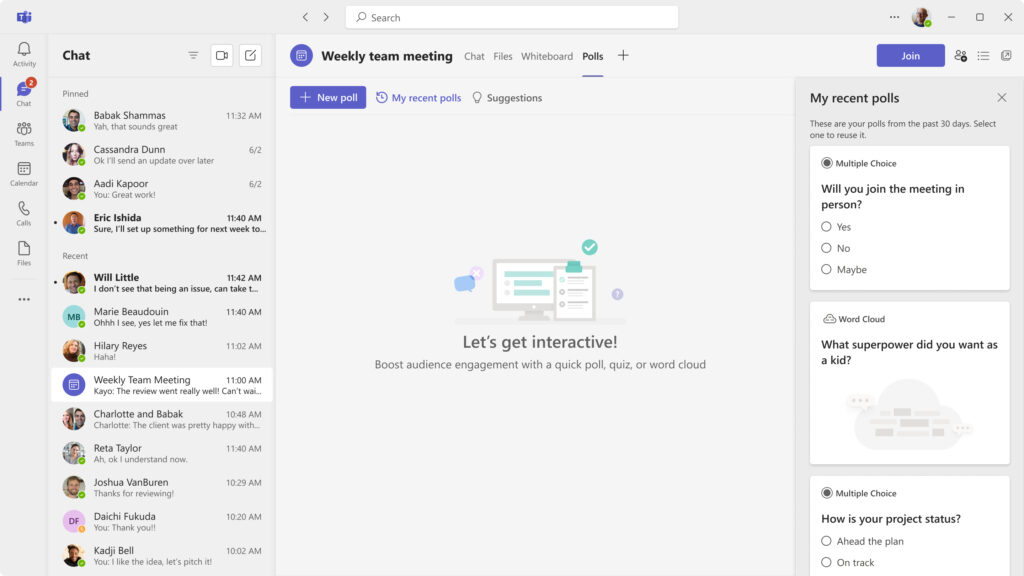
We now have an improved Polling experience in Teams. Teams meeting owners can easily create and launch new pre-defined polls or repurpose recent polls to increase engagement and collect input from their meeting attendees, as well as share the results live. A new, dynamic experience with animations for voting and results views makes polls more interactive and engaging. We’ve also added Rating as a new question type. Read more about what’s new in Microsoft Teams.
Leverage the How to Hybrid: The WorkLab Guides
For leaders grappling with how to make hybrid work work, check out the new WorkLab Guides. From collaborating asynchronously to hosting effective meetings to knowing how and when to come together in person, these detailed guides include hands-on advice to help leaders navigate the new approach to work and figure out what works for their teams. Learn more at The WorkLab Guides.
How to Hybrid: The WorkLab Guides
Leverage hands-on advice to help leaders navigate the hybrid work world.
This month we debuted enhanced capabilities across Microsoft 365 to help people collaborate and stay connected and engaged in the flow of work. Stay tuned for more developments next month, as we highlight a number of new product innovations in Microsoft 365.
The effectiveness of ransomware attacks have caused organizations to move from a threat prevention strategy to a cyber resilience strategy. This is because companies now need the ability to respond to a security breach, mitigate damage and enable data recovery to restore normal operations when protecting their data. The shift has caused more companies to look at backup and recovery as part of the security stack. This holistic approach to attacks acknowledges that even with best-in-class defensive tools, you won’t have 100% prevention. A cyber resilient strategy also allows organizations to mitigate an attack while also protecting their data integrity and enabling successful recovery to normal business operations.
It makes perfect sense that being able to recover data after a cyber attack is crucial, but the alignment between security and DR teams needs work. In the 2022 Veeam Ransomware Trends Report, we found that the closer professionals got to having their hands on the keyboard, the more issues were seen with the alignment between these two camps. The upcoming release of Veeam Data Platform v12 will see significant improvements that can help organizations bridge the gap between cyber security and disaster recovery (DR).
The difference between cyber resilience and cyber security
Cybersecurity has traditionally been about blocking threats before they can do harm to the organization. The as-a-service model for attacks and the effectiveness of threats like ransomware have caused a shift to move from siloed solutions to integrated security stacks where tools share information with each other to create a complete picture of modern cyber threats. Cyber resilience is the next logical step that brings recovery into the response process. The alignment makes sense because security teams need to focus on reducing threats to the organization, and DR teams focus on maintaining service and recovering from outages. Cyber resilience as a practice is simply bringing these goals together as a cohesive ecosystem.
What are the components of cyber resilience?
Cyber resilience is a strategy that must be adopted enterprise wide. Since we are merging multiple processes, it’s imperative that you have all your security and DR processes documented to build a complete workflow to ensure business continuity. An effective cyber resilience plan should include the following elements:
Risk assessment: A thorough assessment of potential risks and vulnerabilities, including those related to cyber attacks, natural disasters, and other disruptions. You can’t stop a meteor, but you should know whether your industry is being targeted by specific threats and threat actors. To understand the risks to your environment, you first need to know what your critical resources are and where they’re located. This includes where your backup repositories live and how they’re protected. Version 12 of Veeam ONE improves visibility into your security posture so you’ll know exactly which workloads are immutable so you can take corrective action.
Prevention and mitigation measures: Knowing why you want to protect a system ensures it will have the correct level of protection and the proper placement in your priority list. Measures to prevent or mitigate the impact of disruptions, like implementing strong security controls, regular patching, and training employees on how to identify and report potential threats. Veeam Data Platform V12 will add multiple security features ranging from multi-factor authentication (MFA) to supporting direct-to-object immutable storage which adds a layer of protection from external threats or human error.
Response and recovery procedures: Detailed procedures for responding to and recovering from disruptions, including incident response plans, data backup, data and restoration and communication with stakeholders, is critical and often ignored. Veeam Recovery Orchestrator has given companies the ability to automatically create and update their DR plans for years. As part of V12 we’ll extend those capabilities to make planning and testing a regular part of your resilience strategy.
Regular testing and review: Regular testing of your DR plan and its components is important, as is periodic review and updates to ensure it remains effective over time. Unfortunately, most organizations only test their DR plans once per year. As organizations take a more resilient stance, DR teams should be brought into the overall security testing process and tabletop exercises. In V12, we’ll give you even more automated testing and reporting to prove you can meet your recovery time objectives (RTOs). It’s an important call out, since according to the 2022 Ransomware Trends Report only 16% of organizations have an automated testing process in place.
Moving forward together into 2023
Veeam has always been focused on recovery. We may not have said it outright, but everything we do is to help organizations improve their data availability and protect against data loss. We do this by providing innovative tools that simplify data security and don’t add to the complexities you already have. For example, we integrate with your existing malware detection tools and give your incident responders access to live data in a separate network for their investigations.
Our comprehensive monitoring and analytics give you control over your data with real-time visibility into your backup environment. This can provide assurances your backup jobs are running as expected, and alert you if there’s an issue that could indicate an attack.
Most importantly, we’re here to help our customers recover their data. At Veeam, we know every network is different and that resilience requires flexibility to create a solution that fits your needs. Whether it’s having the performance needed to meet a critical RTO, the need for multiple levels of data protection or the confidence that you can get your data back when you need it, we’re here to make you more resilient.
Enterprises routinely face challenges when it comes to protecting their critical workloads. Meeting demanding Service Level Agreements (SLAs), unsought multi-team workflows, and convoluted or sprawling toolsets are just a few of the common constraints that organizations routinely face. When these challenges start to compound, you quickly wind up in situations where simple tasks can grind your applications to a halt.
Operations such as backing up Microsoft SQL Server databases can be as simple as capturing an application-aware image-level backup. Complexities start to come into the picture when the discussion shifts to restores. Common questions that organizations need to ask themselves in such scenarios include:
Who should be able to restore this data? Database administrators, backup administrators, or both?
Whether it is protecting backups or concerns around transmitting data over the network, are security or compliance requirements being met? Is the backup admin even authorized to see the data being recovered?
Can your solution and teams effectively protect and quickly recover the application in question?
I recently discussed some of the security improvements that we’ll be seeing in the upcoming Veeam Platform v12. Although security is of paramount concern to many organizations, any tasks that require interaction from multiple teams can lead to inefficiencies. By implementing secure and robust tools that allow for well-defined and controlled delegation, many organizations can reduce friction. With the upcoming Veeam Backup & Replication v12 release, we’ll be seeing many such improvements, that will not only ease these pain points but may also provide opportunities for valuable collaboration between teams.
Fine-tuned workload protection
When it comes to enterprise systems, four of the most critical applications commonly found in large environments are SAP HANA, SAP on Oracle, Oracle RMAN and Microsoft SQL Server. Veeam has been providing application-aware processing for Microsoft SQL Server for many years now. Additionally, existing plug-ins for Veeam Backup & Replication have allowed users to protect the first three of these workloads safely and consistently. With V12, we are going to see improvements, particularly on the day-to-day management side of operations that will make your DBA smile!
Customers who have used Veeam Agent, an integrated part of Veeam Platform, are likely familiar with Protection Groups as they provide a quick, easy and automated path to install, configure and manage endpoint installations. A similar functionality will now be available for SAP HANA, Oracle RMAN and SAP on Oracle plug-ins. Tasks such as installing the plug-ins and managing group backup jobs can now be handled right from the Veeam Backup & Replication console. Not only will this provide increased control to backup administrators when required, but it will also provide an opportunity to entrust database administrators when it comes to protecting their applications.
Extending application support
Veeam Backup & Replication has long been touted as not only one of the pioneers, but as one of the leaders when it comes to application-aware backups. With the ability to define SLAs or perform granular restores, database and backup administrators alike have long loved the consistency and reliability provided by Veeam. In addition to the existing plug-ins, V12 will introduce a new Microsoft SQL Server plug-in which will grant even more granularity when it comes to protecting enterprise data.
The new plug-in will bring features such as specifying individual or custom sets of databases to protect. No longer will entire database instances need to be backed up when not required, resulting in reduced storage utilization. If technologies such as SQL Always On availability groups are in place, administrators will now be able to provide the same level of protection while only backing up the preferred backup replica.
To provide the best fit into existing workflows, the plug-in will integrate right into SQL Management Studio, a tool that database administrators should already be comfortable with. If SQL Management Studio is not available, the plug-in will still be configurable via separate executables. Tasks such as creating backup jobs or restoring databases to points in time will be available without logging into the Veeam Backup & Replication console or Veeam Enterprise Manager. In the same vein, automation such as creating SQL Agent Jobs to perform scripted backups will be available with the click of a button.
Securely delegate restores
Backup administrators typically have no shortage of items on their to-do lists, and many of those items often include performing restores. Whether full VM restores, application-level restores, or individual files, performing any or of all these tasks can quickly take up a significant amount of time in the workday. For years now, organizations of all sizes have been using Veeam Enterprise Manager as a one-stop portal. By leveraging Active Directory corporate network directory accounts, and limiting permissions and scope, it’s the perfect tool to grant non-backup administrators, including application owners and database administrators, the permissions required to restore critical data in a timely fashion.
To offer increased flexibility to users, and hopefully lighten their workload, Veeam Enterprise Manager will be seeing some advances as well. Firstly, Instant Recovery will now be a recovery option right from the web interface. This is something that will assist application owners who are requesting copies of their backups be restored “right now.” Hand in hand with that, the Entire VM Recovery restore option has also been improved to allow for a more granular and streamlined process. Lastly, virtual machine templates will be available for Veeam Enterprise Manager restores as well. Perfect for those situations where an OS update has gone bad and the team responsible needs to roll it back.
Protecting your physical workloads
Physical servers are still commonplace in many enterprise organizations, despite the year-over-year increase in continued virtualization and cloud adoption. One challenge, especially at scale, is dependably protecting these physical servers that may be running your largest applications on bare metal. Whether protecting physical workloads or deploying in a virtual workload, we’ll be seeing considerable enhancements coming to Veeam Agent for Microsoft Windows and Veeam Agent for Linux, both included in Veeam Platform v12.
From a storage perspective, both Agents will support direct-to-object storage as a backup target. When paired with immutable S3 Object Lock technology, this creates a powerful layer of security and defense against hackers, ransomware and possible internal threat actor. For organizations that are looking to reduce their interactions with tape backups, this can be an ideal replacement.
If disaster does strike your Windows or Linux Agent protected application, Secure Bare Metal Recovery is an option to get you back up and running quickly and securely. As part of the restore process, a unique recovery token can be generated, which is then entered as part of the recovery process. This will allow backup administrators to ensure that only specified restore points are available and will prevent unauthorized recoveries.
In addition to supporting Modern Authentication for email notifications, Veeam Agent for Microsoft Windows v6 will also be introducing changed block tracking support for file-level backups. Previously with this type of backup job, if only a small portion of a file was altered, the entire file would have to be backed up again. With the new optimizations, when not exceeding size thresholds, only changed blocks will be copied. In addition to the improvements already mentioned, the Veeam Agent for Microsoft Windows installer has decreased in size.
Summary – empower your enterprise
Complexity is a common foe in enterprises, and typically the larger the environment, the more complexity there is to fight. Veeam is here to help you strengthen your cross-functional team by putting tools in place that reduce limitations. By consolidating and standardizing the tools in your cross-functional environment, enterprises can maximize their efficiencies while reducing risk exposure. The above list (and recent webinar) is but a glimpse of some of the advancements that enterprises of all sizes will be able to leverage with the upcoming Veeam Platform V12 release. Be on the lookout for an invite to our exciting launch event!
2023 is fast-approaching, as is the release of Veeam Platform v12. Now is a great time to take a closer look at your backup strategies from all directions: To the cloud, of the cloud and even from the cloud. From consistent cloud bill shock, to the overwhelming tyranny of choice in cloud platforms and services, to the ever-looming threat of a cyber-attack, there’s a litany of reasons organizations should consider taking time to evaluate and optimize.
Examining hybrid cloud backup from every angle
‘The Hybrid Cloud’ carries a sort of monolithic connotation, generating eye rolls and “it’s just someone else’s computer” reactions. At Veeam, we like to break our cloud story down by directions, platforms, needs and capabilities, thus reducing the mystery.
Backup to the cloud
Veeam sees some key business drivers for why organizations leverage the cloud for backup and archival storage instead of tape or other storage options.
Transparent data retention: Gain visibility into retention times and recoverability
Resiliency: Be confident that your data is secure and recoverable in the face of a cyber-attack or disaster
Cost savings: Tier backups to ultra-low cost, cloud object storage
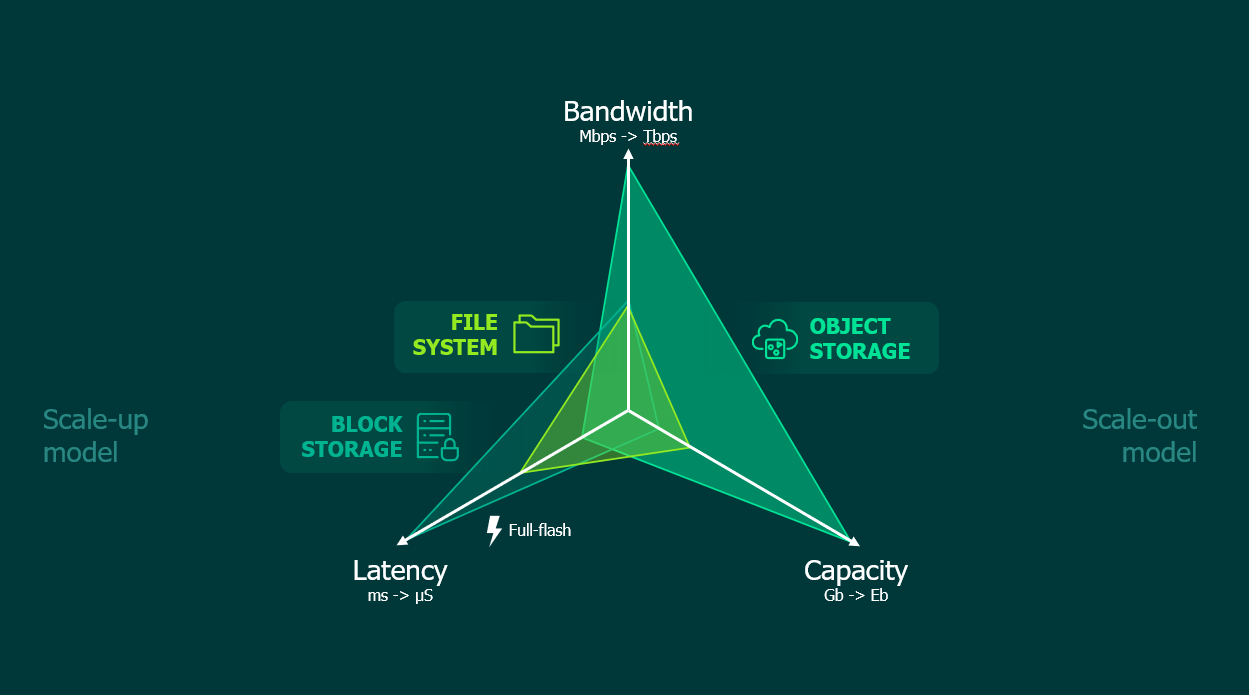
As organizations evaluate their retention goals, recovery time objectives (RTOs), security needs and more, the diagram below can help you see if an object storage backup target is the right fit for your backups.
In our latest webinar, Rick Vanover (Senior Director, Product Strategy) shared some considerations across latency, capacity and bandwidth – a great rubric to evaluate the pros and cons of object storage.
Veeam’s Scale-out Backup Repository offers users a skillful, well-designed mechanism to confidently tier backups to object storage and leverage the immutable storage options that too-often provide the last line of defense against a ransomware attack. Download the latest version now, and get ready for the next wave of enhancements coming to our object storage support in V12!
Backup of the cloud
As workloads move to the cloud, the sphere of control for backing up and protecting data becomes thinner and leaves too many opportunities for one accidental deletion to cause chaos. Veeam continues to push further into the cloud with solutions like Veeam Backup for AWS, Veeam Backup for Microsoft Azure and Veeam Backup for Google Cloud – all of which have new versions coming in V12.
For those who haven’t tried these solutions yet, they’ll find that they have much of the same look and feel as Veeam Backup & Replication, which shows a continued commitment to having a consistent experience for our end users.
In many ways, the story of these solutions is a return to the basics of backup. In our upcoming webinar, Rick Vanover discusses some of the steps users should plan for and consider when implementing a resilient backup strategy within the cloud.
Backup isolation: Setting up a dedicated cloud account for backups, storing backups in another region and even considering an exfiltration strategy are all great best practices for backing up cloud-hosted data. These concepts are inherent to on-premises backup strategies (i.e., logical separation), but must be intentional steps in the cloud.
Least-privileged access: Identity and Access Management (IAM) are critical concepts of the cloud, and backup should be no exception. 2023 planning is a great time to audit access rights and implement Role-based Access Controls (RBAC).
Encryption: Veeam’s cloud-native solutions integrate with many of the key management services cloud users know and trust.
So, if you haven’t tried Veeam’s cloud-native solutions, now’s a great time to deploy from your cloud-of-choice’s marketplace and get started. Get started guides, design schemas (like the one below) and more are available in Veeam’s Technical Documentation Center.
Veeam’s commitment to cloud mobility
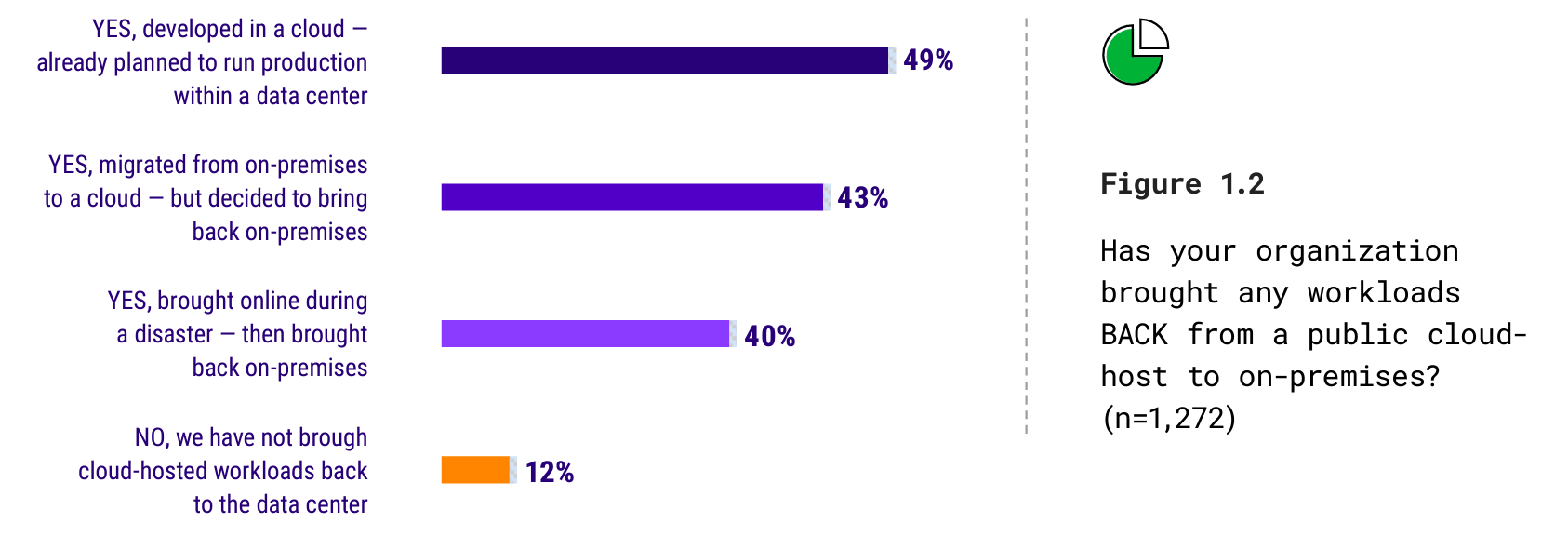
In our recently released Cloud Protection Trends Report for 2023, one of the most buzzed-about stats among the Veeam Team centered on organizations’ experience with bringing a workload back from the cloud to on-premises. While “disaster recovery (DR)” and ”dev/test to production” were somewhat expected responses, the preponderance of workloads that were expected to run in the cloud, but ultimately were brought back to on-premises storage was staggeringly high.
So, while Veeam continues to build advanced techniques to backup, secure and ultimately save storage costs in the cloud and rapidly release enhancements for the biggest hyperscale clouds in the industry, we also continue to remain committed to the promise of portability: Portability of data, licensing, storage support and more.
As we approach the end of 2022 and the upcoming release of the Veeam Platform v12, this is an opportune time to ensure that your organization enters 2023 with a strong security posture. All too often, security is treated as a one-time effort: Audits are performed, new policies are drafted and changes are implemented. Unfortunately, most organizations don’t go back and routinely update and review what they currently have in place. Instead, it usually takes a threat or an incident to shine a light on gaps that should have been plugged.
With the holiday season quickly approaching, the last thing any IT professional wants is to get that dreaded call that their environment has been compromised. Fortunately, there are a few best practices that you can implement to help you enjoy a quiet and restful holiday season. Not only will these tips help keep your environment in optimal shape, but it’ll also pave the way for a successful V12 upgrade.
Implement immutability
When it comes to ransomware or bad actors, immutability is one of the first technologies that you should implement to protect your valuable backups. When data is stored on an immutable repository, you can define a policy for a set period. Until the policy is over, the data cannot be altered. This means that whether you face ransomware attack or a rogue administrator, or even if you simply have regulatory compliance requirements to meet, your data will be safe. Immutability is available today in Veeam Backup & Replication v11 when you use a Linux repository, Amazon S3 Object Lock, tape or other immutable storage targets.
With Veeam Backup & Replication 12, immutability will see some vast improvements that will make Day 2 operations easier for enterprises. Hardened repositories and a few other on-premises object storage options will streamline the process of creating immutable repositories for the greatest level of control. For customers who want to backup directly to virtually limitless cloud object storage, V12 will bring support for Microsoft’s new object level immutability for Azure Blob Storage.
Trust, but verify your backups
An untested backup is a roll of the dice — it’s not the backup that matters, it’s the restore. Although jobs may complete without warnings, it is still imperative that you test your backups. Why? There could still be a large number of issues that throw a wrench into your restores, and your business when problems arise. However, there are other elements to consider in addition to restorability, including:
Is application-aware processing required to reliably backup your workloads?
Are your workloads in a healthy state when they’re backed up? Are reboots pending, and could they be problematic when restored?
Is your repository’s underlying storage system healthy?
Fortunately, features like SureBackup® can help you with customized and automated testing. Veeam first introduced SureBackup in 2010 as a way to guarantee that your backups were truly tested. Automating backup testing takes the pain out of the task while giving you peace of mind knowing that you’re protected.
In situations with increased complexity, Veeam Disaster Recovery Orchestrator v6 (coming soon), offers zero-impact testing. Key new features like orchestrating Windows and Linux restores, restoring anything to cloud and ransomware rollback capabilities will provide the flexibility that you need to test, document and recover fast. With these new features, customers can orchestrate restores of their Veeam backups, whether physical or virtual, to vSphere or Azure, while scanning restore points for threats as part of the recovery.
Documentation
Creating and maintaining documentation is a task that few of us enjoy, but it’s something that many IT professionals wish they did more. This can be time-consuming and laborious to create and validate, and unfortunately, the quality of documentation can vary widely depending on who is creating it, and who’s reading it. Unfortunately, it’s not easily replaced. Whether it‘s an app migration that went wrong, or a cyber threat that took out a datacenter, planned recovery tactics with documentation to help you rebuild fast is one of the best tools for getting operations back up and running.
Good news is, there are tools out there to help. Whether you want to find a good screenshot program to quickly grab setup details, or tools to assist you with logical diagramming, good documentation is nearly irreplaceable. On the Veeam side of things, Veeam Disaster Recovery Orchestrator v6 is just around the corner, within weeks of V12. Among the update’s new improvements is one of the true gems of the product: Automated documentation. Automating your documentation (and your recovery) takes the pain and guesswork out of the task and strengthens your odds for a successful recovery. Empower your executives with the confidence that your business is compliant and ready when disaster strikes.
Reporting and compliance
Whether required by law or your best practices, enterprises need to understand what their current health is. Are there areas that need more attention? Are there service level agreements (SLAs) that are being violated? Visibility into the good, the bad and the ugly is the only way to measure the overall health of your infrastructure. Having well-defined recovery point objectives (RPOs) and recovery time objectives (RTOs) are table stakes. Being able to monitor your organization’s compliance in real-time, before you need them, is one of the keys to success.
With Veeam ONE v12, you’ll see an increased level of focus on reporting on your overall security posture. With the upcoming immutable workloads report, teams will be able to see granular details like what jobs or workloads aren’t protected with immutable backup repositories. For enterprise-grade workloads with aggressive targets, Veeam Disaster Recovery Orchestrator provides an at-a-glance view of SLA compliance with documentation. With the ability to define targets and test plans, IT departments will have the knowledge and confidence to know that their workloads are being protected. Be prepared!
Planning for success starts today
Maintaining a strong security posture is an iterative event, meaning that it’s a task that needs to be continually revisited and re-evaluated. It is also key to a healthy environment. Reviewing and implementing the best practices outlined above will assist you in creating a safe and robust environment. Furthermore, that environment will be in an optimal state to benefit from the Veeam Platform V12 launch with the various security, immutability and enterprise-grade capabilities.
Escape Business Solutions Business Insights and Ideas
Building your business
If you read the business press, you know that big business has embraced the idea of “digital transformation” to enhance collaboration, improve connections with customers, and increase data security to stay competitive. What you might not realize is that the benefits of digital transformation are available to small businesses, too. In fact, upgrading digital resources in any organization can deliver a force multiplier effect that helps people achieve more every day.
Enabling new ways of working
For many businesses, the COVID-19 pandemic brought about a cultural shift that continues to pay enhanced employee engagement dividends. In fact, in the 2022 Work Trend Index survey, 52% of employee respondents say they’re likely to consider transitioning to hybrid within a year. They also said they’re more likely than before to prioritize well-being over work. In short, they want a better employee experience. With hybrid and remote work now commonplace, many businesses are realizing workplace flexibility can help attract and keep top talent. Supporting this new reality with effective collaboration technology is smart business.
Modern collaboration applications make it possible for workers at any business to meet, share information, and track projects more efficiently. What’s more, they enable small businesses to connect with distant customers and suppliers while avoiding the time and cost of travel. Such enhanced collaboration helped many businesses survive and thrive during office shutdowns and showed business owners and workers that a daily trip to the office wasn’t necessary for a business to stay productive.
Strengthening customer connections
Today’s customers are more sophisticated and demanding than ever. Their ability to research and compare companies they might want to do business with gives them a lot of power.
Increasingly, the first contact businesses have with customers is digital, so being able to capture data about who’s visiting your website, responding to your digital ads, or engaging with your social media is key. By harnessing that data and drawing actionable insights with easy-to-use digital marketing tools or a powerful marketing platform, business owners can shape individualized customer journeys that attract and engage target audiences more effectively and foster deeper business relationships with them.
Reining in cyberthreats
Data security is now among the biggest concerns for small-business owners, and for good reason. Research shows that small businesses make up one-half to three-quarters of ransomware victims, and overall ransomware attacks have risen 300% in recent years.1 Traditional antivirus software is no longer your best defense against the phishing, social engineering, web applications, and mobile malware that today’s cybercriminals use in network attacks. Such cyberattacks aren’t just inconvenient, they’re also dangerous and costly.
Unfortunately, security threats are likely to keep increasing. A recent article from Microsoft found there are now 921 password attacks per second—or 79.5M attacks per day—a data point that has nearly doubled in the past year.2
Small Business Solutions
Get tech solutions, help & guidance to keep your business thriving and growingLearn more
Digitally transforming a business’s approach to security is the best way to protect its data, people, and profitability. Upgrading from traditional antivirus software to an enterprise-grade security solution protects a small business’s apps, data, identity, and devices. That gives owners peace of mind and more time to focus on growing their business.
Simplifying digital transformation
Although digital transformation might sound like a big undertaking for a small business, it’s anything but that. It’s really just the process of empowering people to achieve more using technology. Taking your small business digital will save you time, protect your data, and allow you to focus on what’s most important: your customers.
To get an idea of all the ways Microsoft technologies can support digital transformation in your business, schedule a consultation with a product expert to learn more about the right solutions for your business.
About the author
The Escape Business Solutions 365 team is focused on sharing resources to help you start, run, and grow your business.

 , again and then select Apps for Dynamics 365 apps.