Modern enterprises are navigating a landscape where data lives across on‑premises, multi‑cloud, and edge environments, while users, applications, and intelligent agents demand seamless, secure access. Microsoft Entra represents a consolidated family of identity and access tools that enable a Zero‑Trust posture, streamline governance, and extend protection to both human and non‑human actors. For organizations planning cloud modernization or seeking to strengthen resilience and operational risk management, Entra delivers a common framework for authentication, authorization, and continuous risk assessment.
1. Unified Identity Fabric: Entra ID at the Core
At the foundation lies a cloud‑native identity and access management service that authenticates users, devices, and services across all applications. It exposes a consistent API surface, supports multi‑factor authentication, and enforces conditional access policies that evaluate context such as location, device health, and sign‑in risk. By anchoring every tenant in a single directory, the architecture eliminates fragmented identity silos and simplifies the integration of legacy on‑premises systems via managed domain services that provide LDAP, Kerberos, and group policy support.
2. Zero Trust Network Access: Private and Internet Access
Entra extends security beyond the perimeter with two complementary layers. Private Access replaces traditional VPNs, allowing remote users to reach internal workloads through secure, policy‑controlled tunnels that validate the user’s identity and device posture. Internet Access enforces web filtering, application control, and secure outbound connectivity for SaaS and public cloud services. Together they provide an end‑to‑end, application‑level path that removes the need for broad network privileges while enabling granular, risk‑aware authorization.
3. Governance and Risk Automation: ID Governance and Protection
Automated identity lifecycle management is crucial for compliance and operational agility. Governance capabilities allow organizations to automate user provisioning, group membership, and license assignment, then schedule periodic access reviews to ensure least‑privilege principles. Concurrently, risk detection monitors anomalous sign‑ins, compromised credentials, and suspicious device activity. Conditional access policies react in real time—requiring multi‑factor authentication for high‑risk sign‑ins or blocking access from untrusted networks—thus closing the feedback loop between detection and remediation.
4. Workload and Agent Identity: Secure Service and AI Interaction
Modern DevOps pipelines, containers, and AI agents require trusted identities separate from human users. Workload ID assigns cryptographic credentials to applications and services, enabling fine‑grained, context‑aware access to cloud resources without embedding secrets in code. Agent ID expands this model to assistive and autonomous AI agents, granting them governed, least‑privilege identities that can be audited, revoked, or rotated centrally. This approach prevents privilege escalation and ensures that intelligent automation can operate within the organization’s security boundaries.
Why This Matters to Enterprise IT
Adopting a unified identity platform delivers measurable benefits:
Risk Reduction – Continuous risk assessment and automated remediation lower the attack surface.
Operational Efficiency – Centralized identity and policy management cut administrative overhead and accelerate onboarding.
Compliance Alignment – Built‑in audit trails and automated reviews satisfy regulatory requirements such as GDPR, HIPAA, and PCI‑DSS.
Cloud Modernization Momentum – Seamless integration with Azure, Microsoft 365, and third‑party SaaS accelerates migration paths.
AI Readiness – Governing non‑human identities prepares the enterprise for widespread adoption of generative AI and robotic process automation.
EBS Consulting Perspective
At Escape Business Solutions, our expertise spans assessment, design, implementation, and governance of identity platforms in complex, multi‑cloud environments. When partnering with clients around Entra, we focus on:
Enterprise Architecture Assessment – Map current identity and access flows, identify gaps, and model a Zero‑Trust roadmap.
Security & Governance Blueprint – Define conditional access, risk policies, and automated lifecycle rules that align with industry standards.
Migration & Modernization – Plan phased transitions from legacy on‑premises directories to Entra, preserving legacy workloads while introducing managed domain services.
AI & Workload Identity Integration – Securely provision identities for CI/CD pipelines, containers, and AI agents, ensuring auditability and least‑privilege enforcement.
Operational Risk Management – Embed continuous monitoring, incident response playbooks, and compliance reporting into the identity fabric.
Our approach couples technology best practices with organizational change management, ensuring that the new identity model is embraced by users, developers, and security teams alike.
Practical Next Steps
1. Conduct a readiness assessment to catalog existing identity assets, legacy services, and compliance obligations.
2. Deploy a pilot Entra ID tenant, synchronizing a small user group and a handful of applications.
3. Implement Private and Internet Access for a critical internal service and a high‑risk web application.
4. Enable conditional access with risk‑based MFA for the pilot cohort and monitor outcomes.
5. Extend governance workflows to automate onboarding for a new business unit, and schedule quarterly access reviews.
6. Roll out Workload ID for a CI/CD pipeline that interacts with Azure resources, then audit the access logs.
7. Integrate Entra Agent ID for any AI or bot services, ensuring that each agent has a governed identity and audit trail.
Schedule a discovery session with Escape Business Solutions to tailor the above roadmap to your organization’s specific needs and timelines.
Architecting Agentic AI Business Solutions: A Roadmap for Enterprise IT
In today’s digital ecosystem, organizations are moving beyond simple automation to intelligent systems that can reason, adapt, and act autonomously. “Agentic AI” describes software entities that receive prompts, generate actions, and learn from context—capabilities that are reshaping customer engagement, back‑office workflows, and decision support. For enterprises, the challenge is to embed these advanced AI agents securely, govern them responsibly, and align them with long‑term cloud modernization strategies.
1. The Core Architecture of Agentic AI Solutions
At its heart, an agentic AI solution is a layered stack:
Front‑end Interaction Layer – User interfaces built with Power Apps, Dynamics 365 components, or custom web portals that capture intent via natural language or structured forms.
Orchestration Engine – Workflows powered by Power Automate or Azure Logic Apps that route user requests to the appropriate AI models.
AI Processing Layer – Generative models and reasoning engines hosted on Azure OpenAI or other cloud‑based inference services. This layer can include fine‑tuned models specific to the enterprise’s domain.
Data Fabric – A secure, governed data layer that provides the agents with context, historical records, and knowledge graphs. Integration with Dynamics 365, Microsoft 365, and on‑premises databases is typical.
Governance & Security Backbone – Identity management through Azure Active Directory, policy enforcement via Microsoft Purview, and compliance controls that ensure data residency and auditability.
2. Integrating Agents with Existing Business Applications
Agentic AI is most powerful when it sits directly inside the tools employees use daily. Dynamics 365 Copilot, for example, can surface insights in sales dashboards or automatically draft service tickets. Power Platform extensions allow custom copilots that respond to user actions within SharePoint or Teams, leveraging the same underlying AI services. Key integration points include:
API connectors for real‑time data exchange.
Custom connectors that translate enterprise APIs into formats consumable by generative models.
Embedded prompt templates that guide model behavior for compliance and brand consistency.
3. Security, Identity, and Risk Management
Agentic AI introduces new attack surfaces: prompt injection, data leakage through model outputs, and unauthorized model modifications. Robust security requires:
Role‑based access controls on all AI endpoints.
Token‑level authentication and conditional access policies.
Continuous monitoring of model usage and anomaly detection to surface unexpected behavior.
Data masking and privacy controls to protect personally identifiable information when fed into generative models.
4. Governance, Compliance, and Lifecycle Management
Because AI outputs can evolve, governance must treat models like code:
Versioning and change‑control processes for training data and fine‑tuning scripts.
Audit trails for model inference and decision rationales, often stored in a secure data lake.
Regular bias and fairness assessments aligned with regulatory frameworks.
Rollback and rollback testing to quickly revert to known safe models if an agent misbehaves.
5. Cloud Modernization and Migration Pathways
Implementing agentic AI typically requires moving core workloads to the cloud. Migration strategies can include:
Lift‑and‑shift of existing Dynamics 365 instances to Azure, followed by incremental integration of Copilot features.
Hybrid approaches where sensitive data remains on‑premises while generative services run in the public cloud.
Adoption of containerised AI components on Azure Kubernetes Service for scalability and resilience.
Why This Matters to Enterprise IT
Agentic AI offers measurable improvements in productivity, customer satisfaction, and operational efficiency. However, the technology also introduces complexity in governance, security, and cost management. Enterprises that adopt a disciplined architectural framework can:
Accelerate time‑to‑value by embedding AI into existing processes.
Mitigate legal and regulatory exposure through robust governance.
Maintain agility by leveraging cloud elasticity for model scaling.
Balance innovation with control by treating AI as a managed service rather than a black box.
EBS Consulting Perspective
At Escape Business Solutions, our practice spans assessment, design, and delivery of agentic AI initiatives. Key service pillars include:
Assessment & Roadmapping
We conduct enterprise‑wide AI readiness studies, mapping business processes to potential agentic use cases and identifying data readiness gaps.
Architectural Design
Our architects craft solution blueprints that align with your cloud strategy, security policies, and compliance requirements, ensuring that AI components integrate seamlessly with Dynamics 365, Microsoft 365, and Azure services.
Security & Governance Implementation
We establish identity‑based access controls, policy frameworks, and monitoring pipelines that provide end‑to‑end visibility into AI behavior and data flows.
Migration & Modernization
From lift‑and‑shift to cloud‑native deployment, we guide your workloads through phased migrations, adopt containerisation where appropriate, and tune cost controls through reserved instance planning and autoscaling.
Operational Risk Management
Our teams deliver resilience plans, including disaster recovery testing, model rollback procedures, and continuous compliance audits that keep your AI operations compliant and reliable.
Practical Next Steps
<li Conduct a Business‑Process Scan – Identify high‑impact areas where an autonomous agent could reduce cycle time or improve accuracy.
<li Run a Proof of Concept – Build a minimal‑viable AI assistant on Power Platform or Azure to validate user acceptance and data quality.
<li Define Governance Policies – Document model lifecycle, data handling, and security controls before scaling.
<li Engage EBS for a Deep Dive – Schedule a discovery workshop to align agentic AI with your broader digital transformation roadmap.
Agentic AI is not a future trend—it is a current capability that, when architected responsibly, can deliver significant competitive advantage. Let’s begin designing the foundation that turns intelligent agents from experiment to enterprise‑grade solution.
Microsoft Entra is a cloud‑based identity and access management service that links users, devices, and applications through a unified identity platform. By consolidating identity data and enforcing security controls, it supports hybrid environments, external collaboration, and emerging AI workloads.
Identity and Access Foundations
The solution defines several identity principals, including user accounts, application identities, and specialized agent identities for AI. It also supports hybrid identity, which connects cloud resources to on‑premises directories, and external identities that allow partners and customers to access resources without creating internal accounts.
Authentication and Verification
Authentication mechanisms include multi‑factor authentication, which requires additional proof beyond a password. Self‑service password reset enables users to recover access without help‑desk intervention, while password protection policies block weak or compromised credentials.
Access Management and Conditional Controls
Access management is handled through role‑based access control, assigning permissions according to organizational roles. Conditional access policies evaluate context—such as network location, device health, and application sensitivity—to enforce additional verification or restrict access. The platform also integrates with Security Service Edge to provide consistent enforcement across cloud and on‑premises resources.
Identity Protection and Governance
Identity protection capabilities detect suspicious activity and enforce risk‑based responses. Governance tools allow administrators to review access rights, manage privileged roles, and ensure that permissions remain aligned with business needs.
Why This Matters to Enterprise IT
A unified identity platform improves security posture, simplifies compliance, and supports migration to cloud‑first architectures. Consistent enforcement across hybrid environments reduces operational risk, while AI‑agent identities prepare organizations for advanced workloads. Governance capabilities help maintain least‑privilege access, enhancing resilience and lowering the attack surface.
EBS Consulting Perspective
EBS approaches identity modernization through a structured methodology. We begin with an assessment of the current identity landscape, cataloging directories, applications, and access patterns. Based on findings, we design a target architecture that aligns with business goals, incorporating hybrid connectors and AI‑identity extensions where appropriate. Our security consultants configure conditional access policies, multifactor authentication, and risk‑based controls to meet compliance requirements. Migration planning includes phased cut‑over strategies, ensuring minimal disruption and clear rollback options. Governance is established by defining access review cycles, privileged role management, and continuous monitoring. Throughout the engagement, we provide knowledge transfer to internal teams, enabling self‑sufficiency in managing the identity platform.
Practical Next Steps
Organizations can start by inventorying their identity sources and mapping critical applications. Conduct a pilot to enable multifactor authentication for a subset of users and evaluate the impact on support tickets. Define conditional access rules for high‑risk applications, using device compliance and location as signals. Establish a governance process for privileged roles, including just‑in‑time elevation. Finally, schedule a review of the identity architecture with stakeholders to prioritize migration and modernization initiatives.
Implementing End‑to‑End Security Controls for Cloud and AI Workloads: A Practical Guide for Enterprise Architects
As organizations accelerate the adoption of hybrid cloud platforms and embed artificial intelligence into core business processes, the security perimeter expands far beyond traditional network boundaries. Protecting identities, data, and workloads across Azure, Microsoft 365, and multicloud environments requires a unified approach that blends identity governance, data protection, infrastructure hardening, and continuous monitoring. This article distills the key capabilities examined in the SC‑500 certification into actionable guidance for enterprise IT leaders, architects, and security practitioners.
Identity‑Centric Access Management
Modern security starts with verifying who can access what, and under which conditions. Microsoft Entra ID serves as the central identity provider for Azure services, Microsoft 365 applications, and third‑party SaaS solutions. Key controls include:
Conditional Access policies that evaluate user risk, device compliance, location, and application sensitivity before granting tokens.
Multifactor authentication (MFA) and passwordless options such as FIDO2 security keys or Microsoft Authenticator push notifications to reduce reliance on static credentials.
Managed identities for Azure resources, eliminating the need to store service principals or secrets in code.
Privileged Identity Management (PIM) to grant just‑in‑time elevation of Azure AD and Azure RBAC roles, with approval workflows and time‑bound access.
Application registration and OAuth consent governance to limit over‑privileged delegated permissions for enterprise apps and custom developments.
By enforcing least‑privilege principles at the identity layer, organizations reduce the attack surface that adversaries can exploit through credential theft or token replay.
Data, Storage, and Database Protection
Securing the information lifecycle involves encrypting data at rest and in transit, controlling who can read or modify it, and detecting anomalous access patterns.
Azure Storage firewall rules and private endpoints restrict traffic to approved virtual networks, preventing public exposure of blobs, files, queues, or tables.
Azure Key Vault safeguards cryptographic keys, secrets, and certificates, with integration to Managed HSM for hardware‑backed protection.
Transparent Data Encryption (TDE) and Always Encrypted for Azure SQL Database and Managed Instance ensure that data remains encrypted even when queried.
Database auditing, threat detection via Defender for Databases, and classification sensitivity labels help meet regulatory requirements such as GDPR, HIPAA, or PCI‑DSS.
Defender for Storage provides malware scanning, anomalous access alerts, and ransomware protection for blob containers.
These controls collectively enforce confidentiality, integrity, and availability for structured and unstructured data stores that fuel analytics, AI model training, and business applications.
Network Security and Zero Trust Connectivity
A zero‑trust network assumes breach and enforces verification at every communication point. Azure provides several layers to implement this model.
Network Security Groups (NSGs) and Application Security Groups (ASGs) enforce micro‑segmentation based on tags, IP ranges, and ports.
Azure Virtual WAN and Virtual Network Manager enable centralized topology design, routing, and security policy propagation across hub‑and‑spoke architectures.
Azure Firewall offers stateful, high‑availability inspection with FQDN filtering, threat intelligence feeds, and NAT capabilities.
Private Link and Private Endpoints create isolated pathways to PaaS services (SQL, Storage, Cosmos DB) without traversing the public internet.
Defender for Cloud’s network protection recommendations, combined with Network Watcher diagnostics, help visualize effective security rules and identify misconfigurations.
For hybrid and multicloud scenarios, Azure Arc extends Defender for Servers vulnerability scanning, endpoint detection and response (EDR), and agentless assessment to on‑premises, AWS, and GCP workloads.
By coupling network segmentation with continuous posture assessment, enterprises can contain lateral movement and enforce consistent security baselines irrespective of where workloads reside.
AI Workload Hardening and Monitoring
Artificial intelligence introduces new risk vectors—model poisoning, data leakage, and insecure agent interactions. Securing AI pipelines requires protecting the underlying platform, the data used for training, and the runtime agents that invoke models.
Azure API Management AI Gateway enforces authentication, rate limiting, and token validation for calls to Azure OpenAI, Azure Machine Learning endpoints, or custom LLMs.
Defender for AI Service (part of Defender for Cloud Workload Protection) monitors model inference traffic for anomalous prompts, token usage spikes, or signs of prompt injection.
Microsoft Purview Data Security Posture Management (DSPM) scans SaaS apps, including Microsoft Copilot Studio, to identify overexposed files, sensitive data sharing, and risky AI‑generated content.
Conditional Access for Microsoft Entra Agent ID ensures that only authorized service principals or managed identities can invoke AI agents, with risk‑based step‑up authentication.
Guardrails in Azure Machine Learning Foundry (prompt filters, content safety, and output validation) help prevent the generation of disallowed or harmful content.
The Data and AI security dashboard in Defender for Cloud aggregates alerts from Defender for AI, Defender for CSPM, and Purview, giving security operations a unified view of AI‑related risks.
These controls enable organizations to innovate with confidence, knowing that AI workloads are subject to the same rigor applied to traditional cloud services.
Why This Matters to Enterprise IT
Enterprises today face a confluence of pressures: regulatory scrutiny, sophisticated threat actors, and the need to deliver AI‑driven insights at speed. A fragmented security approach—where identity, data, network, and AI protections are managed in silos—creates gaps that attackers can exploit and auditors can flag. By integrating the controls outlined above into a cohesive architecture, organizations achieve:
Reduced risk of credential‑based breaches through strong identity verification and just‑in‑time privilege.
Improved data sovereignty and compliance via encryption, private connectivity, and continuous monitoring.
Greater operational resilience, as network segmentation and workload hardening limit the blast radius of any successful intrusion.
Visibility and control over emerging AI assets, ensuring that innovation does not outpace governance.
A foundation for scalable, multicloud operations, where Azure Arc and Defender for Cloud provide a common security plane across heterogeneous environments.
EBS Consulting Perspective
From a consulting standpoint, the SC‑500 competency map serves as a valuable baseline for assessing an organization’s security maturity. Typical engagements begin with:
Identity and Access Review – evaluating Entra ID configurations, Conditional Access coverage, PIM usage, and OAuth consent risks.
Data Protection Assessment – scanning storage accounts, databases, and Key Vault for encryption gaps, public exposure, and secret leakage.
Network Architecture Analysis – reviewing NSG/ASG rule sets, Virtual WAN topology, Private Link adoption, and firewall rule effectiveness.
AI Workload Gap Analysis – checking for Defender for AI enablement, API Management gateway policies, Purview DSPM findings, and agent‑level conditional access.
Roadmap Development – prioritizing remediation based on risk impact, regulatory deadlines, and planned cloud migration or AI initiatives.
EBS consultants translate these findings into actionable architecture blueprints, recommend appropriate Azure native services (or hybrid equivalents where needed), and define governance processes such as policy-as-code with Azure Policy, automated remediation playbooks in Microsoft Sentinel, and continuous compliance reporting via Defender for Cloud. The goal is to move from point‑in‑time checks to an automated, observable security posture that evolves with the organization’s cloud and AI footprint.
Practical Next Steps
Run an inventory of all identity providers, service principals, and managed identities; enforce MFA and Conditional Access for privileged roles.
Enable private endpoints for critical PaaS services and validate that public network access is disabled.
Activate Defender for Cloud workload plans (Servers, Storage, Databases, AI) and configure automated email alerts for high‑severity findings.
Deploy Azure Policy initiatives that enforce encryption, firewall rules, and approved VM sizes; set enforcement mode to “Deny” for non‑compliant resources.
Integrate Microsoft Sentinel with Defender for Cloud and Purview to create a unified incident triage dashboard that includes AI‑specific alerts.
Schedule regular tabletop exercises that simulate identity‑based credential theft, data exfiltration via storage accounts, and AI prompt‑injection scenarios to validate response playbooks.
In today’s hyper-connected business landscape, identity and access management (IAM) has evolved from a compliance checkbox to a cornerstone of enterprise security and operational agility. As organizations embrace cloud-first strategies, hybrid work models, and an expanding attack surface, the ability to securely authenticate users, authorize access to critical resources, and govern digital identities has never been more critical. Microsoft Entra ID, the evolution of Azure Active Directory, serves as the foundational platform for modernizing identity infrastructure, enabling enterprises to balance seamless user experiences with robust security controls. This shift demands a strategic approach that integrates identity governance, adaptive access policies, and cross-platform integration to protect against evolving threats while fostering innovation.
Microsoft Entra ID: The Identity Platform for Hybrid and Cloud Environments
Microsoft Entra ID is the unified identity platform designed to manage identities across on-premises, cloud, and multi-cloud environments. It acts as the central hub for authentication and access control, supporting both traditional Active Directory synchronization and native cloud-based identities. Entra ID’s hybrid capabilities ensure organizations can maintain legacy systems while transitioning to cloud-native solutions. By integrating with Microsoft Defender for Cloud Apps and Microsoft Sentinel, it provides visibility into identity-related threats and enables seamless collaboration across disparate systems. This platform is pivotal for enterprises seeking to unify their identity strategy without disrupting existing workflows or data integrity.
Entra ID also offers robust support for non-Microsoft applications, allowing organizations to extend their security posture beyond the Microsoft ecosystem through standards-based protocols like SAML, OAuth 2.0, and OpenID Connect. This interoperability is essential for enterprises with diverse application portfolios, ensuring consistent access policies and user experiences across all touchpoints.
Secure Authentication and Authorization: Beyond Passwords
Modern authentication demands a departure from password-centric models. Microsoft Entra ID enables passwordless authentication methods, including FIDO2 security keys, Windows Hello for Business, and Microsoft Authenticator push notifications. These approaches reduce the risk of credential theft while streamlining the login process for users. Conditional Access policies further enhance security by evaluating risk signals such as device compliance, location, and user behavior before granting access.
On the authorization front, Role-Based Access Control (RBAC) and Azure AD App Roles provide granular control over resource permissions. These mechanisms ensure users and applications receive the minimum necessary privileges, adhering to the principle of least privilege. Integration with Microsoft Cloud App Security allows real-time monitoring of privileged access activities, mitigating insider threats and unauthorized data exfiltration.
Identity Governance and Lifecycle Management
Effective identity governance requires automating user lifecycle events, such as onboarding, role changes, and offboarding. Entra ID’s Identity Governance module facilitates this through access reviews, entitlement management, and automated provisioning workflows. Access reviews enable administrators to periodically audit and recertify user permissions, ensuring compliance with internal policies and regulatory standards like GDPR or HIPAA.
Entitlement management allows organizations to create and manage access packages—predefined sets of permissions that streamline user requests and approvals. This reduces administrative overhead and minimizes the risk of over-privileged accounts. Additionally, self-service password reset (SSPR) and profile management empower users to maintain their credentials independently, reducing helpdesk burden while maintaining security through multi-factor verification.
Adaptive Access and Risk-Based Security
Adaptive authentication in Entra ID leverages machine learning to assess risks in real time, tailoring security responses to the context of each login attempt. Features like Identity Protection identify and mitigate threats such as leaked credentials, sign-ins from anonymized IP addresses, or atypical access patterns. Administrators can configure automated actions—like blocking access or requiring additional verification—to address high-risk scenarios without disrupting routine operations.
Microsoft Entra ID’s integration with Microsoft Defender for Identity (part of Microsoft Defender for Cloud) extends threat detection to on-premises environments, offering a holistic view of identity-related risks across hybrid infrastructures. This capability is critical for enterprises with legacy systems that cannot be immediately migrated to the cloud.
Why This Matters to Enterprise IT
Enterprises face mounting pressure to secure their digital assets against increasingly sophisticated cyberattacks while enabling workforce productivity and innovation. A well-architected IAM strategy anchored in Microsoft Entra ID addresses these challenges by:
Reducing Attack Surfaces: By eliminating password vulnerabilities and enforcing dynamic access controls, organizations can significantly lower the risk of credential-based breaches.
Ensuring Compliance: Built-in governance tools simplify adherence to regulatory mandates, reducing audit complexity and potential penalties.
Enhancing User Experience: Seamless authentication and self-service capabilities minimize friction for employees and external partners, boosting engagement and satisfaction.
Supporting Cloud Modernization: Entra ID’s hybrid-ready architecture enables enterprises to transition legacy systems to the cloud at their own pace without compromising security or functionality.
EBS Consulting Perspective
At Escape Business Solutions, we recognize that IAM modernization is not merely a technology upgrade but a strategic imperative. Our approach begins with a comprehensive assessment of your current identity landscape, identifying gaps in security, scalability, and compliance. We then collaborate with your team to design a tailored Entra ID architecture that aligns with your business objectives and risk tolerance.
Our services include:
Architecture Design: We develop secure, scalable IAM solutions that integrate with existing systems while preparing for future cloud workloads.
Security Hardening: From configuring conditional access policies to deploying zero-trust principles, we ensure your IAM controls are resilient against modern threats.
Migration Planning: Our team executes seamless transitions from legacy IAM systems to Entra ID, minimizing downtime and data loss through phased rollouts and rigorous testing.
Governance Frameworks: We implement automated provisioning, access reviews, and lifecycle management processes to maintain compliance and reduce administrative overhead.
EBS also provides ongoing optimization support, including monitoring, auditing, and continuous improvement initiatives to adapt your IAM strategy to evolving business needs and threat landscapes.
Practical Next Steps
Organizations ready to modernize their identity infrastructure should begin by:
Assessing Current State: Conduct a gap analysis of your existing IAM systems to identify vulnerabilities and inefficiencies.
Engaging EBS: Schedule a consultation with our IAM experts to define your strategic roadmap and prioritize quick wins.
Starting with a Pilot: Deploy Entra ID in a controlled environment, such as a departmental rollout, to validate functionality and user adoption before enterprise-wide implementation.
Azure Landing Zone Reference Architecture: Building Enterprise-Grade Cloud Foundations
An executive introduction to the Azure landing zone reference architecture
The Azure landing zone reference architecture serves as a foundational blueprint for organizations transitioning to cloud-native operations. Rather than treating cloud adoption as a single event, this approach emphasizes a structured, phased methodology that embeds security, governance, and compliance into every layer of the environment. The reference architecture is designed to scale across multiple regions and workloads, providing a consistent starting point that can be customized to meet specific business and technical requirements.
At its core, the landing zone concept separates infrastructure provisioning from application development, establishing a well-defined boundary between managed services and custom resources. This separation enables teams to adopt Infrastructure-as-Code practices, automate repetitive tasks, and enforce organizational policies consistently across all environments. By following the reference architecture, enterprises can reduce configuration drift, accelerate time-to-value, and build a resilient platform capable of supporting both legacy migrations and future growth trajectories.
This article explores the key design areas that constitute the Azure landing zone reference architecture, offering practical insights for IT leaders evaluating their current state and planning transformation initiatives.
Landing Zone Architecture: Scaled-Out Target Foundation
The Azure landing zone reference architecture presents a scaled-out target environment rather than a monolithic setup. This approach distributes resources across availability zones, regions, and logical groupings to enhance fault tolerance, performance, and scalability. The architecture organizes resources according to a hierarchical model where high-level domains correspond to distinct functional areas such as networking, compute, storage, and identity management.
Each design area within the reference architecture represents a logical grouping of resources that share common characteristics in terms of security posture, compliance requirements, and operational patterns. These areas—labeled alphabetically from “A” through “I”—create a clear taxonomy for organizing the landing zone and enable teams to apply consistent governance models across disparate components. For instance, the network design area encompasses virtual networks, subnets, and routing configurations that form the backbone of connectivity, while the identity and access management area defines how users and systems authenticate and authorize interactions with the environment.
By adopting this hierarchical organization, organizations gain visibility into dependencies between components and can make informed decisions about where to apply additional controls or optimizations. The reference architecture encourages a “zero-trust” mindset by enforcing least-privilege access at every layer, ensuring that even if one component is compromised, the blast radius remains contained. This architectural discipline becomes increasingly valuable as cloud environments mature and the attack surface expands.
Security and Governance Design Areas: Embedding Controls Early
Security and governance represent two interconnected pillars of the Azure landing zone reference architecture. The security design area establishes baseline protections including network segmentation, private endpoints, and encryption standards. It mandates that all data-at-rest and data-in-transit be protected using industry-standard cryptographic algorithms, with keys managed through dedicated key vaults rather than embedded in applications.
The governance design area complements security by defining policies around resource lifecycle management, tagging strategies, cost allocation, and audit trails. Automated policy enforcement through Azure Policy ensures that every resource conforms to established rules before being deployed to production. This proactive stance prevents misconfigurations from becoming systemic risks and creates a defensible audit trail for compliance reviews.
Together, these design areas shift security from a reactive posture to a continuous, automated practice. As organizations expand their cloud footprint, the reference architecture makes it easier to extend controls to new environments without reinventing governance logic. The combination of centralized policy definitions and distributed enforcement capabilities positions enterprises to meet evolving regulatory requirements while reducing operational overhead.
Compliance and Iterative Refinement: An Evolving Process
Compliance design areas within the landing zone reference architecture recognize that regulatory obligations are not static—they evolve with market demands, industry standards, and organizational priorities. The architecture treats compliance as an iterative process rather than a one-time project completion. New applications may introduce specialized compliance needs, such as data residency requirements or third-party certification mandates, prompting targeted refinements to existing design areas.
This iterative nature aligns with the reality of cloud modernization, where initial architectures often prove insufficient as business requirements mature. When a new compliance standard emerges—for example, stricter data sovereignty rules for certain jurisdictions—organizations can selectively update the relevant design areas without disrupting the entire landing zone. The reference architecture supports this flexibility by allowing granular adjustments to individual design areas while maintaining overall coherence.
For enterprises subject to frequent regulatory changes, this approach reduces the risk of non-compliance penalties and reputational damage. Moreover, the feedback loop created by regular compliance assessments informs architectural improvements, creating a virtuous cycle of enhancement. Teams benefit from a living reference architecture that grows alongside their business objectives rather than becoming obsolete after the initial implementation.
Why This Matters to Enterprise IT
For enterprise IT leaders, the Azure landing zone reference architecture delivers tangible value across multiple dimensions. First, it establishes a predictable, repeatable path to cloud adoption that minimizes the complexity and risk associated with manual provisioning. By codifying best practices upfront, organizations can achieve faster delivery of new capabilities while maintaining control over security and operational quality.
Second, the architecture enhances organizational agility. With clearly defined design areas and standardized tooling, teams can experiment with innovations—such as serverless functions, container orchestration, or AI-driven analytics—without compromising the stability of existing workloads. The separation of concerns inherent in the landing zone model allows different teams to own different layers independently, fostering collaboration and specialization.
Third, the emphasis on security and governance addresses growing regulatory scrutiny and cyber threat landscapes. Enterprises that embed compliance into the foundation of their cloud environment are better positioned to pass audits, respond to incidents swiftly, and demonstrate accountability to stakeholders. In a world where cloud providers continue to invest heavily in native security features, building a robust landing zone becomes a competitive advantage rather than a mere obligation.
Finally, the reference architecture supports long-term cost optimization. By enforcing resource tagging, right-sizing recommendations, and automated scaling policies, organizations can identify waste early and avoid unnecessary spending. The disciplined approach to capacity planning and resource utilization translates into measurable savings over time.
EBS Consulting Perspective: Assessment, Architecture, and Modernization
From an enterprise business solutions consulting standpoint, the Azure landing zone reference architecture offers a structured framework for guiding clients through cloud transformation. Our approach begins with a comprehensive assessment of the client’s current state—evaluating existing infrastructure, skill gaps, and operational maturity. This diagnostic phase identifies quick wins and prioritizes longer-term investments based on business impact and risk exposure.
Following assessment, we collaborate with clients to select the appropriate landing zone implementation option that aligns with their adoption strategy. Options range from fully managed platforms that abstract away much of the underlying complexity to custom-built solutions that offer maximum flexibility. Regardless of the chosen path, our consultants emphasize that every design area must be evaluated against the client’s specific regulatory landscape and strategic objectives. This ensures that the resulting architecture is not merely compliant but also aligned with business goals.
Security and governance are central to our engagement. We help clients define and implement zero-trust principles, establish unified identity management, and configure automated compliance checks. Migration planning receives particular attention, with us developing phased approaches that minimize disruption during transitions from on-premises or multi-cloud environments. Throughout the process, we provide ongoing support to refine compliance design areas as new regulations emerge or business requirements evolve.
Modernization services play a pivotal role in realizing the full potential of the landing zone. By leveraging the reference architecture as a springboard, we guide clients toward advanced capabilities such as AI-powered observability, enhanced disaster recovery, and integrated DevSecOps pipelines. These modernization efforts transform the landing zone from a static foundation into a dynamic platform that continuously adapts to emerging technologies and business needs.
Ultimately, our consulting value lies in bridging the gap between theoretical best practices and practical execution. We help organizations navigate the complexity of cloud adoption while delivering measurable outcomes in security, efficiency, and innovation.
Practical Next Steps
To begin implementing the Azure landing zone reference architecture, organizations should take the following actionable steps:
Conduct a current state assessment — Inventory existing infrastructure, identify gaps in security and governance, and map current processes to the reference architecture’s design areas.
Select an implementation option — Choose between managed, hybrid, or fully custom landing zone approaches based on your team’s expertise, timeline, and compliance requirements.
Define design area ownership — Assign clear responsibility for each design area (networking, identity, compute, etc.) to ensure accountability and prevent silos.
Establish baseline policies — Implement Azure Policies and other guardrails that enforce security and compliance controls across all resources.
Plan incremental rollout — Start with a pilot landing zone for a low-risk workload, then expand systematically to broader environments while monitoring performance and security metrics.
By following these steps, organizations can lay a solid foundation for sustained cloud success and position themselves to adapt quickly to future technological and regulatory changes.
Source Attribution
For further details on the Azure landing zone reference architecture, please refer to the official Microsoft Learn documentation:
Enterprise AI Agent Management with Microsoft Entra Agent ID: A Strategic Overview
Executive Introduction
As enterprises deploy generative AI agents to streamline operations, customer engagement, and internal workflows, managing the identities and access privileges of these agents becomes a critical security and compliance challenge. Microsoft Entra Agent ID provides an integrated identity foundation that lets organizations treat AI agents as first‑class principals, applying Zero Trust principles and governance controls at scale. This article explains the core architecture, key capabilities, and practical implications for enterprise IT teams and consulting partners.
Architectural Foundations of Entra Agent ID
Entra Agent ID builds directly on the Azure Active Directory (Azure AD) identity platform, extending it to support machine‑to‑machine identity scenarios. The architecture comprises three primary layers:
Identity Provider Layer – Agents acquire OAuth 2.0 access tokens by following flows optimized for AI workloads (e.g., client credentials with workload identity or delegated user consent). These tokens are signed by Azure AD’s OpenID Connect endpoints.
Policy Engine Layer – Policies defined in Azure AD Conditional Access and custom policies govern which resources an agent can reach, under what network conditions, and how long its token is valid.
Management Plane Layer – A control plane exposes APIs, SDKs, and a portal for registering agents, assigning roles, and auditing activity. This plane can be integrated with existing governance tools such as Microsoft Entra Permissions Management or third‑party SIEM solutions.
Secure Agent Onboarding and Lifecycle Management
Onboarding an AI agent involves:
Registration – The agent’s public key or certificate is provisioned in Azure AD, and a unique service principal is created.
Role Assignment – Permissions are attached to the service principal using Azure AD role definitions, optionally scoped to specific tenant or application boundaries.
Credential Rotation – Agents can automatically rotate client secrets or certificates through a scheduled job or the Azure Key Vault integration, reducing the risk of credential compromise.
Decommissioning – When an agent is retired, the service principal and associated credentials are revoked and deleted, ensuring no lingering access.
Zero Trust Integration for AI Agents
Zero Trust security demands verification for every request. Entra Agent ID enforces this through:
Device Trust – Agents can be required to run on trusted compute platforms, verified by Azure AD’s device registration status.
Network Context – Conditional Access policies can restrict agent traffic to specific virtual networks or enforce multi‑factor authentication for privileged operations.
Least Privilege – Role definitions are fine‑grained, allowing agents to access only the resources they need, such as specific Microsoft 365 APIs or custom APIs hosted behind Azure API Management.
Cross‑Platform Agent Integration
Entra Agent ID is not limited to Azure‑hosted agents. It can authenticate agents originating from other cloud providers or orchestration platforms, such as AWS Bedrock or the open‑source workflow tool n8n. By issuing OAuth tokens that are accepted by Azure AD‑secured APIs, organizations can unify access management across hybrid environments while preserving compliance controls.
Why This Matters to Enterprise IT
Managing AI agent identities centrally resolves several pain points:
Security Posture – Eliminates the use of static credentials or shared secrets, reducing exposure to credential‑based attacks.
Compliance – Provides audit logs, policy enforcement, and evidence of least‑privilege access for regulatory reporting.
Operational Efficiency – Automation of onboarding, rotation, and decommissioning shortens release cycles and frees DevOps teams from manual credential handling.
Governance Scale – Enables a single control plane to govern thousands of agents, supporting large‑scale AI deployments without incremental security overhead.
EBS Consulting Perspective
Escape Business Solutions can help organizations adopt Entra Agent ID through a structured consulting engagement:
Assessment – Evaluate existing AI workloads, identity footprints, and security requirements to determine readiness for agent‑centric identity management.
Architecture Design – Craft a hybrid identity architecture that integrates Entra Agent ID with current Azure AD tenants, on‑premises directories, and partner ecosystems.
Security Hardening – Implement Zero Trust policies, conditional access rules, and credential rotation strategies tailored to each agent type.
Migration Roadmap – Plan phased migration from legacy credential mechanisms to Entra Agent ID, including pilot programs and rollback procedures.
Governance & Automation – Build tooling around the control plane to automate role assignment, certificate provisioning, and continuous compliance reporting.
Practical Next Steps
Identify AI agents that currently use unmanaged credentials.
Define the minimum required permissions for each agent using Azure AD role assignments.
Set up a test tenant and register one agent to validate the OAuth flow and Conditional Access policies.
Implement a certificate rotation process leveraging Azure Key Vault and Azure AD App Proxy.
Engage with a consulting partner to scale the solution across production workloads.
Enterprise Mobility + Security: Empowering Modern Workforces
In today’s hybrid workplaces, protecting data while enabling seamless employee access to cloud and on‑prem resources is a top priority for enterprises. Microsoft’s Enterprise Mobility + Security (EMS) suite delivers a comprehensive, cloud‑driven approach to identity, device, and data protection, helping organizations reduce risk and streamline operations.
1. Identity & Access Management
EMS provides a scalable identity framework that safeguards credentials, enforces conditional access policies, and connects users to the applications they need. By integrating with Azure AD, the platform applies multi‑factor authentication, adaptive risk scoring, and just‑in‑time access controls, ensuring that only trusted users reach critical workloads.
2. Unified Endpoint Management
Managing a mix of PCs, servers, and mobile devices across on‑prem and cloud environments can be complex. The unified endpoint management layer in EMS brings a single console for device configuration, compliance enforcement, and remote troubleshooting. Cloud‑powered analytics reveal device health trends, enabling proactive maintenance and reducing operational overhead.
3. Data Protection & Classification
Data loss prevention starts with visibility. EMS’s classification engine automatically tags sensitive information, tracks its movement, and applies encryption where necessary. Policies can be customized for regulatory compliance (GDPR, HIPAA, etc.) and automatically enforced on both managed and unmanaged devices.
4. Cloud Access Security Broker (CASB)
Modern workloads often reside in the cloud, but unmanaged traffic can expose hidden vulnerabilities. The CASB component inspects traffic to cloud services, detects anomalous behavior, assesses risk, and protects against data exfiltration or malicious insider activity. It complements the endpoint layer by providing a holistic view of user activity across the organization.
5. Advanced Threat Detection & Incident Response
EMS incorporates threat analytics that identify compromised identities, suspicious network activity, and insider attacks in real time. Security teams receive prioritized alerts, contextual evidence, and automated playbooks that accelerate response times and contain breaches before they spread.
Why This Matters to Enterprise IT
Modern enterprises face an expanding threat surface: remote work, BYOD, multi‑cloud adoption, and regulatory pressure. A unified mobility and security platform reduces the need for disparate tools, lowers operational complexity, and provides consistent policy enforcement across all endpoints and data flows. By embedding security into every layer—identity, device, data, and cloud access—IT teams can focus on enabling productivity while maintaining robust compliance and risk controls.
EBS Consulting Perspective
At Escape Business Solutions, we help clients assess their current mobility and security posture through a detailed gap analysis. Our services cover:
Architecture Design – Crafting a layered security model that aligns with business goals and regulatory requirements.
Endpoint Modernization – Migrating legacy management solutions to a unified EMS console and integrating with existing CMDBs.
Data Governance & Classification – Implementing automated tagging, encryption, and policy enforcement across on‑prem and cloud storage.
Threat Intelligence & Automation – Deploying analytics, incident response playbooks, and continuous monitoring to reduce dwell time.
Governance & Compliance – Establishing audit trails, compliance dashboards, and policy enforcement mechanisms that meet industry standards.
Our approach emphasizes incremental adoption, ensuring that security enhancements do not disrupt business operations. We also provide training for security operations teams and end‑user awareness programs to maximize the return on investment.
Practical Next Steps
Conduct a comprehensive inventory of users, devices, and data assets.
Perform a risk assessment to identify critical gaps in identity, device, or data protection.
Develop a phased pilot plan, starting with high‑risk workloads and extending to broader operations.
Implement conditional access policies for remote users and evaluate compliance with internal controls.
Set up monitoring dashboards and incident response workflows, and iterate based on threat intelligence.
Schedule periodic reviews and updates to policies, ensuring alignment with evolving regulatory and business needs.
By following these steps, organizations can embed security into every layer of their IT environment, creating a resilient foundation for digital transformation.
Securing the Modern Enterprise: Azure as the Core of a Resilient, AI‑Powered Architecture
Enterprise IT leaders face a rapidly shifting threat landscape, increasing regulatory demands, and the imperative to modernize applications while maintaining operational continuity. Azure’s integrated security framework delivers a unified, cloud‑native approach that supports compliance, protects data and workloads, and enables scalable innovation. This article outlines the key architectural layers, explains how they address common operational risks, and illustrates the value a consulting partner such as Escape Business Solutions (EBS) can bring to an organization’s security strategy.
Azure Security Architecture – The Pillar of the Cloud Stack
Azure structures security into a series of interlocking layers that align with the OSI model: perimeter, platform, workload, and data. Each layer builds on the previous one, creating a defense‑in‑depth posture that is both granular and manageable from a single pane of glass.
Perimeter: Azure’s virtual network fabric and Network Security Groups isolate tenant traffic, while Azure Firewall and Web Application Firewall (WAF) provide policy‑based filtering.
Platform: Built‑in identity services, role‑based access control (RBAC), and managed identity features ensure that only authorized principals can reach resources.
Data: Azure Key Vault and Storage Service Encryption guarantee that cryptographic keys and data at rest are protected under hardware security modules (HSMs).
Identity & Access Management – From Passwords to Zero‑Trust
Azure Active Directory (AD) is the foundation of identity across the hybrid ecosystem. The shift toward Zero‑Trust requires continuous verification of every user and device:
Multi‑Factor Authentication (MFA): Enforces an additional layer of evidence beyond credentials, dramatically reducing credential‑based breaches.
Conditional Access: Contextual policies evaluate risk factors such as location, device compliance, and sign‑in behavior before granting access.
Privileged Identity Management (PIM): Enables just‑in‑time privileged access, minimizing the exposure window for high‑risk roles.
Managed Identities: Eliminates the need for credential storage within code, simplifying application security.
Cloud‑Native Threat Detection and Response
Azure offers an integrated security operations suite that fuses data from across the stack into a single, AI‑driven console. Key components include:
Azure Defender for Cloud: Provides continuous vulnerability assessment, configuration compliance checks, and threat intelligence for workloads, databases, and network resources.
Azure Sentinel: A cloud‑native Security Information and Event Management (SIEM) platform that ingests telemetry, applies machine‑learning models to detect anomalies, and orchestrates automated playbooks for response.
Microsoft Defender for Identity & XDR: Extends visibility into on‑premises domain controllers and correlates events across cloud and on‑prem environments to surface lateral‑movement indicators.
Hybrid and Multicloud Protection – The CASB Advantage
Organizations often operate across public clouds, private data centers, and edge devices. A Cloud Access Security Broker (CASB) layer bridges these environments, providing consistent policy enforcement, data loss prevention, and threat detection irrespective of location. By integrating with Azure AD and Azure Defender, the CASB can enforce encryption, token revocation, and compliance checks on all accessed data.
AI‑Enabled Security Analytics – Turning Data into Insight
Security analytics benefits from machine‑learning models that can sift through vast amounts of telemetry to surface subtle patterns that may indicate compromise:
Behavioral analytics for user and entity activity (UEBA) identify anomalous sign‑in times, atypical data access volumes, or unusual device connections.
Predictive scoring informs the prioritization of alerts, helping security teams focus on high‑risk incidents.
Automated playbooks, powered by Azure Logic Apps, can isolate compromised VMs, reset credentials, or quarantine suspicious containers without manual intervention.
Why This Matters to Enterprise IT
Modern enterprises must navigate an intricate balance between agility and resilience. Key implications include:
Regulatory Compliance: Built‑in audit trails, data residency controls, and encryption standards meet frameworks such as GDPR, HIPAA, and PCI‑DSS.
Operational Risk Reduction: Continuous monitoring and automated remediation lower the mean time to detect (MTTD) and mean time to respond (MTTR).
Cost Efficiency: Leveraging shared security services eliminates duplication and reduces the total cost of ownership for security tooling.
Innovation Enablement: Developers can focus on code rather than infrastructure security, accelerating time‑to‑market for new services.
EBS Consulting Perspective
Escape Business Solutions brings a proven methodology for aligning security with enterprise goals:
Assessment: Conduct a comprehensive security posture audit across cloud, on‑prem, and hybrid workloads to identify gaps and prioritize risk.
Architecture Design: Craft a Zero‑Trust security blueprint that integrates Azure AD, Defender for Cloud, Sentinel, and CASB, tailored to your organizational structure and compliance requirements.
Migration & Modernization: Guide application lift‑and‑shift or re‑architecture projects, embedding security controls from day one and ensuring continuous monitoring.
Governance: Implement role‑based policies, data classification frameworks, and automated compliance reporting to meet evolving regulatory demands.
Operational Resilience: Build incident response plans, run tabletop exercises, and automate playbooks to maintain service availability during adverse events.
Practical Next Steps
Schedule an initial security health assessment with the EBS team to surface high‑impact gaps.
Define a Zero‑Trust security strategy that aligns with your business objectives and compliance landscape.
Implement Azure Defender for Cloud and Azure Sentinel to establish continuous monitoring and automated response.
Integrate Azure AD Conditional Access and MFA across all critical workloads.
Establish a governance framework for key management, data classification, and policy enforcement.
Out of the box, WordPress is a pretty well-optimized content management system. A basic setup can provide a strong foundation without extensive customization, theme optimization, and plugins. Beginners can get started pretty quickly with WordPress SEO. That said, you can do a few things with WordPress SEO to increase your chances of ranking, refine your workflow, and make sure your website is perfectly optimized.
By putting the correct basic settings in place and applying a few simple techniques, you can ensure that you have a solid foundation to build upon!
1.1. Check your site health
Before you make any changes to your site, it is good to see where you are now. There’s a lot to gain from getting it right: running your website on a server with updated software at a web host that offers excellent performance. So ask yourself: on what hardware and software are your sites running? What is your hosting plan? Are you using a budget shared hosting provider, or have you invested in a dedicated hosting plan at a well-known web host that fine-tuned its servers with WordPress?
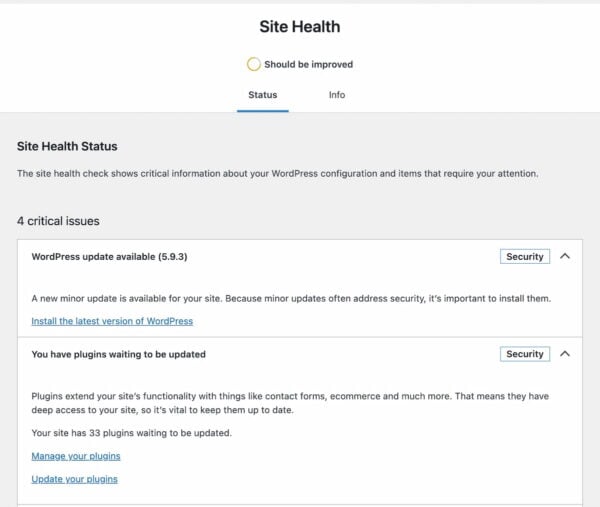
To find out what’s going on behind the scenes of your site, you can visit the Site Health section in WordPress. Also, you could choose to install the Health Check plugin. This plugin gives you loads of technical insights and helps you get information that outside parties can use to help you improve your site. Eventually, all features of the Health Check plugin will move to WordPress core.
Site Health gives you an overview of how your site is doing
1.1.1 Check you’re using suitable hosting
According to WordPress’s technical requirements page, the recommended hosting plan to run WordPress should include a modern version of PHP, MySQL or MariaDB, and HTTPS support. It is possible to work with older server software, but that is not recommended. If you check your Site Health, you can see the technical details of your installation. In addition, if you open your hosting provider’s dashboard, you should be able to see what type of plan you are on.
Remember, paying for good WordPress hosting pays dividends. Upgrading your hosting plan is one of the easiest improvements you can make.
1.1.2. Upgrade to a recent version of PHP
While the numbers are going down quickly, many WordPress sites still run on outdated versions of PHP. One look at the WordPress stats reveals that some sites still run on a PHP version in the five series, while PHP 8.0 and up have been available for years. These old PHP versions don’t receive any more security fixes and are thus increasingly vulnerable to attacks.
Luckily, the WordPress team has dropped support for anything older than PHP 5.6.20. Today, the project recommends running WordPress on at least PHP 7.4.
So, one of the most important things you can do to improve the performance and security of your site — and thus, your WordPress SEO –, is to upgrade your hosting environment to a modern version of PHP. There are a lot of benefits to this:
PHP 7+ offers an incredible speed boost.
It runs a lot more efficiently, meaning less stress on your server.
Bring loads of modern development features.
It’s a much safer and more secure environment.
It’s future-proof.
Now, this is something we all want. If you’ve checked your current hosting set-up in the previous section, you have an idea of what your site runs on now. If this shows outdated server software like PHP 5.5, it is good to update this. However, take special care before doing so. Ask for help if you’re not sure what you are doing — especially if you are a beginner working on your WordPress SEO.
Adopting SSL (getting an HTTPS URL and a green padlock icon in the browser URL bar) was an optional tactic in the past. Many sites, arguably, didn’t need the extra level of security that SSL provides.
Today, having a valid SSL certificate installed is mandatory — search engines may ‘penalize’ sites without valid SSL certificates and setups (and/or show warnings next to their search results). Google has mentioned that HTTPS is a ranking signal. In addition, it’s generally good practice for all websites to use SSL to prevent hackers and third parties from intercepting requests and data.
Many modern site speed and performance techniques require a valid SSL/HTTPS setup. To take advantage of faster web technologies like HTTP/2 and the upcoming HTTP/3, browsers like Google Chrome and Firefox need the website to have a valid SSL certificate.
It’s worth spending some time clicking through all of the sections in the WordPress Settings menu, as many of the options there can impact the SEO of your WordPress site.
In particular, it’s worth double-checking your visibility settings in Settings → Reading to ensure that you’re not accidentally preventing search engines from indexing your website. That’d hurt your visibility and your WordPress SEO!
You should also ensure that your Writing and Reading settings are all set correctly; these control your default categories and what should be displayed on your homepage. Don’t forget to give your site a strong tagline in Settings → General!
1.3. Pick the right permalink structure
Your permalink settings define what format your page and post URLs will take, which can significantly impact WordPress SEO. So if you’re creating a new site, one of the first things you should do is change your permalink settings, which you can find in Settings → Permalinks.
If you don’t change your settings from the default, all of your pages and posts will have URLs that look like example.com/?p=123. While this is perfectly okay, it’s not particularly nice, and it might impact how users and search engines perceive the quality and relevance of your pages.
Changing the permalink structure alters your website’s URLs, components, ordering, and structure. Therefore, selecting the correct format when setting up your website is essential, as changing it later can cause SEO issues.
We usually recommend that people use a structure that creates URLs that look like example.com/post-name/, or example.com/category/post-name/, depending on how much importance they anticipate placing on categorizing their content. Choosing either of these options will be perfectly suitable for most WordPress sites.
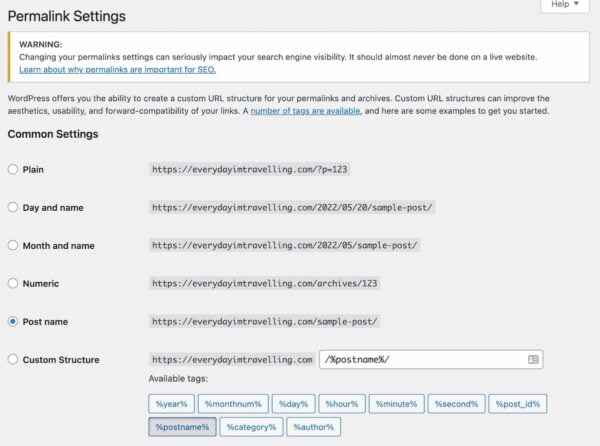
For the first option, you can just change the permalink setting to /%postname%/, like so:
Changing the permalink settings to ‘Post name’, in Settings → Permalinks
To include the category, you can select “Custom Structure” and change the value to /%category%/%postname%/.
If you previously had ?p=<postid> as your permalink, WordPress will take care of all the redirects for you. This is also true if you change from /%postname%/ to /%category%/%postname%/.
If you have an established site and change from any other permalink structure, you might want to consult our article on changing your WordPress permalink structure and the tool you’ll find.
1.3.1. Choose WWW or non-WWW
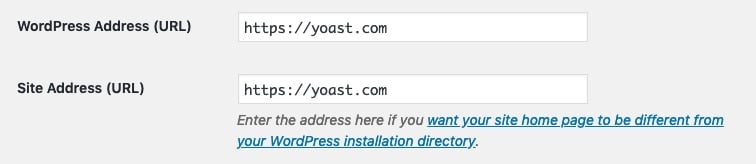
It would help if you thought about what you want your site to show as www.example.com, or simply example.com. Make sure that in your general settings, in Settings → General, the version you want to show up is properly reflected:
Setting the site URL to include or omit ‘www’
From an SEO perspective, there’s little difference either way. Additionally, most hosting and server setups will automatically redirect requests for the ‘wrong’ version to your selected version. That makes this primarily a branding consideration — which approach feels best for your site?
There’s not a massive amount of difference from a technical perspective, either. Some setups might have minor headaches if they omit the ‘www’ component, but these are increasingly rare.
2. Optimize your content
WordPress SEO also means your site should provide the best content on your chosen subject. People are looking for engaging, authoritative articles and trustworthy answers to their questions. Writing high-quality content for your WordPress site begins with your unique ideas or distinctive take on a particular topic. But it also means presenting these ideas in a well-structured and accessible manner. This will help you attract the audience you’re looking for and keep them engaged.
2.1. Research what your users want and need
Curious about the WordPress block editor?
Still haven’t tried the new block editor? Tried, but found it confusing? We’re here to help: our freeWordPress block editor course explains everything you need to know!
Before writing your content, you should think about what search terms you want to be found for. Then, you should optimize every page or post for a specific keyphrase.
But how can you determine what keyphrase you want to be found for? To find out, you need to do keyword research. In this process, you should ask yourself questions: what terms do I want to rank for? How realistic is it that I can rank for these terms?
Imagine you have a baking blog, and you’re passionate about sharing your favorite recipes and baking techniques. Optimizing a post for a term like [best cake recipe] isn’t a realistic goal because it’s a very general term. There’s a lot of competition for such general terms. Instead, it would help if you thought about finding your niche. This niche could be [healthy, low-sugar cake recipes] or[French patisserie you can make at home].
Within a niche, you can become an expert. Your expertise enables you to create content that goes beyond that of your competitors. You can go deeper than others or shed light on different angles of the same topic. For this, you’ll want to focus on long-tail keyphrases. For example, a long-tail keyphrase might be [how to make a low-calorie vegan blueberry cheesecake]. A keyphrase like this is more specific and easier to rank for. Also, it’ll be more suitable for your particular niche topic.
Focus on search intent
It’s also essential to think about what your audience wants to achieve by searching for a specific term. This is called search intent. For example, they could be looking for the answer to a particular question, and you can provide the necessary information. Or they might want to buy a specific product that you can offer them. Think about the needs of your visitors and address them by creating content accordingly.
Need a hand doing keyword research properly? Our Keyword research training can help. This course is part of our Yoast SEO academy. You’ll get access to Academy for free once you sign up for Yoast SEO Premium — two essential products for one low price.
2.2. Write great content for your users
After you’ve done your keyword research and know the topics you want to write about, you need to get to the actual writing. Most of the time, that’s easier said than done. To get from an idea to a great piece of content, most likely, you’ll have to follow a cycle of drafting, writing, editing, and rewriting.
Your first draft can be an outline of your structure. You don’t have to write out everything in perfect prose at this point, but make sure that you follow a logical structure. Most pieces will include an introduction, your main points of argument, and a conclusion. Of course, this will vary per genre – a recipe will have a completely different structure.
You can further flesh out the points in the writing phase, where you try to develop a first complete version of your text. Finally, you should check whether your piece is engaging and easy to read in the editing phase. You might be an expert on your topic, but your audience probably isn’t (yet). So try to make your writing as accessible as possible. Readability is essential. The readability analysis in Yoast SEO helps you improve your writing.
Beginners can find writing hard, but there’s help around the corner. When in doubt, it’s always best to ask a friend or colleague for some feedback. Another helpful trick is to read your text out loud to yourself. You can even let your computer speak it. It will give you a better idea of whether everything flows nicely.
2.3. Optimize your individual posts and pages
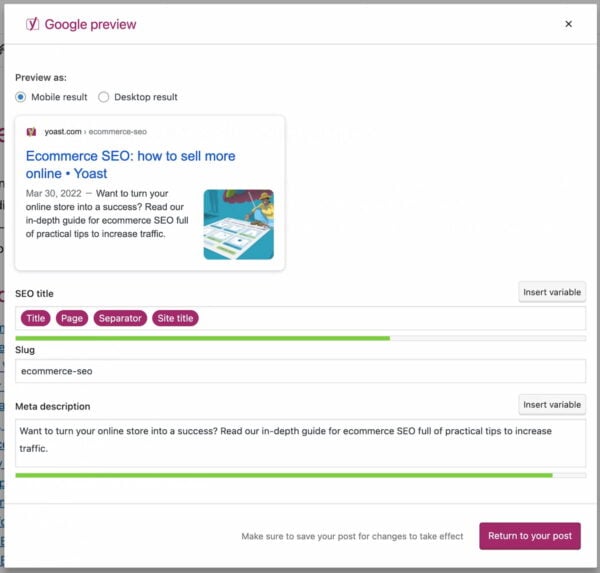
When writing or editing your post for your WordPress site, you need to pay special attention to some elements to make it SEO-friendly. These elements include your subheadings, your SEO title, and your meta description — all of these need to reflect the topic of the specific post.
Don’t forget, SEO-friendly doesn’t just mean that it’s easy for a search engine to grasp a page’s topic. More importantly, it means that your visitors can get the gist of your page at a single glance.
Your meta description and your SEO title might be a deciding factor for whether visitors click on your page in the search results in the first place. And once they’ve visited your site, elements like subheadings can be critical for visitors to decide whether they want to stay on your site.
2.3.1. Set your focus keyphrase(s)
One important rule is not to use a focus keyphrase on more than one page. Otherwise, you might end up cannibalizing yourself. Most of the time, you don’t want to rank for multiple pages on the same keyphrase because it means that you’re setting yourself up as your competition.
It’s also essential to include the focus keyphrase in crucial elements of your post, such as the SEO title, the introduction, your subheadings, and your meta description. All of these elements are signals for what your post is about. Since your focus keyphrase is, in fact, the main topic of your page, it’s a logical consequence that you should make sure this topic is reflected in all of these elements.
The same logic holds for your text overall: you need to make sure that you don’t stray off-topic; if you stay on-topic, it should follow naturally that you use your keyphrase multiple times throughout your text. But avoid stuffing your writing with your keyphrase. If you find it hard to include your keyphrase in your text a sufficient number of times, it might be a sign that you should take a different approach to the topic.
To avoid repetition, you can use synonyms and related keyphrases. Synonyms mean the same or more or less the same as your keyphrase. An example of this is the words film and movie. Search engines will recognize that they have the same meaning, which you can also check by looking at the search results: if you search for movie, film will also be highlighted in the results, and vice versa.
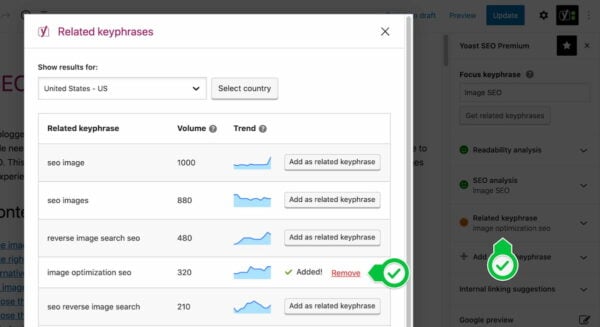
You can also use related keyphrases to optimize a single page for similar, related terms. You can use these to give context to your keyphrase. For example, if your keyphrase is [pumpkin soup], your related keyphrase might be [winter weeknight dinners]. This second, broader term gives additional information about your topic. It can also create coherence by establishing a link to similar pages on your post.
The related keyphrase feature is powered by Semrush data and can help you do keyword research
2.3.2. Optimize your permalink
In most cases, your post’s URL should probably contain your focus keyphrase so that it’s obvious what your page is about from the link. You should always try and keep your permalinks short, descriptive, and clean — don’t put unnecessary words in for the sake of it!
Before you publish new posts or pages, you may also wish to consider removing ‘function words‘ from your permalink. These are words like “a”, “and”, and “the”. This may make your permalinks more readable and easier to use or link to when done carefully. Posts with incredibly long titles may benefit from this approach.
We recommend being careful when changing permalinks for posts you have already published. If people have already linked to your pages, changing the URLs may make a mess. Even though WordPress will sometimes redirect users to the new location (the redirect manager in Yoast SEO Premium handles this automatically and more reliably), changing URLs can impact performance.
2.3.3. Optimize your page title
Each page’s title — the contents of the HTML <title> tag — can be one of the most critical factors for ranking well in search results. Not only is it the literal title of the tab or browser window, but it’s also the first line people see in the search results. It describes what your page is or is about and acts as an advert that encourages users to click.
On many websites, the default structure for posts and pages isn’t necessarily the most optimal approach for SEO. An title like “My blog » Cooking » Carbonara recipe” isn’t as compelling as “My 20-minute delicious carbonara recipe | My Blog”.
You must think about the structure of your titles and the content of the title on each page. Typically, it’s worth considering that:
Search engines may put more weight on the early words, so getting your keywords near the start of the title might make you more likely to rank well.
People scanning result pages see the early words first. If your keywords are at the start of your listing, your page is more likely to get clicked on.
Keep in mind that search engines can rewrite things like SEO titles and meta descriptions if they think they can better describe your content.
For more info on how to create enticing titles for your posts, read our article on crafting good titles for SEO.
The Google Preview in Yoast SEO gives you an idea of how your post will look in search engines. Use it to make your content stand out!
Did you know? You can use Yoast SEO to structure your SEO titles! You can control the default structure of your page titles and descriptions in your Yoast SEO plugin. There are two parts of the plugin that control these. First, as soon as you install and activate the plugin, you get a ‘Yoast SEO’ section in your WordPress admin.
Navigate to the Yoast SEO settings, and click on one of the Content Types or Categories and Tags. You can set a so-called Title Template and meta description templates for each post type and taxonomy. For example, for posts on our site, this looks like this:
You can set templates in the Yoast SEO settings
This allows you to use components and variables to control how your page titles should behave by default. Of course, these can be overridden on a page-by-page basis. For example, in the image above, you can see how we’re automatically grabbing elements like the page’s title to stop us from manually writing titles from scratch for every page.
You can use all sorts of variables in the SEO titles and meta description, and they’re all listed and explained in the help tab on the page.
For advanced users, there are some additional cool features. For instance, you can use cf_<custom field name> to drop in any custom field — either from a post meta value or a user meta value.
NOTE: When you use these templates, check that your title tags behave as expected when viewed on the site. If they don’t, you may have a problem with how your theme is built, and you might need to check the “Force rewrite” checkbox in our options. You can also follow these instructions to modify your templates.
2.3.4. Use headings correctly
Headings are great for structuring your content and helping readers process information in bite-sized chunks. They can also help describe a page’s layout and focus on search engines.
WordPress transforms the headings you put in your content into their respective HTML tags (<h1>, <h2>, <h3> and so on). That makes it important to consider which type of headings you use and in which order. Getting that wrong can make your content harder to understand.
Although most themes for WordPress get the basics right, it’s worth making sure that your template sets your post title is an <h1> tag, and that you’re not using <h1> tags anywhere else on your page or in your post content. Your post content should then ‘flow’ naturally; for example, large, significant headings should use <h2> tags, subsections should use <h3> tags, and then subsequent new sections should use <h2>.
The block editor has a Document Outline feature that gives you an overview of the heading structure
Please read this article on headings and SEO to learn why proper titles are essential. In addition, you can read our article about the heading structure for your blog — from which a lot applies to non-blog WordPress sites.
2.3.5. Optimize your meta description
We don’t recommend automated descriptions
Some themes and plugins try to produce descriptions automatically, by taking the first sentence or so of a post. This is a clever shortcut, but it rarely produces good descriptions. The first sentence of a post is often introductory information, which doesn’t provide a great summary or an enticing advert!
The only well-written description is a handwritten one, and if you’re thinking of auto-generating the meta description, you might as well not do anything, and let the search engine pick and control the snippet.
NOTE: Search engines may choose to ignore your meta description if they think that it’s unsuitable for the page, or they might choose to show a custom description from the page content if they think it’s a better fit. There’s no way of forcing them to use your specific snippet.
Search engines primarily use a meta description to describe your page in the search engine results, usually below your page title. Tailoring and writing a descriptive meta description can encourage users to click your results in the search engine, even if you’re not necessarily ranking in the top position. It’s an advert and your opportunity to impress.
Writing compelling, informative descriptions of your page content for every page on your site is best practice and allows you to attract more visits. While it might feel like a lot of work to craft descriptions for every page and post, it’s worth the effort.
If you don’t provide a meta description, the search engine will generally try to find the keyword searched for on your page and automatically pick a string around that — and highlight the searched phrase in bold on the results page. In some cases, Google will generate its meta description for you.
Automatically generated snippets (whether by plugins or search engines) are rarely as descriptive or as compelling as hand-written ones. We recommend using the meta description field in the Yoast SEO plugin to write a meta description. Make sure it entices the reader to click through and make sure that it contains the focus keyword of your post or page at least once.
2.3.6. Optimize your images and media
An often overlooked part of WordPress SEO is handling your images, videos, and media content. To ensure that search engines can understand your images, you need to think about how you name and format your files. Make sure to pick the correct format and optimize every image. Also, try to see if you can use next-gen image formats like WebP — which WordPress is starting to support. Writing descriptive accessible text descriptions helps to make your images more understandable and can improve your performance significantly. As an added benefit, you’re also helping readers who rely on assistive technologies like screen readers.
Using the proper alt attributes for images and transcripts of videos are also something that we check in the content analysis functionality of our Yoast SEO plugin. We have a longer article on image SEO and one writing alt tags, which can give you more tips to fine-tune your image optimization!
2.4. Maintain your content quality
2.4.1 Keep your content fresh and up to date
As Google strives to show its users the best and most up-to-date information, you should keep track of your content and revise it regularly because you don’t want to show your website visitors outdated, redundant or incorrect information.
This is easier said than done if you publish regularly and have hundreds or thousands of blog posts. That’s why we’d advise focusing on two specific areas for content maintenance: updating cornerstone content and preventing keyword cannibalization.
2.4.2. Update your cornerstone content
Some pages on your site are more important than others. The most valuable content of your site is called cornerstone content. We’ve written extensively about cornerstone articles and how they can improve your rankings.
In short, these posts or pages:
contain essential information for your audience;
are complete, up-to-date, and well-written;
show authority;
get the most links from related posts within your site;
rank higher than your other articles on the same topic;
get the most organic traffic to your site.
Always prioritize your cornerstone content when you doubt where to start updating your site’s content. Your business relies on them, and they should never go stale!
2.4.3. No outdated cornerstones with Yoast SEO
Yoast SEO makes it a little easier to keep your cornerstones up to date. You can mark a post as a cornerstone article if you use Yoast SEO on your site. In doing so, these articles will undergo a more rigorous SEO analysis. In addition, they’ll appear in a separate list in your post overview, which makes it easy to browse through them and check if they’re still up to scratch.
Keeping track of them is even easier if you’re on Yoast SEO Premium. The Stale cornerstone content filter only shows your cornerstone articles that haven’t been updated in the last six months. You’ll find this filter in your post overview. If it doesn’t show any posts, you’re good, and if there are one or more posts in it, make sure you check and update them!
Yoast SEO Premium keeps track of your cornerstone content and warns when they go stale
2.4.4. Keyword cannibalization
Keyword cannibalization means you’re eating away your rankings by creating too many articles for the same or similar keywords. For example, if you have a dozen articles on the same topic, search engines don’t know which one they should rank highest. As a result, you’ll compete with your articles for a high position in the search engines.
If you frequently publish, as we do at Yoast, you’re bound to run into keyword cannibalization issues someday. That’s why we’ve created a framework for dealing with keyword cannibalism. In short, you’ll have to:
Find out for which keywords it’s happening;
Analyze which content performs best for those keywords;
Keep the best-performing posts;
Decide if you should merge the other posts into the better-performing one;
Duplicate content issues arise when search engines encounter multiple URLs with the same or very similar content. As a result, search engines don’t know which URLs to rank higher, resulting in lower rankings.
In the previous section, we’ve already addressed keyword cannibalization caused by writing about the same topic too often. But most of the time, the root of duplicate content is technical and can happen without you even noticing. For instance, some content management systems add session IDs or parameters for tracking URLs. Or, you might have indexed www and non-www versions of a particular page. Accordingly, you’ll have multiple URLs showing the same content.
Besides the technical reasons, your articles can get scraped or copied by other parties. So, there are many causes for duplicate content, as you can read in this extensive article on duplicate content.
If you want to find out if your site suffers from duplicate content, you can use these duplicate content tools to check your site for issues.
2.5.2. Solutions for duplicate content
How you should solve your duplicate content issue depends on the cause of the problem. In general, there are three ways to go about this — in order of preference:
Whenever possible, avoid creating duplicate content. If your system creates session IDs in the URL, try to turn that off.
Can’t avoid creating them? Redirect those URLs with a 301 to the original version.
Need to keep a duplicate article? Make sure to add a canonical link to the original version in the <head> section of the duplicate article. It will show search engines what the original version of the article is to pass the link juice on to the original version. In the next section, you’ll find out how easy this is with Yoast SEO.
With Yoast SEO, adding a canonical link to a post or page is easy. No need for a developer! Go to the Advanced tab in the Yoast SEO meta box below your post or page or the sidebar of the block editor. There, you’ll find the Canonical URL field where you can enter the URL of the original article — the one you want to point search engines to:
Fill in your canonical URL in the advanced section of the Yoast SEO metabox or sidebar
To optimize your site for audiences in several countries or language regions, you’ll need to optimize your content and your technical setup. Let’s start with the content aspects of international SEO.
Doing targeted keyword research and writing fresh content for each audience is crucial. Take items of clothing, for example. An American vest is an entirely different garment from a British vest, a Dutch vest, a French vest, or a Spanish vest… you get the point. We don’t recommend using automated translations. Invest time and resources in proper research and translations to optimize your keywords and copy.
Another important aspect of international SEO is picking the proper domain structure. Generally, a different ccTLD (e.g., www.yoast.de) for every variation is only a good option for huge companies with big budgets. In most cases, subdirectories (e.g., www.yoast.com/de) are the way to go.
Search engines want to display the correct language version of your site to each visitor, whatever country they’re from. To help them, you need to implement hreflang. hreflang is code that tells the search engines what language variations of a page are available and helps prevent duplicate content problems. It’s quite a complex piece of code, but our hreflang guide helps you along the way — or you can take our Multilingual SEO training. This course is part of our Yoast SEO academy that’s free with a Yoast SEO Premium subscription.
2.7. Add Schema.org structured data
Structured data is kind of like a dictionary for search engines. By describing your content in code, you can instantly clarify that particular piece of content. Plus, you can tell who wrote it, who published it, and when on what site. Also, if this article featured recipe, FAQ, or how-to content, you could let search engines know about this. This way, search engines get a better understanding of your site. They can use this to help your site get rich results.
Structured data is essential for WordPress SEO. It used to be hard to add structured data to your site, but we set out to make it easy with structured data in Yoast SEO. Today, we generate the code search engines need to automatically make sense of your site and its connections. You only need to make a couple of choices in Yoast SEO > Site Representation. Select Person if your site is a personal site or Organization if it is a business or professional site. Don’t forget to pick or upload the correct logo or avatar.
That’s not all: you can also quickly build specific types of content pages with our structured data blocks. These blocks work in the block editor, and at the moment, we have two types: FAQs and how-tos. These blocks help you visually build the content while generating valid structured data in the background. Plus, the Schema controls allow you to specify what type of page the one you’re working on. So, you can quickly add structured data to your contact page by picking that specific type.
Pick Person or Organization to get Yoast SEO to generate the correct structured data automatically
3. Optimize your site structure
A solid site structure helps your users and search engines navigate your site. On top of that, it will make clear what pages on your website are most important. Two pillars of a good site structure are organizing your site and internal contextual linking.
3.1. Organize your site
Organizing your site will help you create a navigation path from your homepage to your posts and pages. Adding categories and subcategories will bring order to chaos. Ideally, your site should be organized as such:
The ideal site structure should follow a strict hierarchy
You should always make sure your homepage is straightforward to navigate. Cluttering the homepage with too many options will make your site more difficult to understand. Adding a clear menu and breadcrumbs helps your user navigate your site wherever they are.
3.2. Connect your content with contextual internal linking
Besides organizing your site, you need to link your content within your copy. We call this contextual internal linking because these links always appear within the context of a text. Internal linking is one of the most important aspects of WordPress SEO.
Contextual internal links set up a network of pages, pointing your users to related content. For example, in a post on keyword research, linking to an article on SEO copywriting makes a lot of sense. For search engines, these links provide insight into how pages are related.
Always ensure that the number of links to a page reflects the importance of that page. Our ultimate guides get a lot of links from individual posts about related topics. This helps users and search engines understand that these guides are crucial pillars of our site.
When adding a contextual internal link, make sure the link makes sense within the current page’s context. Moreover, always use anchor texts which accurately describe the page you’re linking to. This gives users and search engines the context to assess whether the link is valid. The internal linking tool in Yoast SEO Premium helps you connect your content by automatically suggesting relevant links.
3.3. Manage your categories and tags
WordPress has two default ways of structuring your content: categories and tags. Categories add hierarchy to your content and group topics broadly. On a website about cooking, pasta could be a category. Tags are non-hierarchical and can be used to describe your post in more detail. Dinner party themes, for example, could be a tag.
When setting up your site structure, pick several main categories. Adding them to your menu can be a good idea, especially if you only have a blog. A different setup might make more sense if you have a blog and several products. Make sure your categories are roughly the same size. If your categories become too big, make subcategories. Your category pages can be great landing pages, especially for ecommerce sites — more on that in our ecommerce SEO guide.
Tags are helpful for users exploring topics, but they are often misapplied. It’s important not to use too many tags and use them more than once or twice. Remember, you want to group your content, not just describe it.
If you want to structure your content differently, WordPress also allows you to create custom taxonomies. Always consider carefully whether your custom taxonomy groups content in a way that makes sense and helps your visitors.
3.4. Manage your archive pages
If you use categories and tags, you will automatically create archive pages. These pages contain a list of the posts and pages within a specific category or tag. Besides categories and tags, there are date-based archive pages and author archives. These archive pages need managing because they cause SEO problems if you don’t.
First, you want to prevent search engines from indexing archive pages that don’t make sense on your site. You can use the Yoast SEO plugin for this. You do this under Yoast SEO → Advanced, where you’ll find the following options on the “Author Archives” tab:
Manage your archives in Yoast SEO
On our site, we’ve disabled the date-based archives, as we don’t use those. Any date-based link will redirect to our homepage because of this setting. We’ve left the author archives untouched, but we have set the subpages of those archives to be noindex, follow by default. This way, you’ll never land on page two of an archive on our site from the search engines.
If your blog is a one-author blog, or you don’t need author archives, use Yoast SEO to disable the author archives. Also, if you don’t think you need a date-based archive: disable it as we have. Even if you’re not using these archives in your template, someone might link to them and thus break your WordPress SEO…
There is one type of archive that is noindex,follow by default in the Yoast SEO plugin: your own internal search function result pages. This is a best practice from Google.
3.4.1. Pagination
If you have many posts on your WordPress site, you might want to think about how your pagination looks and works. Otherwise, your best content is ‘buried’ deep in your site, and users and search engines may struggle to find it. It would help if you also considered customizing how your pagination looks and works to be more helpful for users and search engines.
3.5. Configure your breadcrumbs
You’ll probably want to add breadcrumbs to your posts and pages. Breadcrumbs are the links, usually above the title post, that look like “Home > SEO blog > WordPress SEO“. Breadcrumbs are good for two things:
They allow your users to navigate your site easily.
They allow search engines to determine the structure of your site more easily.
These breadcrumbs should link back to the homepage and the post’s category. If the post is in multiple categories, it should pick one.
To get breadcrumb navigation to show you on your pages, you may need to adapt your single.php and page.php files in your theme and include the code for breadcrumbs from the Yoast SEO plugin. You find the settings and instructions on doing that in the Yoast SEO → Advanced → Breadcrumbs section. Also, we have a unique breadcrumbs block for the block editor that makes it easy to drop in breadcrumbs on any page — without writing code.
3.6. Manage your XML sitemaps
You can use XML sitemaps to tell Google and the other search engines that your site has been updated. While WordPress finally has native XML sitemaps, our solution is more powerful. Our WordPress SEO plugin automatically configures your XML sitemaps, so you don’t have to worry about anything. We generate sitemaps for your different post types, including your images, and make sure that it generates and loads quickly.
We intelligently split your sitemaps into smaller bits, so Google only has to fetch one new XML “sub”-sitemap when a post is published.
You can check and manage which types of content, archives, and templates should be included in your XML sitemaps in your Yoast SEO → APIs →XML Sitemaps settings. Content types that are set to not show in search results will be automatically excluded from your XML sitemaps.
Lastly, our XML sitemaps support has a complete API, allowing developers to add or change functionality through their plugins and themes. Our Local SEO, News SEO, and Video SEO extensions (which generate their specific sitemaps) are built on this API. Other plugins frequently develop their solutions on top of our system.
4. Speed up your WordPress website
If your website is slow, you risk frustrating your users. That makes them less likely to engage, browse, convert, or visit again. That, in turn, can make them less likely to share your content, link to your pages, or recommend your brand. In short, speed is an essential part of WordPress SEO, and a huge part of the overall user experience. That means it’s critical to measure and manage your performance — especially for users on mobile or slower connections!
With Google’s Page Experience update, page speed and user experiences are front and center. Offering outstanding performance will continue to become more critical by the day.
4.1. Measure your site speed
Measuring the speed of your site can be confusing. Different tools give different scores and results and sometimes even give conflicting information. That’s why we’ve put together this helpful guide on how to measure your speed — it’ll walk you through the basics of picking the right metrics to use the right tools for the job when it comes to monitoring and diagnosing issues.
4.2. Improve your site speed
Once you’ve identified what and where your bottlenecks are, the next challenge is to make hosting, theme, plugin, and performance tweaks to speed things up.
Page speed optimization is a discipline that spans well beyond WordPress SEO. That means that the most significant opportunities will vary from site to site and from situation to situation. For some sites, the easiest wins might come from changing hosting or utilizing a CDN; for others, it might mean re-assessing their use of plugins or altering how they load CSS and JavaScript.
WordPress is the most-used platform for website management in the world. It powers almost 42% of the web (June 2021). While that is awesome, it also means that WordPress is the most targeted platform for hackers. When running a WordPress website, basic security is dealt with by the CMS, but there are things you can do yourselves to make your website more secure.
That starts with your login. The default username in WordPress is admin, so change that first. Otherwise, a hacker’s first guess for your username is too easy. The same goes for your password. Passwords like 123456 and welcome01 are just not enough. Use a password manager like 1Password or LastPass and pick a 20+ character password instead. WordPress also has several plugins for two-factor verification, so adding that to your website is easy as pie as well. Please do it.
Of course, there is more you can do; please read our article detailing WordPress security in a few easy steps. We’ll highlight some of the recommendations below.
5.1. Make regular backups
The next thing we’d like you to do is create regular backups. If your site gets hacked or something else goes wrong — for instance, when updating a plugin or theme —you must revert that change in a heartbeat. Regular backups make sure that this can be done.
In WordPress, there is a wide range of backup options to choose from. Several plugin developers have created excellent software solutions for you, so you don’t have the technical hassle of that backup.
5.2. Harden your setup
Hardening your setup starts with picking the right hosting company for your WordPress website. That’s just the start, as every host will do its best to help you out, but it’ll still be your responsibility to harden your setup. Also, tools like Cloudflare are good friends for any company/website.
An easy first step is to limit login attempts. By limiting the number of times, people can try to log in to your website — closing your login form after five false logins, for example — you are hardening your installation against brute force attacks and other malicious acts targeting that form.
The next thing you need to do is ensure that your WordPress install, including plugins and themes, is always up-to-date. Updates might fix security issues as well. Make sure to check for updates and keep your WordPress installation up-to-date regularly.
Another essential thing to realize is that you deal with security whenever you add a new user or writer to your WordPress install. There’s an article in the WordPress Codex regarding Roles and Capabilities you should read. It comes down to giving permissions only to those who need it when needed and only for the time they need it. There is no need to provide a guest blogger administrative rights to your website, right?
Authentication Keys and Salts work in conjunction to protect your cookies and passwords in transit between the browser and web server. Make sure to change these keys when installing a new WordPress instance.
Another easy fix we’d like to mention is ensuring your template files can’t be edited from the WordPress backend. You can do this in Appearance → Editor. When a hacker gets past your login form, this is the easiest way to add malicious code to your website. Hardening this involves changing your wp-config file.
5.3. Use monitoring and logging
Security is an ongoing process. You must keep a keen eye on any breaches and keep your website as secure as possible. You could put part of your WordPress security in the hands of, for instance, a company like Sucuri. In case of a hack, they’ll fix this asap. You could check your site regularly with their Sitecheck tool for your monitoring. Some plugins can help you secure your WordPress site by, for instance, monitoring files on your server, like WordFence, iThemes, or Sucuri. Pick your plugin of choice as long as you make sure that security is monitored.
It can also be helpful to keep track of everything happening on your websites, like file changes and logged-in users. Several plugins and tools exist, like WP Security Audit Log. Keeping track of these things makes sure that you can find irregularities in your installation and act on these or find what happened when in case of a security issue.
6. Cater to your mobile visitors
Take one look around, and you’ll notice that our mobile devices are becoming the de facto way of browsing the web, even when we’re lying on our couch at home. But we don’t visit mobile websites — we visit websites. See your mobile and desktop site as one entity. You, as a website owner, need to cater to your visitors.
Some years ago, the mobile market share surpassed the desktop market share. If you are only optimizing for desktop visitors, you are not optimizing for most of your visitors. Of course, it depends on your specific niche since those numbers could be different. Google Analytics can give you the exact numbers for your site.
With a market share like this, there is no way you can consider your mobile website an ‘extra’. It’s time for mobile SEO.
6.1. Make sure your theme is mobile-friendly
After making sure that your site is fast, make sure your website, or your theme, is mobile-friendly. Making your website mobile-friendly starts with ensuring the links are not too close together and buttons are easily clickable. Your font should be consistent and not too small, and your images are not too big, both in file size and dimensions.
We’d like to highlight two specific mobile theme optimizations below.
6.1.1. Use a responsive design
In 2022, having a responsive design is a no-brainer. Responsive design means that the design of your website adapts to the screen size your visitor is using. You can do this by using specific CSS media queries. You have to address particular ranges of screen widths and plan for those. Most WordPress themes are now responsive.
Depending on the part of the world you are targeting, no, how fast their mobile internet is, you might want to change a couple of things. Think about how you use images on your site. Are you using any text enhancements or font variations that might hinder the excellent performance of the mobile website? Responsive design helps you build a more focused website. That brings us to the second optimization.
6.1.2. Prioritize what’s important to mobile users
Take a step back and look at your website: what do your users want to do here? Define the four to six main tasks your user performs on your website and focus on these. Maybe even give the most crucial task a big fat call-to-action button.
Here’s an example: If you have a local business, the two main tasks might be calling you or finding the directions to your business. That means you could add these as a unique mobile menu, for instance, some visible all the time. Focus on your visitor’s main tasks and make their life as easy as possible. How to find these top tasks? Ask your visitors! Also, check Google Analytics for the most visited pages on your mobile website. More about Analytics further down this article.
7. Analyze and improve your performance
A good SEO campaign relies not only on implementing changes but also on measuring the impact of those changes, seeing what works, and doing more of that. Google has developed two unique tools to analyze your website’s results and identify new opportunities that you could focus on in the future.
The first one for analyzing results is Google Analytics. Adding Google Analytics to your website ensures all user data will be stored in your account. You can, for instance, check how many visits your pages get, how many of your visitors convert, how many visitors immediately leave your website after landing on a specific page, and much more. Within Google Analytics, you can see how visitors behave on your website. Here’s how to track your SEO with Google Analytics.
The second tool analyzes how your website performs and how visitors find you in the search engine. That tool is Google Search Console. Exporting and sorting through your search queries and impression data makes it easy to identify opportunities where you could focus on improving clickthrough rates, content, and/or rankings.
7.1. Set up and integrate Google Analytics
To start with Google Analytics, you need to create an account. Click the ‘Start for free’ button to start. To set up your account, you must first add an Account Name. This could be your company name. However, when you add other websites to your account, we recommend choosing a more generic Account Name. Also, you can always change your Account Name later when you want to.
After setting up your account, it’s time to add a property: the website you want to add. Insert the Website Name and the Website URL. Make sure you add the precise URL: http:// or https:// and with or without www for collecting the correct data.
Create a new account in Google Analytics
After setting up your property, you can choose to enable some of the data-sharing settings. Each data sharing option gives you a clear explanation of what you will be sharing, allowing it.
Now you’re almost ready to go! The last step to connecting your website to your new Google Analytics account is adding the tracking code to your website. After successfully creating your account and adding a new property, you’ll see this screen with your Google Analytics tracking code on top:
Copy the tag to your site
This tag needs to be added to your website. The easiest way to do this within WordPress is by installing a Google Analytics plugin such as the MonsterInsights Plugin for WordPress. By installing this plugin, you don’t need to touch the actual code of your website to connect with Google Analytics. Install and activate the plugin, insert your tracking ID, and set! You can also use Google’s Site Kit WordPress plugin to get data from Analytics and Search Console in your backend.
For more technical readers, it’s also possible to add the tag manually to every web page’s head or add the tag to Google Tag Manager.
Your website is connected to Google Analytics; it will start collecting your users’ data. Start clicking around to see what can be found within the data, or read one of our blog posts about Google Analytics for helpful tips.
7.2. Set up your Google Search Console account
The second tool we think is essential to set up is Google Search Console. We recommend going through all steps, and you will be all set! In brief, these are the steps you’ll need to follow:
Create or sign in to your Google Search Console account.
Click ‘Add a property’ under the search drop-down.
Enter your website URL in the box and click ‘Continue’.
Verify your website — within the Yoast SEO plugin; you can easily copy and paste the meta tag to make it work.
Of course, there are plenty of other valuable tools to get insights into your website and find SEO opportunities. Everyone has their favorite tools, so it’s important to start playing with different tools to find out what tool brings you what you need most.
There are all-in-one SEO tools that give you a complete overview of your performance, and there are more in-depth tools that give you more specific data. Think about site speed tools, duplicate content tools, analysis tools, keyword research tools, etc.
Some tools we use besides Google Analytics and Google Search Console:
Microsoft Clarity
Microsoft Clarity is another tool that provides valuable insights into the behavior of your website’s visitors. Its features, such as the session replays or the heat map, can help you understand how your audience interacts with your website. That information is precious if you want to improve your site’s user experience! On the Microsoft Clarity dashboard, you’ll also find information on session counts, total users, page view details, etc.
Microsoft Bing Webmaster Tools
Within the Source/Medium section of Google Analytics, you can see what percentage of your traffic is coming from Bing. When this is a sufficient amount of traffic, you might want to create a Bing Webmaster Tools account. Microsoft Bing Webmaster Tools is the Google Search Console variant for Microsoft Bing. It shows you your site’s health and performance in the Bing search results.
Semrush
Semrush is another internet marketing and SEO suite that does incredible stuff. In addition, Semrush powers the related keyphrase feature in Yoast SEO. Thanks to this feature, you can easily find powerful keyphrases to rank for.
Google Lighthouse
Google Lighthouse is a Chrome extension that you can download for free. With the Lighthouse tool, you can quickly generate a report with Performance, Progressive Web App, Accessibility, Best Practices, and SEO scores. This report will give you a quick overview of how your site is doing. Plus, you can immediately start working on the areas that need attention. You can also use the web-based version on web.dev/measure. Very helpful if you are working to improve your Page Experience scores.
Hotjar
To get insights into how your visitors move, scroll and click on your web pages, you could use a tool like Hotjar. This user research tool can also add polls or surveys to your site to start doing research. You can try it for free, and the paid packages have competitive prices.
Thanks to WordPress SEO, you put a lot of time and effort into your site’s content and ensure readers can find it via search engines. But there are other ways to get people to visit your WordPress site and read your posts. But how do you get and grow such an audience? Simply writing posts and putting these out there won’t do the trick: you must promote your site!
8.1. Encourage engagement
It’s always fun to interact with your readers, but how do you get them to engage? We mean all the ways people can interact with your post with engagement. It could be leaving a comment, sharing it on social media, or taking action.
But how do you get people to engage? You can always ask them! Write engagingly, and then ask your readers for their opinion. Then respond to these comments to keep the conversation going and build a relationship with your readers.
Engagement also benefits WordPress SEO, showing that your site is alive and active. If you want to dive deeper into blog engagement, you can read our post on how you can increase blog engagement.
8.2. Grow your reach
Social media is the best way to reach and grow your blog’s audience. You should be active on the social media channels where your (potential) audience is present. Facebook, Instagram, Pinterest, and Twitter are examples of popular social media. It might be a lot to decide on, so you can find out more in our blog post on social media strategy: where to begin?
8.3. Build a mailing list
In addition to using social media to promote your blog, investing in a newsletter is often a good idea. Let people sign up for it and send emails with your latest blog posts and other fun facts.
Ensure that you offer a subscribe field beneath your posts and other visible places on your website. Make sure that your newsletter is mobile-friendly. But, most of all, make sure your newsletter is truly something special!
8.4. Amplify your content
The number of blog posts published daily is enormous, so it’s becoming much harder to stand out. Your articles are likely to get lost in the vast sea of content. To help your content reach its full potential, you need to amplify it.
If your content is original and well-structured, you’re probably able to reach new audiences. Look at how you can get new audiences beyond your organic reach.
Maybe advertising on Facebook or Instagram might be a good way to reach new audiences for your content? Analyze what channels you already use and decide where you can do more to broaden your audience.
9. Conclusions
This guide gives you a lot of stuff you can do on WordPress SEO for your site. It goes from technical SEO tips to conversion tips, content tips, conversation tips, and a lot in between. There’s a catch, though: if you want to rank for highly competitive terms, you’ll have to do most of it and create great and compelling content.
You compete with every other website and business for attention, visitors, and outcomes. That means you have to put in a lot of hard work and keep your site SEO fit. Have you neglected your SEO for a while? Don’t worry; it can happen to the best of us! Check Marieke’s post for excellent advice about getting your SEO back on track.